IHOP®
- 14.64K
- 4.6
- Installs
- 1.00M
- Price
- Free

Screenshots

Analysis by Reviewed
When I’m choosing a restaurant app, I start with a practical question: will I use this place often enough for a dedicated app to earn a spot on my phone? The IHOP® app is most useful when I’ve already decided on IHOP and want to browse or arrange a meal before I get there. It’s a free Food & Drink app from Dine Brands Global, Inc., rated for Everyone. Its 4.5 average from around 44,000 ratings is a positive sign, but it can’t tell me whether a particular location or order will suit my plans.
Making the app fit the way you eat
For a practical test, picture a busy morning when I’m picking up breakfast for myself and someone else. I can look through the menu, make choices before arriving, and use the location finder to check which IHOP is convenient. That advance planning is the app’s clearest benefit: it can make a familiar meal easier to arrange, especially when nobody wants to negotiate every detail at the restaurant. I’d still review the finished order before submitting it, because custom choices are only helpful if they match what everyone actually wants.
When ordering ahead is useful
The app is best for repeat customers who have a go-to breakfast, want to adjust it, or prefer to explore the menu at their own pace. Seeing nutritional information alongside menu choices can also help me compare options before committing, rather than trying to make that decision while ordering. A useful habit is to check the meal as a whole after adding changes: extra toppings or a combo can alter what seemed like a simple choice. For a first visit, browsing first and ordering later is a sensible way to avoid rushing.
How it compares with other ways to order
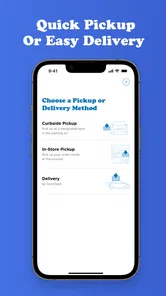
Compared with calling a restaurant or deciding at the counter, placing an order in the IHOP app gives me more room to review choices and customize them. A general restaurant or delivery service may be more convenient if I’m choosing among several places, but a dedicated IHOP app is the more focused option when I’ve already settled on IHOP. The trade-off is that it is useful only for this restaurant; it won’t help me compare a broad range of breakfast spots in one place. Pickup is a natural fit when I’m passing a location, while delivery makes more sense when staying home matters more than choosing a pickup stop.
Choosing the right ordering route
I’d decide between the app, a broader delivery service, and ordering in person based on what I need that day. If I want to compare several restaurants, a general service is the more practical starting point. If I’m already nearby and still deciding, walking in lets me ask questions and make a last-minute choice without planning on a phone. The dedicated app has a narrower job: it helps me plan an IHOP order when I know that is where I want to eat. That focus is an advantage for regulars, but a reason to skip the install if my restaurant choices change every time.
What to keep in mind before installing
The app has been available since December 20, 2017, and its current version is 4.8.33, with Android support starting at version 7.0. It has over one million installs, but those figures don’t guarantee that ordering will feel equally smooth for everyone. The experience depends on whether the app’s ordering options match what I want and whether using a restaurant-specific app fits my routine. If I only visit IHOP occasionally, or prefer to choose from multiple restaurants each time, calling or using a broader service may be simpler. I’d also avoid assuming pickup timing is perfect: leaving enough room for a busy restaurant is a more reliable plan than arriving at the last possible minute.
A useful routine for group orders
For a family breakfast or a small office pickup, I’d treat the phone as a planning tool rather than assume that placing the order settles every detail. I’d gather everyone’s choices first, add items one at a time, then check the order summary for the right customizations before submitting. That final pause matters most when a meal includes swaps or several similar items: it is easier to spot a missed preference on-screen than to discover it after reaching the counter. If someone in the group is undecided, I’d avoid rushing them into a choice just to finish the order early.
More From Our News Desk

Weather by Xiaomi Review: Clear at a Glance, Less Clear Up Close

X Under Pressure: Can It Recover When Posting Goes Wrong?

Clash of Clans Is Won Between the Battles

Android Auto Makes the Case for Quieter Car Software

MobiOffice: Transforming Mobile Productivity with Seamless Integration

EA SPORTS FC™ Mobile Soccer: Redefining Mobile Sports Gaming
Rewards can make repeat visits more appealing, but I’d treat them as a bonus rather than the main reason to order. Before counting on an offer, I would check its terms in the app and make sure the order qualifies; a reward is useful only when it fits a meal I wanted anyway. If I’m ordering for a group, I’d confirm everyone’s choices and any swaps before checkout, since small customization decisions are easy to overlook when placing several items at once.
When the app is not the best fit
I would not install it just because I occasionally want breakfast. A one-off visit may be easier to handle at the restaurant, particularly if I want to ask about a menu choice or decide after seeing the options in person. Likewise, someone who prefers to compare different restaurants, or who does not want another restaurant-specific account or app in their routine, may get more value from a broader ordering option. The key trade-off is convenience for IHOP visits versus keeping my phone and ordering habits focused on fewer tools.
Have you ever found yourself craving those fluffy, delicious pancakes from IHOP but just couldn’t make it to the restaurant? Well, my friend, now you can have the IHOP experience right in your pocket with the IHOP® app. Trust me, this app is a game-changer for breakfast lovers everywhere.
Easy Peasy Pancake Squeezy
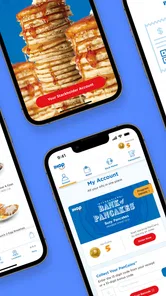
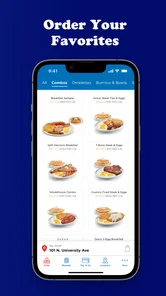
First things first, let’s talk about how easy it is to navigate this app. The interface is super user-friendly, making it a breeze to order your favorite breakfast items. Whether you're a tech guru or a smartphone newbie, ordering pancakes has never been simpler. With just a few taps, you can customize your order to include all the bacon and eggs your heart desires.
Customizing Your Cravings
One of the standout features of the IHOP® app is the customization options. You can add extra toppings, swap out ingredients, and even make your meal a combo. The best part? You can see the nutritional information right there in the app. So, if you’re counting calories or just curious, IHOP has got you covered.
Making menu details work for you
I find the nutrition details most useful as a comparison aid, not as a promise that a meal will match every personal dietary need. I can use them to weigh menu choices before I order, then check the customization I selected rather than assume that changing an ingredient leaves every other detail untouched. If I have a strict dietary requirement or an allergy, I would not rely on a quick glance at the app alone; I’d confirm the relevant details with the restaurant. That extra care is worthwhile whenever a menu decision affects more than taste.
Rewards and Deals Galore
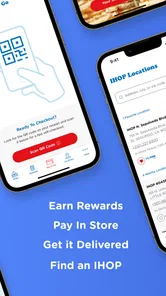
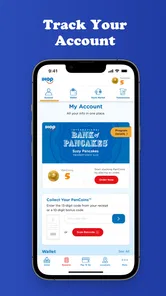
Who doesn’t love a good deal, right? The app rewards you for your loyalty with their Pancake Perks program. You earn points with every purchase, which you can redeem for free pancakes, discounts, and exclusive offers. Plus, you get a free stack of pancakes just for signing up! I mean, come on, who can resist free pancakes?
Checking rewards before checkout
I’d look at the rewards area before building an order if I’m visiting with a particular offer in mind, then read the conditions rather than assume the reward applies automatically. For occasional diners, rewards are a pleasant extra but may not justify installing a dedicated app by themselves. For someone who already returns to IHOP, they can be a reason to place orders through the app and keep track of available offers. Either way, I’d choose the meal I actually want first and let a qualifying deal influence the decision only if it fits naturally.
Location and Pickup Perfection
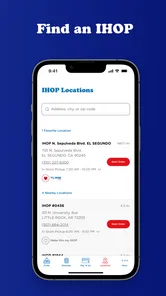
Another cool feature is the location finder. Whether you’re at home or on the go, the app helps you locate the nearest IHOP. Plus, you can choose between pickup or delivery, so you can enjoy IHOP wherever you are. The pickup process is seamless, and your food is always ready when you arrive, piping hot and fresh.
Planning around the restaurant, not just the screen
In practice, I’d use the location finder to make sure I’m choosing a convenient restaurant before I spend time customizing a meal. That small order of operations can prevent a frustrating detour: first settle on the location, then work through the menu and review the final basket. I’d also give pickup some breathing room if I’m heading somewhere on a schedule. Ordering through an app can reduce the decisions I make at the counter, but it cannot remove the ordinary uncertainty of a busy restaurant or guarantee that every visit follows the same rhythm.
In conclusion, the IHOP® app is a must-have for anyone who loves breakfast, pancakes, or just good food in general. It’s like having a personal pancake assistant in your pocket. So, if you haven’t downloaded it yet, what are you waiting for? Go ahead and indulge in some pancake bliss today!
My bottom line
I’d recommend it to people who order IHOP regularly and like to make decisions ahead of time; for them, menu browsing, customization, nutrition details, and rewards can make a familiar stop easier to manage. If you’re loyal to another breakfast place, rarely eat at IHOP, or want one app to compare restaurants, this is less compelling. I’d install it for planned IHOP meals, check the order and reward conditions carefully, and keep a little flexibility around pickup. That’s a more grounded reason to use it than expecting every order to be effortless.
A simple decision before you download
My quick test is whether I can name a likely upcoming IHOP visit where browsing and ordering ahead would genuinely help. If I can, the free app is an easy option to try, especially if I regularly customize meals or want to check nutrition details before ordering. If I cannot, there is little reason to add it just in case; I can decide in person or use a broader service when I need to compare places. That keeps the choice practical rather than treating any restaurant app as essential.
Overall, I see this as a focused convenience for planned IHOP meals, not a replacement for every way of choosing breakfast. It works best when I know the restaurant, want time to review the menu, and am willing to double-check customizations and reward terms. If those habits match yours, it can make a familiar order easier to organize. If flexibility across restaurants or spontaneous in-person decisions matter more, another approach will suit you better.
IHOP® Frequently Asked Questions
What should I know about the IHOP® app before downloading it?
IHOP® is a Food & Drink app from Dine Brands Global, Inc., with the short description “IHOP®” and the store summary “Everything you want right here.” It is designed for people who want to explore IHOP-related options on a mobile device, including restaurant and menu information and ordering features. The app is free to download, so you can install it and decide whether its tools suit the way you use IHOP.
Will the IHOP® app work with my phone’s operating system?
The IHOP® app is available for Android devices running version 7.0 or later. Before downloading, check your phone or tablet’s Android version in its settings to make sure it meets that minimum. The app is also listed for everyone, so its content rating is suitable for a broad audience. Checking compatibility first can help you avoid trying to install an app your device cannot run.
Is the IHOP® app free, and what devices can I use it on?
The IHOP® app is free to download and is listed for everyone. It is available for Android devices running version 7.0 or later, making it accessible on many phones and tablets. Before installing, check that your device meets that requirement and has enough available storage. The app is a convenient way to access IHOP-related features from your phone.
Who makes the IHOP® app, and how popular is it with users?
The app is developed by Dine Brands Global, Inc. It has an average rating of 4.5 from around 44,000 ratings, alongside roughly 14,000 written reviews and over one million installs. These figures suggest that many people use it to interact with IHOP digitally, though individual experiences can vary depending on the device, location, and features they use.
What is the IHOP® app and what features does it offer?
The IHOP® app is a mobile application designed to enhance your dining experience at IHOP restaurants. It offers features such as menu browsing, a restaurant locator, online ordering for takeout, delivery options, and the ability to earn and redeem rewards through the IHOP Rewards program. Additionally, you can customize your orders, save your favorite menu items, and receive exclusive promotions and offers.
Pros
- Wide variety of breakfast options.
- User-friendly interface.
- Exclusive app-only promotions.
- Easy online ordering.
- Quick reward accumulation.
Cons
- Limited customization options.
- Occasional app crashes.
- Location services required.
- No offline access.
- Limited payment methods.











