

Hawk Central
- 94.00
- 4.3
- Installs
- 10.00K
- Price
- Free

Screenshots
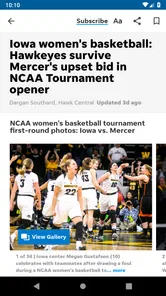
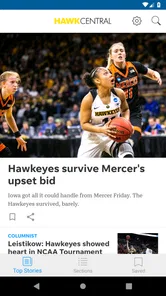
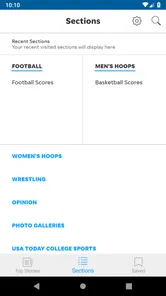
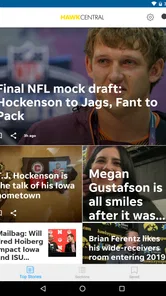
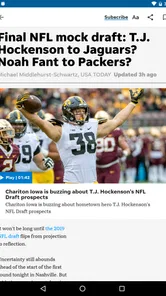
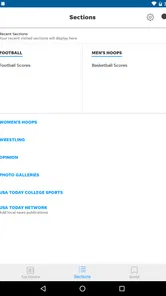
Analysis by Reviewed
Following the Iowa Hawkeyes is easy when I have time to sit down and read through sports coverage, but most fan updates happen in less convenient moments: before work, between classes, on the way to a game, or while checking a phone after a close finish. That is where Hawk Central makes sense. This free sports app from USA TODAY Co. is built around University of Iowa Hawkeyes coverage, so it feels more focused than a broad sports app that asks me to sort through every team and league first.
After spending time with it, my view is straightforward: this is most useful for fans who want Iowa news in one dedicated place, especially when they already know which team they want to follow. It is less convincing as a complete replacement for every sports tool on a phone. The focused coverage is the main attraction, while the app’s value depends on how closely its available stories and updates match the way you personally follow the Hawkeyes.
From a general sports fan to a focused Hawkeyes routine
The starting point is simple. If I open a general news app, I may find Iowa coverage mixed with national headlines, professional sports, scores, opinion pieces, and unrelated notifications. That can be useful when I want a wide view, but it creates extra work when my only question is what is happening with the Hawkeyes. Hawk Central narrows that starting condition immediately.
That focus is also why the app is easier to understand than many all-purpose sports products. I do not need to build a large collection of teams before the app becomes relevant. I can approach it with one clear purpose: check Iowa-related coverage, read the latest material, and decide whether anything needs a deeper look elsewhere.
The app is listed as a Sports app, and its store summary presents the idea clearly: coverage of the University of Iowa Hawkeyes is the central experience. That does not mean I would use it for every sports need. I would still turn to a broader scoreboard or league app when I wanted a wide set of live results. Hawk Central earns its place through specialization rather than breadth.
What I do before opening it
My most useful habit is to decide what I am trying to learn before I launch the app. There is a difference between wanting a quick sense of today’s news, looking for context after a game, and trying to catch up on a developing story. Treating those as separate tasks prevents aimless scrolling.
For a quick check, I scan headlines and stop when I understand the main development. For a deeper session, I open the stories that explain the situation rather than reading every item in order. This sounds obvious, but it matters in a team-specific app: the temptation is to read everything because the subject is already familiar and emotionally important.
More From Our News Desk

 Gmail
GmailGmail in a Busy Inbox: Who Benefits Most?
From first account to crowded workday, Gmail earns its place through dependable search and flexible sorting—but its best fit depends on how much inbox maintenance you can tolerate.

 Prime Video
Switching to Prime Video: What Changes in Your Viewing Routine
Prime Video can make a compelling second home for streaming, but switching means learning a different catalog, rental layer, and route from browsing to playback.

 Universal TV Remote Control
Universal TV Remote Control Works Best as a Reliable Backup
A phone remote earns its place through quick setup and reliable habits. Here is how to get more from Universal TV Remote Control—and where its limits show.

 Weather - By Xiaomi
Weather by Xiaomi Review: Clear at a Glance, Less Clear Up Close
Xiaomi’s weather app makes everyday forecasts quick to scan, but its calm surface can leave useful details and recovery paths harder to find than they should be.

 X
XX Under Pressure: Can It Recover When Posting Goes Wrong?
A resilience-focused review of X, examining setup, mistaken posts, interruptions, weak connections, and the gaps that matter when recovery needs to be dependable.

 Clash of Clans
Clash of Clans Is Won Between the Battles
Its raids are quick; its community is a long-term project of coordination, teaching, rivalry, and shared responsibility—with all the friction that entails.
Latest News



A practical use case is a weekday morning before leaving home. I can check whether there is any significant Hawkeyes news, read one or two relevant pieces, and close the app without getting pulled into a full national sports feed. That is a better fit than opening a general sports service and spending the same time filtering out teams I do not follow.
The reading flow is more useful when I treat headlines as a map
I do not see the first screen as the final answer to every question. I use it as a map of what deserves attention. A headline can tell me whether a story is about a game, a player, a coach, or a broader team issue, but the article itself is where the useful context should begin. My workflow is therefore: scan, select, read, then decide whether I need another source.
That last step is important. A focused fan app can help me discover and follow a story, but I should not assume that one reading session answers every practical question. If I need official scheduling details, a complete live statistical view, or information outside Iowa coverage, a different source may be better suited. Hawk Central works best as the front door to my Hawkeyes news routine, not necessarily as the entire house.
One small advantage of this approach is that it reduces the noise that often makes sports coverage tiring. I am not constantly switching between unrelated teams to find the item I care about. The trade-off is that a narrow feed can feel limited on quiet news days, particularly if I expect a constant stream of fresh material.
How I use it around a game
My game-day workflow is different from my morning check. Before a game, I use the app to get a sense of the current conversation around Iowa. During the event, I am more likely to rely on a dedicated live-score tool or an official source if I need immediate play-by-play information. Afterward, Hawk Central becomes more useful again because I want interpretation and a readable account of what happened.
This division of labor is one of the clearest trade-offs. The app’s identity is tied to coverage, so I value it for staying close to the team’s story. A live-score product is usually the better choice when every possession, statistic, or time update matters. Trying to force one app to perform both jobs can lead to disappointment.
After a close result, I might open Hawk Central while the details are still fresh, identify the main angle, and then save the more thoughtful reading for later. That two-stage routine is less stressful than trying to consume every update immediately. It also helps me separate urgent information from commentary that is more valuable once I have had time to think about the game.
Where the information changes hands
The most important handoff is between the app and me. Hawk Central presents the Iowa-focused material, but I choose what becomes part of my understanding. I may read a story in the app, discuss it with another fan, and then check an official team source when I need confirmation of a practical detail. The app starts that chain, but it does not remove the need for judgment.
A second handoff happens when I move from reading to sharing. A useful article can become a conversation starter in a group chat or at a tailgate, but the person receiving it may not have the same context I do. I find it better to share the key point in my own words rather than simply passing along a headline. Headlines are efficient for scanning, but they can flatten the nuance that matters in a team story.
This is also where a dedicated app can be more convenient than a social feed. Social platforms may surface Hawkeyes discussion quickly, but the surrounding conversation can be noisy, repetitive, or driven by reactions rather than information. Hawk Central gives me a more direct reading path. On the other hand, social channels can reveal fan sentiment and breaking discussion faster, so I would not treat the app as a replacement for every community source.
Another handoff is between the app and a broader sports routine. I may begin with Iowa coverage, then move to a general sports app for national context, a live-score service for a current game, or an official source for logistics. That is not a weakness by itself. It is a realistic way to use specialized apps: each one handles the part it is best at instead of pretending to cover every need equally well.
Who benefits most from the focused approach
I think the app is a good match for an Iowa fan who wants a quick, repeatable way to check team coverage without rebuilding a personalized sports feed every time. It is also useful for alumni, students, relatives of players, and casual supporters who care about the Hawkeyes but do not want a full sports-news subscription workflow.
It may also suit someone who follows several sports but wants one dedicated place for Iowa stories. The app’s narrow subject can make it easier to maintain a simple routine: open it when I want Hawkeyes information, then leave when I am done. That is more manageable than allowing every sports notification and headline to compete for attention.
I would be more cautious about recommending it to a reader who mainly wants comprehensive live data, a multi-team dashboard, or one app covering every league. A broad sports platform will probably be more efficient for that person. Likewise, someone who only checks Iowa news once every few months may find a normal web search or a general news reader sufficient.
What the version and pricing mean in everyday use
The current version is 8.10.3, and the app supports Android 8.0 or newer. That makes the compatibility question fairly practical: before installing, I would check the Android version on an older spare phone or family device rather than assuming every handset will run it. For most recent Android users, this should be a straightforward consideration rather than a complicated setup issue.
The app itself is free, which lowers the barrier for a curious fan who wants to test the experience. There are in-app purchases ranging from $9.99 to $39.99 per item, so I would pay attention to any purchase screen and understand what an optional payment provides before confirming it. Free installation does not automatically mean every part of the broader experience is free.
That distinction is especially important for someone who only wants occasional headlines. If I am a light user, I would first establish whether the free experience already fits my routine. A more committed reader may consider an optional purchase worthwhile, but the decision should come from actual use rather than the assumption that paying is necessary from the start.
The app is rated for Everyone, which makes it approachable for a broad audience. I still think the best audience is defined less by age and more by interest: people who genuinely want University of Iowa coverage will get much more from it than people looking for general sports entertainment.
Three habits that make the app more useful
First, I avoid treating every headline as equally urgent. I scan for the stories that change my understanding of the team, then read those carefully. This keeps a short check from becoming an endless scroll and helps me notice meaningful developments instead of merely collecting updates.
Second, I use a two-source handoff when the information affects a real decision. If I am planning around a game, discussing a roster situation, or repeating a detail to someone else, I use Hawk Central for the coverage and then check an appropriate official or live-information source for the practical fact. This is a stronger workflow than relying on a headline alone.
Third, I separate game-time needs from reflection afterward. I do not expect a coverage-focused app to replace a live scoreboard. I use the fast tool for immediate status, then return to Hawk Central for the story, reaction, and context. That division makes the app feel more valuable because I am asking it to do the job it is designed for.
A fourth habit is worth adding: I check the app at a deliberate time rather than constantly refreshing it. For many fans, a morning scan and a post-game reading session provide enough contact with the team. This reduces notification fatigue and makes the information feel like part of a routine rather than another stream demanding attention.
The result after a complete reading session
When the workflow goes well, I finish with a clearer sense of what matters around the Hawkeyes. I have moved from a vague feeling that I might be missing news to a more organized understanding of the current conversation. That is the app’s strongest outcome: it turns a broad sports interest into a focused check-in.
I also appreciate that the result does not require a long setup. The developer, USA TODAY Co., gives the product a recognizable sports-news context, while the Hawk Central identity keeps the subject narrow. The combination is useful for someone who wants a dedicated Iowa destination without committing to a complicated fan-management system.
The app has an average rating of 4.3 from around 454 ratings, with roughly 94 written reviews. Those figures suggest a generally positive reception, but I would interpret them alongside my own needs rather than as a guarantee. A good rating cannot make a focused app suitable for someone who wants broad league coverage, and a specialized product will naturally feel more valuable to an Iowa supporter than to a general sports reader.
Its install base is over 10 thousand, which fits the picture of a focused team app rather than a universal sports platform. I do not see that narrow reach as a problem. In this case, the relevant question is not whether everyone needs it; it is whether the people who follow the Hawkeyes want a dedicated reading path.
Where the flow breaks
The first possible break is expectation. If I open the app expecting a full replacement for a live-score service, a national sports newsroom, and an official team information hub, I am asking too much of one focused product. The better experience comes from knowing that its main job is Hawkeyes coverage.
The second break is repetition. Team-specific news can naturally circle around the same major subjects, especially when there is one dominant story. If I want constant variety, the narrow focus may begin to feel restrictive. A general sports app will offer more subject changes, although that variety also brings more filtering.
The third break is the free-to-paid boundary. Because in-app purchases are available, I would not tap through a purchase flow casually. Someone who wants only occasional updates should be especially careful to distinguish the basic app experience from optional paid elements. The free price is appealing, but it does not remove the need to read what a purchase offers.
The fourth break is device compatibility. Android 8.0 is the minimum operating system, so an older phone may not be suitable. This is easy to check, but it is still part of the installation decision. I would also leave room for normal app maintenance: keeping the app current can matter when a sports product changes its content or reading experience.
Finally, the app may not satisfy fans who want every update at the exact moment it happens. In that situation, I would pair it with a source designed for immediate scores or official announcements. Hawk Central can remain the place where I make sense of the news afterward, but it should not be my only tool for time-sensitive game tracking.
My recommendation for different kinds of fans
I would recommend Hawk Central to a regular Iowa supporter who wants a focused, free starting point for Hawkeyes coverage and is comfortable using another source when live details or official logistics matter. It is particularly appealing if general sports apps feel cluttered and social feeds feel too reactive.
I would recommend skipping it if your priority is a single dashboard for many teams, minute-by-minute game data, or a broad national sports experience. In those cases, the usual alternatives are likely to save time because they are designed around breadth or live information rather than one university.
For me, the app works best as part of a small workflow: use it to discover and read Iowa stories, hand practical questions to the appropriate official or live source, and return to it when I want context after the immediate moment has passed. That arrangement respects both its strengths and its limits.
In the end, Hawk Central is not valuable because it tries to be every sports app at once. It is valuable because it gives Hawkeyes fans a clear place to begin. The free entry point, Everyone content rating, and focused subject make it easy to try, while the optional purchases and narrower coverage are reasons to use it deliberately. If Iowa is the team you open your sports apps for in the first place, this focused coverage is the real advantage.
Hawk Central Frequently Asked Questions
What kind of content can I expect from Hawk Central?
Hawk Central is a sports app focused on coverage of the University of Iowa Hawkeyes. It is intended for fans who want Hawkeyes-related content in a mobile app, with the store summary describing its coverage as especially comprehensive. The app is published by USA TODAY Co. and is listed as suitable for everyone, making it relevant to a broad audience of Hawkeyes followers.
Will Hawk Central work on my phone?
Hawk Central is available for Android, and its current version is 8.10.3. Android devices need version 8.0 or later to run it, so check your phone’s operating system before installing. If your device meets that requirement, you can download the app for free and explore its Hawkeyes coverage. Its listed release date is May 13, 2015.
What is Hawk Central, and what can I use it for?
Hawk Central is a mobile app designed to give users convenient access to information and services related to the University of Iowa. After installing it, users can typically explore campus news, athletic updates, schedules, event information, and other university-related content in one place. It is especially useful for students, staff, alumni, families, and fans who want quick access to official updates while away from a computer.
Is Hawk Central available for both Android and iPhone?
Hawk Central is generally intended for mobile users and may be offered through the major app stores for Android and iOS devices. Before downloading, check the Google Play Store or Apple App Store listing to confirm compatibility with your phone’s operating system and current software version. Store availability, supported devices, and minimum requirements can change when the developer releases updates.
Do I need a University of Iowa account to use Hawk Central?
Some parts of Hawk Central may be available to anyone, while other features or university services can require an authorized University of Iowa login. Public information, news, schedules, and general content may be accessible without signing in. However, students and staff should be prepared to use their institutional credentials if the app requests access to personalized resources, campus tools, or account-specific information.
Pros
- Centralizes news
- updates
- and information about the Hawk community.
- Simple layout makes key content easy to find and browse.
- Useful for staying informed without checking multiple sources.
- Provides quick access to announcements and community-related content.
- Lightweight experience that should work well on most modern devices.
Cons
- Content may feel limited if you are not part of the Hawk community.
- Some sections may depend on regular updates from the developers.
- Notifications can become distracting if many alerts are enabled.
- The app may offer little value outside its specific target audience.
- Performance and features may vary depending on device and connection.





