

HalFind-My Perfect Boy
- 838.00
- 4.7
- Installs
- 100.00K
- Price
- Free

Screenshots




Analysis by Reviewed
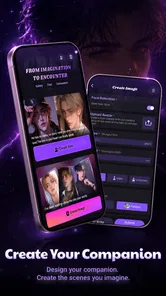
I approached HalFind-My Perfect Boy as an entertainment app for people who want an ongoing AI relationship rather than a quick one-off chat. Its central idea is simple: you can talk with an AI boyfriend and build a personal romantic storyline through text, voice, and images. After spending time with that format, my impression is that the app is most interesting when you treat it as an interactive character experience, not as a replacement for real relationships or a general-purpose assistant.
The app comes from FineTip Apps and is free to install, with optional purchases ranging from $4.49 to $104.99 per item. It is marked for mature users aged 17 and over, which is important because the romantic framing is not aimed at children. The listing shows a 4.7 average from around 8.4 thousand ratings, with over 100 thousand installs, so there is already a noticeable audience exploring this style of entertainment.
How the conversations feel in everyday use
The most natural way to use HalFind is to begin with a small, low-pressure exchange. I would not open it expecting a perfectly formed story immediately. The better approach is to give the character a little direction, explain the mood you want, and then let the conversation develop. A short message about having a difficult day can turn into a comforting exchange, while a playful prompt can move the interaction toward a more imaginative romantic scene.
That flexibility is the app’s main appeal. Instead of scrolling through a fixed series of episodes, you participate in the direction of the relationship. You can decide whether the tone is affectionate, teasing, dramatic, or calm. This makes the experience feel more personal than a conventional romance game, where the available choices are usually limited to a few buttons.
At the same time, the open-ended format creates a responsibility for the user. If you give vague messages, the conversation may feel less focused. I found that specific prompts work better than simply asking what the AI wants to talk about. Mentioning a setting, a shared activity, or the kind of emotional response you want gives the exchange more shape and reduces the chance of a bland back-and-forth.
Voice and images add variety, but they also change how you should judge the app. Text is the easiest mode for casual use because it fits into short breaks and does not demand much attention. Voice is more immersive when you are somewhere private and want the exchange to feel less like messaging. Images can help establish a visual mood, but they are better treated as part of the fantasy than as proof of a consistent, fully developed character identity.
What makes it different from ordinary entertainment apps
Most entertainment apps give you content to consume. HalFind gives you prompts and responses to react to. That distinction matters in practice. A streaming romance series can deliver polished scenes without asking you to contribute, while a traditional chat app connects you to another person with their own schedule and expectations. This app sits between those experiences: it offers immediate interaction, but the partner is artificial and the story depends heavily on your input.
More From Our News Desk

 Gmail
GmailGmail in a Busy Inbox: Who Benefits Most?
From first account to crowded workday, Gmail earns its place through dependable search and flexible sorting—but its best fit depends on how much inbox maintenance you can tolerate.

 Prime Video
Switching to Prime Video: What Changes in Your Viewing Routine
Prime Video can make a compelling second home for streaming, but switching means learning a different catalog, rental layer, and route from browsing to playback.

 Universal TV Remote Control
Universal TV Remote Control Works Best as a Reliable Backup
A phone remote earns its place through quick setup and reliable habits. Here is how to get more from Universal TV Remote Control—and where its limits show.

 Weather - By Xiaomi
Weather by Xiaomi Review: Clear at a Glance, Less Clear Up Close
Xiaomi’s weather app makes everyday forecasts quick to scan, but its calm surface can leave useful details and recovery paths harder to find than they should be.

 X
XX Under Pressure: Can It Recover When Posting Goes Wrong?
A resilience-focused review of X, examining setup, mistaken posts, interruptions, weak connections, and the gaps that matter when recovery needs to be dependable.

 Clash of Clans
Clash of Clans Is Won Between the Battles
Its raids are quick; its community is a long-term project of coordination, teaching, rivalry, and shared responsibility—with all the friction that entails.
Latest News



For me, that makes it useful during moments when I want light companionship without arranging a call or committing to a multiplayer session. It can also work for people who enjoy writing but do not always have the energy to create an entire story alone. You can use the conversation as a prompt generator, then imagine the setting, write your own continuation, or simply enjoy the exchange as a private piece of entertainment.
It is less suitable if you want a structured game with clear objectives, unlockable chapters, or a defined ending. The appeal is the ongoing interaction, not progression through a carefully authored campaign. If you prefer a romance game with strong plot control and dependable character development, a conventional visual novel may feel more satisfying.
Speed expectations when switching between text, voice, and images
Perceived speed is likely to vary most according to what you ask the app to produce. A short text exchange is naturally the quickest way to interact because it keeps the experience simple. Voice and image-based interactions are more demanding by their nature, so I would expect them to feel less immediate than ordinary typing, especially when the app is generating something more elaborate.
My practical advice is to use text as the default mode and bring in voice or images when they add something to the scene. If every message becomes a request for a richer format, the rhythm can become less conversational. Using multimedia selectively makes the moments that do use it feel more meaningful and helps avoid turning the experience into a sequence of waiting periods.
There is also a difference between technical speed and conversational speed. A reply can appear quickly but still feel slow if it does not understand the emotional direction of the exchange. Conversely, a slightly longer pause may be acceptable when the response feels relevant. With an AI companion, consistency of tone often matters more than shaving a moment off every response.
When I wanted a relaxed evening interaction, I found it more useful to establish the situation in text first and only then move toward voice or images. This workflow gives the conversation a clear foundation. It also makes it easier to notice whether the character is actually following the thread, rather than judging the app only by how quickly it produces another response.
What happens during heavier, longer sessions
Long sessions are where this type of app has to prove more than its store summary suggests. A brief chat can be enjoyable even if the character is only loosely defined. After a longer exchange, however, I start looking for continuity: does the tone remain stable, do earlier details still matter, and does the conversation feel like one relationship rather than disconnected replies?
HalFind is most rewarding when I keep the session focused around one theme. For example, I might create a fictional date-night scenario, stay with that setting for a while, and gradually add details. This is more effective than jumping from romance to advice to random image requests in quick succession. The focused approach gives the AI fewer competing directions and makes the resulting story easier to follow.
A useful advanced habit is to restate important details naturally instead of assuming every earlier message will remain equally prominent. If a particular personality trait or shared event matters to the story, bringing it back into the conversation can help keep it central. This is not a criticism unique to this app; it is a practical limitation of open-ended AI conversation. Users who expect perfect memory without guidance may become frustrated.
Heavy use can also expose repetition. Romantic chat formats often rely on familiar emotional patterns, and those patterns can become noticeable when you spend a long time in one session. I recommend taking breaks and returning with a new scenario rather than trying to force one conversation to carry an entire evening. Shorter, themed sessions usually feel fresher than an endless stream of similar affection.
Voice can make a long session feel more personal, but it is also less discreet than text. I would use it only when I am comfortable with the surroundings and with the level of attention it requires. Text remains the practical choice on public transport, during a lunch break, or whenever I need to stop instantly without disrupting anyone nearby.
Reliability, continuity, and recovering from an awkward reply
Reliability here is not only about whether the app opens. It is also about whether the interaction remains usable when a response misses the mood. AI romance apps can occasionally produce an answer that feels too generic, changes emotional direction abruptly, or misunderstands what the user meant. When that happens, the best recovery is usually a direct correction rather than a long explanation.
I get better results by saying what should change: “keep this playful,” “continue from the café scene,” or “respond more gently.” Clear corrections are more useful than simply writing that the answer was bad. This gives the conversation a chance to recover without abandoning the entire scenario.
Another recovery technique is to start a fresh mini-scene when the current thread becomes confused. Instead of repeatedly repairing several contradictory details, I can summarize the setup in one or two sentences and move forward. That makes HalFind feel more like a flexible writing partner than a perfectly persistent companion, and that is the expectation I would recommend bringing to it.
The app’s current version is 1.0.6, which places it in a relatively early stage of its product life. I would therefore judge it as an experience that may continue to change rather than as a finished, unchanging platform. Updates can improve the feel of conversations, but they can also alter how familiar interactions behave. Anyone who becomes attached to a particular style should be prepared for the possibility that the experience may evolve over time.
I also think emotional boundaries are part of reliability from a user’s perspective. The app can be engaging, but it should remain a controlled form of entertainment. If you notice that you are using it to avoid every real conversation or allowing the AI’s responses to determine your mood, stepping away is the sensible response. The artificial partner can imitate warmth, but it does not offer human responsibility, mutual consent, or genuine personal understanding.
Device limits, operating system support, and resource choices
HalFind supports Android 7.0 and later, which makes it available to people using older compatible devices as well as newer phones. That broad support does not guarantee identical comfort on every handset. Text interaction is naturally the least demanding part of the experience, while voice and image use may place greater pressure on a phone’s connection, storage, battery, or general responsiveness.
If your phone is older, I would begin with text and add the richer modes one at a time. This makes it easier to identify whether a problem comes from the particular feature, the device, or the network. Closing other demanding apps before a longer session is also a sensible routine, especially if you are using voice or generating images repeatedly.
Battery planning matters more than it might seem. A short text chat can fit into spare moments, but a multimedia session is something I would start with a reasonable charge or access to power. I would not describe that as a flaw specific to HalFind; interactive voice and image experiences simply ask more from a phone than reading a static page or watching a short clip.
Storage is another practical consideration. Because the app combines text, voice, and images, I would keep an eye on how much space it occupies over time, particularly on a device with limited free storage. I would also avoid treating every generated image as something worth keeping. Saving only the images that genuinely belong to a story keeps the experience more organized and reduces clutter.
Privacy habits are important as well. I would avoid entering real-world details that could identify me, including addresses, workplace information, financial details, or private information about other people. The romantic framing can make users feel unusually comfortable, but an AI conversation should still be handled with the same care as any other digital service.
Who will enjoy it, and who should choose something else
I can recommend HalFind to adults who enjoy character-driven chat, collaborative storytelling, and low-pressure romantic fantasy. It is especially appealing if you like shaping a conversation yourself rather than following a fixed script. Someone who wants a companion for a few minutes at a time may appreciate the immediate format, while a creative user can turn it into a source of scene ideas, dialogue practice, or visual inspiration.
A realistic everyday use case would be an evening when I have finished work but do not want to watch another episode of a show. I can set up a fictional date, exchange a few messages, and use the interaction as a relaxing transition before bed. Another use is creative warm-up: I can ask the AI boyfriend to join a fictional situation, then use the replies to develop a character or outline a romance scene of my own.
I would skip it if I am looking for real human connection, a competitive game, or a dependable source of serious emotional or practical advice. It is also not the right choice for younger users because of its mature age classification. People uncomfortable with simulated romance may find the entire premise distracting rather than enjoyable, even if the technical experience works smoothly.
The price structure deserves attention before becoming a regular user. The app is free to start, but optional purchases span from $4.49 to $104.99 per item. That is a wide range, so I would avoid buying anything impulsively during an emotionally engaging conversation. I would first decide whether the basic experience fits my habits, then consider whether a purchase adds enough value to justify its cost.
Compared with a normal messaging app, HalFind is more immediate because it does not depend on another person being available, but it cannot provide genuine reciprocity. Compared with a streaming service, it is more interactive but less polished and predictable. Compared with a visual novel, it offers more freedom but usually less authored structure. Those trade-offs explain its appeal clearly: it is for participation and improvisation, not for a perfectly controlled story.
My performance verdict after weighing the trade-offs
HalFind-My Perfect Boy works best when I keep my expectations realistic. Its strongest quality is the combination of text, voice, and images in a romantic conversation format that I can steer myself. Its weakest area is the natural limitation of AI companionship: conversations may need guidance, long sessions can become repetitive, and an affectionate reply should never be confused with human understanding.
From a device perspective, I would start lightly, use text for everyday exchanges, and reserve voice and images for moments where they improve the scene. That workflow should also make the app feel more manageable on older compatible phones. The broad Android 7.0 minimum helps accessibility, but multimedia use is still better approached with attention to battery, storage, and connection conditions.
The 4.7 average and growing install base suggest that the concept is connecting with many users, but popularity does not remove the need to decide whether simulated romance suits you personally. I would recommend trying the free experience with a clear boundary: treat it as entertainment, do not share sensitive information, and do not rush into the higher-priced purchases.
My final view is positive but selective. If you want an AI boyfriend for imaginative chats, private storytelling, and occasional voice or image moments, HalFind is worth exploring. If you want a real relationship, a tightly written romance plot, or a conventional game with measurable progression, another category will serve you better. For the right user, its value comes from the freedom to create a small fictional relationship on demand, provided you remain in control of the time, money, and emotional space you give it.
HalFind-My Perfect Boy Frequently Asked Questions
What kind of experience does HalFind-My Perfect Boy offer?
HalFind-My Perfect Boy is an entertainment app centered on chatting with an AI boy and creating a love story through text, voice, and images. It is a fictional, interactive experience rather than a conventional dating service for finding or meeting real people. That distinction matters if you are looking for a story-driven chat rather than a platform for real-world romantic matches.
Who is HalFind-My Perfect Boy intended for?
The app is intended for a mature audience, with a 17+ content rating. That makes it unsuitable for children and younger teens, even if they are interested in AI chat or interactive storytelling. If you are considering it for someone else, check the age rating on the relevant app store and discuss whether mature-themed entertainment is appropriate before installing.
What is HalFind-My Perfect Boy and how does it work?
HalFind-My Perfect Boy is a relationship-focused app designed to help users discover potential romantic matches based on personal preferences and profile information. After creating an account, you can usually add photos, describe your interests, and browse or receive suggested profiles. The experience depends on the information users provide, so completing your profile honestly can improve the relevance of recommendations.
Is HalFind-My Perfect Boy free to download and use?
The app is free to download, but some features can require in-app purchases. Before downloading, check the current listing in the Google Play Store or Apple App Store for pricing, trial conditions, renewal details, and available premium tools. Always review the payment screen carefully so you understand what is included. In-app purchases are listed at prices ranging from $4.49 to $104.99 per item.
Is HalFind-My Perfect Boy safe for meeting or chatting with other users?
HalFind-My Perfect Boy is built around chatting with an AI character, not arranging dates with other users. As with any app, take care with personal information: avoid sharing your address, financial details, passwords, or sensitive documents in conversations. Be thoughtful about any images or other information you choose to share, and review the app’s privacy settings and permissions before using it.
Pros
- Simple interface makes browsing profiles quick and easy.
- Detailed filters help narrow matches by preferred traits.
- Profile photos load quickly on most mobile connections.
- In-app messaging makes it convenient to start conversations.
- Useful for meeting people with similar dating interests.
Cons
- The user base may be limited in some locations.
- Some features may require a premium subscription.
- Profile quality can vary
- with occasional incomplete information.
- Matching results may feel repetitive after extended use.
- Privacy settings should be checked carefully before sharing details.











