Golden Corral
- 10.08K
- 4.8
- Installs
- 1.00M
- Price
- Free

Screenshots

Analysis by Reviewed
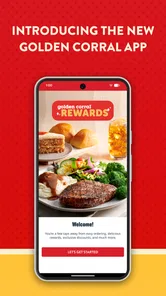
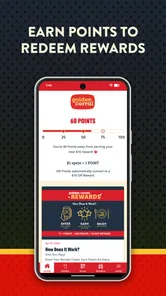
My first-week impression of Golden Corral is that it makes sense as a practical extension of a familiar restaurant, rather than as a food app I would open just to browse. It is a free Food & Drink app from Golden Corral Corporation, aimed at Everyone, and its main appeal is bringing ordering and rewards together in one place. The first few visits are most useful when I already know I want Golden Corral: I can check the available choices, decide between pickup and delivery, and move toward a meal without starting the search from scratch.
When the novelty is useful
A realistic use is a busy evening when nobody wants to cook and the group can’t agree on one dish. Instead of comparing unrelated restaurants in a delivery marketplace, I can look at Golden Corral’s own choices and see whether its familiar, hearty style suits the occasion. That makes the app especially relevant to existing customers, families ordering for different tastes, and anyone who wants to collect rewards while placing an order. It is less compelling if I’m looking for a broad restaurant directory or want to compare many cuisines in one checkout.
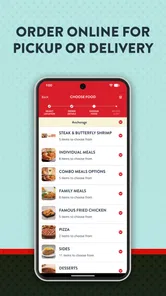
The useful habit is to decide the order before hunger turns browsing into guesswork. I’d look through the menu first, check the details that matter to my group, then choose a pickup or delivery route. For a shared meal, that small pause helps avoid treating the cart as a buffet of impulse choices. The app’s restaurant-specific focus is a strength when I know what I’m after, but it cannot replace the wider selection of a multi-restaurant service.
Does it earn a regular place?
The longer-term value depends on how often Golden Corral fits your routine. If it is already a go-to for a hearty meal, having ordering and rewards in the same app can make repeat visits feel less effortful. The app has an average rating of 4.8 from around 21,000 ratings, and it has been installed over 500,000 times, which suggests plenty of people find a reason to keep it around. Those figures are useful context, but I’d judge it by whether its ordering flow and rewards genuinely help with meals I would have bought anyway.
I would not keep it installed just because it has a rewards section. A better test is to use it for an order you were already planning, then see whether the process saves time and whether you remember to check the rewards on later visits. If you only eat at Golden Corral occasionally, the usual browser or a delivery app may be enough. If you return regularly, the dedicated app is easier to justify, especially when you want the restaurant’s own ordering path rather than a general-purpose marketplace.
What to check before you rely on it
Restaurant ordering always has practical details that matter more than a polished screen: whether the location serving you offers the option you want, whether the menu suits everyone at the table, and whether the pickup or delivery timing works for your day. I’d confirm those details in the app before building a large order around them. For a time-sensitive meal, checking the chosen location and order summary before checkout is a sensible safeguard, not an extra chore unique to this app.
The app is free, currently version 1.4, and was released on April 19, 2021. It is listed for devices running Android 9 or later. That makes it a straightforward option for compatible Android users, though the details of an individual order still matter more than the app’s age or version. The app earns a place through repeat convenience, not novelty: if it becomes your regular way to order from Golden Corral, it can be worthwhile; if you rarely choose the restaurant, it may simply sit unused.
More From Our News Desk

Weather by Xiaomi Review: Clear at a Glance, Less Clear Up Close

X Under Pressure: Can It Recover When Posting Goes Wrong?

Clash of Clans Is Won Between the Battles

Android Auto Makes the Case for Quieter Car Software

MobiOffice: Transforming Mobile Productivity with Seamless Integration

EA SPORTS FC™ Mobile Soccer: Redefining Mobile Sports Gaming
A practical fit, not a meal-planning essential
If you’ve ever found yourself in the mood for an all-you-can-eat experience, Golden Corral might be the place for you. This app is like having a buffet at your fingertips, offering everything from homestyle classics to a variety of international flavors. Let’s dive in and see what makes this app a feast for the eyes and the stomach.
First Impressions
As soon as I launched the Golden Corral app, I was greeted with a user-friendly interface that was both inviting and easy to navigate. The colors are warm and comforting, much like the restaurant itself, and the layout is intuitive. It's clear that the developers wanted to create an online experience as close to a physical visit as possible. The app aims to cater to all ages, making it a breeze for both tech-savvy youngsters and those who might need a little more guidance.
The home screen features a clear menu, showcasing various categories such as breakfast, lunch, and dinner options. Each category is brimming with choices, making it easy to find whatever you're craving at the moment. Plus, there’s a nifty feature that allows you to filter dishes by dietary needs, which is a thoughtful touch for those with specific health considerations.
Features and everyday trade-offs
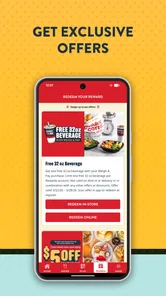
One of the standout features of the app is its ability to personalize your dining experience. From setting up a favorite dishes list to accessing exclusive deals and promotions, the app makes sure you’re getting the most bang for your buck. You can even set reminders for upcoming meal deals, which is perfect for anyone who doesn’t want to miss out on a good bargain.
For regular customers, I’d treat favorites and reminders as shortcuts rather than reasons to order more often. Saving a usual choice can cut down the time spent rebuilding a familiar cart, while a reminder is only useful if the deal fits a meal you were already considering. That distinction matters over the long run: a rewards or promotion prompt can help me notice value, but it should not turn an occasional restaurant meal into an automatic habit.
Another feature I found particularly helpful was the nutritional information provided for each dish. It’s not just about indulgence here; the app appears to be committed to helping its users make informed choices, which is always a plus in my book.
Ordering when plans change
Ordering through the app is as seamless as it gets. You can choose to pick up your order or have it delivered straight to your doorstep. The process is straightforward: browse the menu, add items to your cart, and check out with just a few taps. The app even saves your previous orders, so reordering your favorite meal is ultra-convenient.
That reorder convenience is most useful when the meal is genuinely repeatable: a familiar choice for a workday dinner, for example, or a known crowd-pleaser when family is visiting. I would still review the cart rather than tap through on autopilot, especially when ordering for several people. A saved order can speed up the routine, but checking quantities and any custom requests is a simple way to avoid carrying forward an old choice that no longer fits the group.
There’s also an option to customize your order, which I appreciated. Whether you want extra gravy on your mashed potatoes or prefer your steak well-done, the app allows you to make these adjustments with ease. And for those who like to plan ahead, the app lets you schedule your orders, ensuring your meal is ready exactly when you want it.
Making a group order less stressful
For a family meal or a small gathering, I’d use the app as a planning aid rather than leave the decision until everyone is hungry. Ask people what they want, check the menu and dietary details, then build the cart with the group’s choices in mind. This is especially helpful when one person is coordinating the order: it keeps the restaurant’s options in view without switching between separate menus or trying to remember requests from a conversation.
There is a trade-off, though. A restaurant-specific app can make it easier to settle on one familiar choice, but it won’t help if the group is split between Golden Corral and several other restaurants. In that case, a delivery marketplace is better for comparing different cuisines and providers at once. I’d also avoid treating a saved order as a complete solution for a new gathering; use it as a starting point, then check that its portions and selections still fit the people eating.
Who should keep it installed?
I’d recommend it most to people who already choose Golden Corral often enough to benefit from saved orders, restaurant-specific deals, and a direct way to arrange pickup or delivery. It can also suit a household where one person regularly coordinates a larger meal and wants to review choices in one place. Someone who visits rarely, prefers cooking at home, or wants the broadest possible range of nearby restaurants may be better served by a general delivery app or by ordering only when the occasion comes up.
For a first-time user, I’d begin with a modest order and explore the menu and checkout flow before relying on it for a bigger gathering. That gives you a chance to see whether the options at your selected location meet your needs and whether the timing works for your plans. The app’s interface may make ordering feel easy, but the restaurant choice itself remains the deciding factor: if Golden Corral’s style is not what you want that day, a smoother checkout will not change that.
Keeping the routine useful
The app’s lasting value comes from a few small habits, not from opening it every day. I’d check whether the chosen location and ordering option suit the occasion before filling the cart, use a saved favorite only when it still matches what I want, and glance at rewards or offers when I’m already planning a visit. These steps reduce avoidable backtracking and keep prompts from driving the decision.
It is also worth separating menu exploration from the final order. If I’m arranging food for several people, browsing early gives me time to compare options and ask about preferences; placing the order closer to the meal means I can confirm the practical details again. That two-step approach is more dependable than building a large cart well in advance and assuming every choice will remain appropriate.
Where the app can feel limiting
The focused approach that works for a regular customer can feel narrow to someone who is still deciding what to eat. Unlike a broad delivery service, the app is centered on one restaurant, so it is not the place I’d go to weigh lots of local alternatives, compare unrelated menus, or find a different style of meal. If the main question is “What should we order from anywhere nearby?”, a marketplace or local search tool is a better first stop.
Even when Golden Corral is the plan, the app cannot remove the need to check the location, order details, and timing. Those checks are ordinary parts of restaurant ordering, but they matter more for a larger order or a tight schedule. I’d make a quick final review before submitting rather than assume that an earlier choice, a favorite, or a planned pickup time automatically suits today’s circumstances.
Wrapping It Up
All in all, the app brings a buffet experience to the palm of your hand. Its combination of a user-friendly interface, ordering tools, and thoughtful touches like nutritional insights makes it a useful choice for anyone looking to enjoy a hearty meal at home. Whether you're a long-time fan of the restaurant or a newcomer curious to see what the fuss is about, it is worth considering when Golden Corral is already on your mind.
So, if you're looking for an app that offers convenience, variety, and a little bit of everything, why not give it a try? You might just find your new favorite dish. My lasting verdict is practical rather than enthusiastic: Golden Corral earns its space when it supports a recurring routine, not simply because it is new. If you order from the restaurant regularly, the saved choices and rewards can make repeat visits easier; if not, there is no need to turn it into a permanent fixture on your phone.
Golden Corral Frequently Asked Questions
Can I browse Golden Corral’s menu before visiting or ordering?
The app is designed to help you explore Golden Corral’s dining options, including viewing the menu. This can be useful when you want to look over what the restaurant offers before deciding whether to visit or use a pickup or delivery option. Menu details and ordering choices may vary by location, so check the options shown for the restaurant you plan to use.
Does Golden Corral’s app help me find a nearby restaurant?
Yes, locating nearby Golden Corral restaurants is one of the app’s stated uses. This feature can help when you are planning a visit or checking which location may work for pickup or delivery. Once you find a restaurant, review the choices available for that location, since dining and ordering options can differ from one restaurant to another.
Is Golden Corral’s app free, and what devices can run it?
The Golden Corral app is free to download and is intended for Android and iOS users. Its current version is 1.4, and it requires Android 9 or later. Before installing, check that your device’s operating system meets that requirement and that you are downloading the app published by Golden Corral Corporation.
What is Golden Corral's mobile app used for?
Golden Corral's mobile app is designed to enhance your dining experience by offering convenient features such as viewing the menu, locating nearby restaurants, and accessing exclusive promotions and coupons. Additionally, users can join the Good as Gold Club through the app to receive special offers and updates directly to their mobile device. Its store summary also highlights delivery, pickup, and rewards, making it useful for exploring available ways to enjoy Golden Corral.
Is the Golden Corral app available on both Android and iOS devices?
Yes, the Golden Corral app is available for download on both Android and iOS platforms. You can find it on the Google Play Store for Android devices and the Apple App Store for iOS devices. This ensures that users across different mobile operating systems can enjoy the app's features and benefits.
Pros
- Wide variety of menu options.
- Affordable buffet pricing.
- Family-friendly atmosphere.
- Frequent promotions and discounts.
- Clean and well-maintained facilities.
Cons
- Limited vegetarian options.
- Crowded during peak hours.
- Inconsistent food quality.
- Noisy dining environment.
- Limited dessert options.











