

Givebacks
- 48.00
- 3.5
- Installs
- 100.00K
- Price
- Free

Screenshots
Analysis by Reviewed
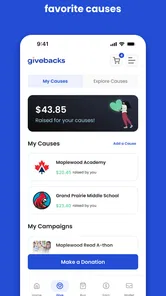
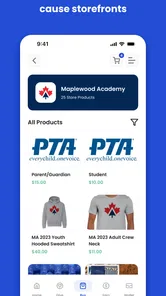
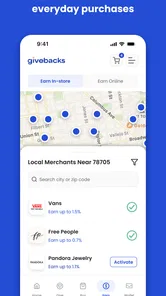
Givebacks is a shopping app with a community purpose: it is designed to help users support their children’s school while they shop. I found that idea more useful than a typical rewards app because it connects an ordinary purchase with something personal and local. Instead of treating shopping only as a way to collect points for yourself, the app puts school support at the center of the experience.
The app is free, rated for Everyone, and developed by Givebacks, Inc. It has reached over one hundred thousand installs and holds an average rating of three and a half from more than one hundred ratings, with dozens of written reviews. Those figures suggest that it has found a real audience, although the mixed rating also tells me that the experience may depend heavily on how clearly a school community uses and explains it.
What to expect before you begin
My first impression is that Givebacks is best understood as a bridge between shopping and school fundraising, not as a full replacement for a large marketplace. The central value is the connection to a child’s school. If you are looking for the lowest price, the widest product selection, or a general-purpose shopping platform, a conventional retailer will probably remain your main destination. Givebacks makes more sense when the school-support element matters enough to influence where and how you shop.
That distinction is important because it sets a realistic expectation. The app’s store summary is simply “Support your kids' school,” and that is a better guide to its purpose than imagining a complicated shopping ecosystem. I would install it when I already have a school, class, organization, or community in mind. Without that connection, the app may feel less immediately useful than a standard shopping app.
I also appreciate that the age rating is Everyone. In practical terms, that makes the app suitable for a family context, although the person handling purchases should still be an adult who understands the transaction before completing it. A child can be part of the reason for using the app, but the shopping decision and any payment-related steps belong with the responsible shopper.
The most useful mindset is to treat Givebacks as a habit rather than a one-time novelty. A single visit may not reveal much. Its purpose becomes clearer when you use it before purchases that you were already planning to make and consistently connect those purchases with the school you want to support. The app is most valuable when it becomes part of your normal shopping routine, not when it replaces careful price checking.
Who is likely to benefit most
I would recommend trying it first if you are a parent, guardian, relative, or supporter who regularly shops and wants those purchases to contribute to a child’s school community. It can also suit people who prefer small, repeatable contributions over occasional fundraising events. The appeal is practical: you do not necessarily need to invent another donation activity when shopping is already on your calendar.
More From Our News Desk

 Instagram
Instagram’s Power Comes From Its Place in Your Phone
A close look at how Instagram turns Meta’s reach, recommendation systems and everyday camera habits into durable platform power—and what that costs users.

 Gmail
GmailGmail in a Busy Inbox: Who Benefits Most?
From first account to crowded workday, Gmail earns its place through dependable search and flexible sorting—but its best fit depends on how much inbox maintenance you can tolerate.

 Prime Video
Switching to Prime Video: What Changes in Your Viewing Routine
Prime Video can make a compelling second home for streaming, but switching means learning a different catalog, rental layer, and route from browsing to playback.

 Universal TV Remote Control
Universal TV Remote Control Works Best as a Reliable Backup
A phone remote earns its place through quick setup and reliable habits. Here is how to get more from Universal TV Remote Control—and where its limits show.

 Weather - By Xiaomi
Weather by Xiaomi Review: Clear at a Glance, Less Clear Up Close
Xiaomi’s weather app makes everyday forecasts quick to scan, but its calm surface can leave useful details and recovery paths harder to find than they should be.

 X
XX Under Pressure: Can It Recover When Posting Goes Wrong?
A resilience-focused review of X, examining setup, mistaken posts, interruptions, weak connections, and the gaps that matter when recovery needs to be dependable.
Latest News



On the other hand, I would be cautious if you expect instant personal savings, a broad comparison-shopping tool, or a detailed financial dashboard. Givebacks is not the obvious choice for someone whose only goal is to find the cheapest item as quickly as possible. In that situation, a retailer’s own app, a price-comparison service, or a standard cashback program may be a better fit.
Setting up the app without getting lost
After installing Givebacks, I would approach setup with one question in mind: which school or school community should benefit from my activity? The first meaningful decision is not browsing products. It is establishing the connection that gives the shopping activity a purpose. Take a moment to search carefully and choose the correct school or organization rather than selecting the first similar name that appears.
This is one of the less obvious places where a little patience can prevent frustration later. Schools can have similar names, and families may support more than one child in different communities. If the app presents more than one plausible result, compare the names closely before continuing. A rushed selection could make your later activity feel confusing even if the shopping itself works as expected.
I would also keep the school’s preferred name or any enrollment instructions nearby during setup. In a real household, this might mean checking a school newsletter, parent message, or fundraising notice before opening the app. That simple preparation is more useful than installing first and trying to remember every detail from memory.
Givebacks is currently at version three point six point seven and requires Android seven point zero or later. That makes it accessible on many older Android phones, which is helpful for families who do not replace devices frequently. Still, an older operating system can make any modern shopping experience feel less smooth than it does on a newer phone, so I would keep expectations sensible if your device is several generations old.
The developer is Givebacks, Inc., and the app is free to install. Free access removes an important barrier for school supporters, but it does not mean every purchase decision should be made inside the app without comparison. I would still check the final cost, shipping details, and item suitability through the normal purchasing flow before confirming anything.
A practical setup routine
Install the app on the phone you normally use for shopping, rather than a device you rarely check.
Identify the exact school or community you want to support before making your first purchase-related decision.
Read each confirmation screen carefully, especially when a school name or support destination is involved.
Keep the app available when you are ready to shop, so you do not forget the support step during a busy day.
This routine may sound ordinary, but it addresses the main risk with purpose-driven shopping apps: the user remembers the purchase and forgets the attribution. Givebacks only feels meaningful when the school connection is clear. I would rather spend an extra minute checking that connection than discover later that I selected the wrong community.
The first successful action
For a first-time user, success should not mean completing the largest possible order. It should mean completing one small, understandable shopping action while feeling confident about which school is being supported. Choose something you already intended to buy, follow the app’s available path, and pause at the final confirmation instead of tapping through automatically.
A realistic example would be a parent preparing for the week and shopping for an item already on the household list. Rather than opening a familiar retailer immediately, the parent first checks Givebacks, confirms the intended school, and then follows the available shopping process. The purchase remains a normal household purchase, but the route now includes a school-support purpose. That is the kind of first win I would aim for.
Starting with a planned purchase has two advantages. First, you are less likely to spend money simply because the app is encouraging you to browse. Second, you can compare the experience with your usual shopping habit while the details are still fresh. Did the extra step feel manageable? Was the school selection easy to understand? Did you know what would happen before completion? Those answers tell you more than a quick installation does.
I would avoid testing the app with an urgent purchase where timing matters. If you need an item immediately, your normal retailer may be the safer route. Givebacks is better introduced during a calm shopping moment, when you can read the screens and understand the relationship between the purchase and the school-support goal.
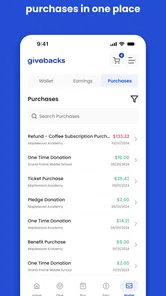
Another useful habit is to make a short mental note after the first action. You do not need a spreadsheet or a complicated tracking system. Simply remember which school you selected, what kind of purchase you made, and whether the process felt clear. If you later see a confirmation or update inside the app, you will have a reference point for understanding it.
Where new users may become confused
The biggest possible confusion is the difference between shopping through a school-support app and receiving a direct personal discount. Givebacks is centered on supporting a school, so I would not assume that every benefit appears as money returned to your own account. Before purchasing, make sure you understand whether the value of the action is primarily community support rather than an immediate reduction in your checkout total.
A second point of friction is attribution. Users may wonder whether simply installing the app is enough, whether opening it is enough, or whether a completed shopping action is required. My advice is to look for a clear connection between the selected school and the action you are taking. If the school is not visible or confirmed at the relevant step, stop and review the setup instead of assuming the app has remembered your choice.
The app’s moderate average rating makes this worth mentioning. With an average of three and a half from over one hundred ratings and around fifty written reviews, the experience is not universally effortless. That does not make it a poor choice, but it does mean I would pay attention to the exact wording on confirmation screens and avoid treating the process as automatic until I understand it.
Another common misunderstanding may come from comparing Givebacks directly with a retailer’s loyalty program. A retailer rewards you for returning to that retailer. Givebacks is organized around the school-support relationship. Those goals can overlap, but they are not identical. If you shop at several different stores, the community purpose may be the stronger reason to use Givebacks. If you are loyal to one retailer and care mainly about personal coupons, the retailer’s own app may be easier.
There is also a practical trade-off between convenience and intention. The usual shopping route is familiar and fast. Givebacks asks you to remember an additional step and pay attention to the school connection. For a busy family, that extra attention may be worthwhile only when the app fits naturally into an existing routine. I would not force it into every purchase if doing so creates stress or causes me to make a worse buying decision.
Using it as part of family life
The strongest use case I see is recurring household shopping. A family can agree that certain planned purchases begin in Givebacks, while urgent or highly specialized purchases continue through the most suitable retailer. This avoids an all-or-nothing approach. You support the school when it is convenient without pretending that one app must handle every shopping need.
That approach is especially helpful when several adults shop for the same household. Decide in advance which school should be connected and explain the basic routine: open Givebacks before a planned purchase, check the selected school, and complete the action only when the details look right. A shared habit is more reliable than expecting every family member to discover the process independently.
I would also use the app around predictable shopping occasions rather than random browsing. A household supply run, a planned gift, or a seasonal purchase gives you a clear reason to open it. The goal is not to buy more. The goal is to redirect an existing purchase through a path that supports the school.
One non-obvious benefit is that this can make school support feel less dependent on a single annual event. Fundraising often competes with work, childcare, and other responsibilities. A shopping-based routine offers a quieter alternative for people who want to contribute but struggle to attend events or organize separate donations. It is not a substitute for every form of support, but it can lower the effort required to participate.
There is a corresponding limitation: the app cannot make an unsuitable purchase sensible. If another store has a significantly better price, better return terms, or a product that fits your needs more closely, I would choose the better purchase and treat school support separately. Supporting a school matters, but it should not encourage wasteful spending or poor consumer decisions.
How it compares with familiar alternatives
Compared with a standard retailer app, Givebacks offers a different reason to open the app. Retailer apps usually emphasize inventory, delivery, coupons, order history, and loyalty benefits. Givebacks is more appealing when your priority is linking shopping with a school community. The retailer may still provide a smoother checkout or more detailed product information, so the best choice depends on whether personal convenience or community attribution comes first for that purchase.
Compared with a conventional cashback service, the distinction is even clearer. Cashback programs generally focus on returning value to the individual shopper. Givebacks is built around school support. If you want to maximize personal rewards, compare the available options carefully. If you want your shopping activity to help your child’s school, Givebacks may align better with your values even when the reward structure feels less immediately personal.
Compared with donating directly, the app may feel easier for someone who prefers to combine support with an activity already taking place. Direct donations are clearer when you want to give a specific amount immediately. Givebacks is more suitable when you want support to grow from planned shopping. These are different tools, and I would not use one as a reason to avoid the other.
The trade-off is that Givebacks requires a little more attention than opening the app you already know. Its strength is purpose, not necessarily speed. I would choose it for purchases where supporting the school is part of the decision, and choose a standard retailer or direct donation when another objective is more important.
The next step after your first purchase
Once the first action feels clear, the next step is to decide whether the app deserves a regular place in your routine. Do not judge it only by how polished the opening screen feels. Judge it by whether you can remember the school connection, complete a planned action without confusion, and feel that the extra step matches what you want to support.
I would begin with one repeatable rule: check Givebacks before a planned, non-urgent purchase that you would make anyway. After a few attempts, you will know whether the workflow is convenient enough for your household. If you repeatedly forget to open the app, place the phone shortcut where your shopping apps normally sit or add the routine to your weekly planning. The useful improvement is not more browsing; it is better timing.
It is also worth reviewing your selected school from time to time, especially if your family’s circumstances change. A child may move schools, or different adults may use the same phone. Confirming the destination before a purchase is a small safeguard that protects the purpose of the app.
Givebacks is not the right choice for everyone. I would skip it if you want a pure price-comparison tool, dislike community-linked shopping, or need a highly specialized retailer experience. I would also avoid using it as an excuse to buy things you do not need. In those situations, your usual shopping method is more honest and probably more efficient.
For families who do want to support a school through everyday purchases, however, I think the app is worth trying. Its free entry, Everyone rating, and accessible Android requirement make the experiment easy, while its school-centered purpose gives it a clear identity. My recommendation is to start small, verify the school connection, and compare the experience with your normal shopping route rather than assuming it will replace it.
My final view is that Givebacks works best as a simple habit for intentional shoppers. It does not need to handle every purchase to be useful. When it helps turn a planned household order into a small act of school support without pushing you toward unnecessary spending, it earns its place on the phone. That focused role is also its main limitation, but for the right family, the focus is exactly what makes the app worthwhile.
Givebacks Frequently Asked Questions
Can I use Givebacks on my phone?
Givebacks is a shopping app for Android, and it requires Android 7.0 or later. Before downloading, check your device’s operating system version and make sure you have enough space for the installation. If you use an iPhone, look for Givebacks in the official iOS App Store and confirm its compatibility there before proceeding.
Who is Givebacks designed for?
Givebacks is aimed at people who want to support a school, team, nonprofit, or other local organization through participating businesses and community fundraising. Its store summary is “Support your kids' school,” though the app’s broader purpose can also suit supporters of other groups. It is listed for everyone, making it relevant to families and community members considering a shopping app with a fundraising focus.
What is Givebacks and how does the app work?
Givebacks is a fundraising and community-support platform that helps organizations, schools, teams, nonprofits, and local groups raise money through participating businesses and everyday purchases. After creating or joining a supported campaign, users can discover eligible offers, shop through the app or participating partners, and generate contributions for their chosen organization. Available features and contribution methods may vary by location and campaign.
Is Givebacks free to download and use?
The Givebacks app is free to download, and users typically do not need to pay a separate membership fee to browse campaigns or participate in eligible fundraising activities. However, normal purchase prices, taxes, delivery charges, and any fees imposed by a participating merchant still apply. Before completing a transaction, review the campaign and merchant terms to understand exactly how contributions are calculated.
How do I support a school, team, or nonprofit through Givebacks?
After installing Givebacks, you usually need to create an account or sign in, then search for the organization or campaign you want to support. Once you select it, follow the instructions for eligible purchases, offers, donations, or fundraising activities connected with that campaign. Some organizations may provide a direct invitation or campaign code, so using the correct link can help ensure your support is credited properly.
Pros
- Simple way to discover and support charitable causes
- Clear information helps users compare available giveback opportunities
- Convenient mobile access to donations and reward-based campaigns
- Can encourage regular giving through an easy digital experience
- Useful for users who want their purchases to have a social impact
Cons
- Available causes and offers may vary by location
- Some features may require account registration or personal details
- Donation processing times can depend on external organizations
- Not every purchase or campaign may qualify for rewards
- Users should review privacy and payment policies before signing up











