

Giftful - Gift List & Wishlist
- 150.00
- 4.7
- Installs
- 100.00K
- Price
- Free

Screenshots
Analysis by Reviewed
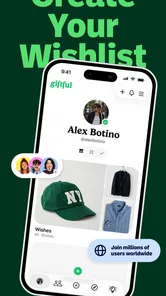
Gift shopping usually goes wrong before anyone opens a checkout page. Someone asks what I want, I forget to answer, three relatives buy similar things, or a perfectly good idea disappears inside a chat thread. Giftful approaches that problem from the other side: instead of waiting for scattered suggestions, I can collect the things I would genuinely like and share them as a usable gift list. After spending time with this shopping app, I found its main value less about browsing and more about making the handoff between “I like this” and “someone can buy this for me” much clearer.
That makes Giftful particularly interesting for birthdays, baby celebrations, holidays, and shared family occasions. It is free, made by Giftful, and available for Android users on version 7.0 or later. The app is rated for Teen audiences, so younger users and families should keep that age guidance in mind when deciding who will manage a list. At the time of writing, it has a 4.7 average from around 3,300 ratings and has passed 100,000 installs, which suggests that the simple wishlist idea is connecting with a real audience.
From a vague gift question to a list people can actually use
I start with the moment that makes a gift list worthwhile: someone asks what I’d like, and I realize my answer is scattered across passing thoughts and old messages. This section looks at how Giftful can turn those vague ideas into choices other people can act on, while keeping the list owner responsible for making each suggestion clear and current.
The starting condition: good intentions, poor organization
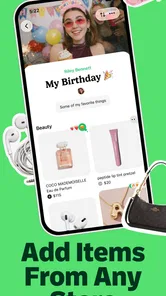
I think the best way to understand this app is to begin with a familiar situation. My birthday is approaching, people ask what I want, and I have several answers spread across browser tabs, screenshots, saved posts, and half-remembered conversations. If I send all of that through a messaging app, the recipient still has to identify the exact item, check whether it is suitable, and work out what has already been chosen. A normal note solves only the first part of the problem.
Giftful gives that scattered information a dedicated home. I can treat it as a personal collection of gift ideas rather than a one-time message. That distinction matters because a list can be prepared before anybody asks for it, adjusted as my preferences change, and shared when the occasion arrives. I found this more useful than trying to compose a polished recommendation message every time a friend or relative wants an idea.
The app also fits situations where the recipient is not the person doing the shopping. A parent can help organize a child’s birthday ideas, a couple can coordinate a household list, or a group of relatives can refer to one source instead of repeatedly asking the same questions. The strongest use case is therefore not “I need one present.” It is “several people need to choose gifts without creating confusion.”
Building the list without turning preparation into work
The first practical test is whether creating a list feels easier than simply sending a message. I would start by thinking in terms of occasions and priorities rather than adding every attractive product I see. A short list of realistic choices is more useful than a huge catalog that leaves other people unsure where to begin. Giftful works best when I use it as a decision aid, not as a storage bin for every impulse purchase.
More From Our News Desk

 Instagram
Instagram’s Power Comes From Its Place in Your Phone
A close look at how Instagram turns Meta’s reach, recommendation systems and everyday camera habits into durable platform power—and what that costs users.

 Gmail
GmailGmail in a Busy Inbox: Who Benefits Most?
From first account to crowded workday, Gmail earns its place through dependable search and flexible sorting—but its best fit depends on how much inbox maintenance you can tolerate.

 Prime Video
Switching to Prime Video: What Changes in Your Viewing Routine
Prime Video can make a compelling second home for streaming, but switching means learning a different catalog, rental layer, and route from browsing to playback.

 Universal TV Remote Control
Universal TV Remote Control Works Best as a Reliable Backup
A phone remote earns its place through quick setup and reliable habits. Here is how to get more from Universal TV Remote Control—and where its limits show.

 Weather - By Xiaomi
Weather by Xiaomi Review: Clear at a Glance, Less Clear Up Close
Xiaomi’s weather app makes everyday forecasts quick to scan, but its calm surface can leave useful details and recovery paths harder to find than they should be.

 X
XX Under Pressure: Can It Recover When Posting Goes Wrong?
A resilience-focused review of X, examining setup, mistaken posts, interruptions, weak connections, and the gaps that matter when recovery needs to be dependable.
Latest News



One useful habit is to add enough context for another person to recognize the right choice. If an item has different sizes, colors, versions, or compatibility requirements, I would make those preferences clear in the list itself or in the item details available while creating it. That small effort prevents a common wishlist failure: the buyer technically selects the requested product but chooses the wrong variation.
I would also separate firm preferences from flexible ideas. A list can contain the thing I really want, a similar alternative, and a lower-cost option, but those choices should be understandable to the person reading them. The app can organize the ideas; it cannot decide whether “any color is fine” or “only this exact model works.” That human explanation remains part of the workflow.
Another practical tip is to review the list before sharing it. Old ideas, unavailable products, and items that no longer match my interests reduce trust quickly. A recipient who opens a list and finds several irrelevant entries may stop using it, even if the useful items are still there. Giftful is most effective when I maintain it as a living list instead of creating it at the last minute and forgetting about it.
Sharing changes the audience and the responsibility
Once the list is ready, the next step is sharing it with the people who may buy from it. This is where the app becomes more useful than a private note: the list is designed to be passed along. I would send it to the relevant group rather than posting it broadly, especially when the list includes personal preferences, children’s items, or information connected to a family event.
The handoff should be accompanied by a plain explanation. I would tell relatives whether the list contains suggestions or strict choices, whether they should coordinate with one another, and whether there are items I would prefer not to receive twice. A shared list reduces uncertainty, but it does not automatically create communication between shoppers. The best results come when the app and a short message work together.
This is also where I would consider the difference between a public-facing registry and a small private wishlist. For a baby celebration or a large family event, a carefully prepared list can help many people choose independently. For a close friend who already knows my tastes, sending a single idea in a chat may still be faster. Giftful earns its place when the number of people, choices, or repeated questions makes a normal message inconvenient.
The buyer’s side: less guessing, but not no thinking
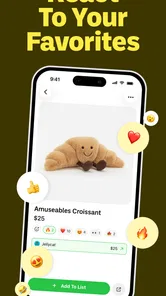
From the buyer’s perspective, a shared list should answer three immediate questions: what is wanted, where can it be found, and has somebody else already claimed it? That is the point at which a wishlist either becomes genuinely helpful or remains just a collection of links. I found the concept strongest when the list was focused, current, and written with the buyer in mind.
A relative shopping for a birthday present does not necessarily want to study my entire taste profile. They want a few dependable options and enough detail to avoid an awkward mistake. I would therefore put the most useful choices near the top or make their importance obvious through the way the list is arranged. If every item looks equally urgent, the recipient has to make the same decision I was trying to simplify.
There is a trade-off here. A dedicated gift list can make shopping more efficient, but it may remove some of the surprise and personal interpretation that comes with choosing a gift independently. That is not always a disadvantage. For practical items, children’s needs, or expensive purchases, accuracy is often more valuable than mystery. For a close friend who enjoys finding something unexpected, I would share a few suggestions rather than relying on the list for the entire gift.
A realistic workflow for a busy family
Imagine a family preparing for a child’s birthday. The parent creates a list several weeks ahead, adds toys and useful items, removes ideas that no longer fit, and shares the finished version with relatives. An aunt chooses one item, a grandparent chooses another, and a family friend uses the remaining suggestions to avoid buying the same kind of present. The parent can then point everyone back to one updated place instead of answering separate messages all week.
The important outcome is not merely that the list exists. It is that each handoff has less ambiguity. The parent turns personal preferences into organized choices. The relatives turn those choices into purchases. The family avoids some duplication and unnecessary back-and-forth. If the list is kept current, the process remains useful beyond one conversation.
I can see the same workflow for a baby wishlist, although the quality of the result depends heavily on how carefully the list is prepared. New parents may want to distinguish essentials from nice-to-have items and indicate whether a particular size, color, or type matters. Without that guidance, even a well-intentioned buyer can select something unsuitable. Giftful helps centralize the choices, while the list owner still needs to provide the judgment.
What happens after the handoff
A good gift list should continue to help after it has been shared. I would revisit it as items are purchased, preferences change, or the event gets closer. This is one of the less obvious advantages of using a dedicated app instead of a screenshot: the list can remain part of an ongoing process rather than becoming an outdated image in a chat.
That ongoing nature also creates a responsibility to avoid clutter. A list that starts as ten thoughtful ideas can become difficult to use if I keep adding items without removing anything. My recommendation is to do a quick clean-up before every major sharing moment. Keep the choices that still make sense, clarify anything confusing, and remove ideas that would force the buyer to investigate too much.
I would also avoid treating a wishlist as a guarantee that every item will remain available or suitable. Shopping conditions change, and the buyer may still need to check the item before completing a purchase. The app improves the recommendation stage; it does not replace the final judgment involved in size, availability, delivery, compatibility, or budget.
Where the flow breaks
The biggest weakness is that a list cannot solve incomplete information. If I add vague entries, forget to mention important variations, or include products that are no longer relevant, the app simply presents those problems more neatly. Organization is valuable, but it can give a false sense of certainty if the underlying list is careless.
There is also a social limitation. Not everyone wants to use a separate shopping app for a single gift, particularly when a text message would be enough. Asking a friend to open another service adds a small amount of friction, and that friction matters when the occasion is informal. I would recommend Giftful most strongly for recurring gift exchanges, larger groups, and events where coordination is genuinely difficult.
People who prefer complete control over a registry may also want more specialized tools. A retailer-specific registry can be better when the entire purchase needs to stay within one store or when the event requires a highly structured shopping process. A plain note can be better for a private list that only I will use. Giftful sits between those options: more organized and shareable than a note, but less tied to one retailer’s shopping system.
Another point worth considering is age and family supervision. The Teen content rating does not make the app unsuitable for families, but it does mean I would not hand it to a child without thinking about how the list is created and shared. An adult can help keep the list practical, avoid oversharing, and make sure the intended recipients are the people who receive it.
Who should use it, and who should skip it?
I would recommend Giftful to anyone who regularly receives the question, “What would you like?” and struggles to answer consistently. It is especially well suited to families, couples, parents preparing baby-related lists, and groups that exchange gifts across several people. The free price makes it easy to try without turning the decision into another purchase, and the app’s current version, 2.38.1, indicates that it is an actively maintained product rather than an abandoned experiment.
I would skip it when the gift is highly personal and the recipient already knows exactly what to buy, or when the list would contain only one simple suggestion. I would also choose a more specialized registry when an event depends on formal categories, detailed purchasing rules, or a single retailer. Giftful is at its best when the problem is coordination, not when I need a complete event-management system.
My final recommendation is to use it deliberately: create a concise list, add the details that prevent wrong choices, review it before sharing, and tell recipients how flexible the suggestions are. In my experience, that workflow turns a potentially awkward gift conversation into a clearer exchange. The app’s real strength is not collecting wishes; it is reducing uncertainty between the person who wants something and the people trying to choose it.
Giftful - Gift List & Wishlist Frequently Asked Questions
Who is Giftful - Gift List & Wishlist designed for?
Giftful is a shopping app for people who want to keep gift ideas organized and share them with others. It can suit someone planning a birthday or holiday list, as well as people collecting ideas for occasions such as weddings and baby showers. Friends and family can also use shared lists to get a clearer idea of what the recipient would like.
What is Giftful - Gift List & Wishlist used for?
Giftful - Gift List & Wishlist is designed to help you collect, organize, and share gift ideas in one convenient place. You can create wishlists for birthdays, holidays, weddings, baby showers, or personal shopping plans, then add products from different online stores. Sharing a list with friends and family can make gift planning easier and reduce the chance of receiving duplicate or unwanted presents.
How do I add products to a Giftful wishlist?
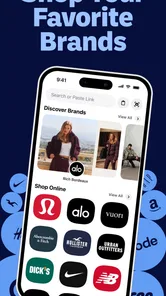
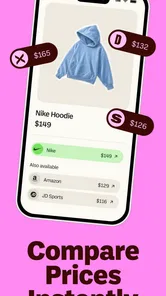
After creating a list, you can usually add items by entering a product link from an online retailer or by using the app’s sharing options from another shopping app or browser. Giftful may import details such as the product name, image, price, and retailer automatically, although the information can sometimes require manual editing. Checking the item before saving is recommended, especially if prices or availability change.
Can I share my Giftful wishlists with friends and family?
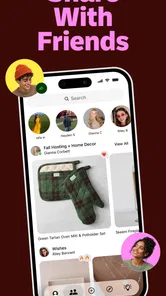
Yes, sharing is one of the main purposes of Giftful. You can send a wishlist through a link or supported messaging and social applications, allowing other people to view your gift ideas. Depending on the list settings, recipients may be able to reserve or mark an item as purchased without revealing that information to you, helping avoid duplicate gifts while keeping the surprise intact.
Is Giftful free to download and use?
Giftful is generally available as a free app, allowing users to create and share gift lists without paying for basic functionality. However, availability of specific features, optional upgrades, advertising, or account-related requirements may vary according to the current version and platform. Before downloading, it is worth checking the app store listing for updated information about subscriptions, in-app purchases, and supported devices.
Pros
- Simple way to create and organize gift ideas in one place.
- Useful for sharing wishlists with friends and family.
- Helps avoid duplicate gifts for birthdays and holidays.
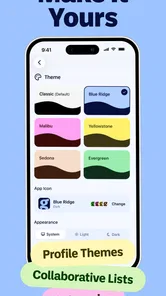
- Supports collaborative planning for upcoming celebrations.
- Clean interface makes lists easy to browse and update.
Cons
- Some features may require creating an account.
- Availability of certain retailers can vary by region.
- External product links may change or become unavailable.
- Privacy settings should be checked before sharing personal lists.
- Users may need to add products manually when links are unsupported.











