

Ghost Radio: EVP Spirit Box
- 1.37K
- 4.0
- Installs
- 100.00K
- Price
- $4.99
Screenshots
Analysis by Reviewed
I approached Ghost Radio EVP/EMF Simulator as a spooky activity to try with friends, rather than as a way to prove anything paranormal. That distinction matters: the app is entertainment from Exelerus Apps, and its EVP and EMF theme is best enjoyed with curiosity and a little skepticism. If you want a low-effort way to set the mood for a ghost-hunting game night, it has an appealing premise; if you need dependable scientific measurements, I’d choose a different tool.
Start with the right expectations
The first useful decision is where and why to use it. At home, it can add atmosphere to a storytelling evening; on a walk through a place where you’re allowed to be, it can give a group something to focus on. I wouldn’t treat a sound or changing reading as evidence of a spirit. A phone’s sensors and an entertainment app are not a controlled paranormal investigation, and ordinary environmental changes can prompt people to hear or see patterns that feel meaningful.
That expectation also helps avoid a common mistake: letting the app’s mood shape the conclusion before a session has even started. I’d agree with friends in advance that the goal is to have fun, keep the volume comfortable, and stop if anyone feels uneasy. It makes the experience more enjoyable for people who like spooky stories without turning uncertainty into a claim.
Pick a setting that supports the activity
I’d choose a place where the group can pause without blocking anyone or disturbing others: a living room after dinner is often a better starting point than a busy public spot. If you take the app outdoors, stick to places you’re permitted to visit and keep the session secondary to basic safety. Darkness can make the atmosphere more effective, but it also makes it easier to trip, lose track of belongings, or mistake a passing sound for something unusual.
A useful first run is deliberately uneventful. Try the app in a familiar room with the lights on, notice the ordinary sounds around you, and then decide whether you want a more theatrical setting. This gives newcomers a baseline for how the experience feels before the group starts building a story around every noise. It also makes the app easier to introduce to someone who is curious but not comfortable with a full-on scare.
How a session comes together
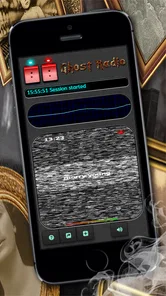
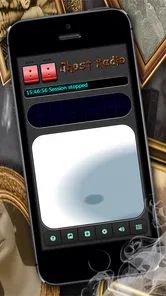
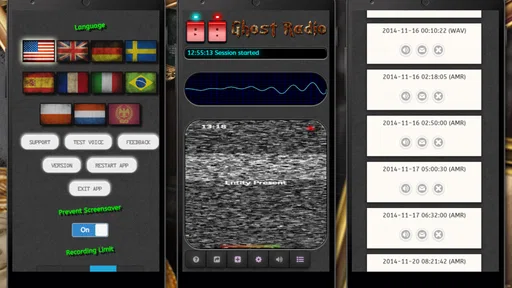
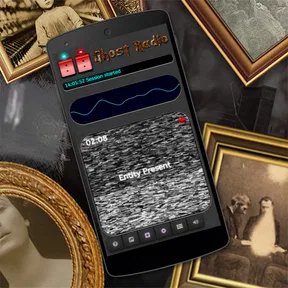
Upon launching the Ghost Radio EVP/EMF Simulator, you're immediately enveloped in an eerie atmosphere that sets the tone for your supernatural adventure. The app's interface is straightforward, making it easy for anyone to navigate, whether you're a seasoned ghost hunter or a newbie curious about the other side.
From first scan to a recording
One of the standout features of this app is its ability to simulate EVP (Electronic Voice Phenomena) and EMF (Electromagnetic Field) readings. It's like having your own ghost hunting kit right in your pocket. The app uses your device's sensors to detect changes in the environment, and believe me, it can get pretty intense when it starts picking up on anomalies.
More From Our News Desk

 Gmail
GmailGmail in a Busy Inbox: Who Benefits Most?
From first account to crowded workday, Gmail earns its place through dependable search and flexible sorting—but its best fit depends on how much inbox maintenance you can tolerate.

 Prime Video
Switching to Prime Video: What Changes in Your Viewing Routine
Prime Video can make a compelling second home for streaming, but switching means learning a different catalog, rental layer, and route from browsing to playback.

 Universal TV Remote Control
Universal TV Remote Control Works Best as a Reliable Backup
A phone remote earns its place through quick setup and reliable habits. Here is how to get more from Universal TV Remote Control—and where its limits show.

 Weather - By Xiaomi
Weather by Xiaomi Review: Clear at a Glance, Less Clear Up Close
Xiaomi’s weather app makes everyday forecasts quick to scan, but its calm surface can leave useful details and recovery paths harder to find than they should be.

 X
XX Under Pressure: Can It Recover When Posting Goes Wrong?
A resilience-focused review of X, examining setup, mistaken posts, interruptions, weak connections, and the gaps that matter when recovery needs to be dependable.

 Clash of Clans
Clash of Clans Is Won Between the Battles
Its raids are quick; its community is a long-term project of coordination, teaching, rivalry, and shared responsibility—with all the friction that entails.
Latest News



What I love about this app is how it blends technology with the paranormal. You can choose from different modes, each offering a unique experience. Whether you're listening for ghostly whispers or scanning for electromagnetic disturbances, there's never a dull moment. And dare I say, it's almost addictive to see what you might uncover next.
For a more grounded session, I’d keep the setup simple: stay in one spot for a little while, make a recording, then listen back with the group before moving somewhere else. Changing rooms, people talking over the audio, or handling the phone can make it harder to tell what you actually heard. A quiet pause before recording gives you a useful reference point, even if the result remains entertainment rather than proof.
Make the phone handoff count
When several people want a turn, I’d avoid passing the phone around while a scan or recording is underway. Pick one operator for that short stretch, ask everyone else to stay still and quiet, and only hand the device over between attempts. That simple workflow reduces handling noise and keeps the group from confusing a movement or conversation with something coming from the app.
It also helps to agree on who is listening before anyone offers an interpretation. One person can operate the phone, another can keep track of the room’s ordinary sounds, and the rest can listen without being prompted with a suggested word or phrase. This is a small but worthwhile way to limit expectation bias: once someone announces what they think they heard, others may start hearing the same thing.
What happens after you press record
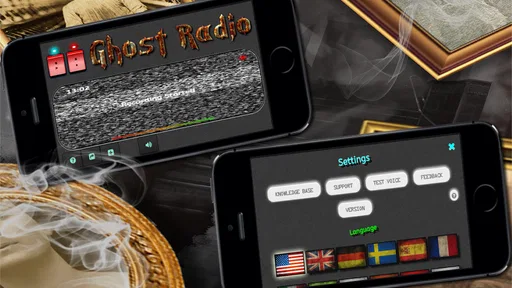
The sound effects and visuals play a significant role in creating a chilling experience. From the static noise that mimics a traditional spirit box to the ghostly apparitions that occasionally flash on your screen, every element is designed to give you goosebumps. It's like starring in your own horror movie, and you're the lead investigator.
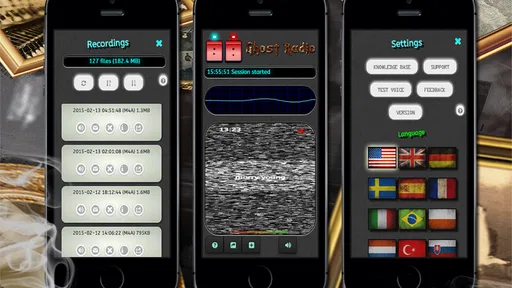
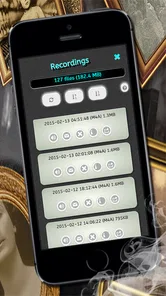
The app also allows you to record your sessions, which is perfect for those who want to analyze their findings later or share them with fellow ghost hunters. It's a neat feature that adds a layer of authenticity to your ghost hunting endeavors.
Recording changes the experience from a quick novelty into something you can revisit. I’d use it to compare what the group thought it heard in the moment with what is actually audible on playback. That handoff is useful for a party or a personal spooky-story project, but it also has a downside: repeated listening can make an ambiguous sound seem clearer simply because everyone is expecting a message. I’d avoid editing or presenting an unclear clip as a definite answer.
Turn a clip into a fair replay
For a more useful playback, I’d listen once without stopping and then compare impressions, rather than replaying a tiny fragment until it seems to say something. Keep the original recording intact and make notes separately if you want to tell the story later. That preserves the difference between what the app recorded and what the group inferred from it. It’s especially helpful when a friend who wasn’t present listens afterward: they can form an impression without hearing the room’s running commentary first.
For a casual evening, the outcome does not have to be a dramatic sound or a memorable reading. A quiet session can still work as a prompt for conversation, a shared recording, or a setting for a ghost story. If the group expects an unmistakable answer every time, the activity is likely to disappoint; if the aim is atmosphere and a little playful uncertainty, an inconclusive result can be part of the fun.
Who will enjoy it—and who may not
The app suits people who enjoy paranormal-themed entertainment, want a simple activity for a small group, or like recording atmospheric sessions. It is less suitable for anyone seeking a verified EMF meter, a research instrument, or a quiet audio recorder without spooky effects. For those needs, a dedicated measurement device or ordinary recording app is the more sensible choice. Ghost Radio’s appeal is the themed experience, not a promise that every reading has a supernatural cause.
There’s also a practical difference between using it alone and sharing it. By yourself, you can take your time and replay a session without feeling rushed. With friends, it works better if one person operates the phone while another keeps the room quiet and notes what happened. That small division of roles reduces accidental bumps and overlapping conversation, and makes the playback easier to follow.
A realistic evening with the app
Imagine using it after dinner when a few friends are swapping local ghost stories. I’d let everyone settle in, explain that the app is for entertainment, and choose one quiet room rather than roaming through the house. The operator can try a mode, leave a pause for listening, and record a short session. Afterward, the group can replay it once and describe what each person noticed before anyone suggests an interpretation. That gives the app a clear role in the evening without requiring anyone to believe the sounds are paranormal.
This routine is also a good way to decide whether the app suits you before making it the centerpiece of a gathering. If your friends enjoy suspense and discussing ambiguous sounds, it can give them a shared activity. If they prefer quick, competitive party games or want a definite winner, a ghost-radio session may feel slow and open-ended. It works best when the conversation around the experience matters as much as any apparent result.
Cost, compatibility, and the point where it stops fitting
Ghost Radio is a paid entertainment app, priced at $4.99 as a one-time purchase, so I’d think of it as a small themed activity rather than a free utility to keep installed for everyday use. It has an Everyone age rating, runs on Android 7.0 or later, and its current version is 2.18.0. The app has a 4.1 average from around 6,200 ratings, with over 100,000 installs. Those figures suggest it has found an audience, but they don’t tell you whether its style will suit your group.
The “offline” aspect is handy if you want to use it somewhere without a reliable connection, but it doesn’t change the central trade-off: the atmosphere is the product, while the readings should be treated cautiously. Compared with a standard voice recorder, Ghost Radio is more theatrical and paranormal-focused; compared with dedicated EMF equipment, it is less appropriate for measurement. I’d pick it for a spooky evening, not for a claim that needs reliable evidence.
Choose the alternative that matches your purpose
Compared with a regular recorder, this app gives a session a spooky frame and combines the idea of EVP and EMF activity in one entertainment experience. A recorder is the better pick when clean, neutral audio is the priority, such as capturing an interview or documenting a sound you want to inspect without added paranormal presentation. For an actual electromagnetic reading, use equipment intended for that task rather than treating a phone-based entertainment app as a substitute.
The distinction matters if you plan to share the result. A dramatic clip may be more engaging for a story, but a neutral recording is easier to assess without the app’s atmosphere guiding the listener. If you want to make a short spooky video or give friends a memorable activity, the themed presentation is a strength. If you want to establish what caused a noise or measure a physical field, it is the wrong tool for that job.
The app’s offline use is appealing for a session away from dependable connectivity, but I’d still prepare the phone before leaving home: make sure it has enough battery for the outing and avoid relying on it as your only way to communicate or navigate. That is ordinary phone planning rather than a special capability, but it matters when an entertainment activity takes place outdoors. Keeping the session in a permitted, familiar location is a sensible trade-off between atmosphere and convenience.
Where the flow can break
The biggest friction is expectation. A group can arrive hoping for a clear message, then spend the whole session trying to force meaning from static or a changing display. I’d set a time limit and treat each attempt as a prompt, not a test that the app has to pass. That keeps a quiet result from becoming frustrating and makes it easier to stop when the mood no longer feels enjoyable.
Another limitation is that a phone session is not automatically a controlled one. People move, speak, touch the device, and bring their own expectations; each of those can affect how they interpret the experience. If you need a repeatable method, objective measurement, or a clean audio record, choose a tool designed for that purpose. Ghost Radio is at its best when the goal is a themed experience, not certainty.
I’d also skip it if you or someone in the group is uncomfortable with horror imagery, eerie audio, or the idea of paranormal themes. A paid app is poor value if its central mood is something you would rather avoid. Likewise, anyone who expects the app to validate a personal belief may find the uncertainty unhelpful. It is easier to enjoy when everyone is free to treat the session as a game and disagree about what they heard.
Should You Download It?
If you're someone who enjoys the thrill of the unknown and doesn't mind a few goosebumps along the way, then the Ghost Radio EVP/EMF Simulator is worth checking out. It's a fun and engaging app that not only entertains but also feeds your curiosity about the paranormal. Just remember, while it's all in good fun, the power of suggestion is strong, so don't be surprised if you start hearing things that go bump in the night!
In conclusion, this app is a splendid mix of technology and the supernatural, perfect for anyone looking to explore the mysterious side of life. So grab your device, fire up the app, and let the ghostly adventures begin!
My practical verdict
I’d recommend it to a friend who wants a compact, spooky activity for a small gathering and understands that the fun comes from the atmosphere, recording, and shared interpretation. I would not recommend it as a substitute for a dedicated meter, a neutral recorder, or evidence of paranormal activity. That distinction makes the purchase easier to judge: if the themed session is what you want, the one-time cost may make sense; if you mainly need a practical tool, choose the simpler or more specialized alternative.
My best advice is to decide the purpose before opening the app, keep the first session short, and agree on how you’ll handle recordings before anyone starts listening for clues. Used that way, it can turn an ordinary evening into a memorable little ghost-hunting game without asking the app to prove more than it can. If the group wants reliable answers rather than eerie entertainment, I’d leave it off the plan.
Ghost Radio: EVP Spirit Box Frequently Asked Questions
Does Ghost Radio EVP/EMF Simulator record sessions, and can I listen to them later?
The app’s store description highlights recording alongside its EVP and EMF features, which can make a session easier to revisit. Recording may be useful if you want to compare what you heard during a simulated investigation or share the experience with someone nearby. Keep in mind that recordings are part of an entertainment-focused app and should not be treated as proof of paranormal activity.
Is Ghost Radio EVP/EMF Simulator free to download, and what should I expect to pay?
Ghost Radio EVP/EMF Simulator is a paid app with a one-time purchase price of $4.99, rather than a free download. That makes the upfront cost clear for anyone deciding whether its simulated ghost-hunting experience is worth trying. It is listed as an Entertainment app, and its content rating is Everyone, so it is intended for a broad audience.
What is Ghost Radio EVP/EMF Simulator and how does it work?
Ghost Radio EVP/EMF Simulator is an intriguing app designed for paranormal enthusiasts. It simulates an EVP (Electronic Voice Phenomenon) recorder and EMF (Electromagnetic Field) meter, commonly used in ghost hunting. The app claims to detect paranormal activity by capturing sound waves and electromagnetic fluctuations, allowing users to experience ghost hunting through their smartphone. Its effectiveness is often debated, making it more of a novelty or entertainment app rather than a scientific tool.
Is Ghost Radio EVP/EMF Simulator scientifically accurate?
The Ghost Radio EVP/EMF Simulator is primarily designed for entertainment purposes and should not be considered a scientifically accurate tool for detecting paranormal activity. While it mimics the functionalities of traditional ghost hunting equipment, it lacks the precision and validation required for scientific investigations. Users should enjoy the app as a fun experience, acknowledging its limitations in accuracy and reliability.
Can I use Ghost Radio EVP/EMF Simulator without an internet connection?
Yes, you can use Ghost Radio EVP/EMF Simulator without an internet connection. The app is designed to function offline, allowing users to explore its features and conduct simulated ghost hunts in areas without internet access. This makes it convenient for use in remote or secluded locations, enhancing the experience of exploring the paranormal without connectivity constraints.
Pros
- Simulates EVP and EMF detection.
- User-friendly interface.
- Regular updates.
- Customizable settings.
- Free to download.
Cons
- Might not be scientifically accurate.
- Ads can be intrusive.
- Requires internet connection.
- Limited features in free version.
- Battery consumption can be high.











