

Get Paid Early: Cash Advance
- 166.00
- 4.2
- Installs
- 50.00K
- Price
- Free

Screenshots
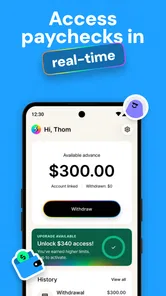
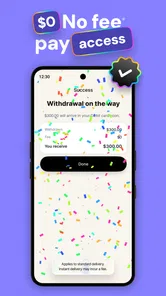
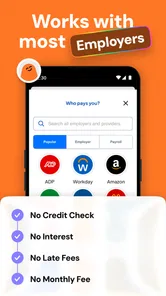
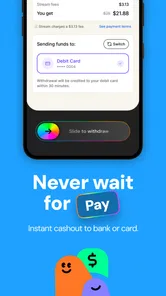
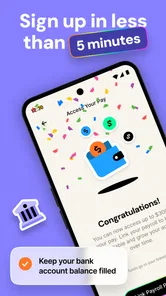
Analysis by Reviewed
When money arrives on a fixed payday but an important bill appears earlier, the gap can feel much bigger than it really is. Get Paid Early: Cash Advance is a finance app built around that exact problem. I tested it as a tool for accessing earned pay before the normal payday, and its appeal is easy to understand: it presents itself as an advance on money already earned rather than a conventional loan, with no interest and no hidden fees described in its store summary.
That distinction matters. This is not a budgeting app, an investment service, or a replacement for a regular paycheck. Its usefulness depends on your employment and pay situation, the way your earnings are recognized, and whether an early payment actually solves a short timing issue instead of creating a new one. I found it most interesting as a controlled emergency option: something to use deliberately, not a button to press every time the balance looks low.
How the everyday workflow feels
The simplest way to think about the app is as a bridge between work already completed and the date when that income would normally become available. A typical user opens the app, checks what is available, reviews the terms shown for the requested advance, and decides whether moving part of the pay forward makes sense. The important habit is to treat the displayed amount as part of the next pay cycle, not as extra money.
That sounds obvious, but it is where many cash-advance products become difficult in real life. If I used an early payment to cover a utility bill today, I would also need to remember that the later paycheck may be smaller by the same amount. The app can help with timing, but it cannot repair a monthly budget whose expenses regularly exceed income. I would therefore open it with a specific purpose in mind: a bill due before payday, a necessary purchase, or a short-lived cash-flow mismatch.
The interface is most useful when I read it as a sequence rather than rushing straight to the advance action. First, I would confirm the amount available. Next, I would check when the regular pay is expected and how the early access affects that cycle. Finally, I would make sure the amount requested is no larger than the immediate need. That three-step pause is more valuable than trying to maximize the amount shown on screen.
For a realistic example, imagine that a grocery payment and a transport expense arrive two days before payday. I might use the app for only the combined shortfall, then record that amount in my budget as already spent from the upcoming paycheck. This makes the tool part of a repeatable plan instead of a vague source of extra cash. If I cannot explain exactly what the advance is covering, I would probably wait.
Who gets the most value from it
Get Paid Early: Cash Advance is aimed at people whose earnings are predictable but whose payment date does not line up neatly with their obligations. It may suit someone paid on a regular schedule who occasionally faces an early bill, or a worker who wants a little flexibility around a short gap. The free price also makes it easy to consider without committing to a subscription just to test the basic experience.
More From Our News Desk

 Gmail
GmailGmail in a Busy Inbox: Who Benefits Most?
From first account to crowded workday, Gmail earns its place through dependable search and flexible sorting—but its best fit depends on how much inbox maintenance you can tolerate.

 Prime Video
Switching to Prime Video: What Changes in Your Viewing Routine
Prime Video can make a compelling second home for streaming, but switching means learning a different catalog, rental layer, and route from browsing to playback.

 Universal TV Remote Control
Universal TV Remote Control Works Best as a Reliable Backup
A phone remote earns its place through quick setup and reliable habits. Here is how to get more from Universal TV Remote Control—and where its limits show.

 Weather - By Xiaomi
Weather by Xiaomi Review: Clear at a Glance, Less Clear Up Close
Xiaomi’s weather app makes everyday forecasts quick to scan, but its calm surface can leave useful details and recovery paths harder to find than they should be.

 X
XX Under Pressure: Can It Recover When Posting Goes Wrong?
A resilience-focused review of X, examining setup, mistaken posts, interruptions, weak connections, and the gaps that matter when recovery needs to be dependable.

 Clash of Clans
Clash of Clans Is Won Between the Battles
Its raids are quick; its community is a long-term project of coordination, teaching, rivalry, and shared responsibility—with all the friction that entails.
Latest News



The app is less convincing for someone who needs a permanent solution to recurring debt. If every pay period requires an advance, the feature is no longer solving an occasional timing problem. In that situation, I would look first at changing bill dates, building a small buffer, speaking with a provider about payment arrangements, or using a traditional banking tool with clearer long-term planning support.
It is also not the right fit for a person who needs a large, long-term loan. Early access to earned pay should not be confused with financing a major purchase, consolidating debt, or covering several months of expenses. A bank product, credit union, or carefully assessed personal-loan option may be more appropriate for those needs, even though each alternative brings its own costs and eligibility requirements.
Settings and checks worth making before the first request
Experienced use begins before an emergency. I would review the account and income details carefully, making sure the information connected with employment and pay is current. A mismatch can turn a simple request into a frustrating wait, so accuracy is more important than speed. I would also make a note of the normal payday and keep that date visible in my calendar.
The next useful check is the amount I can safely move forward. I would not automatically request the full available balance. Instead, I would compare the displayed amount with the exact bill or purchase that prompted me to open the app. Leaving part of the next paycheck untouched gives me more room for ordinary expenses after payday.
I would also read every confirmation screen rather than treating the app’s short description as the complete explanation of a transaction. The store summary emphasizes no loans, no interest, and no hidden fees, but a responsible user still needs to understand the timing, destination, and effect of each request before confirming it. Clear reading is especially important in financial apps because a small misunderstanding can affect the next pay cycle.
Another practical setting is not inside the app at all: notifications and calendar reminders. If the app offers relevant alerts on your device, I would keep them enabled only if they help me track an active request or upcoming pay event. Separately, I would create a reminder for the day after the regular payday to review the account. This prevents an early-access transaction from disappearing into the background of a busy week.
Privacy and device security deserve attention as well. Because this is a finance app, I would use a screen lock, avoid signing in on a shared device, and keep the operating system updated. The app supports devices running Android 7.0 or later, which covers many older phones, but compatibility is not the same as security. An older phone that no longer receives meaningful security updates is a poor place for any financial account.
Shortcuts that make repeat use less risky
The fastest workflow is not necessarily the one with the fewest taps. My preferred shortcut is a small written rule: use the app only for a named expense, request the smallest practical amount, and record the repayment effect immediately. Once that rule becomes routine, the decision takes less time without becoming careless.
I would keep a simple note with three items: the date of the early request, the amount moved forward, and the regular payday affected. This is especially helpful if I use several financial apps or have more than one income source. It also makes it easier to notice a pattern. If the note shows repeated requests for groceries, transport, or utilities, the underlying issue is probably budget pressure rather than a one-off timing problem.
A second useful pattern is to separate urgent access from ordinary spending. I would avoid opening the app while browsing online shops or making nonessential plans, because the presence of available earned pay can make a want feel like a need. The strongest use case is a known obligation with a clear amount, not general spending flexibility.
A third habit is to check the next paycheck before making another request. If an earlier advance has already reduced what will arrive, I would treat that reduced amount as the new baseline. This prevents the common mistake of stacking today’s decision on top of yesterday’s without considering the combined effect. The app may make access convenient, but the user still has to manage the total.
For households, I would also communicate before using it if the incoming paycheck supports shared bills. An early payment can solve one person’s immediate problem while leaving a joint account short later. A quick conversation about which expense is being covered is often more valuable than any in-app shortcut.
Where the convenience has limits
The biggest limitation is that access depends on eligibility and the app’s ability to recognize the relevant earnings. That means a new job, irregular income, changes in payroll, or incomplete account information may affect the experience. I would not rely on it as the only emergency plan. A small cash reserve or a direct conversation with a bill provider remains important, especially when the expense is essential.
There is also a psychological limit. “No interest” can sound like “no consequence,” but moving pay forward still changes the timing of money. Even without borrowing interest, the next payday may leave less available for rent, food, or transport. The financial cost may be low or absent under the stated model, while the budgeting consequence is still real.
Another trade-off is simplicity versus control. A focused cash-advance app can be quicker than applying for a traditional loan, but it will not replace the broader planning tools found in a full banking or budgeting service. If I wanted spending categories, long-term savings targets, debt payoff planning, and account aggregation in one place, I would use a dedicated budgeting app alongside this one rather than expecting it to do everything.
People who prefer to avoid any early-pay service may also be better served by alternatives. Asking an employer about payroll timing, arranging a bill’s due date, using a savings buffer, or comparing a credit-union option can provide more structural control. The best choice depends on whether the problem is a rare timing mismatch or a continuing shortage.
The app’s public reception suggests that many users find the concept useful: it has an average rating of 4.3 from over 700 ratings, alongside more than 160 written reviews. I see that as encouraging but not decisive. Finance apps can work very well for one employment arrangement and be less convenient for another, so I would judge the experience by how clearly it handles my own pay cycle rather than by the rating alone.
What the current release tells me about maturity
StreamFunds, Inc. is the developer behind the app, which is currently listed as version 3.0.39. The release number suggests an established product rather than a first experiment, and the app has passed 50 thousand installs. Those details make it easier for me to approach it as a practical service with an existing user base, while still keeping normal financial caution.
It is listed as free and carries an Everyone age rating. That makes the initial download accessible, but age suitability should not be mistaken for financial suitability. A younger user may still need a parent, guardian, or trusted adult to understand how early pay affects later income, and any user should read the transaction details before proceeding.
One thing I appreciate about the product’s positioning is the attempt to distinguish earned-pay access from a loan. That language helps explain the intended use, but I would still evaluate each transaction on its practical effect. Labels matter less than whether I know the amount, the timing, and the consequences for the next pay period.
My verdict after building a repeatable routine
I see Get Paid Early: Cash Advance as a focused tool for smoothing an occasional gap, not as a complete financial strategy. Its strongest quality is the directness of the idea: if I have earned pay that is scheduled for later, early access may help me handle a necessary expense now. The free entry point and broad Android compatibility make it straightforward to try for eligible users.
My recommendation comes with a firm condition: use it with a written limit and a reason attached to every request. Check the amount, confirm the timing, account for the smaller upcoming paycheck, and avoid turning convenience into a habit of spending ahead. Those steps are more important than finding the fastest route through the interface.
I would recommend it to a worker with predictable income who occasionally needs to bridge a few days and wants an alternative to interest-bearing borrowing. I would skip it if my income is too irregular to plan around, if I need substantial long-term financing, or if I am already depending on advances every pay cycle. In those cases, a broader budgeting solution, employer arrangement, savings plan, or carefully compared credit option is likely better.
Overall, the app earns its place as a narrowly useful finance tool. The key is to use early pay as a timing adjustment, never as a raise. With that mindset, its workflow can be quick and practical; without it, even a fee-free advance can make the following week harder.
Get Paid Early: Cash Advance Frequently Asked Questions
Is Get Paid Early: Cash Advance free to download, and which devices can run it?
Get Paid Early: Cash Advance is free to download and is a Finance app from StreamFunds, Inc. It requires Android 7.0 or later, so check your device’s operating system before installing. The app is intended for a general audience, and its free download does not necessarily mean every optional service or transfer method is free to use.
Who is Get Paid Early: Cash Advance designed for?
Get Paid Early: Cash Advance is aimed at people who want access to some of their earned pay before payday. The service is not a loan, and its summary describes access to earned pay with no interest or hidden fees. You still need to review the app’s eligibility requirements and any applicable terms before requesting money, since access is not guaranteed for every user.
What is Get Paid Early: Cash Advance?
Get Paid Early: Cash Advance is a financial app designed to help eligible users access part of their earned income before their regular payday. Instead of waiting for an employer’s normal payment schedule, users may request an advance through the app and repay it according to the service’s terms. Availability, limits, fees, and repayment options can vary by user, employer, location, and account history.
How does the cash advance process work?
After creating an account, the app may ask you to verify your identity, employment, income, and banking information. If you qualify, it can display the amount available for an advance and the expected delivery time. You then review the repayment details before confirming. Approval is not guaranteed, and the app may use account activity or payroll information to determine eligibility.
Are there fees or other costs to use the app?
Before requesting money, carefully check the app’s fee disclosures because the total cost can depend on the transfer method and delivery speed. Some advances may involve optional express-transfer charges, subscription costs, administrative fees, or other conditions, while standard delivery may be slower or less expensive. Always review the final repayment amount and terms rather than relying only on promotional wording.
Pros
- Fast access to earned wages before payday
- Simple application process with minimal paperwork
- Transparent repayment dates shown before accepting an advance
- Useful budgeting tools can help track upcoming expenses
- No traditional credit check may be required for eligibility
Cons
- Availability and advance limits vary by employer and user history
- Optional tips or express-transfer fees can increase the total cost
- Repayment may be withdrawn automatically from your linked account
- Not available in every state or for every employment arrangement
- Frequent advances can make future paychecks harder to manage











