

Game Cashouts – Play & Earn
- 6.55K
- 4.8
- Installs
- 1.00M
- Price
- Free

Screenshots

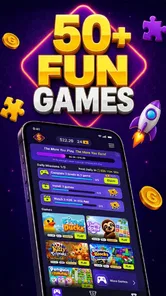
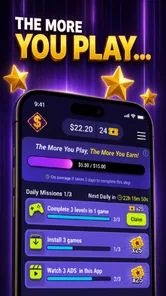

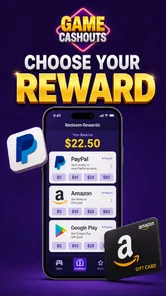
Analysis by Reviewed
Game Cashouts – Play & Earn is an entertainment app built around a simple promise: spend time playing available games and work toward PayPal cash or gift cards. I approached it less like a traditional game and more like a reward hub, because that distinction affects almost every part of the experience. It is free to use, comes from Rewarded Games LTD, and is aimed at adults because its content rating is Mature 17+.
My first impression was that the appeal is easy to understand. If I already want a casual distraction on my phone, the possibility of earning a reward gives that spare time an extra purpose. At the same time, I would not treat it as a replacement for paid work or as a guaranteed income source. The real question is whether the app remains comfortable and understandable during ordinary use, especially for people with different reading, motor, visual, hearing, attention, or situational needs.
How the app feels to use in everyday situations
I approach Game Cashouts as something to fit into a calm, intentional break rather than a task to squeeze into every spare minute. A useful habit is to decide beforehand how long I want to play and what I need to understand before starting an activity; that keeps the reward angle from turning casual entertainment into a chore. It also makes it easier to notice whether the experience suits my routine.
Readable screens and a navigation style that needs patience
The most important accessibility issue in a rewards app is not only whether the text can be read. It is whether I can tell what I am supposed to do next without second-guessing a button, offer, progress message, or cashout step. Game Cashouts – Play & Earn presents itself as a place to discover games and pursue rewards, so the clearest experience is likely to come when I treat each offer as a small workflow rather than tapping around randomly.
I found it helpful to slow down before starting anything: read the full task wording, check what action is being requested, and only then begin. That habit matters because reward apps can make a small misunderstanding costly in time. A large-looking button may take me into an offer, while another control may relate to account or redemption activity. For a user with dyslexia, limited attention, or a language-processing difficulty, this pause can make the difference between a predictable session and a frustrating one.
The app is listed as version 0.16.1 and supports Android 8.0 or later. That broad device compatibility is useful for people who keep an older phone because of budget, familiarity, or a preference for a particular physical setup. However, operating-system support alone does not guarantee that every screen will work equally well with a user’s chosen display settings. I would test text scaling, contrast, and screen magnification before committing serious time to the platform.
One practical tip is to use the phone’s accessibility settings before starting a long reward task. Increase text size if small labels slow you down, enable a stronger contrast mode if available on your device, and turn on magnification for screens that are difficult to inspect. I would also avoid making decisions while rushing. A rewards interface is much easier to use when I can read the conditions in a quiet moment instead of trying to understand them while commuting or waiting in a queue.
More From Our News Desk

 Gmail
GmailGmail in a Busy Inbox: Who Benefits Most?
From first account to crowded workday, Gmail earns its place through dependable search and flexible sorting—but its best fit depends on how much inbox maintenance you can tolerate.

 Prime Video
Switching to Prime Video: What Changes in Your Viewing Routine
Prime Video can make a compelling second home for streaming, but switching means learning a different catalog, rental layer, and route from browsing to playback.

 Universal TV Remote Control
Universal TV Remote Control Works Best as a Reliable Backup
A phone remote earns its place through quick setup and reliable habits. Here is how to get more from Universal TV Remote Control—and where its limits show.

 Weather - By Xiaomi
Weather by Xiaomi Review: Clear at a Glance, Less Clear Up Close
Xiaomi’s weather app makes everyday forecasts quick to scan, but its calm surface can leave useful details and recovery paths harder to find than they should be.

 X
XX Under Pressure: Can It Recover When Posting Goes Wrong?
A resilience-focused review of X, examining setup, mistaken posts, interruptions, weak connections, and the gaps that matter when recovery needs to be dependable.

 Clash of Clans
Clash of Clans Is Won Between the Battles
Its raids are quick; its community is a long-term project of coordination, teaching, rivalry, and shared responsibility—with all the friction that entails.
Latest News



The app’s popularity gives it a degree of reassurance for people who prefer established products: it has passed one million installs, with an average rating of 4.8 from roughly eighty thousand ratings. Those figures suggest that many people find the basic concept workable, but they do not tell me whether the interface suits a particular disability or device setup. I would use the rating as a starting signal, not as proof of inclusive design.
Motor control, touch accuracy, and sensory load
For users with tremors, reduced dexterity, joint pain, or one-handed phone use, the key trade-off is the amount of precise tapping required. Game-based rewards can be more demanding than ordinary browsing because the user may need to open a game, follow an objective, return to the rewards environment, and repeat that pattern. Even when each touch is simple, repeated actions can become tiring.
I would recommend using the app in short sessions rather than treating it as something to operate continuously for hours. This is not only better for comfort; it also makes it easier to notice whether a task is genuinely suitable for the user’s motor control. A phone stand, a larger touch target setting where the operating system provides one, or a stylus may help some people. Those are personal workarounds rather than features I would attribute to the app itself.
Users who are sensitive to flashing images, rapid animation, sound effects, or busy game scenes should choose their activities carefully. The app connects users with games, and the sensory experience may therefore vary depending on what is being played. I would keep media volume low at first, use the phone’s reduced-motion or flashing-light options when available, and stop immediately if a particular game causes discomfort. The reward is never worth pushing through a sensory reaction.
Hearing differences can also change the experience. If a game communicates progress mainly through sound, a deaf or hard-of-hearing user may need visual confirmation from the game or the surrounding app. I would not assume that audio cues are optional in every activity. Before investing time, I would look for visible progress indicators and make sure I can recognize completion without relying on sound alone.
For someone with limited vision, the strongest approach is to combine system-level tools with a cautious workflow. Screen readers, magnification, bold text, and increased contrast can improve general phone use, but reward interfaces sometimes contain changing content, promotional wording, or controls that are difficult to interpret out of context. If a screen reader reads controls in an unclear order, I would consider that a meaningful barrier rather than trying to guess which action will count.
Using it with limited time, data, energy, or privacy
Situational accessibility matters even for people who do not identify as disabled. Imagine I am on a crowded bus with one hand available, poor lighting, background noise, and only a few minutes before reaching my stop. That is a bad moment to begin a new reward task. I may misread instructions, tap the wrong control, or lose track of what I was doing. I would reserve setup and cashout-related actions for home or another calm environment.
A similar issue affects users with fatigue, migraines, concentration difficulties, or fluctuating health. The app’s entertainment angle makes it tempting to keep going because the next reward feels close, but I would set a personal stopping point before beginning. A short session with clear notes about what I started is easier to resume than an exhausting session that leaves me unsure whether progress was recorded.
People with limited or expensive mobile data should think about the game downloads and online activity involved in the wider experience. I would use a trusted Wi-Fi connection for setup whenever possible and avoid starting a large activity when the phone battery is low. These are ordinary precautions, but they are especially important for users who cannot easily replace a depleted data allowance or charge their device during the day.
Privacy and trust are also part of access. A person may be willing to play casually but uncomfortable with a reward process that requires more personal or payment-related interaction than expected. I would read each screen before proceeding, keep account details private, and avoid sharing sensitive information outside the app’s normal redemption flow. Because the app involves PayPal cash and gift cards, I would treat cashout as a deliberate financial step, not as a casual tap at the end of a game.
Another useful workflow is to keep a simple personal record: note the game or activity started, the date, and the goal I intended to complete. I would not record passwords or sensitive details. This small habit helps users with memory difficulties and also protects anyone who switches between several activities. It gives me a reference point if I return later and cannot remember which task I was following.
Where the inclusive experience still has friction
The biggest limitation is that the app’s accessibility depends partly on the games connected to it. Even if the reward hub is easy to understand, an individual game may use tiny text, rapid gestures, time pressure, color-only signals, or audio instructions. That makes the overall experience uneven. A user cannot judge accessibility from the reward concept alone; each activity needs to be considered separately.
There is also a motivational barrier. Reward systems can encourage people to continue past the point where the activity is enjoyable, particularly when progress feels almost complete. For users with attention-related conditions, compulsive tendencies, or difficulty estimating time, I would be especially careful. Set a timer, decide what “enough” means in advance, and remember that a reward app should fit around wellbeing rather than control the schedule.
Users who need highly predictable interfaces may prefer a conventional casual game, puzzle app, or streaming service instead. Those alternatives usually have a clearer primary purpose: play, solve, or watch. Game Cashouts – Play & Earn adds a second layer involving goals and redemption. That can be motivating, but it also introduces more reading, more checking, and more opportunities to wonder whether an action qualified.
I would also skip it if my main requirement is guaranteed earnings, instant payment, or a fully hands-off experience. The app’s appeal is the combination of games and possible rewards, not certainty that every minute will translate into meaningful cash. Someone who dislikes advertisements, promotional interfaces, or repeated task instructions may find a paid game or ad-free entertainment option more comfortable, even without the reward angle.
On the other hand, it can suit an adult who enjoys trying different casual games and wants a reason to explore them. It may also work for someone who prefers small, optional activities rather than committing to a long game campaign. The best match is a user who can read conditions carefully, tolerate some repetition, and treat rewards as a bonus rather than the sole reason to use the phone.
What I would check before committing time
I would begin with a low-pressure test. First, confirm that the text is comfortable at the phone’s preferred size. Next, see whether I can identify the current activity, its objective, and the route back to the reward area. Then I would test whether visual information is enough for me, or whether the experience appears to depend on sound, rapid motion, or precise timing.
I would also check how well the app fits my daily routine. If I can only use it in noisy places, during short breaks, or with one hand, the practical experience may be less accessible than it seems at home. A person with limited energy should ask whether the setup effort is worth the expected entertainment. A person with motor limitations should notice whether repeated taps cause strain. These answers are more useful than a general claim that the app is easy for everyone.
For cashouts, I would proceed slowly and verify every step on the screen. I would make sure the selected reward is the one I intended and keep my payment account details accurate. Since the app is free, there is no purchase price to recover, but time still has value. My rule would be simple: if I am spending more effort tracking the reward than enjoying the game, I would stop and choose another form of entertainment.
The Mature 17+ rating is another reason I would not recommend handing the app to a child simply because the activities look game-like. Parents and caregivers should make their own decision about whether it suits an older teenager or adult, taking the reward mechanics and the connected games into account. The rating is part of the product’s identity, not a detail to ignore.
My inclusive verdict
I see Game Cashouts – Play & Earn as a potentially enjoyable option for adults who already like casual mobile games and appreciate the possibility of PayPal cash or gift cards. Rewarded Games LTD has positioned it in entertainment rather than as a serious financial tool, and that is how I would use it: a way to add interest to spare gaming time, not a promise of dependable income.
Its accessibility strength is flexibility of context. I can approach it in short sessions, use phone-level reading and display tools, choose a quiet environment, and keep my own notes to reduce confusion. Those adjustments can make the experience more manageable for people with fatigue, attention differences, limited dexterity, or changing sensory needs.
Its weakness is that the experience does not end at the app’s main interface. The connected games, task wording, touch demands, sound, motion, and redemption steps all influence whether it works for a particular person. Someone who needs large, consistent controls and fully predictable navigation may be happier with a conventional accessible game. Someone seeking reliable earnings should look elsewhere entirely.
For me, the sensible recommendation is conditional: try it gently, read before tapping, use accessibility settings, and stop when the process becomes tiring or unclear. With that mindset, the free app can be a worthwhile entertainment experiment. Without it, the reward promise may encourage more time and effort than the experience deserves.
Game Cashouts – Play & Earn runs on Android 8.0 and newer, and its current version is 0.16.1. It has earned a 4.8 average across about eighty thousand ratings and has more than one million installs, which explains why it attracts attention. I would still make the final choice based on my own reading comfort, motor control, sensory tolerance, available time, and willingness to treat rewards as an extra rather than a guarantee.
Game Cashouts – Play & Earn Frequently Asked Questions
What kinds of games and activities can I expect to find?
Game Cashouts – Play & Earn is built around playing games and earning rewards, so it may appeal to people who enjoy trying mobile games as part of a rewards experience. The selection and activities can change over time, and availability may depend on your region. Before spending time on an offer, read its requirements in the app so you understand what counts as completion.
Who is Game Cashouts – Play & Earn intended for?
This app is aimed at adults who enjoy mobile games and are interested in earning rewards while playing. Its Mature 17+ age rating is an important consideration before installing, particularly for families choosing apps for younger users. It is also best suited to people who are comfortable reviewing offer conditions and treating possible rewards as a bonus rather than as guaranteed income.
Is Game Cashouts – Play & Earn free to download, and what devices can run it?
Game Cashouts – Play & Earn is a free entertainment app from Rewarded Games LTD. Its current version is 0.16.1, and it requires Android 8.0 or later. Before installing, check that your device’s operating system meets that requirement and that you have enough storage for the app and any games you choose to play. The app is rated Mature 17+.
What is Game Cashouts – Play & Earn?
Game Cashouts – Play & Earn is a rewards-focused mobile app that lets users play games and complete activities in exchange for points or other in-app rewards. After reaching the required balance, users may be able to request a cashout through the payment options supported in their region. The available games, earning rates, eligibility rules, and reward choices can change over time. Its stated reward options include PayPal cash and gift cards.
Can I really make money with Game Cashouts – Play & Earn?
The app may provide opportunities to earn rewards, but it should not be considered a reliable source of income. Earnings generally depend on the games you play, completed tasks, available offers, time spent, and regional conditions. In practice, rewards are usually modest and may require patience before reaching the minimum withdrawal threshold. Always review the current terms before investing significant time.
Pros
- Simple games make it easy to start earning rewards quickly.
- Short play sessions fit well into spare moments during the day.
- Reward progress is easy to monitor within the app.
- A variety of game options helps prevent repetitive gameplay.
- No advanced gaming skills are required to participate.
Cons
- Earnings may be too small to justify extended playtime.
- Some rewards can require reaching demanding milestones.
- Availability of games and offers may vary by location.
- Ads may interrupt gameplay and slow down reward progress.
- Cashout eligibility and processing times may change over time.











