

Fubo: Watch Live TV & Sports
- 20.91K
- 3.0
- Installs
- 10.00M
- Price
- Free

Screenshots
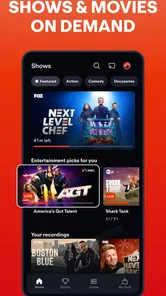
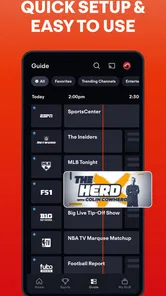
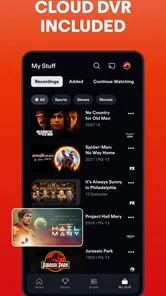

Analysis by Reviewed
Fubo makes the most sense when live sports are the reason you open a streaming app, rather than just one part of a broad entertainment mix. I’d think of it as a viewing hub for sports, television, movies and news, with the strongest appeal for people who want live events alongside everyday programming. It is an entertainment app from fuboTV, and its current version is 5.42.2. The version number tells me which build is current, but by itself it doesn’t reveal what changed between releases, so I wouldn’t treat it as proof of a particular new feature.
Where it fits in a streaming routine
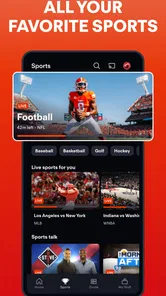
For a household that follows several leagues, one useful way to approach the app is to make the live guide part of a routine: check what is on before settling in, then use channel favorites to reduce the amount of scrolling. That is more practical than opening a general streaming service and hoping a live match happens to be available. The trade-off is that a sports-first service may be less compelling if your viewing is mostly on-demand dramas or films.
It is free to install, but in-app purchases are listed at $6.99 per item, so I would check the purchase details in the app before committing to anything. The Teen content rating is another reason to keep the household’s viewing preferences in mind, especially if younger viewers share a device. I would also confirm that the channels and events you care about are available for your needs before making it the center of a viewing setup.
Who is likely to get the most from it
I’d recommend trying it first if you regularly watch live sports and also want news or general TV in the same place. It may be a weaker fit if you only follow one team, rarely watch live broadcasts, or mainly want a library of shows to dip into whenever you like. In those cases, a league-focused option or a more on-demand service may suit your habits better than keeping a broad live-TV app in your rotation.
A realistic use case is a busy evening when a game overlaps with dinner or a commute: the app’s described recording option can help you catch a program later instead of planning your schedule around its start time. I’d still check how that workflow works on your own device before relying on it for a one-time event. A recording is useful only if you can find and play it when you need it, and no feature removes the need to check which broadcast you selected.
What I would watch for over time
Fubo has been available since September 8, 2014, and it has reached more than 10 million installs. Its average rating is 3.2 from around 50,000 ratings, with about 20,000 written reviews. I read that as a sign of a widely tried app with mixed reactions, not a guarantee that it will behave identically on every phone or network. Before relying on it for a big match, I’d test the guide, playback and any casting setup at home.
The minimum operating-system requirement is Android 5.0, which makes the app usable on a broad range of Android devices, though an older phone can still feel different from a newer one during streaming. If you are comparing it with a standard live-TV service, focus on the channels and sports you actually watch rather than the size of a general lineup. That simple check can prevent paying attention to content you will never open.
More From Our News Desk

 Gmail
Gmail in a Busy Inbox: Who Benefits Most?
From first account to crowded workday, Gmail earns its place through dependable search and flexible sorting—but its best fit depends on how much inbox maintenance you can tolerate.

 Prime Video
Switching to Prime Video: What Changes in Your Viewing Routine
Prime Video can make a compelling second home for streaming, but switching means learning a different catalog, rental layer, and route from browsing to playback.

 Universal TV Remote Control
 Works Best as a Reliable Backup
A phone remote earns its place through quick setup and reliable habits. Here is how to get more from Universal TV Remote Control—and where its limits show.

 Weather - By Xiaomi
Weather by Xiaomi Review: Clear at a Glance, Less Clear Up Close
Xiaomi’s weather app makes everyday forecasts quick to scan, but its calm surface can leave useful details and recovery paths harder to find than they should be.

 X
X Under Pressure: Can It Recover When Posting Goes Wrong?
A resilience-focused review of X, examining setup, mistaken posts, interruptions, weak connections, and the gaps that matter when recovery needs to be dependable.

 Clash of Clans
 Is Won Between the Battles
Its raids are quick; its community is a long-term project of coordination, teaching, rivalry, and shared responsibility—with all the friction that entails.
Latest News



Ever found yourself juggling between multiple apps trying to catch the latest sports action or watch your favorite live TV shows? Well, those days might just be over thanks to Fubo: Watch Live TV & Sports. Having tried it for a few weeks, I've got to say, it might just be a game-changer.
Why Fubo is a Must-Have for Sports Fans
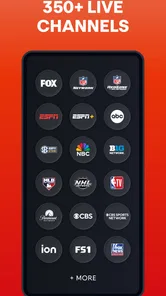
First off, if you're a sports enthusiast, Fubo is like a candy store. I mean, we're talking major leagues like the NFL, NBA, MLB, and even international soccer. I was pleasantly surprised by the sheer variety of sports channels available. From ESPN to beIN Sports, it feels like I’ve got a front-row seat to every game happening around the world.
But here’s the kicker - it’s not just sports! Whether you’re into binge-watching drama series or catching up on reality TV, Fubo’s got you covered. I was able to watch everything from the latest episodes of "The Bachelor" to news on CNN without missing a beat.
The User Experience
Now, let's talk about the user interface. Setting up was a breeze. The app is pretty intuitive, so even if you're not tech-savvy, you’ll find your way around easily. The live TV guide is straightforward, and I loved how I could customize my favorite channels for quick access. Plus, the streaming quality is top-notch. No buffering issues here, folks!
Another cool feature I stumbled upon is the Cloud DVR. Imagine having the ability to record live shows and watch them later. I recorded the last NBA game and watched it while commuting. Say goodbye to FOMO!
Some Features That Stand Out
One thing I found really handy is the multi-screen option. You can watch up to four live streams simultaneously on the app. It’s perfect for those weekends when you want to keep tabs on multiple games at once. Also, the app allows for seamless casting to your TV via Chromecast or Airplay, which is a big win in my book.
And for the tech enthusiasts, the app supports 4K streaming. As someone who appreciates good picture quality, this was a delightful surprise.
Finally, the app is available on both Android and iOS, making it accessible for everyone. The download process is straightforward, and the app runs smoothly on both platforms.
Making a match day easier to manage
My best practical tip is to treat the guide as a planning tool, not just a list you open after kickoff. Before a busy sports evening, I’d scan the schedule, favorite the channels I actually use, and decide which event deserves the main screen. That small bit of preparation matters when several games overlap: it reduces last-minute channel hunting and makes it easier to choose a recording for the event you cannot watch live.
If you are watching with other people, the multi-screen option described in the app can help settle the “which game goes on?” debate, but I would use it selectively. Several live pictures are useful when scores are changing across games; they are much less helpful for following the details of one close match. I’d keep the primary event prominent and use the extra views as a quick check rather than expecting four small streams to replace focused viewing.
How it compares with other ways to watch
Compared with a league-specific app, Fubo’s appeal is breadth: it can bring sports together with television and news instead of keeping each interest in a separate destination. That is convenient if your household switches between a live game and ordinary programming. A dedicated service can still be the better choice if you care about one competition’s particular coverage or want a narrower experience built around a single team or league.
Against an on-demand subscription, the difference is more fundamental. Fubo is most useful when timing matters—when a game or broadcast is happening now, or when you want to record it for later. If your evenings are usually about choosing a film or series whenever you feel like it, a conventional on-demand library may be easier to browse and a better match for your routine. I would not keep a live-TV app simply because it has a large range of content; I’d keep it if I actually use the live guide.
Small checks that prevent match-day frustration
Before depending on a particular event, I’d search for the exact matchup or program rather than assuming that a league’s presence means every broadcast you want will appear. Then I’d test playback on the device and network I plan to use. A quick test also tells you whether the screen is comfortable to watch for a full game and whether the guide is easy to navigate from the couch, not just while browsing casually.
For a commute or a shared household schedule, recording is a useful fallback, but it is worth checking the saved program soon after setting it up. Confirm that you selected the intended broadcast and know where to return to it. This is a practical habit rather than a special trick: it helps avoid discovering later that you recorded a different program or cannot find the replay when you have time to watch.
Casting can shift the experience from a phone to a larger screen, while the app’s reported 4K support may appeal to viewers with compatible equipment. I would treat both as options to test rather than assumptions about every stream or setup. Start playback before guests arrive, check that the chosen screen is receiving the right feed, and keep the phone available as a fallback for browsing the guide. These steps are especially sensible for a one-off final or a family gathering, when troubleshooting during the event is more annoying than testing beforehand.
Cost, household fit, and everyday expectations
The free download should not be confused with a promise that every viewing choice is included at no cost. Since the app lists in-app purchases, I’d review the specific purchase screen and its terms before confirming anything, and I’d make sure everyone sharing the device knows who can approve purchases. That is a simple way to avoid an unwanted charge, particularly when a phone or tablet is used by more than one person.
For families, the Teen rating is a useful starting point when deciding whether the app belongs on a shared device, but it does not replace checking what a particular channel or program contains. A parent who wants tight control over what younger viewers watch may prefer to supervise viewing directly or use a service whose controls better match the household’s needs. Fubo’s broad mix is convenient, yet that same range means the app is not automatically a child-focused viewing space.
People often ask whether it makes sense for someone who watches only occasionally. My answer is: install it if you want to explore the live experience, but judge its value by your actual viewing pattern. If you open it only for a few major events, compare the cost and terms of any purchase or subscription option with that limited use before making it a regular part of your setup. If you watch several sports and other live programs throughout the week, having them gathered in one app is much easier to justify.
Another common question is whether an older Android phone can run it. The minimum requirement is Android 5.0, but meeting that baseline does not guarantee the same comfort or streaming performance on every device. I’d update the app when a newer version is offered for your device, close other demanding apps before a big stream, and test the connection early. Those are sensible precautions, not a promise that every older phone will handle a long live broadcast equally well.
What the version history can—and cannot—tell you
The app has been around since September 8, 2014, and the current build is 5.42.2. That tells me Fubo is an established product with ongoing versioning, but a version number alone does not explain which parts of the experience have changed or whether a particular issue has been fixed. I would look at the release notes available on the device before updating if a change matters to my routine, then check the guide and playback after the update rather than assuming everything behaves exactly as before.
For an existing user, the sensible way to judge a new build is by the tasks that matter: can you locate the event you expect, open a channel without extra fuss, and return to a recording or cast stream? If those basics remain comfortable, a changed screen or menu may simply require a short adjustment. If an update disrupts your usual flow, it is worth checking the app’s current settings and support information rather than repeatedly reinstalling it without first noting what changed.
Final Thoughts
In a world where streaming is king, Fubo: Watch Live TV & Sports stands out as a versatile app that caters to both sports fans and TV lovers. It combines the best of both worlds with an impressive lineup of channels and user-friendly features. If you're tired of flipping between different apps and missing out on live action, Fubo might just be the app you've been waiting for.
Whether you're catching the latest touchdown or just relaxing with a good show, Fubo has something for everyone. So, why not give it a shot and see for yourself?
Fubo: Watch Live TV & Sports Frequently Asked Questions
Is Fubo free to download, and what should I expect to pay to watch?
Fubo is free to download, but watching its streaming content may involve a subscription or other in-app purchases. The app lists in-app purchases at $6.99 per item, while the actual cost of using the service can depend on the plan and options you select. Check the current offer and its terms before signing up, and distinguish the free app download from paid access to programming.
Will Fubo work on my Android device?
The Android version supports devices running Android 5.0 or later. Fubo is designed for watching live TV and sports through its app, so check that your device meets this minimum requirement and that you can install apps from your device’s usual app store. The service is also intended for viewing across devices, although the exact experience can vary by device.
What devices and operating systems can I use to watch Fubo?
Fubo is designed for watching live TV and sports through its app, and the Android version supports devices running Android 5.0 or later. Before downloading, check that your device meets this minimum requirement and that you can install apps from your device’s usual app store. The service is also intended for viewing across devices, although the exact experience can vary by device.
What is Fubo: Watch Live TV & Sports?
Fubo is a streaming platform that offers a wide variety of live TV channels, including sports, news, and entertainment. It's primarily known for its extensive sports coverage, making it a popular choice for sports enthusiasts. Users can watch live games, sports events, and other TV shows on various devices. Its entertainment app is rated for Teen audiences.
How much does Fubo cost and are there different subscription plans?
Fubo offers several subscription plans to cater to different viewing preferences and budgets. The service typically includes a base plan with additional add-ons for premium channels and features. Prices can vary, so it's recommended to visit the Fubo website for the latest pricing and plan details. The app is free to download, but in-app purchases are offered, so the cost of using the service may depend on the plan or options you choose.
Pros
- Wide range of live sports channels.
- User-friendly interface.
- Includes cloud DVR feature.
- High-quality streaming.
- No contract or hidden fees.
Cons
- Limited availability outside the US.
- Premium plans can be expensive.
- Some channels may experience lag.
- Ads on lower-tier plans.
- Requires stable internet connection.











