Freddy’s
- 4.74K
- 4.7
- Installs
- 1.00M
- Price
- Free

Screenshots
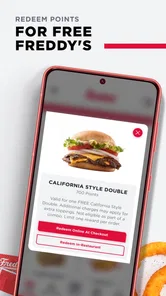
Analysis by Reviewed
I look at Freddy’s as a practical choice for someone who already knows where they want to order, rather than as a way to browse every restaurant nearby. This free food-and-drink app is made by Freddy’s LLC and brings ordering and a points-earning option together. If I’m choosing between placing an order directly with a restaurant and using a general delivery service, that focused purpose is the first thing I’d weigh: it makes sense when Freddy’s is the destination, but it is less useful when I’m still deciding what kind of food I want.
What I would check before relying on it
The app supports carry-out, delivery, and dine-in ordering, so the right option depends on the occasion. For a quick lunch, I’d choose carry-out if I already had a pickup plan; for a relaxed meal, dine-in ordering may suit me better; and delivery is the obvious route when leaving home is inconvenient. Those choices are useful, but they do not make the app a general restaurant finder. I would open it with Freddy’s in mind, not expect it to compare menus across unrelated places.
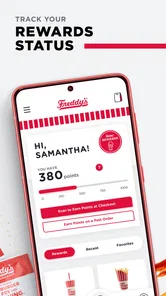
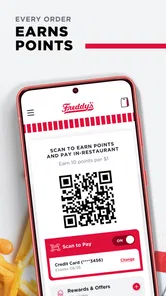
One practical habit is to decide the meal and ordering method before starting the checkout process. If I’m coordinating with family or coworkers, I’d first settle on the location and whether everyone expects pickup, delivery, or a dine-in visit. That small step can prevent a rushed change of plan at the end. The app’s points are another reason to order through it, but I’d treat them as a bonus rather than assume they make every order cheaper: the useful question is whether I’m already choosing Freddy’s and can conveniently earn points along the way.
Choosing it for the right kind of meal
I would think of the app as an extension of a decision I have already made, not as the place where I make every food decision. That distinction matters when I am hungry and in a hurry. A restaurant-focused app can reduce friction once I know where I want to eat, while a broader delivery service is more useful when I am weighing different restaurants, cuisines, or nearby options. The first choice is about convenience with a specific destination; the second is about discovery and comparison.
For a weekday lunch, for example, I might already know that Freddy’s is convenient on my route. I would choose the ordering method that fits the rest of the day, rather than assume that every option suits every situation. Carry-out makes sense when I can collect the order myself; delivery is helpful when I cannot leave; and dine-in ordering is relevant when I plan to eat there. The useful decision is not simply whether to use the app, but whether ordering ahead fits the meal I actually have planned.
I would also separate the points benefit from the basic reason to order. Points can make using the restaurant’s own app more appealing if I am already going there, but I would not let a reward change a meal choice that otherwise makes little sense. It is better to think of points as a side benefit of a planned order than as a reason to order more often. That keeps the decision grounded in convenience and appetite, rather than turning a loyalty feature into an excuse for an unnecessary purchase.
Where direct ordering has an edge
The strongest case for a restaurant’s own app is straightforward: I have selected the restaurant, and I want a direct way to arrange the visit. Freddy’s combines several ordering situations with the possibility of earning points, which gives regular customers a clear reason to consider it. Its narrower scope can also make the choice feel simpler than opening a large marketplace and sorting through places I was not considering in the first place.
More From Our News Desk

Weather by Xiaomi Review: Clear at a Glance, Less Clear Up Close

X Under Pressure: Can It Recover When Posting Goes Wrong?

Clash of Clans Is Won Between the Battles

Android Auto Makes the Case for Quieter Car Software

MobiOffice: Transforming Mobile Productivity with Seamless Integration

EA SPORTS FC™ Mobile Soccer: Redefining Mobile Sports Gaming
That advantage is situational. If I am planning food for a group and people have not agreed on a restaurant, Freddy’s cannot replace the conversation or the comparison stage. I would first decide whether everyone is happy with the destination, then use the app if it fits the way we want to order. For a group meal, the less obvious benefit is not that the app makes everyone agree; it is that settling the restaurant and order type early can keep checkout from becoming another round of indecision.
There is also a useful trade-off between preparing an order ahead and keeping plans flexible. If my schedule is uncertain, I would avoid building my whole meal plan around an order I may need to change. If I know when and how I will eat, opening the app with that plan already settled is more practical. In my view, this is a better workflow than browsing first and trying to decide everything while moving between pickup, delivery, and dine-in options.
Setting the Scene
When you first launch Freddy’s, you’re immediately drawn into a chilling atmosphere. The dark, eerie environment is perfectly crafted, making you feel like you’ve stepped into a horror movie. The graphics are top-notch, with every detail meticulously designed to enhance the spooky ambiance. Whether it’s the flickering lights or the creepy sound effects, every element works together to keep you in a constant state of suspense.
Gameplay Mechanics
The gameplay is straightforward but incredibly engaging. You play as a night security guard at a haunted establishment, and your goal is to survive the night without getting caught by the animatronic characters that roam the halls. Sounds simple, right? Well, think again! These animatronics are not your everyday robots; they have a mind of their own and are determined to make your night a living nightmare.
What I found truly fascinating is how the game keeps you on your toes. You have to constantly monitor security cameras, manage your limited resources like power supply, and make split-second decisions to stay alive. It’s this constant tension and the fear of the unknown that keeps your adrenaline pumping.
Immersive Sound Design
One of the standout features of Freddy’s is its immersive sound design. The developers have done an incredible job at using sound to amplify the horror experience. From the unsettling background music to the sudden, jarring noises, every sound cue is strategically placed to keep you on edge. Trust me, playing this game with headphones is an experience in itself!
Replay Value
Even after surviving a few nights, the game doesn’t lose its appeal. Each playthrough offers a different experience, thanks to the unpredictable behavior of the animatronics. Plus, with various difficulty levels, there’s always a new challenge waiting for you. It’s this replayability that makes Freddy’s a game you’ll return to time and again.
Everyday ordering and the trade-offs
A useful everyday scenario is a busy evening when I know I want Freddy’s but don’t want to spend time sorting out the order at the counter. I can use the app to place an order for the kind of visit I have planned, then keep the points-earning benefit in mind for that purchase. For a group, I’d confirm everyone’s choices before ordering rather than assume the app will solve the coordination for me. That is a simple but worthwhile distinction: it helps with the order, while decisions about what the group wants still belong to us.
Compared with a general delivery app, a restaurant’s own ordering app is naturally narrower: it is for people who have chosen that restaurant, not people comparing many cuisines and businesses. That focus is a strength when Freddy’s is already the plan. A broader service may be a better starting point when I want to compare nearby alternatives or have not settled on a restaurant. Likewise, someone who prefers to order in person can skip the app; using it is not essential just because it offers points.
Making the change without adding hassle
Switching from ordering at the counter to using an app is worthwhile only if the new routine is genuinely easier. I would try it on a meal where my plans are already clear, rather than make my first attempt during a rushed stop or while coordinating a large group. That gives me room to see whether the ordering approach suits me without making the meal depend on a last-minute experiment. If I prefer the usual in-person routine, there is no need to change it just to use a digital option.
For someone who orders from Freddy’s regularly, a small amount of preparation can make the app feel more useful. I would check that I can get into the account or setup I intend to use before I am ready to place an order, and decide in advance whether I am collecting food, getting delivery, or eating there. These are modest steps, but they address the main sources of avoidable friction: being unsure about the plan or discovering that the basic setup is unfinished when time is short.
One question people often have is whether the app is useful if they only visit occasionally. I would say it can still make sense when you want to order through it for a particular visit, but its value is naturally greater if Freddy’s is already part of your routine. Another question is whether the points alone make it worth downloading. I would not make that the sole test; the more reliable reason is whether the ordering options match the way you actually eat there.
Who should install it—and who can pass
I’d recommend trying it if you order from Freddy’s and want carry-out, delivery, or dine-in ordering in one place, especially if earning points is a useful extra for you. The app is free, is rated for Everyone, and has an average rating of 4.8 from around 28,000 ratings, with more than a million installs. It first appeared on June 25, 2019, and version 25.5.29 supports Android 6.0 and newer. Those details make it easy to judge basic compatibility, but they don’t change the central decision: it’s most relevant to people who actually plan to order from Freddy’s.
If you rarely visit Freddy’s, prefer choosing among multiple restaurants, or are happy ordering face-to-face, there is little reason to make this your main food-ordering tool. Before switching your routine, I’d consider how often I expect to use it and whether ordering through it fits the way I collect points. If you already have an account or routine connected to the restaurant, make sure you can access what you need before placing an order; the app is most convenient when the basic setup is done before hunger and time pressure arrive.
It is also worth being clear about what the app cannot solve for you. It can support the ordering part of a visit, but it does not decide whether Freddy’s is the right choice for your group or whether a pickup plan fits your schedule. If you need to compare restaurants first, a broader food-ordering option is a more natural starting point. If you already know the restaurant and want to arrange the meal, the focused approach here is more relevant.
In conclusion, Freddy’s offers a straightforward way to order from the restaurant across several dining situations, with points as an added reason to place an order through the app. Its focus is also its main limitation: it is not a substitute for a service built around comparing lots of restaurants. For someone who already chooses Freddy’s, I’d give it a try and see whether the ordering flow suits their routine. For everyone else, I’d decide on the restaurant first and install it only if that choice becomes a regular one.
Freddy’s Frequently Asked Questions
Can I use Freddy’s app to browse the menu before deciding what to order?
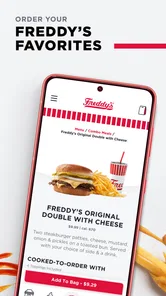
Freddy’s app is intended to support the restaurant experience, including menu browsing and ordering. You can look through the available menu options as part of deciding what to have, then choose whether to arrange carry-out, delivery, or dine-in. Menu availability and ordering choices can depend on the location you select, so review the options shown in the app before completing an order.
Do I need an account to use Freddy’s app and earn points?
Freddy’s app includes ordering and a rewards feature that lets users earn points on orders. If you plan to collect or use points, follow the account and sign-in steps shown in the app so your activity can be associated with your rewards profile. You can also explore the app’s available features before deciding how you want to use it.
Can I place an order for carry-out, delivery, or dine-in through Freddy’s app?
Yes. Freddy’s app supports ordering for carry-out, delivery, or dine-in, so you can choose the option that best suits your plans. It is a convenient way to arrange a meal through the app, and you can also earn points on every order. Before ordering, check the options shown for your chosen location and follow the in-app steps to complete your order.
Is Freddy’s app free, and what devices can run it?
Freddy’s app is free to download and is intended for Android devices running version 6.0 or later, as well as iOS devices. The app is in the Food & Drink category and is developed by Freddy's LLC. Checking your device’s operating system before downloading can help ensure it meets the app’s minimum requirement.
What is Freddy’s app primarily used for?
Freddy's app is designed to enhance your experience at Freddy's restaurants by providing features such as menu browsing, location search, and loyalty rewards. It aims to streamline your dining experience, allowing you to easily find your favorite meals, earn points, and access exclusive offers.
Pros
- Intuitive user interface for easy navigation.
- Rich graphics enhance user experience.
- Variety of customizable settings.
- Engaging storyline keeps users hooked.
- Frequent updates with new features.
Cons
- High battery usage during gameplay.
- Occasional in-app purchase prompts.
- Requires stable internet connection.
- Large app size requires ample storage.
- Some features locked behind paywall.











