FoxFi Key (supports PdaNet)
- 6.98K
- 3.6
- Installs
- 1.00M
- Price
- $7.99

Screenshots

Analysis by Reviewed
Alright, folks, let me tell you about an app that's been quite the lifesaver for my mobile connectivity needs: FoxFi Key (supports PdaNet). If you’ve ever been stranded without Wi-Fi or needed a quick hotspot on the go, this app might just become your new best friend. Let’s dive into what makes this app tick and why it might be worth a spot on your phone.
Unlocking Internet Freedom
Picture this: you’re out and about, need to send an important email, but there's no Wi-Fi in sight. Enter FoxFi Key. This nifty app transforms your phone into a mobile hotspot without the need for rooting. Yes, you heard it right—no more fiddling with complicated rooting processes that void warranties or risk bricking your device. With FoxFi, it’s all about simplicity and accessibility.
Installation and Setup
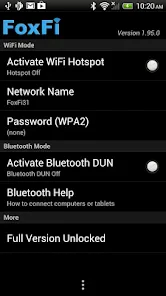
Getting started with FoxFi Key couldn’t be easier. Just download the app, and within a few taps, you’re ready to roll. The interface is straightforward—no clutter, just the essentials. You have options to tweak settings, like hiding tether usage or securing your hotspot with a password. It’s like having a personal IT department in your pocket!
Performance and Reliability
Now, let’s talk about performance. I’ve tested it in various scenarios—from urban environments with strong signals to rural areas with spotty coverage—and the app held up remarkably well. The connection was stable, and speeds were decent enough for browsing, streaming, and even gaming. What’s more impressive is that it handles multiple devices without breaking a sweat. This means you can share your connection with friends or family without hogging all the bandwidth.
Compatibility and Support
One of the standout features of FoxFi is its compatibility. It supports a wide range of Android devices, making it an incredibly versatile tool. Whether you’re using a Samsung, Google Pixel, or any other brand, chances are FoxFi has got you covered. And if you ever hit a snag, their support is pretty responsive. They’ve got a handy FAQ section and a support email to address any issues.
Security Features
In today’s digital age, security is paramount, and FoxFi doesn’t skimp in this department. The app allows you to password-protect your hotspot, ensuring that only those with permission can hop onto your network. It’s a small but crucial feature that adds an extra layer of peace of mind when sharing your connection.
In conclusion, FoxFi Key (supports PdaNet) is a reliable and efficient app for anyone needing a quick and easy mobile hotspot solution. It’s user-friendly, performs well across various conditions, and offers the kind of security you need in today’s connected world. Whether you're a digital nomad, a frequent traveler, or just someone who wants to stay connected everywhere, FoxFi deserves a spot on your app roster.
You May Like

Clash of Clans Is Won Between the Battles

Android Auto Makes the Case for Quieter Car Software

MobiOffice: Transforming Mobile Productivity with Seamless Integration

EA SPORTS FC™ Mobile Soccer: Redefining Mobile Sports Gaming

How Microsoft OneDrive Became a Mobile Productivity Giant

How Google Translate Breaks Language Barriers Effortlessly
FoxFi Key (supports PdaNet) Frequently Asked Questions
What is FoxFi Key and how does it work?
FoxFi Key is an Android application that enables your smartphone to function as a mobile hotspot without the need for a tethering plan from your carrier. It works by creating a Wi-Fi network that other devices can connect to, using your phone's data connection. This can be incredibly useful for sharing internet access on the go, but users should be cautious of potential data charges from their carrier.
Is FoxFi Key compatible with all Android devices and carriers?
While FoxFi Key is designed to support a wide range of Android devices, compatibility can vary depending on your phone model and carrier. Some carriers may block or limit the functionality of the app. It is advisable to check the compatibility with your specific device and carrier before downloading to ensure it meets your needs.
Does FoxFi Key require root access to function?
No, FoxFi Key does not require root access to work. This makes it accessible to a broader range of users who may not want to modify their devices. However, in some cases, certain features might be limited or require additional setup depending on your device's configurations and the restrictions imposed by your carrier.
Are there any costs associated with using FoxFi Key?
Downloading and installing FoxFi Key itself may involve a one-time purchase, but there are no recurring fees for using the app. However, users should be aware that using the app will consume your mobile data, which could result in additional charges from your carrier if you exceed your data plan's limits.
What are some common issues users face with FoxFi Key and how can they be resolved?
Some users may experience connectivity issues or find that their carrier blocks the hotspot functionality. Troubleshooting steps include restarting the device, ensuring the app is up to date, and checking connection settings. If problems persist, consulting the app's support or community forums can provide additional help or alternative solutions.
Pros
- No root access required
- Easy setup and use
- Supports various carriers
- Stable connection
- No extra charges
Cons
- Limited to Android devices
- May slow down phone
- Not compatible with all phones
- Occasional disconnects
- No iOS support

- Category
- Communication
- Version
- 1.20











