FOX
- 280.00
- 4.5
- Installs
- 100.00K
- Price
- Free

Screenshots

Analysis by Reviewed
I’d treat FOX as an entertainment app to investigate if you already watch programming associated with the brand, rather than assuming its name tells you exactly what you’ll find. Its identity can be easy to misread: people may expect news, sports, or a broad streaming service, but those are different kinds of viewing. Before making it part of your routine, I’d check whether the content available in your app matches what you actually want to watch. That small step matters more than a polished pitch, because an app is only useful when its library fits your evenings, commutes, or background-TV habits.
What the free price does—and does not—tell you
FOX is a free entertainment app from FOX LATIN AMERICAN CHANNEL LLC. I see that as a low-risk invitation to install it and explore, not as a promise that every program or viewing option will be available without conditions. Free access is useful when you want to see whether the app is relevant before spending time setting up a viewing routine. I would still separate the cost of downloading the app from any possible requirements tied to particular content: those are not the same thing, and I would check the details shown in the app before relying on a specific show.
That distinction is especially helpful if you are comparing FOX with paid streaming subscriptions. A subscription service usually makes its payment model central to the decision; here, the confirmed price is free, so the first question is whether the app’s actual offering suits you. I would not treat the free price as evidence of a particular subscription arrangement, a complete catalogue, or unrestricted access. If you are looking for a service to replace several paid platforms, compare what you can genuinely watch in FOX with the shows you currently follow before cancelling anything.
Where the app may fit into an ordinary day
For a realistic test, imagine you have a short break after work and want to see whether there is something worth watching without opening several apps. I’d launch FOX, browse the available choices, and decide quickly whether anything fits the time I have. If I find a program I already follow, that makes the app more useful than a general search across multiple services. If I don’t, I can close it and use my usual platform rather than scrolling out of habit. This is a simple but practical way to judge it: does it reduce the effort of finding something you actually want?
It may also suit someone who prefers to keep up with one particular source of entertainment instead of searching a large, mixed catalogue. The trade-off is that a focused app can feel less useful when your tastes change from day to day. I’d keep it as a targeted option if the shows available are a regular part of your viewing, but I wouldn’t expect it to replace a broad service that you use for films, unrelated series, and recommendations across many genres.
How I’d compare it with other viewing options
Compared with a general streaming platform, FOX is best approached as a brand-specific destination, not as an automatic all-in-one library. That difference affects how I would use it: I’d open it when I have a particular FOX-related program in mind, while I’d turn to a wider service when I want to browse a large mix of unrelated entertainment. If your main habit is channel surfing or checking live programming, a live-TV option may be a closer match than an on-demand service; if you mostly watch saved series, a service organized around your watchlist may feel more convenient.
There is also a useful difference between opening a dedicated app and searching for a show in a general video platform. A dedicated destination can make sense when you already know which brand you want, while a broad platform may be better for discovering clips, creators, or content from many sources. I’d choose based on the task rather than assuming one format is superior. For someone who follows a specific program, direct access can cut down on searching; for someone who wants variety first and a particular title second, the larger platform may be the easier starting point.
More From Our News Desk

Clash of Clans Is Won Between the Battles

Android Auto Makes the Case for Quieter Car Software

MobiOffice: Transforming Mobile Productivity with Seamless Integration

EA SPORTS FC™ Mobile Soccer: Redefining Mobile Sports Gaming

How Microsoft OneDrive Became a Mobile Productivity Giant

How Google Translate Breaks Language Barriers Effortlessly
Small checks that save time
Before settling in to watch, I’d check the title itself and whether the episode or stream I want is available in the app at that moment. This avoids the familiar disappointment of opening a service for one specific program and discovering that the available selection does not match the plan. I’d also make sure I’m using the right FOX app for my purpose: the name is shared across different kinds of media, so confirming the publisher and the app’s own current content is more reliable than relying on a search result or an icon that looks familiar.
If you are choosing between installing it and simply using a television or another streaming app, consider where you actually watch. A phone can be handy for a quick check or a short viewing session, but it is not automatically the best screen for a long episode. If your priority is a comfortable, uninterrupted evening on a larger display, compare the viewing options available to you before building the app into that routine. For occasional checking or watching while away from the TV, a mobile app may be the more convenient route.
Who is most likely to get value from it?
I’d recommend trying FOX if you already follow programming connected with it, want a free app to explore, and are comfortable checking what is currently available rather than assuming the name guarantees a particular catalogue. It is also a sensible candidate for viewers who want a direct destination for a familiar source of entertainment and do not need one app to cover every mood. The app has an average rating of 4.5 from around 1.3 thousand ratings, with about 280 written reviews, and has been installed around 100 thousand times. Those figures suggest that people are using it, but they cannot tell you whether its content matches your own preferences.
I’d be more cautious if you want one dependable home for a very wide mix of films and series, or if you dislike checking availability before you watch. In that case, a broader streaming catalogue or your existing television service may be a better fit. FOX is rated PEGI 3, which makes its age classification suitable for a general audience, but I would still choose individual programs with the viewer in mind; an app’s age label is not a substitute for checking the content of a particular show.
The app was released on October 22, 2020, and its current version is 10.7.0.101. I would not use version details alone to decide whether it is right for me; the more practical test is whether it opens smoothly on my device and gives me access to the programming I want. If you are troubleshooting, checking that you have the current version and restarting the app are straightforward first steps, but I would not assume that updating changes what content is available.
Have you ever wanted to have all your favorite TV shows and movies right at your fingertips? Well, let me introduce you to the FOX app! As someone who loves binge-watching everything from thrilling dramas to laugh-out-loud comedies, this app has quickly become my go-to for entertainment. But let’s dive a little deeper into what makes this app worth downloading.
Entertainment on the Go
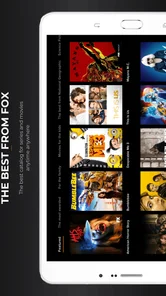
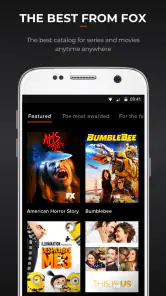
One of the first things you'll notice about the FOX app is its extensive library of content. Whether you're commuting, lounging at home, or just killing time, this app offers a plethora of current hits and classic favorites. You can easily catch up on the latest episodes from popular shows or revisit older series that you might have missed. The user interface is sleek and intuitive, making it super easy to navigate through different genres and find exactly what you're in the mood for.
Features that Stand Out
Now, let’s talk features. What I really appreciate about this app is the seamless streaming experience. You know how annoying it is when you're watching something, and it keeps buffering? Well, with a stable internet connection, that’s rarely an issue here. Plus, the video quality is top-notch, offering clear and crisp visuals that make your viewing experience all the more enjoyable.
Another cool feature is the personalized recommendations. The app learns your viewing habits over time and suggests shows and movies you might like. It’s like having a personal assistant who knows your taste in entertainment better than you do!
User Experience
Signing up is a breeze. You can link your existing cable provider account, or if you're a cord-cutter like me, you can simply subscribe directly through the app. The app is available on both Android and iOS, and it syncs across devices, which means you can start watching a show on your phone and finish it on your tablet without any hassle.
I also love that the app keeps track of where you left off, so you don't have to remember the exact moment you paused. Trust me, this is a lifesaver if you’re as forgetful as I am!
Final Thoughts
In a world where entertainment options are endless, the FOX app stands out by offering a robust selection of content and a fantastic user experience. It’s perfect for anyone who wants easy access to a variety of shows and movies, whether you’re a drama enthusiast, a comedy lover, or someone who enjoys a bit of everything.
To sum it up, if you’re looking for an app that combines quality content with a user-friendly interface, give the FOX app a try. It’s become a staple on my phone, and I’m sure you’ll love it just as much!
FOX Frequently Asked Questions
What is FOX and what features does it offer?
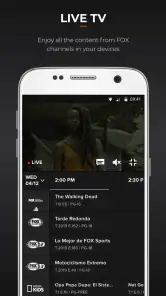
FOX is a versatile app that provides users with access to a wide range of content including live TV, on-demand videos, news, and sports. It is designed to offer a comprehensive viewing experience with high-quality streaming, personalized content recommendations, and easy navigation. The app is compatible with both Android and iOS devices, ensuring accessibility for a broad audience.
Is FOX free to use or does it require a subscription?
While FOX provides some free content, access to premium content and live TV channels typically requires a subscription. Users can choose from various subscription plans that cater to different preferences and budgets. Free trials might be available for new users, allowing them to explore the features before committing to a paid plan.
How can I download and install the FOX app on my device?
To download the FOX app, visit the Google Play Store for Android devices or the Apple App Store for iOS devices. Search for 'FOX', select the official app from the search results, and click the 'Install' button. Ensure your device has sufficient storage space and meets the app’s system requirements for a smooth installation process.
What kind of content can I expect from the FOX app?
The FOX app offers a diverse range of content, including live TV broadcasts, on-demand shows, news updates, and sports events. Users can enjoy popular TV series, breaking news, and live sports coverage, all curated to meet various entertainment preferences. The app frequently updates its library, ensuring fresh and relevant content for its users.
How user-friendly is the FOX app for new users?
The FOX app is designed with user-friendliness in mind, offering an intuitive interface that is easy to navigate. New users can quickly familiarize themselves with the app's layout, thanks to clear menu options and straightforward navigation tools. Additionally, the app provides tutorials and customer support to assist users in maximizing their experience.
Pros
- High-quality streaming content
- Wide variety of TV shows and movies
- User-friendly interface
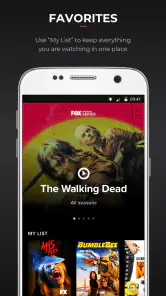
- Customizable watchlist features
- Compatible with various devices
Cons
- Subscription required for full access
- Limited content for non-U.S. users
- Occasional streaming lags
- Ads in the free version
- Complex cancellation process
- Category
- Entertainment
- Version
- 10.7.0.101