

Fluent Reader Lite - RSS Clien
- 8.00
- 3.3
- Installs
- 1.00K
- Price
- $1.99

Screenshots
Analysis by Reviewed
I use RSS in a particular way: instead of checking a row of news sites one by one, I want a single reading space where I can decide what deserves my attention. Fluent Reader Lite is built around that straightforward idea. It is a paid News & Magazines app from developer Haoyuan Liu, and its uncluttered approach will appeal most to readers who already know which sources they trust and want a calmer way to follow them.
Why a focused feed can change the routine
The useful part of RSS is not simply seeing many headlines together; it is choosing what enters that stream. With this app, I would treat subscriptions as a deliberate reading list rather than a replacement for every news habit. Add sources you return to, group them by topic, and the main benefit becomes less time spent reopening the same sites and more time deciding which articles are worth reading.
That distinction matters if your current routine depends on social feeds or a general news app. Those can be better for discovering unfamiliar stories, while a personal RSS setup is better for keeping up with known publications without unrelated posts crowding the view. I see Fluent Reader Lite as a reader’s tool, not a newsroom or a recommendation engine.
A reader you shape yourself
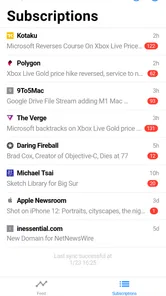
The central capability here is control over the reading stream: you choose the publications, organize them into categories, and use keyword filters to bring particular topics into focus. That is a different kind of convenience from opening a news app and accepting its prepared front page. I like the trade because it turns the feed into something closer to a personal desk: familiar sources are together, but I decide what belongs there.
That control is useful only if I am willing to exercise it. Fluent Reader Lite will not remove the work of deciding which outlets deserve a place in my routine, and it is not designed to surprise me with a constant supply of unrelated recommendations. Readers who enjoy tuning a list of sources may find that refreshing; readers who want news to arrive fully curated may experience it as setup and maintenance.
How I would make it work in practice
I would begin with the sources I actually open in a normal week, rather than importing every feed I have ever saved. If I already have a collection in OPML, importing it can make the switch less tedious, but I would still scan the list afterward and remove dormant subscriptions. A shorter, relevant set is easier to browse than a long archive that makes every check feel like a chore.
From there, I would create only a few categories with clear purposes: perhaps work-related reading, local interests, and slower weekend pieces. The point is not to build a perfect filing system. It is to make the next choice obvious when I have only a few minutes. If categories become too detailed, the system can take more effort to maintain than it saves.
More From Our News Desk

 Gmail
GmailGmail in a Busy Inbox: Who Benefits Most?
From first account to crowded workday, Gmail earns its place through dependable search and flexible sorting—but its best fit depends on how much inbox maintenance you can tolerate.

 Prime Video
Switching to Prime Video: What Changes in Your Viewing Routine
Prime Video can make a compelling second home for streaming, but switching means learning a different catalog, rental layer, and route from browsing to playback.

 Universal TV Remote Control
Universal TV Remote Control Works Best as a Reliable Backup
A phone remote earns its place through quick setup and reliable habits. Here is how to get more from Universal TV Remote Control—and where its limits show.

 Weather - By Xiaomi
Weather by Xiaomi Review: Clear at a Glance, Less Clear Up Close
Xiaomi’s weather app makes everyday forecasts quick to scan, but its calm surface can leave useful details and recovery paths harder to find than they should be.

 X
XX Under Pressure: Can It Recover When Posting Goes Wrong?
A resilience-focused review of X, examining setup, mistaken posts, interruptions, weak connections, and the gaps that matter when recovery needs to be dependable.

 Clash of Clans
Clash of Clans Is Won Between the Battles
Its raids are quick; its community is a long-term project of coordination, teaching, rivalry, and shared responsibility—with all the friction that entails.
Latest News



Keyword filters can help with a recurring subject, but I would add them one at a time and check what they actually surface. A phrase that seems precise may miss articles using different wording, while a broad term can pull in plenty of material I did not mean to prioritize. Used sparingly, filters can reduce scanning; used as a wall around my interests, they can make the feed narrower without making it better.
A small daily routine, not another feed to chase
A realistic use for me would be checking the reader over breakfast, spotting one article that needs more attention, and leaving the rest for later rather than bouncing between several publication sites. If I have a commute or a waiting-room break ahead, I can save reading time for when I have it instead of trying to finish every story immediately. This is a quieter habit than monitoring a stream all day, and that is part of the appeal.
The offline reading option supports that split between collecting and reading. I would use it by checking the feed while connected, then opening saved articles during a period when the connection is unreliable or unavailable. For an important trip, I would test the exact sources and reading flow beforehand rather than assuming every publication supplies articles in the same way. RSS is a format shared by many publishers, but the contents and completeness of feeds can vary.
That variability is an important practical detail. Some sources may provide enough text to read comfortably in the app; others may offer a more limited feed that sends me to the publication for the rest. So I would judge the experience using my own subscriptions, not just by how tidy the main screen feels. If most of my favorite sources do not provide the reading experience I want through RSS, the advantage of consolidating them becomes smaller.
A Breath of Fresh Air in RSS Readers
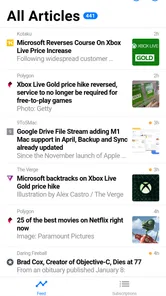
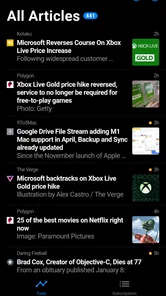
The first thing that caught my eye about Fluent Reader Lite - RSS Client is its minimalist design. It's like a breath of fresh air amid the cluttered interfaces of other RSS readers. The app is incredibly intuitive, with a clean layout that makes navigation a breeze. Whether you're a tech-savvy user or someone who's just venturing into the world of RSS feeds, this app is designed to be user-friendly for everyone.
Seamless Syncing and Customization
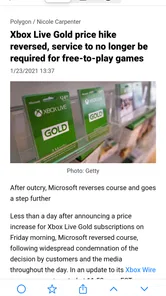
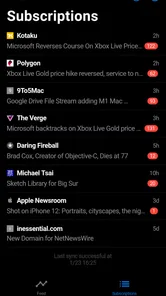
One of the standout features of Fluent Reader Lite is its seamless syncing capability. You can easily import your subscriptions from platforms like OPML, ensuring that all your favorite content is just a tap away. Plus, the app supports both light and dark modes, so you can choose the theme that suits your reading environment best. I found this particularly helpful during late-night reading sessions when the dark mode was easy on the eyes.
Importing an existing OPML collection is especially useful when changing readers: it can save the tedious work of finding and adding each source again. I would still review the imported list before relying on it. A large collection may include feeds I no longer read, and trimming those down makes the app’s clean layout more useful. The practical trade-off is that RSS is only as relevant as the subscriptions you maintain.
Never Miss a Beat
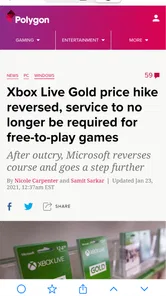
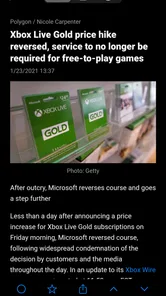
If you're someone who's always on the go, you'll appreciate the offline reading feature. Fluent Reader Lite allows you to download articles to read later, even when you don't have an internet connection. This means you can catch up on your news during your commute or while you're waiting for your coffee without having to worry about connectivity.
A realistic routine is to check the feed while connected in the morning, save a few pieces that need more than a quick glance, then read them on a commute or during a short break. That makes the offline option more than a convenience: it separates the moment you collect something interesting from the moment you have time to focus on it. If reading offline is central to your routine, I’d test that workflow with the sources you actually follow before depending on it for a long trip.
Customization Galore
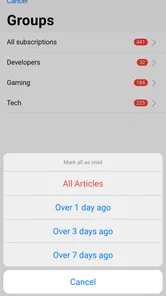
The app offers a plethora of customization options that let you tailor your reading experience. From adjusting the font size to organizing feeds into categories, Fluent Reader Lite puts the control back in your hands. I particularly enjoyed creating custom categories for different topics, which made it easier for me to switch between tech news and my favorite lifestyle blogs.
Another cool feature is the ability to filter articles by keywords. This ensures that you only see the content that truly interests you, saving you time and keeping you focused on what matters most.
Using filters without hiding the whole story
Keyword filtering works best when I use it as a narrow aid, not as a substitute for choosing good sources. A carefully selected term can help bring a recurring subject into view; a broad one can also screen out articles that discuss that subject in a different way. I’d start with one topic I regularly search for, check whether the results feel useful, and adjust from there. That small habit helps prevent a filter from quietly narrowing the range of what I read.
Categories solve a different problem. I would use them to separate reading modes, such as quick industry updates from longer personal-interest pieces, rather than trying to sort every feed into a complicated hierarchy. This makes the list easier to scan when I only have a few minutes and reduces the friction of deciding what to open next.
Where it fits among news apps
Compared with a general news app, a personal RSS client puts more responsibility on me to choose sources, but gives me a more intentional stream in return. Compared with visiting each publication directly, it can make routine checking more convenient by bringing subscriptions together. The exchange is clear: I gain control and a consolidated reading habit, but I should not expect the same kind of broad, automatic discovery that a recommendation-led service may provide.
That also makes it a poor fit for someone who wants breaking-news alerts, a ready-made selection of headlines, or a feed that does all the curation. In that case, a mainstream news service may be easier. I’d also skip an RSS app if I rarely revisit the sites I follow; managing a subscription list only pays off when those sources are part of my regular reading.
Cost, compatibility, and expectations
Fluent Reader Lite costs $1.99, so I’d think of it as a modest one-time purchase for a focused reading tool rather than a free trial of a larger news service. Its current version is 1.0.4, and it requires Android 7.0 or later. It is rated for Everyone, which suits a general-purpose reading app. The app has a 3.3 average from 47 ratings, with 1K+ installs; that gives a prospective buyer a reason to keep expectations measured and decide based on whether an RSS workflow suits them.
The open-source approach may appeal to readers who value software transparency, but it does not remove the everyday trade-off: I still need to pick and maintain feeds. Before paying, I’d check that my device meets the system requirement and make sure the app’s focused format matches how I want to discover news. The price makes less sense if I mainly read through social apps or want a service that selects stories for me.
Who gets the most from this approach
I think it makes the strongest case for someone who already has a small set of dependable sources: specialist blogs, publications with recurring columns, or sites that matter for work or a hobby. Those readers can benefit from having updates collected in one place without surrendering the choice of what to follow. Someone building an RSS habit for the first time can also use it, but should start with a few feeds and add more only when they prove useful.
It is less suited to readers whose main goal is to learn what is happening across unfamiliar subjects. A recommendation-led news app or a publication’s own front page may do a better job of exposing them to stories beyond their established reading list. Likewise, if I need immediate alerts or a tightly edited briefing, I would choose a service built around those needs rather than expecting a quiet RSS reader to behave like a live news desk.
There is also a useful middle ground for people who read both broadly and selectively. I would keep a general news source for discovery, then use Fluent Reader Lite for publications I specifically want to follow. That avoids forcing one tool to do two different jobs. It also helps keep the RSS list from becoming an attempt to duplicate every headline available elsewhere.
Overall, the Fluent Reader Lite - RSS Client is a must-have for anyone looking to streamline their news consumption. It's not just an app; it's a powerful tool that enhances your reading experience. So, if you're tired of sifting through endless articles and want a more organized approach to staying informed, give Fluent Reader Lite a try. Trust me, your inbox will thank you!
My take for everyday readers
I’d recommend it most to someone with a handful of favorite publications, blogs, or specialist sources who wants to check them in one place and read at their own pace. It is less compelling for a casual reader who wants headlines picked automatically or for anyone who expects every source to behave identically. RSS feeds can differ in what they provide, so the experience depends partly on the publishers you choose.
For me, the strongest case is a simple one: when my reading list is intentional, a clean RSS reader helps me keep it that way. If you are willing to choose your sources and occasionally tidy your subscriptions, this app offers a practical alternative to hopping between sites. If you would rather have discovery and curation handled for you, another kind of news app will likely feel more natural.
Fluent Reader Lite - RSS Clien Frequently Asked Questions
Is Fluent Reader Lite suitable for a simple, focused reading experience?
Fluent Reader Lite is described as a simplistic RSS client, so it may suit readers who want a straightforward way to follow RSS feeds rather than a more elaborate news app. It belongs to the News & Magazines category and is open-source. The app is developed by Haoyuan Liu, and its content rating is Everyone.
What is Fluent Reader Lite and how does it work?
Fluent Reader Lite is an RSS client designed for streamlined and efficient news reading. It allows users to subscribe to various news feeds and blogs, providing a centralized platform to read and manage content. The app syncs smoothly across devices, ensuring you can access the latest news anytime, anywhere. It's an ideal solution for those who want to keep up with news without the clutter of traditional news apps.
Is Fluent Reader Lite free to use?
Fluent Reader Lite is listed at $1.99, so it is a paid app rather than a free download. Check the price displayed for your store and region before installing, since app prices may vary by location. The content rating is Everyone, making its listed age classification suitable for general audiences.
What platforms is Fluent Reader Lite available on?
Fluent Reader Lite is available on both Android and iOS platforms. This makes it convenient for users who own multiple devices or switch between different operating systems. The app ensures a consistent experience across all devices, allowing you to seamlessly continue reading your news and feeds no matter where you are.
How can I customize my news feed in Fluent Reader Lite?
Fluent Reader Lite offers extensive customization options for your news feed. Users can easily subscribe to their favorite blogs and news sources, categorize them, and adjust the appearance settings to suit their preferences. The app's intuitive interface allows you to tailor the reading experience, ensuring you receive the most relevant and personalized content.
Pros
- User-friendly interface
- easy to navigate.
- Supports multiple RSS feeds seamlessly.
- Offline reading capability for convenience.
- Customizable themes for user preference.
- Fast syncing with minimal data usage.
Cons
- Limited advanced features in free version.
- Occasional sync issues with some feeds.
- No integrated social media sharing options.
- Lacks built-in podcast support.
- Requires manual feed updates occasionally.











