

Flowt Wear
- 0.00
- 0.0
- Installs
- 50.00
- Price
- $4.99

Screenshots
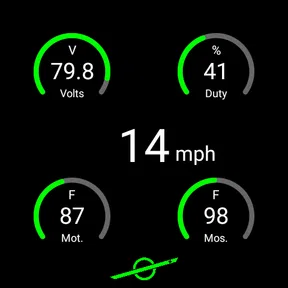
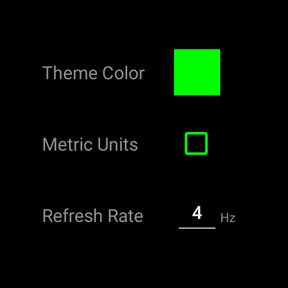
Analysis by Reviewed
For anyone who uses a VESC device, the key question is whether a live view of its operation is useful in the moments they actually need it. I find Flowt Wear best approached as a focused monitoring companion, not as a general smartwatch organizer or a catch-all vehicle app. Its purpose is narrow, which can be a real advantage when you want to check a compatible setup without turning a quick glance into a longer phone session.
Reading the information at a glance
Monitoring on a wearable can make information easier to reach, but it also puts a premium on clear presentation: a display is small, attention is limited, and a glance may happen while you are moving. I would treat a watch view as a way to check information briefly, not as a reason to keep watching a screen. Before relying on it, try the interface in a safe, stationary setting and see whether the information you need is easy for you to distinguish at a glance.
That distinction matters for different reading needs. People who prefer larger text, strong contrast, or more time to interpret figures may find a phone easier for careful inspection. A wearable can reduce the effort of reaching for a phone, but it cannot make a small display suitable for every person or every situation. I’d use the format that lets me understand the information comfortably, rather than assuming that a watch is automatically the more accessible option.
Movement, attention, and sensory comfort
Live monitoring can be helpful when a rider wants a quick status check, yet it should not compete with road awareness or control of the vehicle. I would check the screen only when stopped somewhere safe. If a watch notification or visual prompt pulls your attention away, silence or remove distractions using the controls available on your device, and keep the ride itself as the priority.
Sensory preferences also vary. Some people find wearable information discreet; others find screen changes, alerts, or the expectation of checking a wrist distracting. A sensible first test is to use the app while stationary and notice whether it adds calm or another thing to manage. That small trial can tell you more than a feature list about whether this kind of monitoring fits your habits.
Where a wearable view fits
A plausible everyday use is checking a VESC-equipped vehicle before setting off, then glancing at the watch only after pulling over during a trip. The benefit is convenience: the status information is closer at hand than a phone tucked away in a bag. The trade-off is that a watch is not a substitute for a deliberate inspection or for understanding what the displayed information means. If you need to investigate a change or make a considered decision, stop and use the device that gives you the clearest view.
Compared with a phone-based VESC monitoring option, a wearable-oriented tool may suit someone who values quick access more than a larger screen. A phone remains the better choice when you need space to read, navigate menus, or spend time interpreting information. If you do not use a compatible VESC device, or you mainly want broad vehicle-management features, this focused app is unlikely to be the right purchase.
More From Our News Desk

 Gmail
GmailGmail in a Busy Inbox: Who Benefits Most?
From first account to crowded workday, Gmail earns its place through dependable search and flexible sorting—but its best fit depends on how much inbox maintenance you can tolerate.

 Prime Video
Switching to Prime Video: What Changes in Your Viewing Routine
Prime Video can make a compelling second home for streaming, but switching means learning a different catalog, rental layer, and route from browsing to playback.

 Universal TV Remote Control
Universal TV Remote Control Works Best as a Reliable Backup
A phone remote earns its place through quick setup and reliable habits. Here is how to get more from Universal TV Remote Control—and where its limits show.

 Weather - By Xiaomi
Weather by Xiaomi Review: Clear at a Glance, Less Clear Up Close
Xiaomi’s weather app makes everyday forecasts quick to scan, but its calm surface can leave useful details and recovery paths harder to find than they should be.

 X
XX Under Pressure: Can It Recover When Posting Goes Wrong?
A resilience-focused review of X, examining setup, mistaken posts, interruptions, weak connections, and the gaps that matter when recovery needs to be dependable.

 Clash of Clans
Clash of Clans Is Won Between the Battles
Its raids are quick; its community is a long-term project of coordination, teaching, rivalry, and shared responsibility—with all the friction that entails.
Latest News



Planning a useful first ride
I would make the first outing a low-pressure test rather than choosing a route where a quick status check feels essential. At home or in another safe place, establish what the watch shows during ordinary operation and decide which information is genuinely useful to you. Then take a short ride in familiar surroundings, leaving any inspection for a planned stop. This separates two questions that are easy to muddle: whether the device connection works for your setup, and whether a wearable view fits your riding routine.
A practical detail is to decide in advance what you will do if the display changes or looks unfamiliar. The answer should be simple: stop safely, regain a clear view, and investigate without trying to diagnose the issue while moving. That habit is useful even for experienced riders because live information can invite a reaction before its meaning is understood. A monitor is most helpful when it informs a calm check, not when it becomes another source of urgency.
Choosing between watch and phone monitoring
The choice is not simply convenience versus inconvenience. A wrist display may reduce the steps needed for a brief check, but the phone can be easier to hold steady, read carefully, and use when you need to inspect a broader view. If your usual trips involve frequent stops or you already carry your phone where it is safely accessible, the phone may be the more practical primary monitor. The watch makes more sense when a quick glance is a genuine advantage and you can comfortably read it without turning the ride into a screen-focused activity.
I would also avoid assuming that the wearable should replace the phone just because it is available on your wrist. A useful division of labor is to use the watch for brief checks while stationary and the phone for longer examination or setup work. If that arrangement feels awkward, or if you repeatedly need more context than the watch gives you, that is a good sign to rely on the larger screen instead.
Getting Started with Flowt Wear
Installing Flowt Wear was a breeze. It’s available on both Android and iOS, so no matter what ecosystem you’re part of, you’re covered. Once installed, it takes you through a neat onboarding process. I appreciated the simple, no-fuss setup that had me up and running in just a few minutes. If you’re someone who’s not too tech-savvy, fear not! The app’s intuitive interface is as straightforward as it gets.
Features That Make Life Easier
One of the standout features of Flowt Wear is its ability to filter notifications. You can choose what’s essential and what’s not, ensuring your wrist doesn’t buzz for every meme your friend sends. The app allows you to customize notifications from different apps, which is a lifesaver if you’re juggling work and personal life on the same device.
But wait, there’s more! The app’s integration with other fitness and health apps is seamless. Whether you’re tracking your steps, monitoring your heart rate, or even keeping tabs on your sleep, Flowt Wear syncs effortlessly, giving you a comprehensive view of your health data.
Performance and Usability
I’ve used quite a few smartwatch apps, and the lag can be a real deal-breaker. However, with Flowt Wear, everything is buttery smooth. The transition between screens, the responsiveness of the app, and even the battery consumption have been optimized to give you a hassle-free experience.
And let’s talk about the user interface. It’s modern, clean, and doesn’t overwhelm you with too many options. The developers have done a stellar job in ensuring that the app is not only functional but also aesthetically pleasing. It’s like having a mini personal assistant right on your wrist, without the headaches of a clunky UI.
Wrapping It Up
In a world where we’re constantly bombarded with information, Flowt Wear brings a breath of fresh air. It’s not just an app; it’s a tool that helps you reclaim your attention and focus on what truly matters. Whether you’re a fitness enthusiast, a busy professional, or someone just looking to streamline their digital life, this app has something for everyone.
So, if you’re on the hunt for a reliable, efficient, and downright handy assistant for your smartwatch, give Flowt Wear a shot. It might just be the app you never knew you needed, but once you have it, you’ll wonder how you ever lived without it.
Who should consider it
The actual appeal is much more specific than the smartwatch-organizer framing above suggests: this is an Auto & Vehicles app by Dmac Mobile Developments, LLC, intended for live monitoring of VESC devices. I’d consider it if I already use that kind of hardware and want a wearable way to check its status. If I don’t own or use a VESC device, the central use case simply isn’t there, so I wouldn’t buy it just because I wear a smartwatch.
It costs $4.99, which makes compatibility worth checking before paying. The app is rated for Everyone, has a 0.0 average rating and 50+ installs, so there is little public user feedback to lean on. I’d therefore make the purchase decision around my own equipment and monitoring needs, rather than treating popularity as proof either for or against it.
Practical checks before relying on it
For a first session, I’d pair and explore the setup while stationary, confirm that the watch and VESC device communicate as expected, and learn what each displayed value means before using it on a trip. That is more useful than trying to interpret unfamiliar live information in motion. It also helps answer the practical question of whether the wearable view is readable and useful for your own device and habits.
Another trade-off is the role of the watch versus the phone. A watch can make a quick check convenient, while a phone is generally the more comfortable place to examine details at length. I would not treat a live monitor as a repair guide or as a substitute for safe riding judgment; if something looks unexpected, stop in a safe place and investigate rather than reacting to the screen while moving.
Understanding the limits of a live check
It is worth separating monitoring from maintenance. Seeing information while a VESC device is operating can help you notice what is happening, but a status view alone should not be treated as a diagnosis, a guarantee of safe operation, or an instruction to change how you ride. If a value is unfamiliar, pause and consult the guidance you normally trust for your vehicle and equipment. That boundary matters especially for newer owners, who may be tempted to give every changing figure a meaning before they know how it behaves in normal use.
For an experienced VESC user, the app’s focused role may be enough: a convenient place to look during a deliberate check. For someone still learning the hardware, it may be better to build confidence with a larger-screen monitoring workflow first, where information is easier to examine slowly. The right choice depends less on whether a watch is appealing and more on whether you can interpret the live view without guessing.
Cost, feedback, and confidence
Because this is a paid app with limited public feedback, I would make the decision carefully rather than relying on social proof. Its $4.99 price is most defensible when you already have a VESC setup, know what you want to monitor, and expect to use a wearable view often enough to justify the convenience. If you are still deciding whether to buy compatible hardware, or only want to experiment once, it is sensible to compare the app’s role with the monitoring tools already available to you before spending.
The low install count and absence of an average rating do not tell me whether the app will work well for a particular person; they simply mean there is little crowd experience to use as a shortcut. I would put more weight on checking the exact watch, phone, and VESC combination and testing the connection in a safe setting. A careful trial is especially valuable here because the usefulness of a live monitor depends on the equipment and the rider’s routine, not just on the app in isolation.
Accessibility in real riding contexts
Accessibility is not only a question of text size. A rider may need to keep one hand available, avoid sudden sensory prompts, or limit the amount of attention spent on a screen. For that reason, I would judge the app in the context where it will be used: stationary setup, a safe stop, and ordinary daylight or lighting conditions. If the display is hard to distinguish or the act of checking it feels distracting, that is meaningful feedback about fit, not a personal failing.
Someone who benefits from spoken guidance, a larger display, or more time to compare readings may find a phone or another established workflow more comfortable. Someone who prefers a discreet glance may appreciate the wearable format, provided it remains easy to interpret. I would not assume that a watch works equally well for every visual, motor, or sensory need; a short, no-pressure trial is the best way to see whether it reduces effort or adds another demand.
An inclusive verdict, with the right expectations
The current version is 1.0.2, released Nov 6, 2023, and the minimum operating system is 7.1. Those details are useful when checking whether an older device can run it, but compatibility with the app alone does not guarantee that a particular watch, phone, or VESC setup will work together. I’d check the full device combination before relying on it for a ride.
My inclusive verdict is cautious but positive for the right person: a VESC user who can comfortably read a wearable display and wants a quick status view may find this focused approach worthwhile. Someone who needs larger presentation, prefers phone-based monitoring, is easily distracted by wrist alerts, or has no VESC hardware should choose another route. The app’s narrow purpose is its strength, but it also sets a clear boundary on who is likely to benefit.
Flowt Wear Frequently Asked Questions
What does Flowt Wear do with VESC devices?
Flowt Wear is an Auto & Vehicles app for live monitoring of VESC devices. Its focus is on viewing device activity in real time, rather than serving as a general fitness tracker. It is developed by Dmac Mobile Developments, LLC, and may be relevant if you want a mobile app centered on keeping an eye on a VESC device.
What should I know about Flowt Wear before downloading it?
Flowt Wear is a paid app that costs $4.99, so it is worth checking that its VESC monitoring purpose matches what you need before purchasing. It is rated for Everyone and has a 0.0 average rating, with 50+ installs. The app was released on Nov 6, 2023, and its current version is 1.0.2.
What is Flowt Wear and how does it enhance my fitness routine?
Flowt Wear is a revolutionary fitness app designed to integrate seamlessly with your wearable devices. It tracks your physical activities, monitors heart rates, and provides personalized workout recommendations. By analyzing your daily movements and health metrics, Flowt Wear offers insights to optimize your fitness goals, making your routines more effective and engaging.
Is Flowt Wear compatible with multiple devices and platforms?
Yes, Flowt Wear is compatible with both Android and iOS platforms. It supports a wide range of wearable devices, including popular brands and models. The app's synchronization capability ensures that all your fitness data is updated across different devices, allowing you to switch between them without losing any progress or data.
Does Flowt Wear offer personalized workout plans and goals?
Absolutely! Flowt Wear provides personalized workout plans tailored to your fitness level, goals, and preferences. The app uses advanced algorithms to analyze your current fitness state and suggests exercises that align with your objectives, whether it's weight loss, muscle gain, or endurance improvement. This personalization ensures maximum efficiency and satisfaction.
Pros
- User-friendly interface
- easy to navigate.
- Seamless integration with wearable devices.
- Customizable notifications and features.
- Efficient health and fitness tracking.
- Regular updates with new features.
Cons
- Limited compatibility with older devices.
- Some features require premium subscription.
- Battery consumption can be high.
- Occasional sync issues with devices.
- Limited offline functionality.












