JB4 Mobile
- 277.00
- 3.6
- Installs
- 10.00K
- Price
- $27.99

Screenshots
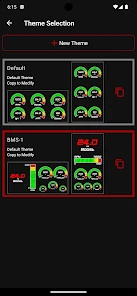
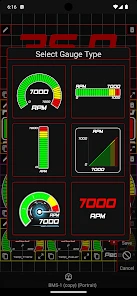
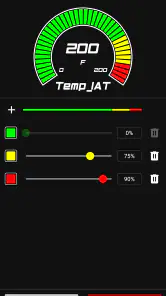
Analysis by Reviewed
Before I would pay for JB4 Mobile, I would ask one practical question: do I already have a compatible JB4 setup, and will I actually use the information it can show me? This is a focused companion for people who want to work with JB4 hardware from a phone, not a general-purpose car app. Its value depends less on how often I drive and more on whether checking and recording vehicle data is part of how I look after or tune my car.
Where the connection shapes the experience
Because the phone works alongside JB4 hardware, a useful session begins before the car is moving. I would connect while parked, confirm that the expected information is appearing, and only then set off. That small routine reduces the chance of discovering a pairing or display problem in traffic, where the phone is a distraction and troubleshooting is unsafe.
The same dependency affects how I would plan a track outing or a spirited drive. If monitoring is part of the plan, I would check the setup in advance and decide what I want to observe before leaving. The app makes phone-based access convenient, but it cannot make a disrupted connection useful; I would treat a stable link as part of the equipment rather than assume the phone will simply sort itself out.
A realistic routine for road and track use
On an ordinary weekend drive, I would connect before departure, choose a limited monitoring goal, and leave the phone alone once underway. After parking, I could review a recording and note the conditions around it. At a track day, the same discipline matters even more: collect information during the session, then inspect it in the paddock instead of trying to interpret a busy screen while driving.
That approach also answers a common question: is this useful if I am not actively changing a tune? It can still make sense if the purpose is to observe and record data, provided the JB4 hardware is already part of the setup. If I do not care about those readings or have no plan to review them, the phone connection and logging workflow add little to my day.
What to do when communication falters
If the app stops showing expected information, I would not make an immediate tuning change to compensate. I would concentrate on driving, pull over safely, and check the phone and hardware only when stationary. A momentary interruption is a reason to verify the setup, not proof that the vehicle’s tune has changed or that a recording was saved correctly.
For a repeatable check, I would reconnect in a safe, stationary setting and confirm that the app is displaying the information I intend to use before relying on it again. If the issue returns, recording what happened and when gives a knowledgeable JB4 user or support contact a clearer starting point than a vague report that “it stopped working.” The trade-off is straightforward: phone access is convenient when the link is behaving, but it introduces another point to check when it is not.
More From Our News Desk

Clash of Clans Is Won Between the Battles

Android Auto Makes the Case for Quieter Car Software

MobiOffice: Transforming Mobile Productivity with Seamless Integration

EA SPORTS FC™ Mobile Soccer: Redefining Mobile Sports Gaming

How Microsoft OneDrive Became a Mobile Productivity Giant

How Google Translate Breaks Language Barriers Effortlessly
Keeping data useful without letting it take over
It is tempting to watch every available reading, especially when a screen makes them easy to reach. I would resist that. Pick one question for a drive or session, such as whether a particular condition is worth examining, and use a recording to revisit it later. A focused log is easier to compare and discuss than a pile of data gathered without a purpose.
Data also needs context. If I share a recording, I would explain what the car was doing and whether anything about the setup had recently changed. I would avoid treating a single value as a diagnosis or a reason to alter settings. For decisions with mechanical consequences, the app can support careful review, but it does not replace sound judgment or advice from someone who understands the specific vehicle and configuration.
Getting to Know the App
First things first, JB4 Mobile is a companion app designed to work with the JB4 tuning hardware. It’s like having a personal tuner right in your pocket. Whether you're cruising in a BMW, Mercedes, or even a Mini, this app has got you covered. The setup is surprisingly straightforward. With a user-friendly interface, even those who are not tech-savvy can navigate around it with ease.
Features that Fuel Your Passion
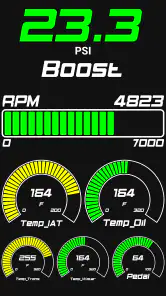
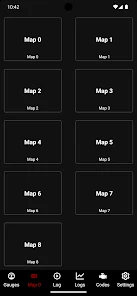
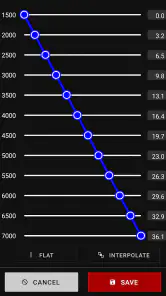
One of the coolest features is the real-time data monitoring. Imagine keeping tabs on everything from boost levels to temperatures, all while driving. It’s like having a mini control center in your car. Plus, the app allows you to customize your tuning maps on the fly. So if you’re feeling a bit adventurous on the freeway, just swipe and tweak!
For me, the useful habit is to decide what I want to learn before starting a drive: watch a particular reading, or make a log for later review, rather than trying to follow every value at once. That helps keep attention on the road. I would not treat a moving car as a place to experiment with map changes; pull over somewhere safe first, and make a deliberate adjustment only when you understand the consequences for your setup.
Making logs useful beyond the drive
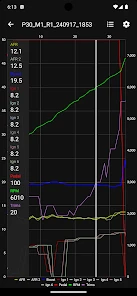
Another nifty feature is the logging capability. You can record all your performance data, which is perfect for those track days when you want to analyze and improve your ride. It’s like having your own pit crew ready to break down every twist and turn.
A practical routine is to keep each recording tied to a clear question: what was the car doing under a certain kind of drive, and what should I compare next time? A log is most helpful as evidence to review calmly, not as a verdict by itself. If you share one with a knowledgeable tuner or fellow JB4 user, explain the conditions and changes around it; context can matter as much as the figures on screen.
Connectivity when the car is moving
The connection is central to the experience because the phone is being used alongside JB4 hardware. That makes setup worth checking before a trip: pair the equipment while parked, make sure the display is behaving as expected, and avoid troubleshooting while driving. A familiar route or a stationary check is a better place to notice a connection problem than a busy road or track session.
For an everyday example, I would connect before leaving for a weekend drive, keep monitoring simple on the road, then review a recording after parking. If the phone stops communicating, I would focus on driving safely first and reconnect only once stopped. I would not assume a lost connection means the car has changed tune or that a recording has been saved; check the hardware and app state before relying on the next session’s information.
Why You’ll Love It
What really sets JB4 Mobile apart is its seamless integration with your vehicle. The wireless connection means no more tangled wires or complicated setups. Plus, the app is continually updated, ensuring your tuning experience only gets better with time.
That wireless convenience is also a trade-off: the experience depends on a working link between the phone and the tuning hardware, so it is not the same as a standalone display that is already built into a vehicle. Compared with generic OBD-style dashboards, this app is more focused on the JB4 ecosystem rather than serving as a universal monitor. That focus is valuable if you own compatible hardware, but it makes the purchase difficult to justify if you do not.
Cost is another practical consideration. JB4 Mobile is a paid app at $27.99, so I would decide based on whether I will use its JB4-specific monitoring and logging often, not simply because it sounds interesting. It is rated for Everyone, and it was released on April 16, 2014; the current version is 3.0.5 and it requires iOS 7.0 or later. Dmac Mobile Developments, LLC is the developer. It has a 3.6 average from over 700 ratings, with more than 270 written reviews and over 10,000 installs. Those figures suggest a real installed audience, but I would still weigh the mixed average against my own need for a JB4 companion.
Before buying, I would confirm that the app and hardware suit the particular vehicle and phone I plan to use. Compatibility is the question that matters most here; owning a car from a familiar brand alone does not tell me whether a given setup will work. If I am unsure, I would check with a knowledgeable JB4 source before spending money, rather than expecting a general-purpose alternative to fill the same role.
Community, help, and sensible expectations
And let’s not forget the community aspect. With access to forums and user groups, you can share tips, tricks, and even get advice from fellow gearheads. It’s like having a virtual garage filled with enthusiasts ready to lend a hand.
I would use that community as a place to frame a question, not as a substitute for careful diagnosis. Describe the vehicle and setup, say what you were doing when an issue appeared, and include relevant log context if you have it. For an unexpected reading or connection trouble, repeat a safe check while parked before making changes. This approach makes advice more useful and helps avoid chasing a one-off signal.
Who should choose something else?
For someone who already has JB4 hardware and wants a phone-based way to monitor or log, this has a specific job that a generic dashboard may not serve as directly. A universal vehicle app may be the better choice for someone who wants broad compatibility or routine driving information without committing to this tuner’s ecosystem. Likewise, a built-in display may be simpler if the main goal is glanceable information and there is no interest in making or reviewing logs.
I would also skip it if I rarely inspect vehicle data, am uncomfortable interpreting readings, or expect an app to tell me exactly what mechanical change to make. The best fit is a driver who is curious but methodical: someone willing to collect information, learn what it means for their own setup, and leave tuning decisions until the car is safely parked. That distinction matters more than enthusiasm for performance alone.
Final Thoughts
In a world where everything is going digital, it’s refreshing to see an app like JB4 Mobile keeping pace with the needs of modern-day car enthusiasts. It’s not just an app; it’s a gateway to a more dynamic driving experience. Whether you’re looking to eke out a few more horsepower or just want to understand your car better, this app is worth a spin. So, why not take it for a test drive and see what your car is truly capable of?
My verdict is narrower but more useful: if you already own compatible JB4 hardware, want phone-based monitoring, and are willing to review logs thoughtfully, this has a clear purpose. If you want a general-purpose car app, rarely inspect vehicle data, or do not have the matching tuner, I would skip it and keep the money for a tool that fits those needs. Connectivity is not a bonus detail here; it is part of the working setup, so I would treat a stable pairing and safe, parked troubleshooting as essentials rather than afterthoughts.
JB4 Mobile Frequently Asked Questions
Do I need a JB4 tuner to use JB4 Mobile?
Yes. JB4 Mobile is designed to work with the JB4 tuner rather than as a standalone vehicle-monitoring or tuning app. The app’s role is to provide a data logger and display for that hardware, so you should make sure you have a compatible JB4 setup before downloading. Without the tuner, its main purpose and features are not available.
What is JB4 Mobile and what features does it offer?
JB4 Mobile is an advanced tuning app designed for automotive enthusiasts who want to optimize their vehicle's performance. The app offers real-time data logging, performance adjustments, and diagnostic tools. It enables users to adjust boost levels, fuel mapping, and other parameters directly from their mobile device, providing a comprehensive tool for both casual and professional tuners.
Is JB4 Mobile compatible with all vehicles?
JB4 Mobile is compatible with a wide range of vehicles, but not all. It primarily supports vehicles equipped with JB4 tuning devices, typically those from manufacturers like BMW, Audi, Volkswagen, and more. Before downloading, users should check the official compatibility list to ensure their vehicle is supported to avoid any inconvenience.
What are the system requirements for using JB4 Mobile?
To use JB4 Mobile, users need a smartphone or tablet running Android or iOS. The device should have Bluetooth capability to connect with the JB4 hardware. It's recommended to have the latest operating system updates installed to ensure smooth operation and access to all features. Users should also ensure adequate storage space for data logging.
How can I download and install JB4 Mobile?
JB4 Mobile can be downloaded from the Google Play Store for Android devices and the Apple App Store for iOS devices. Users should search for 'JB4 Mobile' in their respective app store and follow the on-screen instructions to download and install the app. It's important to have a stable internet connection during installation to avoid any issues. The app is rated for Everyone, and its current version is 3.0.5.
Pros
- User-friendly interface design.
- Real-time engine data display.
- Customizable dashboard settings.
- Comprehensive vehicle diagnostics.
- Wide compatibility with vehicle models.
Cons
- Requires Bluetooth connectivity.
- Subscription needed for full features.
- Limited support for older model cars.
- Occasional app crashes reported.
- High battery consumption on use.
- Category
- Sports
- Version
- 3.0.5