

Floread - Light Read
- 36.00
- 4.4
- Installs
- 10.00K
- Price
- Free

Screenshots
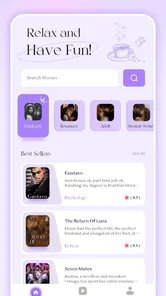
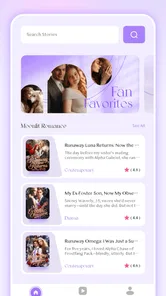
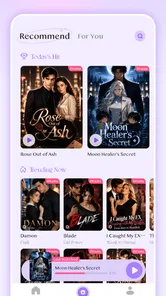
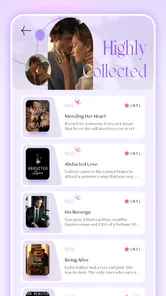
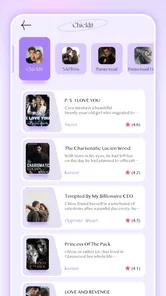
Analysis by Reviewed
I approached Floread - Light Read as a small entertainment app for reading on the go, rather than expecting it to replace every full-featured reading platform. That distinction matters. Its appeal is the simple promise of opening a novel wherever I happen to be and settling into a story without turning the experience into a complicated project. After using it, I see it as a practical choice for readers who want a focused mobile reading habit and are comfortable exploring the app at their own pace.
The app is developed by AG Tech Pro and is available free to install, with optional in-app purchases ranging from $0.99 to $99.99 per item. It is intended for mature audiences aged 17 and over, so I would not treat it as a general children’s reading app. The current release is version 1.2.1, and it runs on Android 7.0 or later. Those details make it accessible to people using older Android phones, although the actual comfort of reading will still depend heavily on screen size, brightness, and how well the device handles extended text sessions.
How I built a comfortable reading routine
I get the most out of a reading app when I decide in advance what a session is for, rather than opening it and browsing whenever I have a spare minute. In this section, I focus on keeping that routine comfortable and easy to resume, including a small way to notice when the phone or surroundings—not the story—are making reading feel like a chore. That foundation makes it easier to streamline the next session.
The basic workflow is deliberately uncomplicated
My usual starting point was straightforward: open the app, choose something that matched the amount of time I had, and read without trying to optimize everything immediately. That is the right way to approach this kind of app. If I begin by searching through every available option or worrying about perfect settings, I lose the main benefit of a light reading tool: reducing the distance between a spare moment and the first page.
Floread fits naturally into short gaps in the day. I can imagine using it while waiting for an appointment, during a quiet commute, or before bed when I want a story instead of another fast-moving social feed. The important habit is to decide in advance what kind of session I am having. For a five-minute break, I choose something easy to resume. For a longer evening session, I give myself enough time to settle into the story rather than judging the app after a few hurried paragraphs.
One useful approach is to treat the app as a dedicated reading doorway rather than as a complete personal library manager. I would not open it expecting the same organizational depth as a specialist ebook service. Instead, I use it when the priority is immediate access to fiction and a calmer screen experience. That narrower purpose is also its strength: fewer decisions can make it easier to keep reading.
Who benefits most from this style of reading
I think the best match is someone who reads in bursts and wants a mobile-first entertainment option. If you regularly have ten or fifteen minutes available but rarely carry a physical book, a novel app can turn those fragments into a consistent habit. The experience is especially appealing if you prefer reading to watching short videos but need something more convenient than carrying a paperback everywhere.
More From Our News Desk

 Gmail
GmailGmail in a Busy Inbox: Who Benefits Most?
From first account to crowded workday, Gmail earns its place through dependable search and flexible sorting—but its best fit depends on how much inbox maintenance you can tolerate.

 Prime Video
Switching to Prime Video: What Changes in Your Viewing Routine
Prime Video can make a compelling second home for streaming, but switching means learning a different catalog, rental layer, and route from browsing to playback.

 Universal TV Remote Control
Universal TV Remote Control Works Best as a Reliable Backup
A phone remote earns its place through quick setup and reliable habits. Here is how to get more from Universal TV Remote Control—and where its limits show.

 Weather - By Xiaomi
Weather by Xiaomi Review: Clear at a Glance, Less Clear Up Close
Xiaomi’s weather app makes everyday forecasts quick to scan, but its calm surface can leave useful details and recovery paths harder to find than they should be.

 X
XX Under Pressure: Can It Recover When Posting Goes Wrong?
A resilience-focused review of X, examining setup, mistaken posts, interruptions, weak connections, and the gaps that matter when recovery needs to be dependable.

 Clash of Clans
Clash of Clans Is Won Between the Battles
Its raids are quick; its community is a long-term project of coordination, teaching, rivalry, and shared responsibility—with all the friction that entails.
Latest News



It can also suit readers who want a low-commitment way to test a reading routine. Because the app is free to install, there is little initial friction in trying it. However, free installation should not be confused with every part of the experience being free, since optional purchases are available. I would decide what I am willing to spend before browsing deeply, particularly if I am prone to buying a title simply because I have already invested time in it.
On the other hand, I would steer away from it if my main requirement were a broad set of advanced library tools, extensive cross-device organization, or a carefully managed collection of purchased ebooks. A dedicated reading platform may be better for that. Floread makes more sense when the reading itself is the priority and elaborate catalog management is secondary.
A realistic everyday session
Imagine finishing dinner with twenty quiet minutes before the rest of the evening begins. Instead of opening a general entertainment feed, I would launch Floread, return to the novel I was reading, and keep the phone in a comfortable position with notifications out of sight. The useful part is not a dramatic feature; it is the repeatable sequence. Open the app, continue the story, stop at a natural pause, and close it before the session turns into aimless browsing.
For a commute, I would use a similar pattern but prepare for interruptions. I would avoid beginning a complicated chapter just before changing trains or arriving at work. Starting at a clear break makes it easier to resume later, especially when reading on a phone where a sudden interruption can break concentration. This is one of the small habits that makes a simple reading app feel more reliable in daily use.
What I would check before settling in
The first settings worth examining are the ones that directly affect comfort: text presentation, screen brightness, and any reading controls the current version exposes. I would not assume the default arrangement is ideal for everyone. A font that looks fine in a store or living room may feel too small on a moving bus, while a bright background that works during the day can become tiring at night.
I also recommend checking how the app behaves when you leave and return. The practical question is whether your reading position is easy to recover, not whether the interface looks impressive during the first launch. A good routine is to read a few pages, exit normally, reopen the app, and confirm that continuing feels natural. Doing this early prevents frustration later and tells you whether the app fits your stop-and-start schedule.
Because the audience rating is mature, I would also be thoughtful about where and when I use it around other people. That age guidance is not merely decorative for a shared family tablet. If younger readers may access the device, I would keep the app separate from children’s reading choices and avoid treating it as universally suitable entertainment.
Settings should serve the session, not distract from it
Experienced use is less about changing every available option and more about creating two or three dependable reading arrangements. During daylight, I prefer a presentation that remains clear without forcing me to hold the phone close. At night, I want less visual strain and a layout that does not make the screen feel intrusive. If the app provides controls for these aspects, I would adjust them once and then leave them alone unless the environment changes.
There is a trade-off between larger text and page flow. Bigger text can improve comfort, but it may also create more frequent page changes and make a chapter feel fragmented. Smaller text shows more at once but can encourage squinting. I would choose the largest size I can read comfortably from a normal distance, then test it for a full session rather than deciding after a single screen.
Brightness deserves the same practical treatment. Increasing it can make text clearer outdoors, but it can also drain attention and make bedtime reading less pleasant. Lowering it too far may cause the opposite problem. I found that the best choice depends more on the room than on a permanent preference, so I treat brightness as part of the reading setup rather than as a one-time configuration.
Faster patterns for readers who want less friction
Once a routine feels comfortable, I look for ways to remove tiny delays without turning reading into a checklist. A useful trick is to separate choosing what to read from the short windows I reserve for actually reading; that way, a break is less likely to disappear into browsing. I’ll also consider which interruptions I can control and which call for a different reading option altogether.
Use repeatable entry points
The fastest workflow is the one I can repeat without thinking. I would keep the app in a familiar place on the phone, open it when I have a defined reading window, and avoid browsing aimlessly once I have chosen a story. This sounds obvious, but it changes the role of the app. Instead of asking, “What should I do with my break?” I already have an answer: read the next section.
A useful rule is to stop at a point that gives me a clear return cue. I might pause after completing a scene or at the start of a new chapter rather than in the middle of an important exchange. That makes the next session faster because I do not need to spend several minutes reconstructing what was happening. This habit is particularly valuable for people who read in short bursts and frequently lose momentum.
I would also separate discovery from reading. If I have a longer period available, I can explore what to read then. During a short break, I should open the chosen title and begin immediately. Mixing those activities creates the same problem as opening a video service without knowing what I want to watch: the search can consume the time intended for entertainment.
Make the phone work like a reading device
One of the most effective improvements is environmental rather than technical. I would silence nonessential notifications, hold the phone at a stable distance, and use a position that does not strain my wrists. A lightweight novel app cannot solve distractions caused by the rest of the phone. If messages and alerts keep appearing, the reading experience will feel less focused no matter how clean the app is.
For longer sessions, I would take a brief pause before my eyes become tired. The temptation with a short-form reading app is to keep going because the next page is always available, but comfort matters more than finishing a particular section. A reader who builds a sustainable habit will get more from the app than someone who forces a long session and then avoids it for several days.
Another small advantage of a consistent setup is easier troubleshooting. If text suddenly feels uncomfortable, I can tell whether the issue comes from the room, the phone angle, the brightness, or the app’s presentation. Changing several things at once makes it difficult to identify the cause. I prefer adjusting one element, reading for a few minutes, and keeping the change only if it genuinely helps.
How it compares with familiar alternatives
Compared with a physical novel, Floread is more convenient when I leave home unexpectedly or want to use a spare moment without carrying anything. A paperback still wins for tactile comfort, freedom from phone notifications, and the feeling of reading away from a multipurpose screen. I would choose the physical option for a long uninterrupted evening if I wanted fewer digital distractions.
Compared with a general ebook reader, the app’s lighter identity can be appealing. A specialist ebook service may offer deeper collection management, more established synchronization, and a larger ecosystem around books. Floread is the better fit when I want a simple entertainment app centered on opening and reading rather than managing a serious digital library.
It also differs from serialized reading platforms that encourage constant updates, comments, or rapid chapter consumption. I prefer Floread when I want the story to remain the main activity. If my enjoyment depends on community discussion, author interaction, or highly structured reading challenges, another category of app may serve me better.
Where the free model needs careful attention
The free starting point is useful, but I would pay attention whenever an optional purchase appears. The available purchase range is wide enough that I would not tap automatically just to remove a small inconvenience or unlock something I have not evaluated. My approach would be to use the free portion first, understand how the app fits my routine, and then decide whether spending adds real value.
This is also where expectations matter. A free entertainment app may be a good way to sample the experience, but readers who want a predictable, fully owned library may prefer a service with a clearer long-term purchasing structure. I would not call the purchase option a problem by itself; I would simply keep the payment decision separate from the excitement of finding a promising story.
Practical limits advanced users should understand
Floread’s simplicity can become a limitation for demanding readers. If I want to organize a large personal collection by several layers of tags, move freely between multiple reading ecosystems, or build a detailed archive, I would look elsewhere. The app is more convincing as an accessible reading companion than as the central database for every book I own.
The phone itself is another boundary. Reading on a compact display is convenient, but it is not automatically comfortable for hours. People with eye strain, limited battery, or a strong preference for distraction-free hardware may be happier with an ereader or paper book. I would judge the app together with the device I plan to use, not as though the software controls the entire reading environment.
There is also a difference between being easy to start and being rich in advanced controls. New readers may appreciate not having to learn a complicated system. Experienced readers who want extensive customization should first test whether the available presentation options meet their needs. A clean workflow is valuable, but it should not be mistaken for deep configurability.
Compatibility and audience considerations
The Android requirement is modest, with support beginning at version 7.0, so people using older compatible phones may still be able to try it. I would nevertheless keep the app updated to the current version, 1.2.1, when possible. Updates can affect stability and usability, and staying current is generally more sensible than judging an old installation forever.
The mature age rating is one of the clearest reasons to think about the intended audience before installing it on a shared device. I would recommend it to an adult reader who understands that the app is not positioned as children’s entertainment. For a family looking for safe reading material for younger users, I would choose a service designed and labeled for that purpose instead.
My overall recommendation after using it
Floread - Light Read works best when I give it a focused job: help me read a novel during ordinary gaps in the day. Its strongest quality is not an elaborate feature set but the possibility of building a dependable routine around a mobile screen. I can see it becoming useful for someone who wants to replace scattered scrolling with a story and does not need a heavyweight library system.
The app is less suitable for readers who expect every advanced ebook function, a large-scale collection manager, or a reading experience completely separate from the distractions of a phone. Those users should compare it with dedicated ebook services, ereaders, or physical books before committing to it as their main platform.
With an average rating of 4.4 from around 167 ratings and more than 10 thousand installs, it has already attracted a modest group of users, though I would treat those figures as context rather than proof that it will suit everyone. My own recommendation is conditional but positive: try it if you want a free starting point for mobile novel reading, keep your purchase decisions deliberate, and spend a few minutes shaping the reading environment around your eyes and schedule.
In the end, Floread - Light Read is most convincing when used with simple discipline. Choose a story before a short break, adjust the presentation for the room, return at clear stopping points, and resist turning every session into browsing. Those habits reveal what the app does well while making its limitations easier to live with. For an adult reader seeking a straightforward entertainment app for reading anywhere, it is worth trying; for a reader demanding a complete digital library ecosystem, I would recommend looking beyond it.
Floread - Light Read Frequently Asked Questions
What age rating does Floread - Light Read have?
Floread - Light Read is rated Mature 17+, so it is intended for adult users rather than children. That rating is worth checking before downloading, especially if the app will be used on a shared device or by a younger reader. Parents and guardians should consider the rating alongside the available content and supervise access as appropriate.
Which devices can run Floread - Light Read?
Floread - Light Read is an app for mobile devices, and its minimum operating system requirement is version 7.0. Before installing, check that your device meets this requirement and that the app is available for your platform. Keeping your operating system compatible can help you install and use the app as intended.
What is Floread - Light Read, and who is it designed for?
Floread - Light Read is a reading-focused app intended for people who want a simpler, more comfortable way to enjoy written content on a mobile device. Its light-reading approach makes it suitable for users who prefer short, accessible reading sessions rather than navigating a feature-heavy platform. It may appeal to casual readers, learners, and anyone looking for a calmer alternative to visually busy apps.
Is Floread - Light Read free to download and use?
Floread - Light Read is free to download, but in-app purchases are available, with items ranging from $0.99 to $99.99. Before downloading, consider whether any paid options are relevant to you and review the purchase details shown in the app. The free download does not necessarily mean that every reading feature or piece of content is included at no cost.
Does Floread - Light Read require an internet connection?
Some parts of Floread - Light Read may require an internet connection, particularly when downloading content, synchronizing information, loading updates, or accessing online features. Whether reading is available offline depends on how the app handles saved material and on the specific content provided. If offline access is important to you, check the app description and test whether selected items can be opened after disconnecting from Wi-Fi or mobile data.
Pros
- Clean
- distraction-free interface makes short reading sessions comfortable.
- Lightweight app uses little storage and runs smoothly on modest devices.
- Simple navigation helps users open and continue books quickly.
- Useful for building a daily reading habit through brief content.
- Minimal visual design is easy on the eyes during extended use.
Cons
- The library may feel limited compared with larger reading platforms.
- Advanced customization options for fonts and themes may be missing.
- Content availability can vary depending on region or account settings.
- Readers may want stronger tools for organizing saved or finished books.
- Some features may require an internet connection to work properly.











