Flashfood—Grocery deals
- 7.76K
- 4.1
- Installs
- 1.00M
- Price
- Free

Screenshots
Analysis by Reviewed
I find grocery-deal apps most useful when they fit around the shopping I already do, rather than asking me to build a whole new routine. Flashfood—Grocery deals is aimed at that practical moment: I can check for reduced groceries, decide whether anything suits my household, and make a pickup part of an ordinary trip. The idea is appealing, but the value depends on what is available nearby and whether I can use it before it goes to waste at home.
Quick checks, not a replacement for a shopping list
I would treat Flashfood as a way to supplement a grocery plan, not as a dependable source for every meal. Opening it to see what is currently offered should be a fairly lightweight task in everyday use; the more important time cost is deciding whether a deal is genuinely useful and arranging a store visit. A low price is not a saving if I have to make a special journey for something I would not otherwise buy.
A sensible workflow is to check nearby options when I am already planning errands, then compare the listings with meals I expect to cook. If a suitable item appears, I can adapt a meal around it. If not, I can close the app and stick with my usual list. That keeps browsing from turning into impulse shopping and makes the app’s changing selection easier to work with.
Busy moments and the value of flexibility
The app is most useful when I can be flexible about ingredients. A household that regularly cooks a range of meals may be able to use an unexpected vegetable, fruit, or other grocery find. Someone following a strict recipe plan, managing allergies, or buying only a precise set of products may have fewer useful choices on any given visit. I would check labels and condition in person as carefully as I would with any grocery purchase, and I would not buy food just because the discount looks tempting.
Imagine I am planning a weeknight dinner and already expect to pass a participating store. I can look for a deal that fits a meal I know how to make, buy it in the app, and collect it during that planned stop. That is a realistic way to make the savings worthwhile: the item has a clear purpose, and the pickup does not require a separate outing. If nothing fits, there is no reason to force a purchase.
Timing also matters. Reduced items can attract other shoppers, so a listing that looks useful during one check may not remain available when I am ready to act. I would avoid making an entire meal plan depend on a single deal until the purchase is secured. For a time-sensitive dinner, keeping a normal backup ingredient at home is more reliable than assuming a particular discounted item will still be there.
Reliability means checking the whole pickup plan
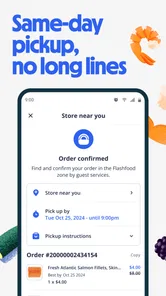
The app’s basic flow is easy to understand: set a location, browse participating stores, choose a deal, purchase through the app, and collect the items from the store. That clarity helps, but a smooth screen experience is only one part of a successful shop. I still need to account for travel, store hours, the time I can collect, and whether the item makes sense for the next few days. Those practical details determine whether a deal is convenient rather than merely attractive.
More From Our News Desk

Weather by Xiaomi Review: Clear at a Glance, Less Clear Up Close

X Under Pressure: Can It Recover When Posting Goes Wrong?

Clash of Clans Is Won Between the Battles

Android Auto Makes the Case for Quieter Car Software

MobiOffice: Transforming Mobile Productivity with Seamless Integration

EA SPORTS FC™ Mobile Soccer: Redefining Mobile Sports Gaming
For reliability, I would make the store visit part of a trip I already intend to take and check the listing before setting out. I would also keep a record of what I bought and when I expect to use it, especially if I am trying several reduced groceries in one week. This small habit helps avoid a common false economy: saving on the checkout while forgetting the food in the fridge.
There is a trade-off between spontaneity and certainty. Flashfood can make it easier to discover surplus items, but it is not the same as ordering a fixed basket of everything on a recipe list. If a particular ingredient is essential, a regular grocery shop is the safer choice. If I can switch dishes or use an item as a side, the changing selection becomes an opportunity instead of a disruption.
Who benefits, and when another option makes more sense
I think this app suits people who live or work near participating stores, have some flexibility in what they cook, and can collect purchases without adding much travel. It may be especially handy for someone who shops frequently enough to use fresh items promptly, or for a household willing to freeze suitable food when that is appropriate. The key is to judge each item on its own merits rather than treating every marked-down listing as a bargain.
It is less compelling if the nearest participating store is inconvenient, if transport makes small pickups costly, or if a carefully fixed meal plan leaves little room for substitutions. People who need to know exactly what they will buy for a particular dinner may prefer a conventional grocery list and a standard shop. Likewise, if I only want pantry staples or a specific brand, a broad search across ordinary grocery options may be more dependable than waiting for a surplus listing that happens to match.
Compared with browsing a supermarket’s regular promotions, Flashfood centers the experience on discounted surplus groceries and store pickup. A weekly flyer can be easier for planning predictable staples, while a general grocery delivery or pickup order is better when convenience and a complete basket matter more than finding opportunistic reductions. I see this app as an extra channel alongside those choices, not a universal substitute. Its strongest role is helping me make use of a suitable nearby offer when the timing works.
Device expectations and sensible habits
Flashfood is a free food-and-drink app from Flashfood Inc. It has a 4.2 average from around 25,000 ratings, with more than a million installs, and its content rating is Everyone. The release date is April 25, 2018, and the current version is 3.3.1, with Android 9 as the minimum operating system. Those details make it easier to judge whether the app is a fit for a device, but they do not guarantee that every store or offer will be equally useful in every location.
I would expect basic browsing and location-based discovery to be less demanding than a large game or a media-editing tool, though I would not infer exact speed or battery use from the app’s category. If a list seems slow to appear, I would first check the connection and location settings, then try again rather than repeatedly tapping purchase controls. Keeping the app current can also be a sensible troubleshooting step when an older installation behaves unexpectedly. The practical performance test is simple: can I find a relevant nearby listing and complete the steps without making the shopping trip more complicated?
For a busy shopping run, I would browse before leaving home or while planning the route, rather than standing in a store aisle trying to make a rushed decision. That gives me time to consider the item, the pickup stop, and how soon I can use it. If I am comparing several possible purchases, I would prioritize what already fits meals and storage space, not just the biggest-looking reduction. A modest saving on food I will eat is more useful than a dramatic discount on something I will forget.
Discovering Discounts in Unexpected Places
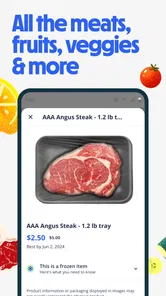
So, here’s the scoop. Flashfood is an app that partners with grocery stores to sell surplus food at a discounted rate. We're talking up to 50% off on items ranging from fresh produce to bakery goods. The app is designed to help reduce food waste while saving you some serious cash. Who said you can't do good while shopping?
How It Works
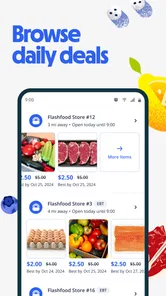
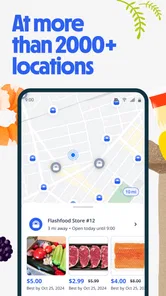
Using Flashfood is a breeze. You simply download the app, enter your location, and voilà, a list of participating stores pops up. From there, you can browse daily deals and snag whatever catches your eye. After purchasing through the app, you just swing by the store to pick up your items. Easy peasy, lemon squeezy!
Why I Love It
One of the things I genuinely appreciate about this app is its user-friendly interface. It’s intuitive, making navigation a piece of cake. Plus, the thrill of stumbling upon unexpected deals adds a sprinkle of excitement to my weekly grocery shopping. Not to mention, knowing that I’m contributing to reducing food waste makes each purchase feel like a win-win.
Some Handy Tips
- Check the app frequently, as inventory changes daily.
- Be quick to grab deals before they disappear.
- Plan your meals around the deals you find to maximize savings.
On a side note, it’s also a great way to experiment with new ingredients or try out items you wouldn’t normally buy at full price. Who knows, you might discover a new favorite snack or cooking ingredient!
The Bigger Picture
Beyond personal savings, Flashfood plays a part in a larger movement to tackle food waste. By supporting this app, you’re joining a community that values sustainability and smart consumption. It's about making small changes that collectively make a big difference.
All in all, Flashfood—Grocery deals is a game-changer for anyone looking to save money, reduce waste, and try something new. It's a small step towards a more sustainable lifestyle, and hey, who doesn't like saving a few bucks while they're at it?
Flashfood—Grocery deals Frequently Asked Questions
Does Flashfood show deals from nearby grocery stores?
Flashfood is designed around grocery deals offered by participating stores, so nearby offers are central to the experience. You can use the app to look for available items and check which store has them before deciding whether to buy. Offers depend on local participation and current stock, so the selection can vary. It is a practical option when you are open to shopping from the deals currently available around you.
Can I choose what groceries to buy, or are orders packed as a set?
The app lets you browse available deals and select the items you want to purchase, rather than requiring you to accept a fixed grocery box. That makes it easier to focus on food your household can use, while remembering that the choices depend on what participating stores have available. Review each offer before ordering, since the app is built around current grocery deals rather than a guaranteed assortment.
Is Flashfood suitable for someone who wants to reduce food waste?
Flashfood is intended to help grocery stores sell surplus food and give shoppers access to discounted groceries. Its offers can include items approaching their expiration date while still being suitable to consume, so it may appeal to people who want to make use of food that might otherwise go unsold. Check each product’s details and make sure you can use it in time; the app works best when a deal fits your plans.
Do I need to create an account before browsing Flashfood deals?
Flashfood is a shopping app for finding grocery offers and completing purchases, so you should expect to use an account or provide relevant details when you move from browsing to ordering. Getting set up can make it easier to review offers and manage a purchase, but it is worth checking the app’s prompts and permissions during setup. You can also decide whether the available deals and pickup locations suit you before placing an order.
Can Flashfood replace my regular grocery shopping?
Flashfood is better viewed as an additional way to find grocery deals than as a guaranteed replacement for a regular shopping trip. Its selection depends on participating stores and what they have available for quick sale, which means you may not find every item on your list. It can complement your usual routine when a nearby offer suits your needs and you can collect it in person.
Pros
- Saves money on groceries.
- Reduces food waste effectively.
- User-friendly interface.
- Real-time inventory updates.
- Wide variety of food items.
Cons
- Limited store locations.
- Deals may vary daily.
- Short shelf life items.
- Requires frequent app checks.
- Not available in all regions.











