First Watch
- 598.00
- 4.8
- Installs
- 500.00K
- Price
- Free

Screenshots
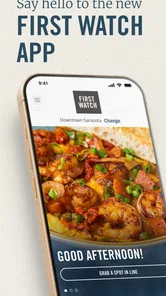

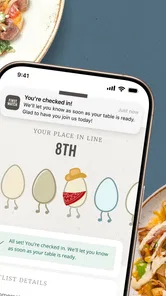

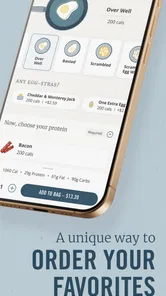
Analysis by Reviewed
When I want breakfast from First Watch without spending extra time waiting to order, the First Watch app gives me a practical shortcut. It is a free Food & Drink app from First Watch Restaurant Group, Inc., built around ordering ahead, repeating familiar choices, and using app-focused conveniences. I found its value less in flashy extras and more in how it can remove a small but annoying step from a busy morning.
That usefulness depends heavily on your local First Watch routine. If you already visit the restaurant, the app can make repeat orders easier to manage. If you rarely eat there, its narrow focus may not justify space on your phone. After using it as a customer-facing ordering tool, I see it as a focused companion rather than a general food-delivery service.
How First Watch feels during a normal breakfast run
I find the trust question here less about broad promises and more about how carefully I handle an order that may include several people’s breakfast choices. In this section, I’ll look at the practical checks I use before sending anything, then turn to the points where a little extra attention matters most.
Speed expectations before you leave home
The main appeal is planning before arriving. Instead of deciding at the counter while other people wait behind me, I can look through the menu, make choices at my own pace, and submit an order for pickup. That changes the rhythm of a rushed morning: the app moves the decision-making away from the restaurant and gives me a little more control over when I place the order.
I would not describe this as a magic solution for every delay. An app can make ordering faster, but the meal still has to be prepared by the restaurant. The useful distinction is that it can reduce ordering friction, not guarantee that breakfast will be ready instantly. I keep that in mind when planning around a meeting, school drop-off, or a limited lunch break.
The interface is most helpful when I already know what I want. Browsing is convenient enough for comparing familiar breakfast choices, but a large menu still requires attention. I prefer using it when I have a few minutes to review the order rather than trying to make complicated decisions while walking between errands.
The best speed advantage is decision speed, not a promise of instant food. That makes the app especially useful for repeat customers who can move through the same order without starting from scratch every time. It is less compelling if I am still exploring the menu or need extensive help choosing.
More From Our News Desk

Weather by Xiaomi Review: Clear at a Glance, Less Clear Up Close

X Under Pressure: Can It Recover When Posting Goes Wrong?

Clash of Clans Is Won Between the Battles

Android Auto Makes the Case for Quieter Car Software

MobiOffice: Transforming Mobile Productivity with Seamless Integration

EA SPORTS FC™ Mobile Soccer: Redefining Mobile Sports Gaming
A realistic everyday use case
Imagine a Saturday morning when I am meeting someone at First Watch and do not want the first part of the visit consumed by ordering. I can open the app before leaving, choose the restaurant workflow available to me, check the order carefully, and arrive with a clearer plan. If I am ordering the same meal I enjoyed previously, the process feels especially sensible because I am not rebuilding every choice from memory.
For a workday, the benefit is even more straightforward. I can place the order before heading out, use the app as a reminder of what I selected, and avoid making a rushed decision at the restaurant. I still allow extra time for preparation and travel. That small adjustment prevents the common mistake of treating mobile ordering as a guaranteed schedule.
What happens when the app gets heavy use
The more useful test is not one casual order but repeated use. A family breakfast, several customized meals, or a busy weekend order puts more pressure on the review stage. I pay close attention to every item, option, and quantity before confirming, because convenience can make it easy to move too quickly and overlook a detail.
For group orders, the app can simplify collecting choices in one place, but it also makes the person placing the order responsible for accuracy. I would rather ask each person to confirm their meal before submitting than assume everyone remembers what was discussed. This is a small workflow improvement, yet it matters when different people want different modifications.
Reordering is where the app makes the strongest case for itself. A returning customer does not need the same amount of browsing as a first-time visitor. I can use a previous favorite as a starting point, then review it instead of treating it as an automatic duplicate. That review step is important because preferences, companions, or the intended restaurant may have changed.
During a particularly busy breakfast period, I would avoid placing a last-second order with no buffer. The app may make the request easy to send, but a crowded restaurant can still affect preparation and pickup. My practical approach is to order earlier than the absolute latest possible moment and keep the confirmation details available until I have collected the meal.
Reliability and recovery when plans change
Reliability is not only about whether an app opens. It also includes whether I can recover gracefully from a mistake, a changed plan, or an uncertain order status. First Watch feels most dependable when I treat it as part of a simple routine: select the location carefully, review the order, submit it with time to spare, and keep the result visible until pickup.
That routine matters because breakfast orders are time-sensitive. If I accidentally choose the wrong location or place an order too late, the convenience disappears quickly. I therefore check the restaurant information before finalizing rather than relying on a rushed tap through the last screen. This is one of those habits that prevents more trouble than any single interface feature can solve.
Recovery also means knowing when not to keep tapping. If a screen takes longer than expected or I am unsure whether an action went through, repeatedly submitting the same order could create confusion. I prefer pausing, checking the current order state, and confirming what has already been sent before trying again. That is sensible behavior for any ordering app, but it is particularly important when the same breakfast could be duplicated.
I also keep expectations realistic about restaurant-side changes. An app can transmit a request, but it cannot personally resolve every substitution, preparation question, or pickup issue. If something about the meal is important enough to require a conversation, speaking with the restaurant may be better than trying to force the issue through the app. The app is strongest for clear, standard orders; human help remains valuable for unusual situations.
Device age, storage, and everyday constraints
The current version is 5.5.0, and the minimum operating system is Android 7.1. That makes the app accessible to people who are not using the newest phone, which is useful for anyone keeping an older device as a daily handset. Still, compatibility on paper does not make every older phone feel equally quick. A dated device may open screens more slowly or have less room for other tasks running at the same time.
Because this is a focused restaurant app, I would not expect it to be a major resource burden compared with a large social, video, or delivery platform. Even so, storage and system health can affect the experience. A phone with very little free space, an overloaded browser-like environment, or an outdated operating system may make any ordering workflow feel less responsive. Keeping the device reasonably maintained is more useful than blaming the app for every pause.
For someone with limited mobile data, I would prepare the order while connected to reliable Wi-Fi when possible, especially if I am browsing slowly or reviewing a larger group order. The app is not something I would open casually for entertainment; I use it when I have a specific breakfast task. That focused behavior naturally limits unnecessary battery and data use.
The Everyone content rating also makes the app suitable for a broad household audience. A parent could use it to organize a family order, while a teenager or older relative who already knows the restaurant may find the basic workflow approachable. The more important constraint is not age but comfort with mobile ordering and the ability to check details before submitting.
Where it beats the usual alternatives
The most obvious alternative is ordering in person. That remains better when I need to ask questions, discuss unusual requests, or decide only after seeing the menu. It also avoids depending on my phone at the exact moment I want breakfast. In contrast, First Watch is more convenient when I know the meal and want to reduce time spent standing at the counter.
Another alternative is a general delivery platform. Those services can be useful when I want to compare restaurants or arrange delivery from several places, but they add a broader layer around the order. For a direct First Watch pickup routine, the restaurant’s own app feels more focused. I am not searching through unrelated listings; I am going straight to the brand I already chose.
That focus is also the limitation. A general platform may be better for discovering new restaurants, comparing fees, or coordinating an order across a wider selection. First Watch is not trying to replace that kind of marketplace. I would choose it when the destination is already decided, not when I am still asking what to eat.
Calling the restaurant can be preferable for a complicated situation. A phone conversation offers immediate clarification, while the app is better for repeatable, clearly defined orders. My choice depends on the order itself: standard breakfast and pickup favor the app; unusual details or uncertainty favor direct contact.
Small workflow improvements that make a difference
My first tip is to separate browsing from submitting. I look through the menu once, make a mental or written note of what everyone wants, and only then build the final order. This reduces the chance of accidentally rushing through choices because another person is waiting for me to finish.
My second tip is to treat a reorder as a draft, not a guarantee. A previous order is a useful shortcut, but I still verify the restaurant, quantity, and every meaningful option. That habit preserves the time-saving benefit without turning convenience into an avoidable mistake.
My third tip is to build in a pickup cushion. If breakfast is connected to a train, appointment, or work shift, I do not plan to arrive at the exact minute I need to leave. Preparation time can vary with demand, and a mobile order should be part of the plan rather than the entire plan.
My fourth tip is to use the confirmation as the reference point for the handoff. I keep the order information accessible until the meal is collected, particularly when I am handling several meals. That makes it easier to check what I requested instead of relying on memory during a busy pickup.
Who should use it, and who should skip it
I recommend First Watch to regular customers, people who frequently pick up breakfast, and anyone who dislikes making menu decisions at the counter. It is also a good fit for households that repeat favorite orders but still want to review them before sending. The free price removes the main barrier to trying it, so an existing First Watch customer has little reason not to test the workflow.
I would be more cautious if you visit only once, prefer full-service conversation, or need a broad restaurant search tool. Installing a dedicated app for a single occasional meal may feel unnecessary when ordering in person is just as easy. Likewise, someone who often changes plans at the last minute should not rely on mobile ordering without checking the order status and timing carefully.
People using older phones should find the minimum operating-system requirement reassuring, but they should judge the experience on their own device. If the phone is already slow or nearly full, the app may not feel as immediate as it does on a healthier device. That is not a reason to reject it automatically; it is a reason to test it before depending on it for a tightly timed morning.
Popularity, publisher, and overall confidence
The app has an average rating of 4.8 from around 3.2 thousand ratings, with 595 written reviews and over 500 thousand installs. Those figures suggest that it has reached a meaningful audience and that many users find the restaurant-specific approach worthwhile. I still read that popularity as context rather than a guarantee, because the practical experience depends on how often you visit First Watch and how smoothly your local ordering routine works.
It is published by First Watch Restaurant Group, Inc., which gives the app a clear connection to the restaurant brand rather than making it an unrelated ordering layer. That direct connection is one of its strengths: the app makes sense when I want First Watch and little else. It also explains why its usefulness is narrower than that of a general food marketplace.
My performance verdict after regular-style use
In performance terms, I see First Watch as a focused tool with a sensible workload. Its perceived speed comes from shortening the ordering process and moving decisions away from the counter, while its real-world responsiveness still depends on the phone, connection, and restaurant timing. I would not judge it solely by how quickly a screen appears; the complete experience includes choosing correctly, recovering from uncertainty, and collecting the order without rushing.
Stability matters most during repeated use and busy moments. My advice is to keep orders simple when time is tight, review every reorder, and leave a buffer before pickup. Those steps make the app feel more dependable because they account for the parts of the process an app cannot control.
First Watch is free, rated for Everyone, and was released on May 23, 2017, so it is an established option rather than a brand-new experiment. For me, the deciding question is simple: do I regularly choose this restaurant and value a quicker, more organized ordering routine? If yes, I would install it. If I want restaurant discovery, complex personal assistance, or the flexibility of a broad delivery marketplace, I would choose a different option or order directly.
My final view is positive but specific. First Watch earns its place when repeat breakfast orders matter more than restaurant discovery. It does not eliminate preparation time or replace human help for every unusual request, yet it can make an ordinary pickup noticeably easier. Used with a little planning, it is a practical companion for regular First Watch customers rather than an app everyone needs.
First Watch Frequently Asked Questions
Can I use First Watch to skip the line?
First Watch promotes the app as a way to skip the line, making it useful if you want to make a restaurant visit more convenient. The options you see can depend on the location you choose, so check the app for available features before heading out. For the smoothest experience, select your restaurant and review its current details in the app.
Is First Watch free to download, and what devices can run it?
First Watch is free to download and is intended for Android and iPhone users. The app is rated for Everyone, and its current version is 5.5.0, with a minimum operating-system requirement of 7.1. Check that your device meets the relevant requirements and download from the official app store so you get the legitimate app from First Watch Restaurant Group, Inc.
What is First Watch, and what can I do with the app?
First Watch is the official mobile app for the First Watch restaurant chain, designed to make planning and enjoying a visit more convenient. Depending on your location, you can browse the breakfast and brunch menu, view restaurant details, join a waitlist, make or manage reservations where available, and find the nearest participating location. The exact features may vary by restaurant and region.
Can I order First Watch food for pickup or delivery through the app?
The app may provide access to ordering options, but availability depends on your selected First Watch location and local service partners. Some restaurants support pickup, while delivery may be handled through a third-party platform rather than directly inside the app. Before relying on the feature, choose your restaurant and check the available ordering methods, estimated preparation times, fees, and operating hours.
Does First Watch require an account to use its main features?
You can generally use basic features such as browsing the menu, searching for restaurants, and viewing location information without creating an account. However, an account may be required or recommended for features such as saving favorite locations, managing personal details, tracking rewards, or keeping order information. Registration requirements can differ depending on the app version, location, and services enabled in your area.
Pros
- Easy access to live TV and on-demand content in one app.
- Supports multiple devices for watching at home or on the go.
- Clear menus make finding channels and shows straightforward.
- Useful option for users who already subscribe to First Watch services.
- Regular content updates help keep the viewing library fresh.
Cons
- Some features may require an active First Watch subscription.
- Video quality can depend heavily on your internet connection.
- The app may use significant mobile data when streaming over cellular networks.
- Availability of shows and channels can vary by location.
- Occasional playback issues may occur on older devices.











