

Fantasy AI: RP & Companions
- 458.00
- 4.6
- Installs
- 100.00K
- Price
- Free

Screenshots


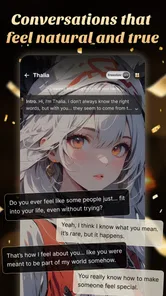


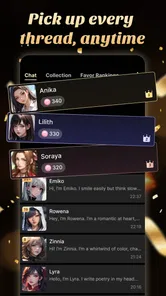

Analysis by Reviewed
I went into Fantasy AI: RP & Companions expecting a light entertainment app and found something closer to a personal playground for AI conversations, character ideas, and fantasy artwork. It is built around roleplay chat and creative world-building rather than ordinary messaging, so the quality of the experience depends heavily on how clearly you describe the kind of companion or setting you want. When the setup is thoughtful, it can be surprisingly absorbing. When the prompt is vague, the result can feel generic very quickly.
That distinction matters because this is not an app I would recommend simply because you enjoy chatting with an AI. Its appeal is more specific: you need to like inventing characters, testing different tones, and guiding a conversation that may wander. I reviewed it as an entertainment app from LYRASOFT, and my overall impression is that it works best when treated as a creative activity rather than as a replacement for a normal social network or a conventional story game.
Getting past the first setup hurdles
The first place many users are likely to get stuck is deciding what to create. “Fantasy AI” sounds broad, and the app’s focus on unique companions and worlds gives you plenty of room, but that freedom can also make the opening feel less directed than a traditional game. If you arrive without a character concept, the experience may not immediately show its best side. I had better results when I started with a simple role, a clear personality, and one situation that could produce a natural reply.
A useful starting prompt is not a long biography. I would describe the companion’s role, attitude, relationship to me, and the immediate setting. For example, a cautious mapmaker meeting me at a ruined observatory gives the conversation a reason to begin. Adding one or two boundaries for the tone helps too. A character who is “witty but reluctant to trust strangers” is easier to interact with than one described with a page of disconnected traits.
The same principle applies to art. If you want a particular visual result, identify the subject, mood, environment, and important visual details instead of relying on a single broad phrase. I found that creative tools like this are more enjoyable when I treat the first result as a draft. The point is not always to get the perfect image or personality immediately; it is to refine the idea until the character feels distinct.
Before blaming the app for a disappointing response, I would check whether the initial request contains a usable direction. A vague instruction can produce a vague companion, while a tightly controlled instruction can make the interaction feel less spontaneous. The best balance is to establish the essentials and leave enough space for the AI to surprise you.
There is also an important age consideration before you begin. The app carries a Mature 17+ content rating, so it is not something I would hand to a younger user or install casually on a shared family device without considering who may open it. That rating should shape expectations: this is aimed at mature audiences, and parents looking for a general-audience creative app should choose something else.
More From Our News Desk

 Gmail
GmailGmail in a Busy Inbox: Who Benefits Most?
From first account to crowded workday, Gmail earns its place through dependable search and flexible sorting—but its best fit depends on how much inbox maintenance you can tolerate.

 Prime Video
Switching to Prime Video: What Changes in Your Viewing Routine
Prime Video can make a compelling second home for streaming, but switching means learning a different catalog, rental layer, and route from browsing to playback.

 Universal TV Remote Control
Universal TV Remote Control Works Best as a Reliable Backup
A phone remote earns its place through quick setup and reliable habits. Here is how to get more from Universal TV Remote Control—and where its limits show.

 Weather - By Xiaomi
Weather by Xiaomi Review: Clear at a Glance, Less Clear Up Close
Xiaomi’s weather app makes everyday forecasts quick to scan, but its calm surface can leave useful details and recovery paths harder to find than they should be.

 X
XX Under Pressure: Can It Recover When Posting Goes Wrong?
A resilience-focused review of X, examining setup, mistaken posts, interruptions, weak connections, and the gaps that matter when recovery needs to be dependable.

 Clash of Clans
Clash of Clans Is Won Between the Battles
Its raids are quick; its community is a long-term project of coordination, teaching, rivalry, and shared responsibility—with all the friction that entails.
Latest News



Small checks that prevent avoidable frustration
Fantasy AI: RP & Companions is free to install, which makes trying it straightforward, but in-app purchases range from $3.49 to $59.99 per item. I would not start by purchasing anything. First, spend enough time learning how the characters respond, how much prompting you personally need, and whether the art side is important to you. A free starting point is useful for judging fit; it does not automatically mean every desired option will remain free.
On Android, the app requires Android 7.0 or later. That is a relatively broad compatibility range, but I would still check the operating system before troubleshooting installation. If the app will not install or update, the first checks should be available storage, a stable connection, and whether the device is running a supported version. These are basic steps, but they distinguish an installation problem from a problem inside the app.
The current version is 2.5.3, and keeping the installed build current is a sensible first step when something behaves unexpectedly. I would also close and reopen the app after an update rather than assuming an interrupted session has recovered perfectly. If a conversation or creative task appears stuck, restarting the session can be more useful than repeatedly tapping the same control.
Account and device context can matter as well. If you use the app on more than one device, make sure you are entering the same account context before assuming that a character or conversation has disappeared. I would avoid deleting the app as an early troubleshooting move, especially if you have created something you care about and are not sure how it is retained. Reinstallation is a last resort, not a routine refresh.
These checks sound ordinary, but they are particularly important in an AI entertainment app because several parts of the experience depend on a live connection and on the app receiving your request correctly. A delayed reply, a partial generation, and a failed launch can look similar from the user’s side even though the causes are different.
How I recover a conversation that loses its direction
The most useful recovery technique I found was to summarize the scene instead of continuing to send increasingly complicated prompts. If the companion forgets the immediate objective, I would write a short reset such as: “We are still in the observatory, you are hiding the map, and I am asking why.” That gives the conversation a clean anchor without demanding that the app reconstruct every earlier detail.
For longer roleplay, I recommend keeping a small private note with the character’s name, motivation, important relationships, and current location. This is not glamorous, but it makes recovery much easier when a session drifts. It also lets you start a new direction without rewriting the entire concept. The note becomes a compact creative brief that you can adapt as the story changes.
Another practical trick is to separate scene instructions from dialogue. I use one paragraph for what is happening and another for the desired response style. That reduces ambiguity and makes it easier to correct the tone. If the character becomes too formal, too agreeable, or too dramatic, I would adjust one trait at a time rather than replacing the entire prompt. Small changes reveal which instruction is actually affecting the result.
When an image does not match the companion, I would avoid changing every detail at once. Keep the character’s core identity and alter the setting, mood, or composition separately. This gives you a clearer sense of what is helping. It also prevents the common problem of ending up with an attractive but inconsistent character who no longer resembles the one you were roleplaying with.
There is a trade-off between control and discovery here. Repeating the same correction can make the experience feel like editing a form, while accepting every unexpected turn can make the story lose its identity. I found the app most enjoyable when I used a few fixed anchors and allowed the conversation to improvise around them.
When the app may not actually be the problem
AI roleplay can feel inconsistent even when the app is working normally. A companion may interpret a sentence differently from what you intended, especially when the prompt mixes backstory, instructions, dialogue, and several emotional cues. Before deciding that the system is failing, I would simplify the request and test one clear action. If the response improves, the issue was probably ambiguity rather than a broken feature.
Connection quality is another likely source of confusion. If a reply takes longer than expected, a generated result appears incomplete, or the interface seems unresponsive, I would first check whether other apps are also having trouble online. Switching between a weak mobile connection and a stable Wi-Fi connection can help identify whether the delay is local. I would not repeatedly submit the same request during a delay, because that can make it harder to tell which request eventually completed.
Device performance can also affect the experience. Older phones may handle an entertainment app less comfortably when several demanding tasks are open, especially if storage is nearly full. Closing unused apps and restarting the device are reasonable general checks. If only one particular conversation behaves strangely while other parts of the app work, I would treat it as a session-specific issue and try a fresh, simpler interaction before changing the whole installation.
It is also worth remembering that the app is not a conventional roleplaying game with a fixed campaign that guarantees the same plot structure for everyone. If you want authored levels, reliable rules, inventory systems, or a clearly defined ending, a story game will probably be more satisfying. This app is better suited to open-ended experimentation, where the user supplies much of the direction and judges whether the resulting exchange is entertaining.
Privacy and personal boundaries deserve common sense too. I would avoid placing sensitive personal information into a fictional conversation simply because the companion feels friendly. The mature rating does not turn an AI character into a trusted confidant, and I would keep real passwords, private documents, financial details, and identifying information out of creative prompts.
Who will get the most from the creative workflow
I can see this app working well for someone who enjoys writing but does not always want to begin with a blank page. A companion can provide a conversational starting point, while the world-building angle gives the user a reason to keep developing the idea. It is also useful for testing character chemistry: before writing a longer story, you can see whether two personalities produce interesting tension or simply repeat the same type of exchange.
For a practical everyday scenario, imagine having twenty minutes after work and wanting a creative break without committing to a full game or opening a document. I would create a traveler with one unresolved problem, place them in a visually distinctive location, and use the chat to explore the first decision. If the exchange becomes interesting, the resulting scene can inspire a short story, illustration, or roleplaying session elsewhere. If it does not, the time investment remains small.
It can also suit people who like visual prompts but do not want to learn a full digital art workflow. The art side gives a character or setting a more concrete identity, while the conversation helps decide what that identity should be. The strongest use is not treating the image as a final professional asset; it is using it to make an imagined world easier to picture and continue.
I would be more cautious recommending it to someone who wants dependable factual answers, emotionally reliable support, or a structured game with measurable progress. AI companions can be entertaining, but their confidence and warmth should not be confused with human understanding. Likewise, users who dislike rewriting prompts or correcting a drifting scene may find the open-ended design tiring rather than liberating.
The mature audience is another dividing line. Families seeking safe shared entertainment should look toward an app with a younger content rating. Readers who mainly want to watch shows, browse short videos, or play a traditional fantasy adventure will probably find their usual alternatives more direct. The value here comes from participation: you shape the character, the world, and the direction.
How it compares with ordinary entertainment choices
Compared with a standard chat app, this experience is more imaginative but less socially grounded. You are not waiting for a friend’s authentic response; you are guiding an artificial character designed for a scenario. That makes it easier to explore unusual fantasy ideas without coordinating with anyone, but it also means the emotional exchange can feel constructed when the replies become repetitive or too agreeable.
Compared with a conventional story game, it offers more freedom and less certainty. A fixed game usually gives you authored dialogue, consistent rules, and a known progression. Fantasy AI: RP & Companions instead asks you to create the momentum. I prefer the app when I want to improvise a scene or test a character. I would choose a traditional game when I want polished pacing, strategic systems, or a story that remains coherent without constant user guidance.
Compared with a dedicated art generator, the companion element gives the visual work a narrative reason to exist. You are not only asking for an image; you can build a personality and setting around it. The trade-off is that users seeking precise artistic control may prefer a specialized tool with a deeper editing workflow. This app’s strength is the connection between conversation, fantasy identity, and visual imagination, not necessarily professional production control.
The free entry point lowers the risk of trying that workflow, while the purchase range means I would pay only after identifying a specific recurring need. Someone who uses the app occasionally for inspiration may find the free experience sufficient. A frequent roleplayer or art-focused user should think about spending carefully and decide whether the extra convenience genuinely improves their routine rather than buying simply because a generation feels imperfect.
My practical verdict after using it
Fantasy AI: RP & Companions has a clear personality as an entertainment app: it is a flexible space for AI roleplay, companion creation, and fantasy art. LYRASOFT has aimed it at people who want to participate in the fiction instead of consuming a finished story. The average rating is 4.6 from around 5.7 thousand ratings, and the app has passed 100 thousand installs, which suggests that this format has found an audience, though those figures alone cannot tell you whether its open-ended style matches your preferences.
My recommendation is to begin with one compact character concept, one setting, and one immediate conflict. Spend time learning how to steer the conversation before considering purchases. If a scene wanders, reset it with a short summary; if the art misses the mark, change one visual element at a time; if the app appears stuck, check the connection and restart before assuming your project is lost. Those habits make a noticeable difference to the experience.
The app is at its best when you treat it as a collaborative sketchbook for fantasy ideas, not as an always-correct companion or a complete game. I would recommend it to mature users who enjoy improvisation, character design, and visual world-building. I would skip it if I wanted a fixed campaign, a family-friendly environment, professional art controls, or dependable human conversation. For the right person, however, it offers an easy way to turn a spare moment into a small, interactive story.
Fantasy AI: RP & Companions Frequently Asked Questions
What age is Fantasy AI: RP & Companions intended for?
Fantasy AI: RP & Companions is rated Mature 17+, so it is intended for adult users rather than children. That matters for a role-play app, where conversations may explore mature themes and AI-generated replies can vary in tone. Before installing, consider whether the app is appropriate for everyone who uses your device, and use any available content controls thoughtfully.
What is Fantasy AI: RP & Companions?
Fantasy AI: RP & Companions is an artificial-intelligence chat app focused on role-playing and virtual relationships. It lets you interact with fictional characters or customized AI companions through text conversations, usually with personalities, backgrounds, and scenarios designed for entertainment. The experience is intended to feel immersive and spontaneous, although responses are generated by AI and may occasionally be repetitive, inaccurate, or inconsistent with the character’s profile.
Can I create or customize an AI companion in Fantasy AI?
The app is designed around personalized role-play, so users can generally choose from available characters and adjust conversations according to their preferred scenario, tone, or relationship dynamic. Depending on the current version, customization options may include a character’s name, personality, appearance, interests, and backstory. Before downloading, remember that some advanced creation tools, character access, or conversation features may require an account or paid credits.
Is Fantasy AI: RP & Companions free to use?
Fantasy AI: RP & Companions is free to download, but free access does not necessarily include unlimited conversations or every character and feature. The app offers in-app purchases ranging from $3.49 to $59.99 per item, and longer chats or premium content may involve additional costs. Check the payment screens carefully, especially if children or other users share your device.
Is Fantasy AI: RP & Companions safe and private?
Because conversations are sent to an AI service, you should treat chats as potentially sensitive information rather than a completely private diary. Avoid sharing passwords, financial details, real-world addresses, or identifying personal data with any virtual companion. Review the app’s privacy policy, permissions, account settings, content controls, and data-retention practices. AI characters can also produce mature, disturbing, or inappropriate replies, so supervision and age restrictions are important.
Pros
- Wide range of fantasy characters and roleplay scenarios
- Customizable conversations help create a more personal experience
- Useful for creative writing
- storytelling
- and idea generation
- Available for casual chats without requiring advanced setup
- Regular interactions can feel engaging and immersive
Cons
- Some features may require a paid subscription or in-app purchases
- AI responses can occasionally be repetitive or inconsistent
- Conversations may lose context during longer roleplay sessions
- Romantic or mature themes may not suit younger users
- An internet connection is generally needed for uninterrupted chats











