

Fandango: Movies & Series
- 45.60K
- 4.4
- Installs
- 10.00M
- Price
- Free

Screenshots
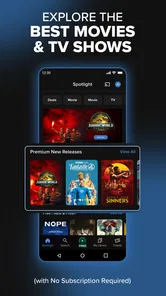
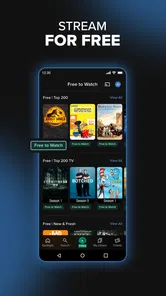
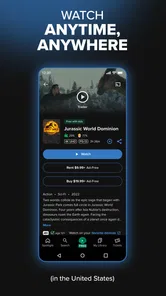
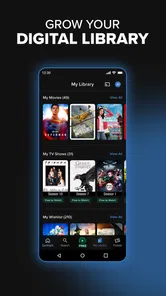
Analysis by Reviewed
When I try a movie app for the first time, I want to know one thing quickly: can I find something worth watching and understand how to play it without turning the evening into a setup project? Fandango at Home is built around films and TV, with a focus on renting or buying titles rather than simply browsing a subscription catalogue. That makes it useful when I have a particular release in mind, but it also means I check the cost of a title before settling on it.
What to expect from a movie-first app
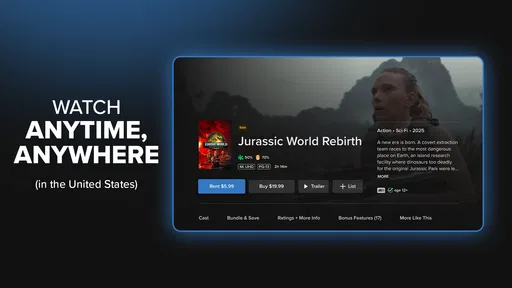
Fandango at Home is a free entertainment app from Fandango at Home, though “free” describes getting the app, not every film inside it. Individual purchases can reach $99.99 per item, so I treat the title page as part of the decision: check whether I’m looking at a rental or a purchase and what the displayed terms are before confirming. The app is rated Teen, has an average rating of 4.5 from around 211,000 ratings, and has been installed over 10 million times. It has been around since December 19, 2012, and its familiar identity as the service previously known as Vudu helps explain why some people may recognize the older name.
For a first-time user, the practical distinction is between this kind of digital storefront and a subscription service. A subscription can be simpler if I want to browse whatever is included for one recurring fee. Here, the appeal is choosing a specific title without needing to judge it by whether it happens to be in a rotating catalogue. The trade-off is that separate rentals and purchases can add up, especially if I browse casually and make quick decisions.
Your Personal Box Office
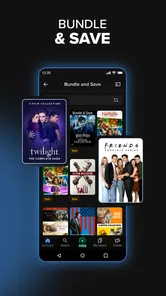
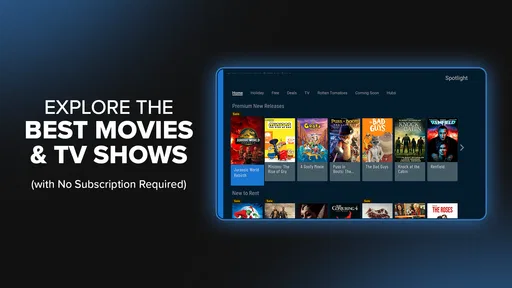
First off, let's talk about what Fandango at Home brings to the table. This app is basically your personal box office where you can buy or rent the latest movies right from your phone. And I mean, who doesn’t love skipping the queues and watching the latest flicks from the comfort of their couch? With a wide range of genres and an ever-updating library, it’s hard not to find something that piques your interest.
Getting from install to first watch
I’d start by opening the app with a title or a rough idea of the night’s mood in mind, then use search or browse to narrow the choices. Before I commit, I check the listing carefully so I know whether I’m renting or buying and can compare the available option with what I actually want. That small pause is more useful than scrolling through pages of covers: it keeps a spontaneous choice from becoming an accidental purchase. Once I’ve made the selection, the first meaningful success is simple—getting the film playing on the device I plan to use.
A realistic use case is a weeknight when friends are coming over and nobody wants to spend half an hour deciding. I can each suggest a title, compare the choices in the app, and settle on one before the snacks are ready. For a planned family film night, I’d make the selection earlier rather than leave payment and title checking until everyone is waiting. The app works best when I arrive with an idea of what I want, rather than expecting it to solve every part of choosing for me.
User Experience
Getting around the app is a breeze. The interface is sleek and intuitive, making it super easy to navigate. Whether you’re tech-savvy or not, you’ll find it straightforward to search, select, and start watching your chosen movie. Plus, the streaming quality is top-notch. I’ve never had to deal with annoying buffering, and the picture quality is crystal clear.
More From Our News Desk

 Gmail
Gmail in a Busy Inbox: Who Benefits Most?
From first account to crowded workday, Gmail earns its place through dependable search and flexible sorting—but its best fit depends on how much inbox maintenance you can tolerate.

 Prime Video
Switching to Prime Video: What Changes in Your Viewing Routine
Prime Video can make a compelling second home for streaming, but switching means learning a different catalog, rental layer, and route from browsing to playback.

 Universal TV Remote Control
 Works Best as a Reliable Backup
A phone remote earns its place through quick setup and reliable habits. Here is how to get more from Universal TV Remote Control—and where its limits show.

 Weather - By Xiaomi
Weather by Xiaomi Review: Clear at a Glance, Less Clear Up Close
Xiaomi’s weather app makes everyday forecasts quick to scan, but its calm surface can leave useful details and recovery paths harder to find than they should be.

 X
X Under Pressure: Can It Recover When Posting Goes Wrong?
A resilience-focused review of X, examining setup, mistaken posts, interruptions, weak connections, and the gaps that matter when recovery needs to be dependable.

 Clash of Clans
 Is Won Between the Battles
Its raids are quick; its community is a long-term project of coordination, teaching, rivalry, and shared responsibility—with all the friction that entails.
Latest News



For the smoothest first session, I’d make sure the phone is on a reliable connection and decide in advance whether I want to watch on the phone or another supported screen. A small screen is handy for a quick solo watch, but it is not how I’d choose to share a feature-length film with a group. If playback doesn’t begin as expected, I’d first recheck that I selected the intended title and playback option, then check the connection before restarting the app. Those basic checks can prevent a minor hiccup from feeling like a bigger problem.
Choosing without overspending
The storefront approach makes the app especially handy for someone who follows a particular release or wants to pick one film for a specific evening. It is less compelling for viewers who watch something new every night and prefer not to make a separate decision about each title’s cost. I’d also skip it as my main option if my priority is a large all-you-can-watch subscription library; a subscription service may suit that habit better. The best fit is a viewer who values control over the exact title and is comfortable reviewing the terms before pressing buy or rent.
One practical habit is to use a watchlist, if available, as a shortlist rather than a promise to watch everything saved there. I can collect a few possibilities during the week, then make the final choice when I’m ready to watch and compare the options on offer. This separates browsing from spending and makes it easier to avoid impulse decisions. If I’m choosing for someone else, I’d also check the age suitability of the specific film: the app’s Teen rating is not a guarantee that every title is right for every child.
Features Galore
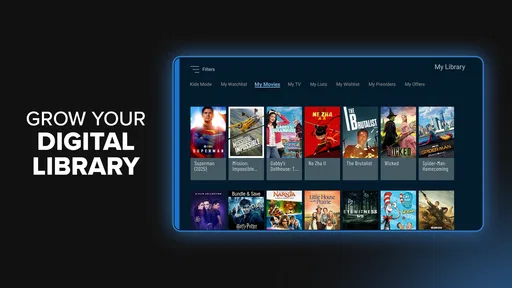
Now, let's dive into the features. One of my favorites is the personalized movie recommendations based on your viewing history. It’s like having a friend who just "gets" your taste in films. Also, there's an option to create a watchlist, so you can queue up movies you’re eyeing for later. And if you're a family person, you’ll appreciate the parental controls that ensure the little ones are watching age-appropriate content.
Recommendations are most useful to me as a way to discover a possibility, not as a replacement for checking the details of a title. Viewing history can help surface films that resemble what I’ve watched, but a recommendation still needs to fit the mood, budget, and people watching tonight. A watchlist is particularly useful for that distinction: I can save an idea without having to decide immediately. For family use, I’d set parental controls before handing over the device, then still check the individual film rating rather than assuming one control setting answers every viewing question.
Another cool feature is the behind-the-scenes content. If you’re someone who loves to know more about how movies are made, the interviews and extras available are a real treat. It’s like having access to bonus content that you’d typically find on DVDs.
Making the first choice easier
If I were helping a friend use the app for the first time, I’d suggest starting with one specific title rather than trying to understand every section at once. Search for the film, open its details, and pause long enough to distinguish the viewing option from the title itself. A familiar movie is a useful first test because you already know what you intend to watch; that makes it easier to notice whether the selection and playback steps make sense without also weighing an unfamiliar story.
There is a small but useful planning distinction here: save possible titles when you are browsing, but make the final rental or purchase decision when you are ready to watch. That keeps a recommendation or attractive cover from becoming a commitment by momentum. If the evening is still several days away, I would revisit the title before deciding rather than assume the option or terms I saw while browsing will be the ones I want later.
Where it fits—and where it doesn’t
Compared with a general streaming subscription, Fandango at Home feels more like a place to choose a particular film than an open-ended channel to leave running. That difference is valuable when I already know what I want, and less convenient when I want endless low-effort browsing. Compared with keeping a film collection on disc, digital access is easier to manage from a phone, while a physical collection can be preferable to someone who values owning a shelf copy or watching without relying on an app. I see this service as a complement to subscriptions, not an automatic replacement for them.
It is also worth separating the app’s useful extras from the central job. Behind-the-scenes material can make a movie night more rewarding for someone who likes production details, while recommendations and saved titles help with planning. But none of those removes the need to check the title’s terms or decide whether a one-off payment makes sense. My own rule is straightforward: use the app when a specific film is the point of the evening; use a subscription when the point is simply to browse and see what catches my eye.
Who will get the most from it
I’d recommend it most to people who sometimes have a particular new release, older favorite, or hard-to-find choice in mind and would rather select that title directly than wait for it to appear in a subscription catalogue. It can also suit households that already use subscription services but want another route for a specific movie night. The key is to treat each title as its own decision, not to assume that installing a free app means the viewing itself is included.
On the other hand, I wouldn’t make it my first choice for someone who wants a single predictable monthly cost and a large pool of included viewing. It is also less suited to a viewer who likes to start browsing with no plan and regularly watches whatever looks interesting. In that situation, the separate cost attached to titles may interrupt the relaxed, channel-surfing feeling that a subscription catalogue is designed to offer. There is no need to choose only one kind of service: the better option depends on whether tonight’s goal is a specific film or open-ended discovery.
Questions worth settling before movie night
Does downloading the app mean I can watch every title for free? No: I think of the app as free to get, while individual films may involve a rental or purchase. Before confirming, I would check the option shown for that title and make sure it matches what I intend to do. The listed in-app purchase amount can reach $99.99 per item, so I would never treat a quick tap as a trivial step; reading the displayed terms is sensible, especially when choosing a title for someone else.
Can I use it for a family viewing session? The app has family-oriented controls, but I would still check the rating and suitability of the individual film. The Teen age rating applies to the app, not as a blanket judgment on everything available to watch. For a shared evening, I’d choose the film first, review who will be watching, and set controls before passing a device to a younger viewer.
Is it better than a subscription app? Not across the board. It is more appealing when I care about a particular title and less appealing when I want a broad selection included in one recurring plan. Can I use it without planning? Certainly, but I find the experience more comfortable when I browse first and decide deliberately, rather than discovering the payment choice only after I have already settled on a film. That modest bit of preparation is what makes the storefront model feel convenient instead of frustrating.
Ending Thoughts
In conclusion, Fandango at Home is a solid choice for anyone looking to elevate their home movie-watching experience. It’s user-friendly, packed with features, and keeps you up-to-date with the latest releases. Whether you’re into action, romance, or documentaries, this app has something to offer everyone. So, grab your popcorn, get comfy, and let Fandango at Home bring the cinema to you.
My recommendation is to install it when you have a particular movie in mind, browse before the evening begins, and pause at the rental-or-purchase details before confirming. If you prefer predictable access to a broad catalogue, pair it with—or choose instead—a subscription service that matches that habit. For a first-time user, that simple approach makes the app’s purpose clear: it is a convenient way to select individual films, with the best experience coming from a little planning and a deliberate choice.
Fandango: Movies & Series Frequently Asked Questions
What kind of app is Fandango at Home?
Fandango at Home is an entertainment app for movies and TV shows, previously known as Vudu. You can use it to browse titles and rent or purchase selected content for viewing. If you are looking for a service focused on choosing individual movies and shows rather than simply browsing an entertainment catalog, its rental and purchase approach may suit you.
Who is Fandango at Home designed for?
The app is intended for people who want to find movies and TV shows to watch on a device, whether they are browsing for something familiar or a new title. Its content rating is Teen, so families should consider that guidance when deciding whether it is appropriate for younger viewers. You can explore the app’s entertainment offerings and choose titles that fit your preferences.
Is Fandango at Home available for Android and iOS?
Fandango at Home is offered for Android and iOS, so users on either mobile platform can look for the app in their device’s app store. Before downloading, check that your phone or tablet meets the app’s compatibility requirements. The service is also described as supporting a range of devices, including tablets, smart TVs, and streaming devices, though compatibility can vary by model.
Is Fandango at Home free to download, and are there costs inside the app?
Fandango at Home is free to download, so you can install it and explore the entertainment app without paying an upfront download fee. Renting or purchasing movies and TV shows is a separate cost, and the app includes in-app purchases. Check the price shown for a title before completing a transaction, since the amount depends on the item you choose.
What is Fandango at Home and how does it work?
Fandango at Home is a streaming service that allows users to rent or purchase movies and TV shows directly from their device. It offers a seamless viewing experience, enabling users to watch the latest releases from the comfort of their home. The app provides a user-friendly interface, making it easy to browse, select, and play content. Users simply need to create an account, choose their desired movie or show, and enjoy high-quality streaming.
Pros
- Wide selection of movies and TV shows.
- User-friendly interface and navigation.
- Excellent streaming quality.
- Exclusive content and early releases.
- Option to rent or buy content.
Cons
- Requires a stable internet connection.
- Limited free content available.
- No offline viewing option.
- Subscription can be pricey.
- Occasional buffering issues.











