How Old Do I Look
- 461.00
- 4.0
- Installs
- 1.00M
- Price
- Free
Screenshots
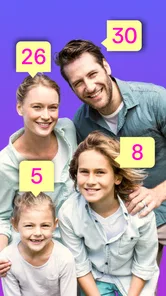
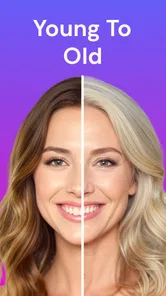
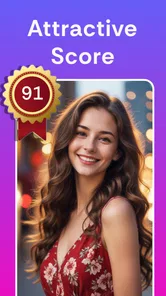
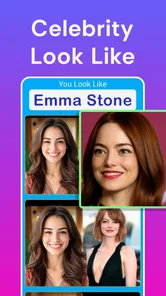



Analysis by Reviewed
I reach for a face-editing app when I want a quick laugh, not a perfectly polished portrait. FaceSwap: Aging & Cartoon Me is built around that playful impulse: turn a photo into a different-looking version of yourself, then decide whether the result is funny enough to send to a friend. After trying its transformations, I found the appeal is less about producing a definitive image and more about seeing how a familiar face changes when a filter takes it in an unexpected direction.
Who gets the most out of a face transformation
I’d recommend this app to people who enjoy casual photo experiments and want a simple way to make a selfie feel surprising. It suits a quick laugh better than a long editing session: you can start with a familiar photo, see it reimagined, and decide whether the result is worth saving or sharing. If you mostly want to correct lighting, remove small blemishes, or fine-tune a portrait, a conventional beauty editor gives you more direct control and is likely the better fit.
It can also work as a low-effort activity with friends or family. One person can choose a photo and let someone else pick the effect, turning the result into a small guessing game: which version looks most like the person, and which is simply the funniest? I’d keep the tone friendly and ask before editing or sharing another person’s face. The joke is only enjoyable when the person in the image is comfortable with it.
Make the source photo do some of the work
A useful trick is to keep a clean original alongside the edited result. That makes it easy to compare what changed and helps avoid mistaking an amusing filter for a realistic portrait. For a fair test, use a straightforward photo with the face clearly visible, then try a second image only if the first result seems off. Changing the source photo before changing the effect is a practical way to figure out whether the image or the transformation is responsible for an odd outcome.
For group pictures, I’d crop to one face before experimenting rather than expecting a face-focused effect to handle a crowded frame neatly. That extra step also makes it easier to decide whose image you’re working with and what you want to share. If the final image is meant to become a meme, add captions or layout elements in a separate editor afterward; keeping the face transformation and the graphic design stages separate is usually less frustrating than asking one playful tool to do everything.
A quick tool for playful photo experiments
Made by GlintTec Apps, this free beauty app sits in a lighthearted corner of photo editing. It has been available since March 17, 2017, and version 7.0.21 is the current release. That long lifespan makes it feel like an established casual app rather than a new editing trend, though I wouldn’t treat its transformations as a substitute for careful retouching or a professional portrait workflow.
The basic appeal is easy to understand: choose a face photo, try a transformation, and see what the app makes of it. The aging effect is especially suited to sharing with friends, while cartoon-style results make ordinary selfies feel more like playful sketches. I’d use it for a group chat, a birthday joke, or a low-stakes social post—not for a profile picture where I need precise control over every detail.
More From Our News Desk
 Instagram
’s Power Comes From Its Place in Your Phone
A close look at how Instagram turns Meta’s reach, recommendation systems and everyday camera habits into durable platform power—and what that costs users.
 Gmail
Gmail in a Busy Inbox: Who Benefits Most?
From first account to crowded workday, Gmail earns its place through dependable search and flexible sorting—but its best fit depends on how much inbox maintenance you can tolerate.
 Prime Video
Switching to Prime Video: What Changes in Your Viewing Routine
Prime Video can make a compelling second home for streaming, but switching means learning a different catalog, rental layer, and route from browsing to playback.
 Universal TV Remote Control
 Works Best as a Reliable Backup
A phone remote earns its place through quick setup and reliable habits. Here is how to get more from Universal TV Remote Control—and where its limits show.
 Weather - By Xiaomi
Weather by Xiaomi Review: Clear at a Glance, Less Clear Up Close
Xiaomi’s weather app makes everyday forecasts quick to scan, but its calm surface can leave useful details and recovery paths harder to find than they should be.

 X
X Under Pressure: Can It Recover When Posting Goes Wrong?
A resilience-focused review of X, examining setup, mistaken posts, interruptions, weak connections, and the gaps that matter when recovery needs to be dependable.
Latest News

The Magic of Transformation
First off, let's talk about how easy it is to get started. With just a few taps, you’re on your way to seeing yourself in a whole new light. The app interface is user-friendly, guiding you through each step without any fuss. The moment I uploaded my first picture, I was amazed at how quickly the app processed it. Within seconds, I was staring at a cartoon version of myself! It was like stepping into an animated world where everything is possible.
Getting Older Isn’t So Bad After All
One of the standout features is the aging tool. Now, I know what you’re thinking – who wants to look old, right? But trust me, it’s both fascinating and hilarious. I couldn’t resist sharing the older version of myself with friends just to get their reactions. The app uses AI technology to predict how your features might evolve over time, and while it’s all in good fun, the results are surprisingly realistic.
FaceSwap: Aging & Cartoon Me also has this quirky feature where you can mix and match different facial elements. Ever wanted to see yourself with a pirate’s eye patch or perhaps a clown nose? The possibilities are endless, and it's a great way to let your creativity run wild.
Getting a better result from a selfie
For the most useful comparison, I’d start with a clear, front-facing photo in steady light and try to keep hair or hands from covering key features. This is a practical tip for face effects: if the source image makes your eyes, nose, or jaw hard to see, the change can look less convincing. I also prefer to test one effect at a time before adding extra facial elements, so I can tell which transformation is doing the work rather than ending up with a busy image.
A realistic everyday use is a quick break with friends: take turns choosing a selfie, compare the aging and cartoon results, and save only the versions that genuinely make everyone laugh. If you’re sharing an image of someone else, ask first; a joke can feel different to the person whose face is being edited. For a carefully designed meme with text, layers, and precise placement, a general-purpose photo editor is usually the better choice. This app’s strength is the fast face-focused reveal, not detailed graphic design.
Sharing, cost, and who it suits
What’s a great app without the ability to share your creations? The app makes it ridiculously easy to share your transformed images on social media platforms. Whether you’re looking to prank a friend or just show off your new look, the sharing options are seamless. Plus, you can save your images directly to your device, making it a breeze to revisit your creations anytime.
One thing I noticed is how the app encourages interaction. There’s a vibrant community of users who love swapping tips and sharing their funniest transformations. It’s like joining a club where everyone’s just there to have a good laugh.
The app is rated for Everyone, and its broad appeal makes sense for casual experiments that don’t need much setup. It has over a million installs and an average rating of 3.8 from around eleven thousand ratings, so it has attracted plenty of interest, though that score is a reminder that results may not delight every user. The app is free to download, with optional in-app purchases ranging from $0.99 to $15.99 per item. I’d try the free experience first and only consider paying if I knew I would use the extra options; check the purchase prompt before confirming so a quick experiment stays within your budget.
Where expectations matter
The aging effect is entertaining, but I wouldn’t read it as a forecast of how anyone will actually look. It’s a creative filter, not a personal prediction, and different source photos can produce different impressions. Likewise, cartoon effects are a quick stylized treatment rather than a replacement for a custom illustration. If your priority is consistent editing controls, fine adjustments, or a particular artistic style, a dedicated editor may suit you better.
For existing users, the move to version 7.0.21 is useful context for the app’s current state, but a version number alone doesn’t tell me which features changed or how an older setup compares. I’d judge it by whether the effects you enjoy still fit your routine, rather than assuming an update guarantees a different experience. It supports Android 8.0 and later, which is worth checking before installing on an older device.
What I’d keep an eye on
If you’re deciding whether to keep using it, I’d pay attention to the quality of results on your own photos, how often you return to the effects, and whether any optional purchase feels worthwhile after trying the free app. Someone looking for a quick visual gag will likely get more from it than someone hoping for a full suite of beauty tools. The 458 written reviews alongside its rating can offer more user perspectives, but I’d still treat your own test photo as the most useful way to judge the fit.
How I’d fit it into a photo routine
I wouldn’t make this the first stop for every selfie. I’d use it after choosing a photo I already like, then treat the transformation as a separate playful version rather than a replacement for the original. That small habit matters if you later want a natural-looking image for a profile or a more expressive one for a joke: keeping the source intact prevents a novelty edit from becoming the only copy you can find.
There’s also a useful trade-off between speed and control. Face-focused effects are appealing because they can turn an ordinary portrait into something noticeably different without the manual work of drawing or assembling a design. The flip side is that a quick result may not give you the exact expression, finish, or composition you had in mind. If you care more about choosing every detail than seeing an immediate surprise, a manual editor or illustration app is a better place to spend your time.
What to expect from the next session
When I return to an app like this, I’d look for consistency on the kinds of photos I actually take, not just the most flattering example. A front-facing selfie, a photo in softer light, and a picture with a different expression can reveal whether the effects suit my camera roll. I’d also keep an eye on whether the free options are enough for occasional use; the paid choices make more sense only if I find myself returning to them, rather than buying something because one result happened to be funny.
The release history gives the app some staying power, while the current version tells me which release is available now; neither fact is a promise about what will come next. For someone already using it, I’d focus on whether it still delivers the quick, lighthearted edits they want. For a new user, I’d start with one photo and a small number of effects, then decide from the results whether it deserves a place in a regular photo routine.
So, if you’re looking for an app that’s not just about altering images but also about having a blast, FaceSwap: Aging & Cartoon Me is definitely worth a try. It’s a delightful blend of creativity and technology, and trust me, you’ll find yourself coming back to it more often than you’d expect. Who knew aging and cartoons could be this much fun?
How Old Do I Look Frequently Asked Questions
What should I check before downloading FaceSwap: Aging & Cartoon Me?
FaceSwap: Aging & Cartoon Me is a Beauty app from GlintTec Apps, with an Everyone age rating. It is free to download and has in-app purchases, so it is worth checking that the Android device meets the minimum OS requirement of version 8.0 and reviewing any purchase options before using paid features.
What is FaceSwap: Aging & Cartoon Me and how does it work?
FaceSwap: Aging & Cartoon Me is an innovative app that allows users to transform their photos by applying various fun effects, including aging and cartoon filters. Utilizing advanced AI technology, the app analyzes facial features and applies the chosen effect seamlessly, providing a realistic or artistic transformation depending on the selected filter.
Is FaceSwap: Aging & Cartoon Me free to use?
FaceSwap: Aging & Cartoon Me offers a free version with limited features and filters. However, to access a wider range of effects and an ad-free experience, users can opt for a premium subscription. The premium version unlocks additional filters, higher resolution exports, and other advanced features that enhance the user experience.
What are the key features of FaceSwap: Aging & Cartoon Me?
The app boasts a variety of features including aging effects, cartoon filters, face swapping technology, and real-time editing. Users can also share their creations directly to social media platforms. The intuitive user interface ensures even beginners can navigate and use the app with ease, making it accessible to a broad audience.
Is FaceSwap: Aging & Cartoon Me safe to use?
Yes, FaceSwap: Aging & Cartoon Me prioritizes user privacy and data security. The app requires access to your camera and photo library, but it does not store personal data or images on its servers. It complies with standard data protection regulations, ensuring your photos and personal information remain secure and private.
Pros
- Intuitive interface for easy navigation.
- High-quality face swapping results.
- Wide range of filters and effects.
- Fast processing of images.
- Frequent updates with new features.
Cons
- Requires internet for full functionality.
- Limited free features.
- Some ads in the free version.
- Occasional glitches in face detection.
- May drain battery quickly.