Face Shape - Face Rating, Hair
- 56.00
- 3.9
- Installs
- 1.00M
- Price
- Free

Screenshots

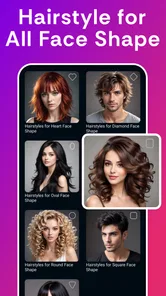
Analysis by Reviewed
I’d treat Face Shape - Pretty Scale as a light, practical starting point rather than a final authority on what suits you. Its appeal is straightforward: use a photo to explore face shape and beauty-related results, then decide whether those ideas are useful for your own style. If you’re trying it for the first time, a little care with the photo can make the result easier to interpret.
Getting a useful first result
Before taking or choosing a picture, look for even light and a view of your face that is not heavily tilted or obscured. Try to keep hair away from the sides of your face if you want to compare the outline, and avoid judging the result from a photo with strong shadows. These are simple ways to make a face-shape estimate more informative; they don’t turn it into a professional measurement.
A useful first session is to check the result, then compare it with what you see in a mirror or in another clear photo. If the label seems surprising, try a second image with a different expression or angle before drawing conclusions. Facial outlines can look different from one picture to another, so I wouldn’t make a haircut or glasses decision based on one result alone.
Where the result helps—and where it doesn’t
The most useful way to apply a face-shape result is as a prompt for experimenting, not a rulebook. If you are considering a fringe, a new parting, or a pair of frames, use the suggested shape as one idea to explore alongside your own preferences. Face Shape - Pretty Scale can help you put a name to the outline you’re noticing, but personal taste, comfort, and the details of a particular style matter more than a category label.
That distinction also helps with the app’s beauty score and rating angle: treat them as entertainment or a conversation starter, not an objective measure of attractiveness. Scores can feel more personal than a face-shape label, and they may not reflect what you value about your appearance. If numerical judgments tend to affect your confidence, it’s perfectly reasonable to skip that part and focus on the more practical styling question.
Choosing it over other beauty tools
Compared with browsing hairstyle galleries or asking a stylist, a face-analysis app is quicker and more private as a first step, but it cannot replace seeing a style on you or getting a trained opinion. Galleries offer more visual inspiration, while a stylist can consider hair texture, upkeep, and your preferences. I’d use this app to narrow down questions before a salon visit, not to make the decision for me.
It is a better fit for curious users who want a quick, low-pressure way to explore face shape. If you need precise facial measurements, individualized beauty advice, or a dependable basis for a major appearance change, choose a professional consultation or a tool designed specifically for that purpose instead. The app is free to try, though it also offers in-app purchases; check the purchase details before opting into anything paid.
More From Our News Desk
 Instagram
’s Power Comes From Its Place in Your Phone
A close look at how Instagram turns Meta’s reach, recommendation systems and everyday camera habits into durable platform power—and what that costs users.

 Gmail
Gmail in a Busy Inbox: Who Benefits Most?
From first account to crowded workday, Gmail earns its place through dependable search and flexible sorting—but its best fit depends on how much inbox maintenance you can tolerate.

 Prime Video
Switching to Prime Video: What Changes in Your Viewing Routine
Prime Video can make a compelling second home for streaming, but switching means learning a different catalog, rental layer, and route from browsing to playback.

 Universal TV Remote Control
 Works Best as a Reliable Backup
A phone remote earns its place through quick setup and reliable habits. Here is how to get more from Universal TV Remote Control—and where its limits show.

 Weather - By Xiaomi
Weather by Xiaomi Review: Clear at a Glance, Less Clear Up Close
Xiaomi’s weather app makes everyday forecasts quick to scan, but its calm surface can leave useful details and recovery paths harder to find than they should be.

 X
X Under Pressure: Can It Recover When Posting Goes Wrong?
A resilience-focused review of X, examining setup, mistaken posts, interruptions, weak connections, and the gaps that matter when recovery needs to be dependable.
Latest News



A calmer way to interpret the results
One useful habit is to decide what question you want answered before opening the app. “What face shape might I have?” is a manageable prompt; “Which features should I change?” gives a score far too much authority. Keeping the question narrow makes the experience more useful and less likely to turn into repeated checking. I’d write down a styling idea that genuinely interests me, then close the app and see whether that idea still feels appealing later.
There is also a practical difference between identifying a broad outline and judging how a specific style will look. A face-shape category cannot account for every detail that matters, such as how a haircut sits with your hair’s natural texture or how frames feel during a full day of wear. Use the result to generate options, then compare actual examples and consider comfort, upkeep, and personal taste before committing.
Have you ever wondered how your face shape stacks up against the beauty standards of the world? Well, wonder no more, because the Face Shape - Pretty Scale app is here to answer all your questions. This nifty little app promises to analyze your face and tell you which of the classic face shapes you have, from oval to square to heart-shaped. Intrigued yet? Let’s dive right in!
Unlocking the Mysteries of Face Shapes
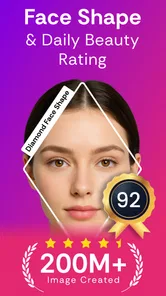
First things first, let’s talk about how easy it is to get started with Face Shape - Pretty Scale. As soon as you download the app, you're greeted with a sleek interface that’s as user-friendly as it gets. Simply snap a selfie or upload a photo from your gallery, and the app does its magic. With a few taps, you’ll have your face shape analyzed and the results in front of you faster than you can say "cheese."
The Science Behind the Magic
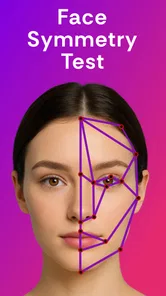
Now, I know what you’re thinking: how does this app actually work? Essentially, it uses facial recognition technology to map out the key points on your face, like your cheekbones, jawline, and forehead. From there, it calculates the proportions and angles, comparing them to the standard face shapes. This isn’t just guesswork; there’s some legit science and tech wizardry going on here.
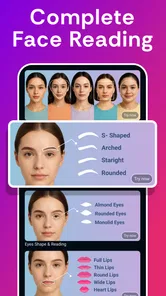
But it’s not just about figuring out your face shape for the fun of it. Knowing your face shape can actually be super helpful in real life. It can guide you in picking the most flattering hairstyles, makeup techniques, and even glasses that complement your unique features.
Turning a label into a useful plan
For a first-time user, the best next step is not to search for a single “correct” style. Pick one change you are already considering—perhaps a different parting or frame shape—and use the result to find a few possibilities to compare. That keeps the app’s output connected to a real decision rather than turning a quick analysis into an open-ended judgment about your appearance.
If you are preparing for a salon visit, bring the ideas you liked rather than relying on the face-shape label alone. A stylist can tell you whether a reference suits your hair and the amount of maintenance you want. For glasses, trying frames in person remains more informative because fit and comfort matter alongside appearance. The app can help you start that conversation, but it cannot make those practical checks for you.
Personal Experience and Verdict
So, what’s my take on Face Shape - Pretty Scale? I have to admit, I was a bit skeptical at first. I mean, can an app really tell me something about my face that I don’t already know? Turns out, it can! After using it, I found out I have an oval face, which is apparently the most versatile and balanced shape. Who knew?
The app is a fun way to pass the time and it’s surprisingly accurate. The results matched up with what I’ve always thought about my face, and it’s nice to have that confirmation. Plus, it’s free to use, so there’s no harm in giving it a try.
Who gets the most from a quick analysis
I can see this being most enjoyable for someone who likes trying beauty apps casually and wants a starting point for exploring hairstyle or eyewear ideas. It may also help if you have never had a face shape explained and want a simple label to use while browsing inspiration. A short, purposeful session is likely to be more satisfying than treating the app as a source of definitive personal advice.
I would steer away from it if you are looking for a clinical assessment, precise measurements, or a score that can tell you how attractive you are. It is also not the right tool for settling an important decision on its own. If appearance ratings tend to linger in your mind, you can skip that part; the more practical face-shape exploration is the reason I would try the app in the first place.
Face Shape - Pretty Scale is a beauty app from GlintTec Apps, with a 3.9 average across around 7,200 ratings and more than 1 million installs. It is free, rated for Everyone, and its current version is 1.0.219. The app first appeared on March 15, 2023, and supports Android 7.0 and up. Those details make it easy to see who can install it, but the more useful question is whether it fits the way you want to explore your appearance.
What to expect from the first session
Think of the first result as a conversation starter with yourself, not a test you need to pass. You can take a selfie or choose a photo, look at the analysis, and decide whether it gives you a helpful way to describe your features. If the label feels unfamiliar, there is no need to force it into a fixed identity; it is simply one interpretation of the image you chose.
A common point of confusion is expecting a beauty score and a face-shape result to mean the same thing. They answer different kinds of questions: one gives a broad category, while the other is a subjective rating. Neither tells you what you must change. I’d focus on the category only when it helps with a concrete styling search, and leave the score aside if it adds no value.
For a realistic everyday use, imagine you are thinking about changing your hairstyle before a salon appointment. You could use a clear, front-facing image to get a face-shape label, then collect a few styles you like and discuss them with your stylist. The label can give you a starting vocabulary, but it should not narrow your options: hair texture, maintenance, and what makes you feel comfortable are just as important. A photo result is most helpful when it opens up ideas rather than deciding for you.
Small choices that make the app more useful
One practical trade-off is choosing between a fresh selfie and a gallery photo. A selfie is convenient, but the camera angle can change how wide or long your face appears. A more neutral existing portrait may be easier to compare with a mirror, provided your features are visible. If two images produce a different impression, I would treat that as a reminder that face-shape categories are approximate—not a reason to keep testing until the app gives a preferred answer.
It’s also worth separating the app’s different kinds of feedback. A shape label can be useful for searching hairstyle or eyewear inspiration, while a beauty score is much more subjective. If you are only interested in practical styling, focus on the former and don’t let a number stand in for your own judgment. That is especially relevant for younger users: the app is rated for Everyone, but any appearance score is best approached as playful feedback, not a verdict about self-worth.
Making the result actionable without overrelying on it
A small, useful workflow is to save the category in your notes only if it helps you search for ideas, then compare those ideas with styles you already know you like. This avoids letting one label define your choices. If the suggestions you find through that search do not fit your taste, that is a good reason to move on; the point is to broaden the options you consider, not to obey a category.
Another sensible trade-off is deciding whether to use the app alone or alongside other sources. For a quick curiosity check, it is convenient. For choosing a cut, color, or frames, galleries and real-world examples give you more visual context, while a professional can account for details a photo-based result cannot. I would use each for what it does best rather than expecting one app to provide the whole decision.
Who should give it a try
I’d recommend it to someone who is curious, enjoys experimenting with beauty tools, or wants a quick starting point before browsing styles. It is less suitable if you expect exact measurements, personalized professional advice, or a definitive answer that will settle a major change. Compared with ordinary beauty galleries, it offers a more direct face-shape angle; compared with a stylist, it is faster but far less tailored. That difference is the key to setting expectations.
The app’s 42 reviews sit alongside its broader rating count, so I’d avoid treating public feedback as proof that every result will match every face. It includes optional in-app purchases priced from $0.99 to $15.99 per item, so take a moment to review any purchase prompt before proceeding. You can begin with the free experience and decide whether it is useful before spending anything; there is no need to buy something just to make a face-shape label meaningful.
In conclusion, if you’re curious about your face shape or just want to kill some time with a fun app, Face Shape - Pretty Scale is definitely worth a download. It’s simple, quick, and who knows—you might learn something new about yourself. Give it a shot and let the app reveal the secrets of your face!
Face Shape - Face Rating, Hair Frequently Asked Questions
Who is Face Shape - Pretty Scale designed for?
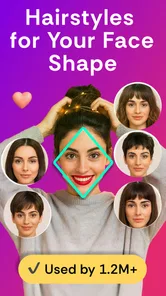
Face Shape - Pretty Scale is a beauty app for people curious about their facial features and interested in exploring how different styles might suit them. Its face analysis and hair style changer make it relevant to anyone looking for a simple starting point for personal styling. The app can be used for inspiration, while individual preferences remain the best guide to choosing a look.
What is Face Shape - Pretty Scale and how does it work?
Face Shape - Pretty Scale is an app designed to analyze your face shape using advanced algorithms. By uploading a clear photo of your face, the app identifies key facial features and determines your face shape based on specific metrics. This app helps users understand their facial structure better, often used for beauty tips or styling advice.
Is Face Shape - Pretty Scale safe to use regarding privacy concerns?
Yes, Face Shape - Pretty Scale prioritizes user privacy. The app processes photos locally on your device and does not store or share your images with third parties. Users can rest assured that their data remains private and secure, aligning with standard privacy practices for mobile applications.
What devices and operating systems support Face Shape - Pretty Scale?
Face Shape - Pretty Scale is compatible with Android devices running version 7.0 or later. Check your device’s operating system before downloading to make sure it meets this minimum requirement. Compatibility can affect whether an app installs and runs properly, so using a supported system is a sensible first step before trying its face analysis and styling features.
Can I use Face Shape - Pretty Scale without paying?
Face Shape - Pretty Scale is free to download, so you can start by exploring the app without an upfront purchase. It also offers in-app purchases, with prices ranging from $0.99 to $15.99 per item, so some content or features may involve an additional charge. Review any purchase prompt carefully before confirming, especially if you only want to use the free experience.
Pros
- User-friendly interface.
- Accurate face shape detection.
- Provides hairstyle suggestions.
- Offers beauty score feature.
- Lightweight and fast app.
Cons
- Limited hairstyle database.
- Ads can be intrusive.
- Requires camera access.
- No offline functionality.
- Occasional crashes reported.