

DynamicDrive
- 649.00
- 4.4
- Installs
- 100.00K
- Price
- Free

Screenshots
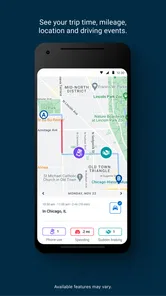
Analysis by Reviewed
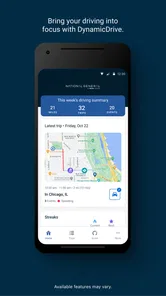
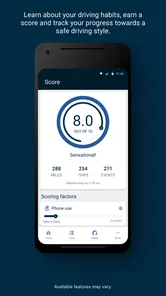
I judge a driving app less by how exciting its pitch sounds and more by whether it helps me notice habits I can actually change. Dynamic Drive is a free driving-behavior app from National General Insurance, built around monitoring what happens behind the wheel. That makes it a different kind of tool from a racing game or a navigation app: its purpose is to encourage safer driving, with the possibility of saving as part of the appeal. I’d consider it when I want feedback on my everyday trips, not a virtual thrill ride.
Readability and navigation in everyday use
When an app is meant to accompany driving, the most useful interface is one that asks little of me while I’m in motion. I would treat Dynamic Drive as something to set up and review while parked, rather than a screen to study on the road. That simple habit makes the experience easier to manage and keeps attention where it belongs. Its focus is straightforward enough to explain: it monitors driving behavior so I can reflect on how I drive and work toward safer routines.
For someone who prefers a clear purpose over a crowded collection of vehicle tools, that focus is a plus. The app sits in the auto-and-vehicle category, and its 4.1 average from around 5,100 ratings suggests it has attracted a sizable group of users, though a rating alone cannot tell me whether its feedback will suit my own driving. It is free and rated for Everyone, which lowers the barrier to trying it; I’d still take a moment to understand the setup and what kind of monitoring I’m agreeing to before relying on it.
Motor and sensory considerations
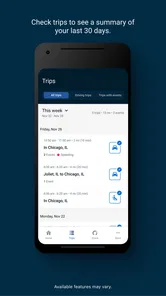
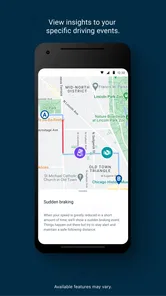
Driving behavior is not just a matter of intention. A driver may need to brake suddenly because traffic changes, a passenger may distract them, or a route may involve conditions that call for extra care. I would not treat an app’s record as a complete verdict on someone’s ability or character. The most useful approach is to look for patterns over several journeys and consider what was happening on the road, rather than judging a single trip in isolation.
This kind of monitoring may appeal to drivers who want a prompt to build steadier habits, but it will not make driving easier for everyone. People with different motor, sensory, or cognitive needs may find that any phone-based driving tool adds another thing to think about. My practical rule would be to handle the phone before setting off, avoid interacting with it while driving, and stop using the app if its presence becomes distracting. Safer driving matters more than collecting feedback.
Rev Up Your Experience
From the moment I opened Dynamic Drive, I was hooked. The interface is sleek and modern, making navigation a breeze. It's designed to simulate a real driving experience, giving you the thrill of the road without ever having to leave your couch. The app’s graphics are top-notch, making every drive feel incredibly realistic. I felt like I was cruising down a scenic highway with the wind in my hair.
Features That Keep You Hooked
Dynamic Drive is packed with features that cater to every driving enthusiast out there. One of my favorite features is the customizable car options. You can tweak everything from the color to the engine, making your ride truly unique. Plus, the app offers a variety of driving modes, from leisurely cruises to intense racing challenges. It's like having multiple games in one app!
More From Our News Desk

 Gmail
GmailGmail in a Busy Inbox: Who Benefits Most?
From first account to crowded workday, Gmail earns its place through dependable search and flexible sorting—but its best fit depends on how much inbox maintenance you can tolerate.

 Prime Video
Switching to Prime Video: What Changes in Your Viewing Routine
Prime Video can make a compelling second home for streaming, but switching means learning a different catalog, rental layer, and route from browsing to playback.

 Universal TV Remote Control
Universal TV Remote Control Works Best as a Reliable Backup
A phone remote earns its place through quick setup and reliable habits. Here is how to get more from Universal TV Remote Control—and where its limits show.

 Weather - By Xiaomi
Weather by Xiaomi Review: Clear at a Glance, Less Clear Up Close
Xiaomi’s weather app makes everyday forecasts quick to scan, but its calm surface can leave useful details and recovery paths harder to find than they should be.

 X
XX Under Pressure: Can It Recover When Posting Goes Wrong?
A resilience-focused review of X, examining setup, mistaken posts, interruptions, weak connections, and the gaps that matter when recovery needs to be dependable.

 Clash of Clans
Clash of Clans Is Won Between the Battles
Its raids are quick; its community is a long-term project of coordination, teaching, rivalry, and shared responsibility—with all the friction that entails.
Latest News



Another cool aspect is the real-time weather simulation. If it's raining in your area, expect to see raindrops on your virtual windshield. This level of detail really adds to the immersive experience. Also, the app’s sound effects are on point – the roar of the engine and the squeal of the tires make it all the more exciting.
Easy to Navigate, Hard to Put Down
Despite its plethora of features, Dynamic Drive is incredibly user-friendly. The developers have done a great job ensuring that everything is easy to find and use. Whether you're a tech wizard or someone who just learned how to text, you'll have no trouble navigating through the app. And trust me, once you start your engine, it’s hard to stop.
The app also includes a social feature where you can share your best drives and scores with friends. It's a great way to add a competitive edge and see who among your pals is the ultimate driver. Plus, the community aspect brings a sense of camaraderie that you don’t often find in mobile apps.
The Road Ahead
As much as I've enjoyed my time with Dynamic Drive, I’m excited to see what the developers have in store for the future. With regular updates and new features being added, this app is sure to keep evolving and surprising its users. Whether you're a die-hard car fanatic or just someone looking for a fun way to pass the time, Dynamic Drive offers something for everyone.
So, if you're ready to take the wheel and embark on a digital journey that gets your adrenaline pumping, then don’t wait any longer. Download Dynamic Drive today and experience the ride of your life. Just remember to buckle up!
When it fits into a real driving routine
Picture a familiar weekday commute: I leave the phone alone during the trip, then check the driving feedback once I’m safely parked. If a pattern seems worth changing, I can choose one manageable goal for the next commute, such as leaving more space or easing into stops. The point is not to chase a perfect score; it is to connect feedback with a specific habit and see whether that adjustment feels practical over time.
That routine also helps me decide whether this is the right kind of app. Dynamic Drive is a reasonable fit for a driver who already takes regular trips and wants a nudge to think about their choices. It is less suitable for someone seeking turn-by-turn directions, vehicle diagnostics, a driving lesson, or entertainment behind the wheel. Those needs call for different tools, and combining several phone apps during a drive can create more distraction than value.
Situational access and practical trade-offs
A phone-based driving tool has to work around varied trips: stop-and-go traffic, short errands, longer commutes, and roads where sudden braking is sometimes unavoidable. I’d avoid drawing conclusions from one unusual journey and instead compare similar kinds of trips, when possible. A difficult school-run morning and a quiet weekend drive are not a fair like-for-like test of driving habits.
There is also a personal trade-off in choosing a monitoring app: some drivers welcome a record that encourages reflection, while others would rather make changes without tracking. Before starting, I’d check the app’s current setup and permissions on my device, then decide whether I’m comfortable with the way it works. If I share driving duties, I would make sure other drivers understand the monitoring arrangement rather than assuming the phone’s owner is the only person whose behavior could be captured.
Choosing it over familiar driving tools
The main alternative is not necessarily another driving-monitoring app; it may be a navigation app, a vehicle-maintenance tool, or simply a personal reminder to drive more gently. Those tools solve different problems. Navigation helps me choose a route, maintenance apps help me keep track of a vehicle, and neither necessarily turns routine journeys into an opportunity to review driving habits. Dynamic Drive’s value is narrower: it gives a driver a reason to reflect on behavior after trips.
That distinction matters if I already rely on my phone for directions. I would keep navigation and driving feedback separate in my mind, rather than expecting one app to do both jobs. If the goal is only to get somewhere efficiently, a navigation tool is the better fit. If the goal is to notice patterns and try a small change on familiar routes, this app may be more relevant, provided its monitoring feels comfortable and does not compete for attention.
A low-pressure way to test the routine
I would begin with a typical, familiar trip rather than a stressful journey or a day when I am rushing. Before setting off, I’d make sure the phone is ready and out of reach, then avoid checking it until parked. Afterward, I’d ask a practical question: did the feedback point to a behavior I can understand and adjust? If it does, I’d try one change at a time instead of attempting to overhaul every part of my driving at once.
This approach is useful for someone who wants to know whether the app fits their routine without treating the first result as definitive. Repeating a comparable commute can make a pattern easier to interpret than comparing an unfamiliar route with a routine one. I would also keep ordinary road conditions in mind; a sudden stop caused by traffic is not automatically evidence of careless driving. The app can prompt reflection, but context and judgment still belong to the driver.
What to expect before relying on it
Dynamic Drive is on version 2.6.0 and requires Android 10 or later. It has more than 100,000 installs, so it is not an obscure experiment, but that does not guarantee it will suit every phone or routine. I’d install it when I have time to complete setup calmly, take a short familiar drive, and review the result while parked before making it part of a daily schedule.
One practical question is whether using it automatically means savings. I would read the terms and eligibility details that apply to my own situation rather than treating potential savings as guaranteed. Another is whether a particular trip will produce useful feedback; the best way to judge that is to try ordinary journeys and see whether the information is understandable and actionable. If monitoring feels confusing or distracting, I would stop and use a simpler habit-building approach instead.
An inclusive verdict for drivers with different needs
National General Insurance’s app has a focused role: it can support reflection on driving behavior, but it should not be mistaken for a substitute for road awareness, instruction, or a driver’s own judgment. I like the idea of reviewing patterns after a trip instead of trying to manage a dashboard while moving. That distinction matters especially for people who find small screens, notifications, or extra cognitive demands tiring.
I’d recommend giving it a try if you want a structured nudge toward safer routines, are comfortable with driving-related monitoring, and can keep the phone out of your hands on the road. I’d skip it if tracking itself causes stress, if you mainly need navigation or mechanical information, or if phone interaction would add an accessibility or concentration barrier. Used thoughtfully, it may be a helpful companion to reflection; the safest choice is still the one that keeps attention on driving.
DynamicDrive Frequently Asked Questions
Is Dynamic Drive free to download, and are there costs to use it?
Dynamic Drive is free to download, so you can try the app without paying an upfront price. It is designed to monitor your behind-the-wheel behavior to help you become a safer driver and save. Before installing, keep in mind that the app’s purpose is driving behavior monitoring rather than a general navigation service.
What is Dynamic Drive and how can it enhance my driving experience?
Dynamic Drive is an innovative app designed to transform your driving experience by providing real-time traffic updates, navigation assistance, and personalized route planning. It leverages advanced algorithms to offer the quickest and most efficient routes, saving you time and fuel. Additionally, it integrates with smart devices to offer hands-free control and enhance driving safety.
Is Dynamic Drive compatible with both Android and iOS devices?
Yes, Dynamic Drive is fully compatible with both Android and iOS platforms. The app is designed to seamlessly integrate with the operating systems of most smartphones, ensuring that users on both platforms can enjoy its comprehensive features. Simply download it from the Google Play Store or Apple App Store. On Android, it requires version 10 or later.
Does Dynamic Drive offer offline navigation capabilities?
Absolutely! Dynamic Drive provides offline navigation features that allow you to download maps and access them without an internet connection. This is particularly useful for those who travel to areas with poor network coverage, ensuring that you always have access to accurate maps and directions no matter where you are.
How does Dynamic Drive ensure user privacy and data security?
Dynamic Drive takes user privacy and data security very seriously. The app employs robust encryption methods to protect your personal information and location data. Additionally, it offers customizable privacy settings, allowing you to control what data is shared and with whom, ensuring complete peace of mind while using the app.
Pros
- User-friendly interface enhances navigation.
- Offers real-time traffic updates.
- Customizable routes for personal preferences.
- Offline maps available for no-network zones.
- Integrates well with other travel apps.
Cons
- Consumes significant battery power.
- Some features require in-app purchases.
- Occasional GPS signal loss in urban areas.
- Limited support for public transportation.
- Updates can be slow on older devices.













