Driving Instructor-Theory Test
- 81.00
- 4.4
- Installs
- 5.00M
- Price
- Free

Screenshots
Analysis by Reviewed
When I choose a driving-study app, I care about more than whether it can keep a quiz moving: I want to know what I can judge for myself and where I should stay cautious. Driving Instructor-Theory Test is a free Android app from Naz Digital, in the auto and vehicles category. It has an average rating of 4.4 from around five thousand ratings and over five million installs, so it has reached plenty of learners, though popularity alone cannot tell me whether its material suits my local test.
Who will get the most from it
I see the strongest case for this app if you are already taking lessons and want a convenient way to revisit theory between them. It can make otherwise idle moments useful: a learner waiting for a bus, sitting in a parked car before a lesson, or taking a break at home can work through a few questions without hauling out a book. That kind of repetition is most helpful when it supports a broader study plan rather than replacing one.
It may also suit someone who finds a dense handbook hard to approach in one sitting. Images, short question sessions, and immediate responses can give revision a clearer rhythm. If you have a busy schedule, try attaching a small session to something you already do, such as reviewing a few difficult items after a lesson. The practical goal is consistency, not a marathon session that leaves you tired and less attentive.
Where an app cannot replace the rest of preparation
I would be more cautious if you are choosing this as your only preparation tool, especially if your test is close or your local rules are unfamiliar. A quiz can help expose weak spots, but it does not necessarily give the context or authoritative wording that an official handbook provides. Likewise, no phone-based practice can replace supervised driving experience: knowing the right answer about a situation and responding safely on the road are related but different skills.
The app is also a poor fit if you need certainty that every question matches a particular country, region, or current examination format. I would first check a handful of examples against the official source used by the licensing authority where you plan to sit the test. If the wording, signs, or rule details do not line up, I would treat the app as supplementary practice at most and switch to a locally approved resource for the core material.
Using the app as a study companion
Upon downloading the Driving Instructor-Theory Test, I was greeted with an intuitive and user-friendly interface. It's like the developers knew exactly what we needed: clear, concise, and straightforward navigation. I was particularly impressed with how the app breaks down the theory test into manageable chunks. No more drowning in a sea of information!
Features That Stand Out
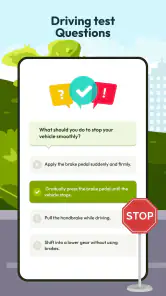
One of the standout features is the extensive question bank. The app boasts a comprehensive library of questions that mirror those in the actual test. I found this particularly helpful because, let's face it, practice makes perfect. The app even mixes up the questions to ensure you're not just memorizing answers but actually understanding the material. There's also a handy feature that lets you bookmark tricky questions to revisit later.
More From Our News Desk

Weather by Xiaomi Review: Clear at a Glance, Less Clear Up Close

X Under Pressure: Can It Recover When Posting Goes Wrong?

Clash of Clans Is Won Between the Battles

Android Auto Makes the Case for Quieter Car Software

MobiOffice: Transforming Mobile Productivity with Seamless Integration

EA SPORTS FC™ Mobile Soccer: Redefining Mobile Sports Gaming
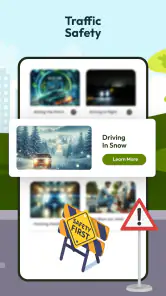
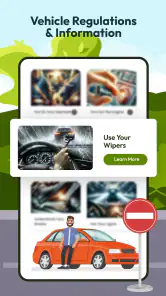
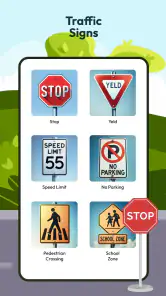
Another gem is the visual aids. The app includes a plethora of images and diagrams which, for visual learners like myself, is a godsend. It’s like having a mini driving manual in your pocket. Plus, with the instant feedback after each question, you can quickly identify areas that need a bit more attention.
Turning practice into useful evidence of progress
There is a subtle trap with shuffled quizzes: familiar questions can make progress feel faster than it is. I would use a different test of readiness—after answering, explain the reason aloud or in your own words before moving on. If you can only recognize the correct choice when it appears, that topic still deserves review. This is especially useful for road signs and diagrams, where a quick visual guess may hide uncertainty about what the sign means in context.
For a practical workflow, I’d keep a short note outside the quiz of the topic behind each repeated mistake, rather than recording only the question itself. Later, I could compare those themes with the relevant section of an official handbook. This makes the app’s bookmarks more valuable: they collect the items that need attention, while the note helps reveal whether several different questions point to the same misunderstanding.
A realistic study day
Imagine you have a driving lesson in the afternoon and ten quiet minutes beforehand. I’d do a small set of questions, bookmark anything I guessed on, and avoid trying to cram an entire subject while distracted. After the lesson, I’d revisit those saved items when I could concentrate, then check any rule that still felt unclear against the official guidance for my test area. That routine separates quick practice from careful learning and gives the instructor a concrete topic to discuss next time.
If you are studying while commuting, use the app only when it is safe to do so and never while driving. A passenger or someone waiting at a stop can practise; the person behind the wheel needs attention on the road. This sounds obvious, but a bite-sized format can make it tempting to squeeze in a question at the wrong moment. I’d keep sessions for stationary breaks and treat road time as driving practice, not screen time.
A routine that makes practice useful
For me, the best way to use the question mix is to treat missed answers as clues about what to review, rather than simply repeating a quiz until the score looks reassuring. I’d keep the bookmark feature for questions where I guessed correctly but could not explain why; those are easy to mistake for mastered topics. After a short session, revisiting only those saved items makes practice more focused than starting from the beginning each time.
A realistic routine might be a brief quiz while waiting for a lesson, followed later by a calmer review of the questions that caused hesitation. If a diagram is confusing, I’d pause and describe what each road user or sign is doing before choosing an answer. That small step can help distinguish understanding from quick pattern recognition, particularly when a question’s wording changes.
Compared with a printed handbook, the app makes it easier to get immediate feedback and return to a difficult question without searching through pages. Compared with a general quiz app, its driving-test focus and visual aids are more relevant to this particular goal. Still, a handbook or official practice resource is the better reference when you need authoritative wording, local rules, or an explanation beyond a quiz response. I’d use the app for repetition and the official material to settle uncertainties.
Trade-offs against other study options
For a learner deciding between this app and a book, I would not frame it as an either-or choice. The app’s advantage is convenience: feedback arrives during practice, and bookmarks make it easy to return to selected questions. A handbook is slower to browse but better suited to reading a rule in context and checking precise local language. If you learn best by building a full explanation before testing yourself, start with the handbook and use the app afterward to see what stuck.
A driving instructor brings a different kind of value again. They can connect theory with what you actually see in lessons and explain why a decision matters on the road. The app can help you arrive with questions ready, but it cannot observe your driving or tailor advice to a moment in traffic. I’d use all three roles deliberately: official material for authority, the app for repeated recall, and lessons for applying knowledge safely.
Making Learning Fun
Now, I know what you're thinking. How can studying for a theory test possibly be fun? Well, the developers have thought of that too. With their gamified quizzes and progress tracking, it feels less like studying and more like a challenge, a game even. The more you engage, the more badges and achievements you unlock. It's a small touch, but trust me, it makes all the difference when motivation starts to wane.
Trust, choices, and sensible caution
Because this is a learning tool, I would pay attention to the choices shown during setup and use, and review the device’s app-permission controls rather than approving prompts automatically. I can’t judge data handling from a quiz experience alone, so I would avoid entering personal details unless the app clearly explains why they are needed. If I later stop using it, I’d also check any account controls available in the app and the relevant device settings; that is a sensible habit, not a claim about a particular account feature.
My approach would be to pause at any request that seems unrelated to practising theory and decide whether I am comfortable proceeding. On Android, permission settings are a practical place to review what access an app has, but they do not answer every question about how information is handled. I would read any explanation shown in the app before sharing details, keep personal information to a minimum, and revisit my choices if my use changes. These are useful checks for any study app, not proof of a specific data practice here.
The app is free to download, with optional in-app purchases listed from $4.99 to $35.99 per item. I’d try the free experience first and only consider paying if a specific paid option clearly addresses a study need I have. The current version is 1.6.9, and it requires Android 7.0 or later, useful details to check before installing on an older device. For an iPhone user, this Android app is not the right choice; they should look for a suitable iOS alternative instead.
What to check before settling into a routine
A few quick checks can prevent wasted study time. First, confirm that the Android device you plan to use meets the app’s operating-system requirement. Then sample questions that cover the rules most relevant to your test and compare them with the licensing authority’s material. Finally, try the free experience long enough to decide whether its question style helps you think, rather than merely encouraging fast taps. Since optional purchases are available, I would make that decision only after identifying a specific need and checking what the purchase offers on screen.
If you are wondering whether it is appropriate for a younger learner, its Everyone age rating is reassuring as a broad content classification, but I would still consider the learner’s individual needs and how they use a phone. If your main concern is whether it is suitable for an iPhone, it is not: this is an Android app, so an iOS learner should choose another resource. And if your concern is whether it guarantees a pass, I would not treat any app as a guarantee; readiness depends on understanding the applicable rules and being able to apply them in the test.
Final Thoughts
In conclusion, if you're gearing up for your driving theory test, I can't recommend the Driving Instructor-Theory Test app enough. It takes the stress out of studying, offering a structured, engaging, and efficient way to prepare. Whether you're a first-time test-taker or someone looking to brush up on their knowledge, this app is a trusty companion on the road to success. So, buckle up, download the app, and get ready to ace that theory test with confidence!
My own recommendation is more measured: it looks like a useful practice companion if you enjoy visual questions, quick feedback, and a little progress-based motivation. I would not make it my only source, assume a strong quiz streak guarantees readiness, or install it on a device that cannot run Android 7.0 or later. Check that the study material fits your test area, use the bookmarks to target uncertainty, and keep official guidance close. With those checks, it can earn a place in a learner’s routine without asking it to do the job of an instructor or an authoritative handbook.
Driving Instructor-Theory Test Frequently Asked Questions
Is Driving Instructor-Theory Test free to download, and are there in-app purchases?
Driving Instructor-Theory Test is free to download, so you can try the app without paying upfront. It also offers in-app purchases, with individual items priced from $4.99 to $35.99. That means some content or features may involve an additional cost, so check the purchase details in the app before buying anything.
Which devices can run Driving Instructor-Theory Test?
The app is listed for Android devices running version 7.0 or later. Before downloading, check your device’s Android version and make sure you have enough available storage for the installation. The app is in the Auto & Vehicles category, and its content rating is Everyone, making it suitable for a broad audience.
Who develops Driving Instructor-Theory Test, and how popular is it?
Driving Instructor-Theory Test is developed by Naz Digital. It has an average rating of 4.4 from around 5,000 ratings, with 81 written reviews and over 5 million installs. These figures give prospective users a sense of its reach and reception, though your own experience will depend on how well its study approach suits your learning needs.
What is the main purpose of the Driving Instructor-Theory Test app?
The Driving Instructor-Theory Test app is designed to help users prepare for their driving theory test. It offers a comprehensive set of practice questions, learning materials, and mock exams to simulate the real test experience. The app aims to enhance a user's understanding of road rules, traffic signs, and safe driving practices, ensuring they are well-prepared to pass the official theory test.
Does the app require an internet connection to function?
While some features of the Driving Instructor-Theory Test app may require an internet connection, such as downloading updates or accessing certain online resources, the core functionalities, including practice tests and learning materials, are typically available offline. This allows users to study and practice at their convenience without relying on a constant internet connection.
Pros
- Comprehensive question bank for thorough preparation.
- User-friendly interface enhances learning experience.
- Regular updates keep content relevant and fresh.
- Offers practice tests and mock exams.
- Detailed explanations help understand each question.
Cons
- Limited free content; subscription needed for full access.
- Some questions may be outdated.
- Occasional app crashes reported by users.
- Ads can be intrusive in free version.
- Requires internet connection for most features.
- Category
- Auto & Vehicles
- Version
- 1.6.9