

Dollarbird Pro
- 128.00
- 3.3
- Installs
- 50.00K
- Price
- Free

Screenshots
Analysis by Reviewed
Managing money sounds simple until a normal week becomes a pile of small decisions: a bill is due before payday, a cash purchase is easy to forget, and an irregular expense quietly changes what is safe to spend. Dollarbird Pro takes a calendar-based approach to that problem. Instead of treating your finances as a long list of transactions, it asks you to think in dates, expected income, and the balance that should remain after each event. I found that idea more useful than I expected, especially when planning ahead rather than merely reviewing the past.
This is a free finance app from Dollarbird Apps SRL, aimed at everyone rather than a specialist audience. It has been available since July 31, 2017, and the current Android release is version 6.2.2, requiring Android 6.0 or later. The app has passed the fifty-thousand-install mark, with a 3.3 average from roughly six hundred ratings. Those figures suggest a product with a real user base but also a fairly mixed experience, which matches my impression: the calendar concept is distinctive, while the usefulness depends heavily on careful setup and consistent habits.
Why the calendar idea works, and where people get stuck
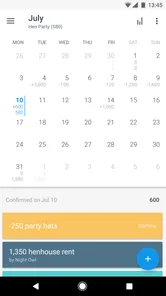
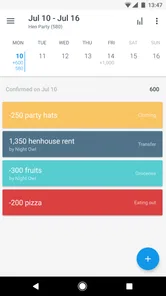
The first thing I noticed is that this is not trying to be a conventional bank dashboard. A typical banking app shows what has already happened. A standard expense tracker often focuses on categories and reports. Dollarbird Pro is more forward-looking. I use it to place expected income and spending on a timeline, then look at how those entries affect the money available later in the month.
That makes the app particularly suitable for recurring obligations. Rent, subscriptions, loan payments, school costs, utilities, and regular transfers are easier to understand when they sit on the dates they actually matter. A monthly total can look comfortable while still hiding a difficult week. The calendar exposes that timing problem immediately.
The same design is also the main source of friction. A calendar only becomes useful when its entries are accurate. If I forget a small purchase, place a bill on the wrong day, or enter an expected payment that arrives late, the projected balance can create false confidence. The app is not a direct replacement for checking a bank account; it is a planning layer that depends on the quality of what I put into it.
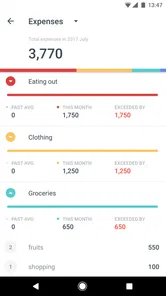
New users can also approach it with the wrong expectation. If you want automatic banking feeds, a polished investment dashboard, or a detailed accounting system, this may feel limited. Its strength is the relationship between money and time. I would not choose it just because I want attractive charts or a long list of spending categories.
Start with a small, dependable calendar
My strongest setup advice is to avoid entering every historical purchase on the first day. That creates work before you understand how the app wants you to think. I would begin with the current balance, the next dependable income, and the bills that are certain to leave the account. After that foundation is visible, I would add flexible spending and less predictable costs.
More From Our News Desk

 Gmail
GmailGmail in a Busy Inbox: Who Benefits Most?
From first account to crowded workday, Gmail earns its place through dependable search and flexible sorting—but its best fit depends on how much inbox maintenance you can tolerate.

 Prime Video
Switching to Prime Video: What Changes in Your Viewing Routine
Prime Video can make a compelling second home for streaming, but switching means learning a different catalog, rental layer, and route from browsing to playback.

 Universal TV Remote Control
Universal TV Remote Control Works Best as a Reliable Backup
A phone remote earns its place through quick setup and reliable habits. Here is how to get more from Universal TV Remote Control—and where its limits show.

 Weather - By Xiaomi
Weather by Xiaomi Review: Clear at a Glance, Less Clear Up Close
Xiaomi’s weather app makes everyday forecasts quick to scan, but its calm surface can leave useful details and recovery paths harder to find than they should be.

 X
XX Under Pressure: Can It Recover When Posting Goes Wrong?
A resilience-focused review of X, examining setup, mistaken posts, interruptions, weak connections, and the gaps that matter when recovery needs to be dependable.

 Clash of Clans
Clash of Clans Is Won Between the Battles
Its raids are quick; its community is a long-term project of coordination, teaching, rivalry, and shared responsibility—with all the friction that entails.
Latest News



This approach answers an important question early: does a calendar-based method fit your habits? If you already know the dates of your major commitments, the answer is often yes. If your finances change constantly and you rarely know what will arrive or leave until it happens, the app will require more maintenance than a simple weekly spending note.
It also helps to separate certainty from guesswork. A confirmed rent payment deserves a different level of trust from an estimated grocery budget or an occasional repair. Even when the interface does not force you to think in those terms, I recommend mentally treating fixed events as anchors and uncertain events as warnings. That prevents a forecast from looking more precise than it really is.
Setup checks that prevent misleading forecasts
Before relying on a projected balance, I check four things. First, I confirm that the starting balance represents the money I can actually use, not an older figure copied from a statement. Second, I review the dates of repeating obligations instead of assuming every payment falls on the same day. Third, I make sure expected income is placed on the date it normally becomes available, rather than the date it is announced. Finally, I scan the next several weeks for expenses that occur less often than monthly.
That last check is easy to miss. Annual renewals, seasonal travel, gifts, maintenance, and school-related costs can be more damaging than daily purchases because they disappear from attention between occurrences. I use a separate mental list for these items and add them before judging whether the calendar looks healthy. A monthly view alone can otherwise make an expensive future week seem harmless.
Another practical check is to compare the app with the real account after a few days of use. I do not treat a mismatch as proof that the application is broken. It may simply mean that a cash purchase, card transaction, transfer, or delayed payment has not been entered in the same way. The comparison is valuable because it reveals which kind of transaction I tend to overlook.
The free download makes it easy to test this method without an upfront payment. There are in-app purchases ranging from $7.99 to $79.99 per item, so I would spend time with the basic workflow before considering any paid option. The important decision is not whether extra access sounds appealing; it is whether the calendar itself becomes part of your routine.
A realistic week with Dollarbird Pro
Imagine that I receive my salary near the end of the month, pay rent a few days later, and have a utility bill midway through the following month. I also know that I need groceries every week and that a car service is likely before the month ends. In a normal banking app, I might see the current balance and mentally subtract these obligations. In this app, I can place them across the calendar and see the order in which they reduce the available amount.
That order changes my decisions. I may have enough money overall but not enough to spend freely before rent. I may also discover that the car service, rather than groceries, is the event that creates the real risk. The useful insight is not a sophisticated financial score; it is the visual connection between today’s choice and a future date.
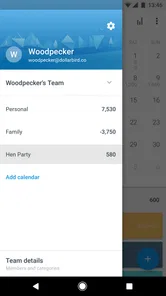
For shared household planning, the calendar can also provide a common reference point, provided everyone agrees on what the entries mean. I would use it for planned obligations and expected contributions rather than treating it as a perfect shared ledger. If two people enter the same bill or use different assumptions about available money, the apparent precision becomes misleading.
Recovering when the workflow gets out of sync
Almost every budgeting routine eventually falls behind. The mistake is trying to repair everything from memory in one long session. When I notice that the calendar no longer matches reality, I would first compare the current balance with the real account and identify the date when the mismatch began. Then I would review only the transactions around that point.
This is faster and safer than editing random entries throughout the month. A single missed expense can shift every later projection, so finding the first divergence matters more than polishing old categories. Once the balance is aligned again, I would add the next known income and fixed bills before returning to everyday spending.
If a future projection looks wrong, I would inspect dates before blaming arithmetic. A payment scheduled for the wrong day can make the app appear to lose money too early or too late. I would also check for duplicates, especially after entering a recurring item manually. Repetition is convenient only when the original event is correct.
When the issue is application behavior rather than a mistaken entry, I keep troubleshooting basic and safe. I check that the device meets the Android requirement, close and reopen the app, and confirm that I am using the latest installed release. I avoid deleting local information as a first step, because a reset can turn a small display problem into a data-reconstruction project. If the problem continues, I record what screen I was using and what action caused it before contacting support.
There is a useful difference between a display problem and a planning problem. If the same entries consistently produce an unexpected result, that is worth investigating as a technical issue. If the result changes after I add a missing purchase or correct a date, the app is probably reflecting the new information. Keeping those cases separate saves a lot of unnecessary frustration.
When the app is not the cause
Financial forecasts are especially sensitive to timing outside the application. Banks can show pending card payments differently from completed payments. Employers can send income later than expected. Transfers may take time to become usable, and cash spending may never appear in a digital account. A calendar can only model the event I tell it about; it cannot know that a real-world transaction has been delayed or processed in another way.
For that reason, I use the app as a decision aid, not as permission to spend the projected balance. If the calendar says I should have money available but the bank shows a lower usable amount, I trust the bank and correct the calendar. If income is uncertain, I do not spend against it merely because it appears as a planned entry.
This distinction is important for anyone paid irregularly. Freelancers, commission-based workers, and people with changing shifts may still benefit from the calendar, but they should enter conservative expectations and update them when money actually arrives. A conventional envelope-style budget may be easier for someone whose priority is limiting categories rather than forecasting dates.
Likewise, users with complicated accounts may prefer a dedicated finance service with automated synchronization, reconciliation, or investment tracking. Dollarbird Pro is more appealing when the main question is, “What will my balance look like after these upcoming events?” It is less compelling when the main question is, “Where did every transaction across all my accounts go?”
Small habits that make the system more reliable
I would reserve a short review at the same point each week. The purpose is not to analyze every purchase but to bring the next stretch of the calendar back into line. I check the current balance, enter forgotten spending, confirm upcoming fixed events, and look for a low-balance period. This is enough to preserve the app’s main advantage without turning budgeting into a daily chore.
Another useful habit is to record an expense as soon as it becomes meaningful, not only when the statement arrives. A large purchase, a transfer, or a payment made from cash can change the forecast immediately. Small purchases can be grouped mentally while I am learning the workflow, but I would not ignore repeated small spending forever; it can still distort the available amount.
I also recommend using the calendar to plan buffers rather than filling every future day with optimistic assumptions. If an expense is likely but not certain, leaving room for it is more honest than pretending the money is free. The app becomes much more useful when it helps me notice risk before the event occurs.
One trade-off is that this method rewards attention. The more current the entries, the more useful the forecast. That is not a flaw unique to this product, but it matters here because the calendar is the central experience rather than a secondary report. People who dislike manual upkeep should test the routine honestly for a couple of weeks before committing to it.
Who should use it, and who should skip it
I think Dollarbird Pro is a good fit for someone who thinks in paydays and due dates, wants a simple forward view, and is willing to maintain entries manually. It can be especially helpful for people who repeatedly run short before a major bill despite having enough income over the full month. The calendar makes that timing problem visible in a way a category total often does not.
It is also useful for a newcomer to personal finance who feels overwhelmed by accounting language. The basic question is approachable: what comes in, what goes out, and when? That simplicity can make it easier to develop a planning habit before moving to a more complex system.
I would skip it if automatic account connections are essential, if you need detailed reporting for taxes or business finances, or if you want a strict envelope system that assigns every unit of money to a category. I would also be cautious if you are unlikely to update the calendar after real purchases. An outdated forecast is worse than no forecast because it can look reassuring.
The Everyone age rating makes the app broadly accessible, but that does not remove the need for financial judgment. Younger users or anyone sharing a household budget should agree on the meaning of the starting balance and planned entries. The app can organize decisions; it cannot decide whether an expected payment is reliable or whether a purchase is affordable.
My practical verdict
After using it as a forward-looking planner, I see Dollarbird Pro as a focused tool rather than a complete financial command center. Its best quality is the calendar perspective: it turns vague anxiety about “making it through the month” into a sequence of dates that can be checked and adjusted. That is a real advantage for recurring bills and uneven cash flow.
Its weak point is equally clear. The forecast is only as dependable as the information and timing behind it, so users must correct missed entries and distinguish expected money from money already available. The mixed 3.3 average reflects why this kind of app will not suit everybody: a useful concept can still feel demanding when the workflow is not maintained.
I would recommend trying the free version with a deliberately small set of entries: the current balance, the next income, the largest fixed bills, and one irregular expense. If that view helps you make better decisions, expand it gradually. If you need automation, deep reports, or almost no manual input, choose a different finance solution instead.
My bottom line: use Dollarbird Pro when dates are the heart of your money problem, and judge it by whether its calendar changes your decisions before a bill arrives. It will not remove the need to check your accounts, but it can give everyday planning a clearer shape than a simple transaction list.
Dollarbird Pro Frequently Asked Questions
What does the “spark of AI” in Dollarbird Pro mean for everyday budgeting?
Dollarbird Pro is presented as a personal finance calendar with a spark of AI, alongside its calendar-based approach to tracking money. In everyday use, the key idea is to organize income, expenses, and planned payments so you can look ahead at your cash flow. Treat any projections as planning aids, and review your entries regularly so they reflect your current finances.
What devices can run Dollarbird Pro, and is it available on both Android and iOS?
Dollarbird Pro is a finance app for mobile devices, and its Android version requires Android 6.0 or later. Before downloading, check the relevant app store on your device to confirm compatibility and availability. The app is free to download, while some features may involve in-app purchases, so it is worth reviewing the store page before deciding whether it suits your device and budget.
What is Dollarbird Pro, and what can I use it for?
Dollarbird Pro is a personal finance and budgeting app designed to help you organize income, expenses, bills, and future cash flow in one calendar-based interface. Instead of only showing past transactions, it helps you see how scheduled payments may affect your balance. It can be useful for planning monthly spending, tracking recurring costs, and gaining a clearer overview of your financial habits.
How does Dollarbird Pro track income and expenses?
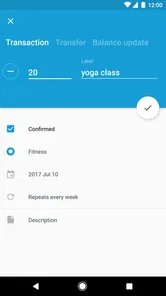
The app lets you manually add financial transactions, assign categories, enter amounts, and select dates. You can record both income and spending, including recurring payments such as rent, subscriptions, or loan installments. Once the information is entered, Dollarbird Pro places it on a calendar and updates your projected balance, making it easier to identify periods when your available money could become limited.
Does Dollarbird Pro connect directly to my bank accounts?
Dollarbird Pro is primarily based on manual financial tracking rather than automatically importing transactions from every bank. This approach gives you more control and can reduce the need to share banking credentials with a third-party service, but it also requires consistent updates. If you expect automatic synchronization, check the current App Store or Google Play listing to confirm which integrations and features are available in your region and version.
Pros
- Calendar-based layout makes recurring income and expenses easy to visualize.
- Supports shared finances
- useful for couples or small households.
- Manual entry encourages awareness of everyday spending habits.
- Future transactions help users estimate upcoming cash flow.
- Available across mobile platforms for convenient access on the go.
Cons
- Requires consistent manual updates
- which can become tedious over time.
- Advanced features may be difficult for first-time budgeting app users.
- Cloud syncing can be inconvenient when internet access is limited.
- Not ideal for users seeking automatic bank-account transaction imports.
- Subscription or purchase cost may not suit users wanting a free budget tracker.











