Dividend Tracker: Stock Market
- 443.00
- 4.5
- Installs
- 100.00K
- Price
- Free
Screenshots
Analysis by Reviewed
I approached Dividend Tracker: Stock Market as a practical finance app rather than a complete investing platform. Its purpose is to help me follow dividend-focused holdings, review portfolio information, and make sense of stock performance in one place. That narrow focus is useful: instead of trying to become a trading terminal, it gives dividend investors a dedicated way to keep an eye on income and portfolio progress.
After spending time with it, my impression is that it works best as a monitoring and organization tool. I would recommend it to someone who already owns dividend-paying stocks and wants a clearer routine for checking them. I would not treat it as a substitute for a broker, tax adviser, or detailed research service. The distinction matters, because the app is most valuable when it sits beside those tools rather than pretending to replace them.
How Dividend Tracker: Stock Market fits into a real investing routine
The app comes from DivTracker LLC and belongs to the finance category. It is free to install, with optional in-app purchases ranging from $0.99 to $99.99 per item. That makes it easy to try without committing money immediately, although anyone who wants the full experience should pay attention to which functions are included at no cost and which may require an upgrade.
The audience is clear from the short description: this is a dividend tracker. In my view, that clarity is one of its strongest qualities. Many general finance apps spread their attention across budgets, news, banking, trading, and market alerts. Here, the central question is simpler: what is happening with my dividend portfolio, and what should I review next?
Its public reception is encouraging, with a 4.5 average from around 2.6 thousand ratings and more than 400 written reviews. The app has passed 100 thousand installs, so it is not an obscure experiment with no visible user base. It is rated for Everyone, which makes the presentation approachable, though the subject matter still requires adult financial judgment.
The app was released on February 2, 2022, and the current version is 1.36.0. It runs on Android 8.0 or newer. Those details are important for people using an older phone: compatibility is broader than with many recent apps, but an older operating system can still affect how comfortably any finance application behaves in daily use.
What I would use it for first
My first task would be building a clean list of dividend positions and checking the information that matters to an income-oriented investor. Rather than opening several broker screens and manually piecing together a picture, I could use the tracker as a dedicated overview. The benefit is not just convenience. Repeating the same review in the same place makes it easier to notice when a holding deserves attention.
More From Our News Desk

Clash of Clans Is Won Between the Battles

Android Auto Makes the Case for Quieter Car Software

MobiOffice: Transforming Mobile Productivity with Seamless Integration

EA SPORTS FC™ Mobile Soccer: Redefining Mobile Sports Gaming

How Microsoft OneDrive Became a Mobile Productivity Giant

How Google Translate Breaks Language Barriers Effortlessly
A realistic example would be a monthly check after receiving a salary. I might open the app, look over the portfolio, inspect the stocks with the largest changes, and compare the expected income picture with my personal plan. I would then return to my broker before making any transaction. That workflow keeps the tracker in its proper role: it helps me observe and organize, while the broker remains the place for execution and account-specific confirmation.
Another useful situation is preparing for a portfolio review. If I hold several dividend stocks across different accounts, the app can serve as a single reference point for the questions I want to ask myself. Am I too concentrated in one area? Is one position contributing much more income than I intended? Have I been ignoring a holding simply because its price has not moved much? A focused dashboard can make those questions easier to raise.
Speed expectations and day-to-day feel
For this type of app, perceived speed is less about rapid trading and more about whether I can reach portfolio information without unnecessary friction. Dividend tracking is usually a review activity, not a split-second decision. I therefore judge the experience by how quickly it lets me move from opening the app to understanding what needs attention.
The app’s focused purpose works in its favor. A dedicated dividend view should feel more direct than a broad financial suite filled with unrelated banking or budgeting sections. I would expect routine checks to be comfortable on a modern device, especially when I am looking at a limited portfolio rather than trying to recreate an entire market database on screen.
There is also a trade-off. A finance app that presents charts, portfolio analysis, and stock information may need to load more than a simple note-taking tool. When I am checking several holdings in sequence, the experience can feel less immediate than opening a static spreadsheet. That is not automatically a flaw, but it is why I prefer using this kind of tracker for deliberate reviews instead of repeatedly refreshing it throughout the day.
The practical performance test is whether the app shortens my review routine, not whether it behaves like a high-frequency trading terminal. For dividend investors, a calm and readable process is often more useful than constant motion.
What happens during heavier use
The most demanding moments are likely to come when I work through a larger portfolio, switch between stock charts and analysis screens, or review multiple positions one after another. Those activities place more pressure on navigation than a quick glance at a single holding. They are also the moments when an app can reveal whether its organization is genuinely helpful.
I would approach a heavy review in stages rather than opening everything at once. First I would check the overall portfolio, then isolate positions that need attention, and finally inspect individual charts or details. This workflow reduces visual clutter and makes it easier to remember why I opened a particular screen. It also gives me a better chance of noticing a meaningful change instead of being distracted by every available data point.
People with a small collection of dividend stocks may never encounter a demanding workload. Someone tracking positions across several accounts or using the app as a research companion will place greater demands on it. For that user, the important question is not simply whether screens open, but whether the app remains understandable when the amount of information grows.
My advice is to avoid treating every chart movement as an action signal. The app’s analysis and stock views can support a review, but they should not turn a long-term income strategy into a sequence of impulsive decisions. If I am checking the tracker several times a day because I feel compelled to react to every price change, the tool is no longer serving my original purpose.
Reliability and recovery when a session is interrupted
Reliability matters more in finance than in many casual apps because I am using the information to shape decisions. I want to return to a familiar portfolio view, understand what I am seeing, and avoid confusion after switching away briefly. A tracker that encourages a consistent routine is valuable even when I only open it occasionally.
I would still use sensible habits. Before acting on a dividend amount, price, or portfolio figure, I would cross-check it with my broker or another trusted source. A tracker can be excellent for organization while still being unsuitable as the sole authority for an investment decision. This is especially important around payment dates, corporate actions, currency differences, and tax treatment, where personal account details can change the meaning of a displayed figure.
Recovery is another reason not to rely on one screen alone. If I am interrupted while reviewing the app, I would make a short note of the holding or question I was investigating rather than assuming I will remember everything. When I return, I can resume with a clear purpose. That habit is useful regardless of whether the interruption comes from the phone, another app, or a busy day.
The app is also better suited to planned checking than emergency decision-making. If a position suddenly moves and I need an immediate, account-specific response, I would go directly to my broker. The tracker is more comfortable as a stable reference for portfolio maintenance than as the final step in a time-sensitive transaction.
Device constraints and resource expectations
Android 8.0 support gives the app a reasonably wide device range, which is helpful for people who keep an older phone. Still, operating-system compatibility does not guarantee identical comfort on every handset. Screen size, available memory, background activity, and the general condition of the device can all affect how pleasant a finance dashboard feels.
On a newer phone, I would expect charts and portfolio screens to be easier to inspect, particularly when I need to move between several sections. On an older or heavily loaded device, I would be more patient during transitions and avoid opening the app while many other demanding tasks are running. That is not a special criticism of this product; it is a sensible expectation for any app that presents financial information visually.
Resource demands are also connected to usage style. A short monthly review is unlikely to feel burdensome, while leaving a finance app open for long periods or repeatedly checking it can be unnecessary. I would close it when finished and allow my phone to manage it normally rather than treating continuous monitoring as part of a dividend strategy.
The free entry point is useful for testing this on my own device. I can see whether the navigation feels comfortable, whether the information layout suits my habits, and whether the app fits my portfolio before considering an optional purchase. Because individual items can cost as much as $99.99, I would make that decision slowly and only after identifying a specific benefit I expect to use.
Three less obvious ways I would get more value from it
First, I would use the app as a pre-meeting checklist before speaking with a financial professional or reviewing my own plan. Instead of arriving with a vague feeling that the portfolio is “fine,” I could identify the holdings I want to discuss and write down why they caught my attention. This turns a passive dashboard into a preparation tool without asking the app to provide personal advice.
Second, I would separate observation from execution. I might review the tracker on one day, wait, and then verify any possible action inside the broker on another day. That small delay helps expose decisions driven by a temporary price move rather than by my income goals. The app is particularly useful here because its dedicated focus encourages me to look at the portfolio as a whole rather than jumping straight into an order ticket.
Third, I would use charts as prompts for questions, not conclusions. If a stock looks unusual compared with my expectations, I would investigate the reason elsewhere before changing anything. This is a subtle but important trade-off: visual analysis can make a portfolio easier to understand, but it can also create false confidence when a chart is viewed without company, tax, or account context.
A fourth habit would be reviewing concentration by contribution rather than by position count. Owning many stocks can create the impression of diversification, while one or two holdings may still dominate the income picture. A dividend-focused tracker is a natural place to notice that imbalance, even though deciding what to do about it remains a personal investment question.
Where it beats ordinary alternatives
The most obvious alternative is a spreadsheet. A spreadsheet gives me complete control over columns, formulas, notes, and custom categories. It can be better for investors who enjoy building their own system or who need unusual calculations. However, it also requires manual maintenance and can become stale quickly. This app is more appealing when I want a ready-made portfolio view and stock-oriented presentation without designing every part myself.
A broker’s built-in portfolio screen is another alternative. The broker wins for live account balances, orders, transaction history, and information tied directly to my holdings. It is the better choice when I am about to buy or sell. The tracker wins in focus: a broker often surrounds dividend information with trading tools, while this app encourages me to think specifically about income and portfolio analysis.
General market apps may offer broader news and quotes, but that breadth can make dividend monitoring feel like a secondary function. I would choose one of those when I need extensive market coverage or news discovery. I would choose this app when my recurring question is narrower and more personal: how does my dividend portfolio fit the plan I am following?
None of these options is universally superior. A spreadsheet is more flexible, a broker is more authoritative for account actions, and a broad market app may be stronger for research. The tracker earns its place by reducing the distance between those two extremes: it is more specialized than a general market feed and more convenient than maintaining every dividend detail manually.
Who should use it, and who should skip it
I think it is a good fit for a beginner who has started building a dividend portfolio and wants a dedicated place to review it. It can also suit an experienced investor who already knows the basics and wants a cleaner monitoring routine. The app’s Everyone rating makes it approachable, but the financial decisions surrounding it should still be made carefully.
I would be cautious about recommending it to someone who does not own dividend stocks and has no interest in income-oriented investing. The focus may feel too narrow. I would also steer active traders toward a broker or a more comprehensive market terminal, because a dividend tracker is not the natural center of a rapid trading workflow.
It may not be the right choice for someone who needs detailed tax reporting, complete transaction accounting, or institution-grade research. In those cases, a broker, accountant, or specialized investment service is more appropriate. The app can help organize questions, but it should not be mistaken for a complete financial record.
Privacy-conscious users should make their own comfort judgment before entering portfolio details into any finance tool. I would begin with the minimum information needed to evaluate the experience, avoid sharing anything unnecessary, and keep official account records in the broker. That approach lets me test the app’s usefulness without making it the only place where my financial history exists.
My performance verdict
Dividend Tracker: Stock Market feels most convincing when I use it deliberately: open it for a portfolio check, inspect the positions that need attention, note questions, and verify important details before acting. Its specialized finance focus gives it a clearer purpose than many all-in-one money apps, and its free starting point makes that purpose easy to test.
I would not promise identical speed or smoothness on every Android phone, especially older devices, but the Android 8.0 minimum makes it accessible to a broad range of users. The current version, 1.36.0, shows that the app is actively presented as a maintained product rather than a forgotten listing. My own expectations would remain practical: use it for organized monitoring, not for constant market surveillance.
The optional purchases deserve attention before upgrading. Free access is enough to decide whether the layout and workflow suit me, while the higher-priced option means I should not buy casually or assume every investor needs premium functions. I would first identify one recurring problem in my routine and check whether the purchase solves that problem in a meaningful way.
Overall, I would recommend it to a dividend investor who wants a focused companion for portfolio review. I like the way its purpose encourages patience and structure, and I see genuine value in using it to prepare better questions about my holdings. I would pair it with a broker for transactions and with independent research for decisions. Used that way, Dividend Tracker: Stock Market is a useful, approachable addition to an income-investing routine rather than an exaggerated replacement for every financial tool.
Dividend Tracker: Stock Market Frequently Asked Questions
Is Dividend Tracker: Stock Market suitable for someone new to investing?
It can be a useful starting point for someone who wants to understand dividend holdings and keep an eye on potential income in one place. The app focuses on organizing and analyzing investments, so it may help make portfolio details easier to follow. However, it does not replace learning about investment risks, and its estimates should not be treated as a recommendation to buy or sell a stock.
What is Dividend Tracker: Stock Market, and who is it designed for?
Dividend Tracker: Stock Market is a mobile investing companion for monitoring dividend-paying stocks, organizing a personal portfolio, and estimating income from dividends. After reviewing its core features, it appears most useful for beginners and long-term investors who want a clearer overview of expected payments, yields, and portfolio performance. It is an information and tracking tool, not a replacement for professional financial advice or a brokerage account.
Can I buy or sell stocks directly through Dividend Tracker: Stock Market?
The app is primarily designed for tracking and analyzing dividend investments rather than acting as a complete stock brokerage. Users can generally review market information, follow securities, and manage portfolio details, but buying or selling shares may require a separate supported brokerage platform. Before downloading, check the current app description and available integrations, since features, supported brokers, and market-data access can change between updates or regions.
How accurate and up to date are the stock prices and dividend details?
Dividend information, payment dates, yields, and stock prices depend on the data sources used by the application and may not always be real-time. Some information can be delayed, estimated, or affected by corporate actions such as dividend cuts, special distributions, stock splits, and ticker changes. Investors should verify important figures through company filings, an official exchange, or their broker before making an investment decision.
Does the app support portfolio tracking and dividend income calculations?
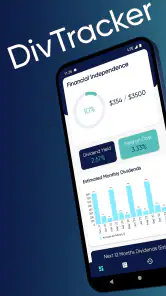
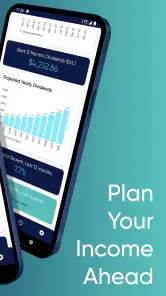
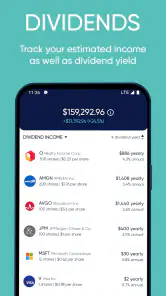
One of the app’s main advantages is the ability to organize dividend holdings and view projected income in a more convenient format than a spreadsheet. Depending on the version, users may enter positions manually or connect information through available tools, then review estimated annual income, payment schedules, yields, and portfolio summaries. Calculations are only as reliable as the quantities, purchase prices, and dividend data entered.
Pros
- Tracks dividend income
- yields
- and payment dates in one place.
- Portfolio tools help monitor dividend growth over time.
- Useful calendar makes upcoming dividend payments easy to review.
- Supports research into dividend-paying stocks and ETFs.
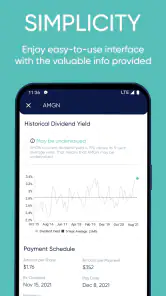
- Clean interface makes financial data quick to scan.
Cons
- Some advanced features may require a paid subscription.
- Data accuracy can depend on market sources and update timing.
- Not a replacement for professional investment advice.
- Limited value for users who do not invest for income.
- Frequent notifications may feel excessive without customization.
- Category
- Finance
- Version
- 1.36.0











