

discovery+ | Stream TV Shows
- 32.33K
- 4.7
- Installs
- 10.00M
- Price
- Free

Screenshots


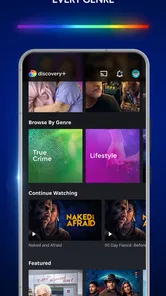



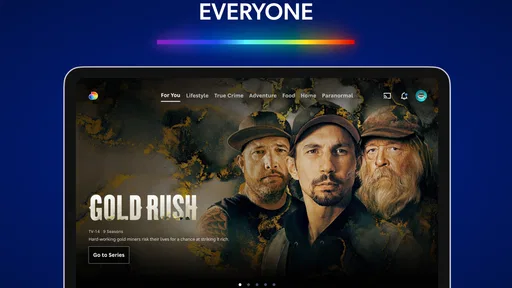
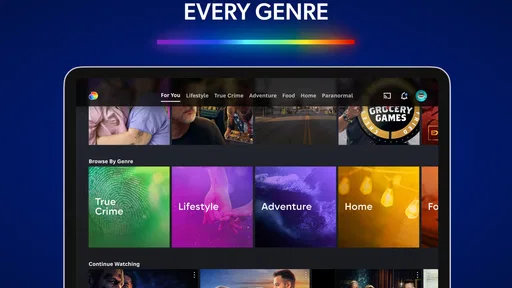
Analysis by Reviewed
I tend to think of discovery+ | Stream TV Shows as the sort of app that can turn a quiet evening into an unplanned documentary night. If you like real-life stories, nature, and reality television, its focus is more appealing than a service where those shows are scattered among scripted dramas and films. I’ve enjoyed browsing it, though the best fit depends on what the rest of your household wants to watch.
Watching Together Without Losing Your Place
First off, the sheer variety of content on discovery+ | Stream TV Shows is mind-blowing. From gripping true crime series to heartwarming nature documentaries, it's like having the entire Discovery Channel universe right in your pocket. I found myself hopping from one fascinating show to another, diving into topics I didn’t even know I was interested in.
A Shared Screen, Different Tastes
In a shared home, the app works best when everyone agrees on the kind of viewing it does well. One person might want a nature documentary while another is drawn to a true-crime series, and that range gives people a reason to browse in the same place. For a realistic weeknight, I’d use it to pick a short episode while dinner is finishing, then save a longer program for the weekend rather than spend the whole evening scrolling.
A practical way to make that choice is for each person to name a preferred mood before opening the app: something calming, something suspenseful, or something easy to watch together. That small bit of coordination keeps browsing from turning into an argument about whose turn it is to choose. I’d also agree on a stopping point before starting a series; a gripping episode can easily take over the evening when nobody has decided how much time they have.
For a mixed household, I’d treat the app as a shared destination for a particular kind of night rather than the default answer to every “what should we watch?” question. It is especially handy when someone wants factual storytelling and another person is happy to discover a topic together. If tastes are far apart, taking turns choosing a program may work better than expecting one title to satisfy everyone.
The app is a better match for households that regularly watch unscripted shows than for people who mainly want new scripted dramas, blockbuster films, or a broad mix of genres. Compared with general streaming services, its advantage is a more focused real-life entertainment identity; the trade-off is that the catalog may feel narrower if your tastes change from one day to the next. I’d keep another service in the mix if variety across many kinds of television matters more than specialist programming.
Profiles and Household Boundaries
The app’s user interface is intuitive and user-friendly. Navigating through the app is smooth, with a clean layout that makes finding shows a breeze. I particularly appreciate the personalized recommendations; it's like the app knows my tastes better than I do! Plus, the ability to download shows for offline viewing is a godsend for those long commutes or flights.
More From Our News Desk

 Gmail
Gmail in a Busy Inbox: Who Benefits Most?
From first account to crowded workday, Gmail earns its place through dependable search and flexible sorting—but its best fit depends on how much inbox maintenance you can tolerate.

 Prime Video
Switching to Prime Video: What Changes in Your Viewing Routine
Prime Video can make a compelling second home for streaming, but switching means learning a different catalog, rental layer, and route from browsing to playback.

 Universal TV Remote Control
 Works Best as a Reliable Backup
A phone remote earns its place through quick setup and reliable habits. Here is how to get more from Universal TV Remote Control—and where its limits show.

 Weather - By Xiaomi
Weather by Xiaomi Review: Clear at a Glance, Less Clear Up Close
Xiaomi’s weather app makes everyday forecasts quick to scan, but its calm surface can leave useful details and recovery paths harder to find than they should be.

 X
X Under Pressure: Can It Recover When Posting Goes Wrong?
A resilience-focused review of X, examining setup, mistaken posts, interruptions, weak connections, and the gaps that matter when recovery needs to be dependable.

 Clash of Clans
 Is Won Between the Battles
Its raids are quick; its community is a long-term project of coordination, teaching, rivalry, and shared responsibility—with all the friction that entails.
Latest News



Personalized profiles can help separate viewing habits when several people use the same household service. I’d have each viewer choose their own profile before starting a show, especially if recommendations matter to them; otherwise, one person’s crime binge can influence what appears for someone looking for nature programs. Profiles are useful for keeping preferences distinct, but I wouldn’t assume they replace household rules or supervise what another person watches.
That distinction matters on a television used by several people. A profile can help keep recommendations from becoming a mash-up of everyone’s viewing, but it is not a substitute for agreeing who is signed in, who is choosing, and what younger viewers may watch. I’d make those expectations clear before handing over a shared remote, rather than expecting an app setting to settle a household disagreement.
For a household with guests, I’d be mindful that the signed-in profile may show viewing choices and recommendations to the next person using the device. Picking the right profile before playback is a simple habit, and switching back afterward can prevent someone else’s session from shaping the next suggestions. This is a small step, but it is more useful than trying to repair a muddled recommendation feed later.
If you plan to use the app while traveling, downloads are worth thinking about before you leave home: choose episodes in advance, while you have time to decide what you actually want to watch. That makes the feature more practical than relying on a last-minute search during a commute. I’d also check that the chosen show is available to download in the app before counting on it for an offline trip.
Downloads are also a good way to plan around limited or unreliable connectivity, but I wouldn’t treat them as a reason to leave preparation until the last minute. Before a trip, I’d open the program I want, confirm the download option is available, and allow enough time for it to finish. That workflow is particularly useful for a train ride or a waiting room, where searching and streaming may be less dependable than watching something already saved.
Choosing a Viewing Experience
One feature that stood out to me is the ad-free viewing option. Let's face it, ads can be a real buzzkill when you're binge-watching. With discovery+, you can opt for a subscription that ditches those pesky interruptions, allowing for a seamless viewing experience.
The app is free to install, but subscriptions and in-app purchases can affect the overall cost, so I’d check the available plan details before making it the household’s main viewing service. The ad-free choice may suit someone who watches often and values uninterrupted episodes; occasional viewers may prefer to decide whether the extra expense makes sense for their habits. Since Discovery Communications LLC develops the app, its identity is closely tied to this kind of factual and reality programming rather than an all-purpose entertainment catalog.
I’d think about cost in terms of how often the household will actually open the app, not just how appealing its programs look during a browse. If one person watches regularly and everyone else rarely joins in, it may make more sense to judge the service around that main viewer’s routine. If several people are keen on the same kinds of shows, the value is easier to see; if use is sporadic, I’d compare the plan options carefully before committing.
Another neat feature is the access to exclusive content. There are shows and documentaries that you won’t find anywhere else, making it a must-have for die-hard fans of the Discovery network. The app also offers a multi-user feature, so everyone in the family can have their own personalized profile.
For someone who is deciding whether to install it, I’d browse with a short list of actual interests in mind: a subject you follow, a kind of documentary you enjoy, or a reality format you already watch. That is more revealing than judging the service by its most prominent recommendations. Exclusive programs matter most when they cover subjects you would otherwise seek out, rather than simply adding more titles to a watchlist you never finish.
Age, Trust, and What to Expect
With a Teen age rating, I’d treat the app as a service for older children and adults, not as an automatic choice for every child in the home. Real-life subjects can vary in tone, so I’d choose programs together when younger viewers are involved rather than relying on the rating alone. Profiles can make it easier to keep viewing preferences separate, but they don’t remove the need for a parent or caregiver to decide what is suitable.
In practice, I’d preview a program or read its on-screen description before letting a younger viewer choose independently, especially when the subject involves crime or other difficult real-life events. A broad app rating describes the service overall; it cannot tell me whether a particular episode is right for a particular child. Watching together can also turn a challenging subject into a conversation instead of an unexpected surprise.
The service has a 4.7 average from around 394,000 ratings, and it has passed over 10 million installs. That level of uptake suggests it has found an audience, but I’d still judge it by whether its specific mix suits your household. It runs on Android 5.0 or later, which makes it an option for many older Android devices, though I’d consider the screen and connection you plan to use when deciding whether watching on a phone or casting to a television makes more sense.
As an entertainment app, it makes the most sense when you already know you enjoy factual and reality programming, but the large audience can still be a useful sign that it is not an obscure niche service. I would not use popularity alone to decide, though. The more personal question is whether you can find programs that fit the way you watch: a quick episode alone, a longer documentary with someone else, or something to download for a journey.
The quality of the streams is top-notch. Whether you’re watching on a small screen or casting to a big TV, the high-definition streams make every show pop with vibrant colors and crisp details. It’s like having a movie theater experience at home, minus the overpriced popcorn.
For shared viewing, a television is usually the more comfortable choice when the program depends on details in the picture or when several people want to follow along. A phone is more convenient for a solo episode or a downloaded show away from home. I’d choose the screen based on the occasion rather than assuming that one viewing setup works equally well for a group and for a commute.
And let's not forget about the subtitles and multiple languages options. It's a great touch for non-native speakers or those who prefer watching shows in different languages.
Those options can also make it easier for people in the same room to follow a program at different levels of language comfort. I’d check the playback settings when starting a show, rather than interrupting a group halfway through because someone is struggling to follow the dialogue. For a household watching together, that quick adjustment can make the experience more welcoming without changing what everyone chose to watch.
Who I’d Recommend It To
I’d recommend it to viewers who regularly seek out documentaries, reality series, and other real-life stories, especially if more than one person at home enjoys that corner of television. It is less convincing as the only subscription for someone who wants a large spread of scripted entertainment, or for a household that rarely watches this style of programming. If you’re unsure, start by browsing the available shows and think about whether you can name a few you’d genuinely watch; a focused catalog is a strength only when it matches your routine.
I’d skip it as a primary service if most of your viewing is scripted drama, films, or live entertainment from a wide range of genres. A broader streaming catalog is a better fit for that routine, while this app is more rewarding when you want real-life subjects and unscripted formats in one place. That difference is not a flaw so much as a decision about what you want your main screen to do.
For a household that already has a general-purpose streaming service, discovery+ can work as a complement rather than a replacement. I’d use the broader service when the group cannot agree on a factual program, then return here when someone wants a documentary, a nature show, or a reality series. That division makes the focused catalog easier to appreciate and avoids expecting it to cover every kind of television night.
The app is free to install, but that does not mean every viewing choice is automatically free of cost. I’d check the current subscription choices in the app before setting it up as a regular family activity, then decide whether the amount of viewing justifies the expense. If several household members plan to use it, it is also worth discussing who manages the subscription and which profile each person should use, so practical expectations are settled before the first episode.
For everyday use, the most useful routine is simple: choose a profile, agree on a program, and decide whether you are watching now or saving it for later. That avoids two common annoyances—recommendations shaped by someone else’s habits and the scramble to find something suitable when a trip is already underway. It also gives each person a clearer boundary between their own viewing and the household’s shared screen.
All in all, discovery+ | Stream TV Shows is a fantastic app for anyone who enjoys quality content, easy navigation, and a personalized experience. It’s like a passport to a world of discovery, right at your fingertips. So, if you haven't tried it yet, what are you waiting for? Dive in and start exploring!
discovery+ | Stream TV Shows Frequently Asked Questions
What kind of entertainment can I expect from discovery+?
Discovery+ brings real-life entertainment and exclusive originals together in one place. It is a streaming app for people interested in TV shows and documentaries, with programming spanning subjects such as lifestyle, adventure, nature, and true crime. That range makes it suitable for browsing different kinds of factual and unscripted viewing, rather than focusing on only one genre.
Who develops discovery+, and what is its age rating?
Discovery+ is an entertainment app developed by Discovery Communications LLC. Its content rating is Teen, which is worth keeping in mind if you are choosing streaming apps for a family device or a younger viewer. Consider whether that rating fits your household before downloading, and use your own judgment about what is appropriate for each person who may watch.
What devices and operating systems can run discovery+?
Discovery+ is an entertainment app developed by Discovery Communications LLC. It runs on Android devices using Android 5.0 or later, and it is also available for iOS devices. Before downloading, check that your phone or tablet’s operating system meets the requirement and that you have enough space for the app. The app itself is free to download, though access to streaming content may involve in-app purchases.
What is discovery+ and what content does it offer?
Discovery+ is a streaming service that provides access to a vast library of TV shows and documentaries. It features content from popular networks such as Discovery Channel, HGTV, Food Network, TLC, and Animal Planet, among others. Users can explore a range of genres including lifestyle, adventure, nature, and true crime, making it a comprehensive platform for entertainment and learning.
Is discovery+ available for both Android and iOS devices?
Yes, discovery+ is available for download on both Android and iOS devices. Users can easily install the app from the Google Play Store for Android or the Apple App Store for iOS. It ensures a seamless streaming experience across smartphones and tablets, allowing you to enjoy your favorite shows anytime and anywhere.
Pros
- Extensive library of TV shows and documentaries.
- High-quality streaming with minimal buffering.
- User-friendly interface and easy navigation.
- Affordable subscription plans available.
- Access to exclusive content and originals.
Cons
- Limited offline download options.
- Ads in some subscription tiers.
- Geographic restrictions on content.
- Requires stable internet for best experience.
- No free trial available for new users.











