

DIRECTV: TV & Movie Streaming
- 27.30K
- 4.6
- Installs
- 10.00M
- Price
- Free

Screenshots

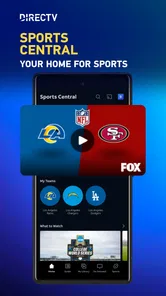
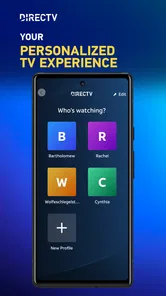
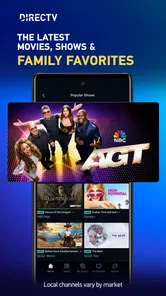
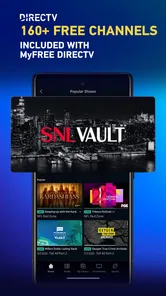
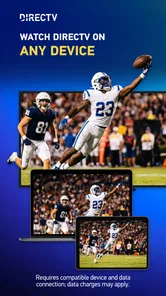

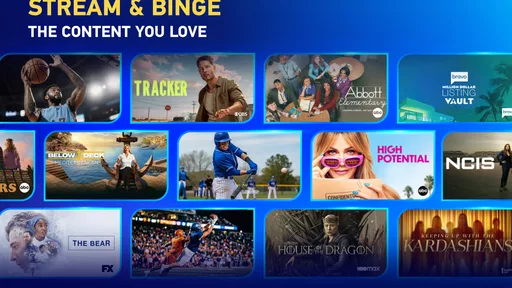
Analysis by Reviewed
I judge a live-TV app not only by what it can play, but by how clearly it lets me understand the choices involved. DIRECTV is an entertainment app from DIRECTV, LLC, and its focus on live television, sports and films makes it feel most useful when I want scheduled viewing rather than an endless catalogue to browse. It is free to install, but that does not mean every way of watching is free: in-app purchases range from $4.99 to $72.99 per item, so I would check the terms attached to any purchase before tapping through. That distinction matters if you are simply exploring the app or deciding whether it fits your household.
What to check before settling in
For trust, I prefer visible choices over assumptions. I would review the app’s permission prompts on my device and allow only what makes sense for the way I plan to use it. I would also look over the account and purchase screens before committing, particularly if someone else in the household may use the same phone or tablet. These are practical checks, not a claim about particular permissions or privacy practices: those details depend on what the app presents on your device and the choices you make.
A useful habit with any streaming service is to separate browsing from buying. If I am comparing what is available, I can take my time and read the wording on a subscription or purchase screen rather than treating the install price as the full cost of watching. If I already have a DIRECTV account, signing in may make the app more relevant to my existing service; if I do not, I would first confirm which viewing options are actually offered to me before building a routine around it.
Endless Entertainment Options
One of the standout features of the DIRECTV app is the sheer amount of content available. Whether you're into live sports, catching up on the latest episodes of your favorite shows, or just looking for a movie to chill with, this app has got you covered. I was pleasantly surprised by the variety – there's something for everyone, and the app keeps things fresh with regular updates and new additions.
User-Friendly Interface
Now, let's talk about usability. The app is super intuitive and easy to navigate, which is a huge plus for me. You can quickly find what you're looking for thanks to the clean layout and well-organized categories. The search function is pretty robust, so even if you're not sure what you want to watch, you can easily browse through different genres and channels until something catches your eye.
Another cool feature is the ability to set reminders for your favorite shows or live events. Never miss a game or episode again! It’s like having a personal assistant dedicated to your entertainment schedule.
Stream On The Go
One of the things I love most about the DIRECTV app is the ability to watch TV anywhere, anytime. Whether you're on your daily commute, traveling, or just lounging around the house, you can stream all your favorite content without a hitch. The streaming quality is top-notch, and I rarely experience any buffering issues, even when I'm on a less-than-stellar Wi-Fi connection.
More From Our News Desk

 Gmail
Gmail in a Busy Inbox: Who Benefits Most?
From first account to crowded workday, Gmail earns its place through dependable search and flexible sorting—but its best fit depends on how much inbox maintenance you can tolerate.

 Prime Video
Switching to Prime Video: What Changes in Your Viewing Routine
Prime Video can make a compelling second home for streaming, but switching means learning a different catalog, rental layer, and route from browsing to playback.

 Universal TV Remote Control
 Works Best as a Reliable Backup
A phone remote earns its place through quick setup and reliable habits. Here is how to get more from Universal TV Remote Control—and where its limits show.

 Weather - By Xiaomi
Weather by Xiaomi Review: Clear at a Glance, Less Clear Up Close
Xiaomi’s weather app makes everyday forecasts quick to scan, but its calm surface can leave useful details and recovery paths harder to find than they should be.

 X
X Under Pressure: Can It Recover When Posting Goes Wrong?
A resilience-focused review of X, examining setup, mistaken posts, interruptions, weak connections, and the gaps that matter when recovery needs to be dependable.

 Clash of Clans
 Is Won Between the Battles
Its raids are quick; its community is a long-term project of coordination, teaching, rivalry, and shared responsibility—with all the friction that entails.
Latest News



Plus, if you have a DIRECTV subscription, you can sync the app with your account and get access to even more channels and features. It's like having a VIP pass to the best in entertainment.
Where it fits in a viewing routine
I find the strongest case for a live-TV app is a specific appointment: say, checking the schedule before leaving home, setting a reminder for a match, then opening the stream when I have a reliable connection. That small routine makes the reminder more useful than simply scrolling through programmes later. It can also help a household coordinate around a show without keeping the television in one room occupied.
There is a trade-off, though. On a commute, watching video may be awkward or impractical, and streaming can use mobile data; I would save phone viewing for a suitable connection or keep it brief when data is a concern. For a relaxed evening of choosing from a broad on-demand library, a service built primarily around that kind of catalogue may suit you better. DIRECTV’s appeal is the mix of live viewing and account-linked access, not necessarily replacing every other streaming service.
Who should take a closer look
The app is a sensible option if live sports, scheduled television or watching through an existing DIRECTV subscription is part of your routine. Its Teen content rating is worth keeping in mind when deciding whether it is appropriate for younger viewers; I would check the available viewing controls and account settings rather than assume a shared device is automatically tailored to each person. If you mainly want a free, self-contained collection of shows, or have no interest in live channels, the purchase options and account context may make another service a simpler fit.
Before relying on it for a big game or a planned family movie, I would sign in ahead of time, check that the title or channel is available under my account, and test playback on the device I intend to use. That quick check avoids discovering at kickoff that my account does not include the viewing option I expected. A tablet can be a comfortable choice for one person, while casting or watching on a television may work better when everyone wants to follow along; the best setup depends on the devices and access available to you.
Choosing it alongside other streaming options
I would compare this app with other services by starting with the kind of viewing I actually do, rather than counting titles. A conventional on-demand service is often easier when I want to pick a series and watch at my own pace. A live-TV option makes more sense when the schedule itself matters: a game happening now, a programme I want to catch as it airs, or the habit of turning on television without planning a specific title. Those are different jobs, so I would not expect one app to be the best answer for both.
That distinction is especially useful when deciding whether to keep several services. If most of my viewing is planned films and complete seasons, a live-oriented app may become a secondary tool instead of my main subscription. If live events anchor my week, however, the ability to check what is on and set a reminder can justify keeping it handy. I would think of it as a companion for particular moments, not assume it replaces every source of entertainment in the home.
A practical way to try it
For a low-friction first session, I would install the app while at home, sign in or review the available access path, and search for one specific programme or event I already intend to watch. Then I would confirm the account’s viewing options and try playback before relying on it outside the house. This is more useful than browsing at random because it quickly answers the practical question: does the content I care about appear available to me on the device I plan to use?
I would also treat reminders as planning aids, not guarantees that every event will fit my account or be convenient to stream. Check the listing first, then set a reminder only for something you have a realistic chance of watching. If you share a device, make the account and purchase screens part of that first check. A little setup can prevent accidental spending or confusion later, especially when another person in the household is used to making purchases on the same device.
When the viewing context matters
A realistic use case is a busy evening when I know a live event starts while I am finishing dinner. I can check the schedule earlier, set a reminder, and decide whether I will watch on a tablet or move to the television once everyone is ready. If plans change, the phone gives me another way to follow along, but I would not count on mobile viewing in a place with a weak connection or where watching a screen would be inconvenient.
For shared viewing, I would make the choice based on who is watching and what screen is comfortable, rather than assuming the phone is the best destination. One person can use a tablet without taking over the living-room television; a group is usually better served by a larger screen if the available setup supports it. The practical advantage is flexibility, while the compromise is that account access, connection quality and the viewing terms still determine what actually plays.
Final Thoughts
All in all, the DIRECTV app is a fantastic tool for anyone who loves TV and wants to make the most of their viewing experience. It’s easy to use, packed with content, and perfect for watching on the go. Whether you're a sports fanatic, a movie buff, or just someone who enjoys a good TV show, this app has something for you. So why not give it a try and see how it can enhance your entertainment routine?
My cautious recommendation is to try it when live television or an existing DIRECTV relationship gives you a clear reason to use it, then review the account and purchase choices before spending. It has a 4.6 average from around 106,000 ratings, and more than 10 million installs, which suggests plenty of people have made room for it, though popularity alone cannot tell you whether its access and costs match your needs. With a Teen rating and optional in-app purchases, I would make the decision with the household’s viewing habits in mind. For me, it earns consideration as a companion to television viewing, rather than an automatic replacement for every streaming app.
DIRECTV: TV & Movie Streaming Frequently Asked Questions
What is the DIRECTV app, and what can I use it for?
DIRECTV is an entertainment app for watching television content on supported screens. Its store summary highlights live TV, sports, and holiday movies, with streaming on a phone, tablet, or TV. It may suit viewers who want to access programming through the DIRECTV service, while the channels and features available can depend on the account and service they use.
Who is the DIRECTV app intended for?
DIRECTV may be useful for people who already use the DIRECTV service and want to watch television on a phone, tablet, or TV. Its focus includes live TV, sports, and holiday movies, so it can appeal to viewers looking for those types of programming. The content available to each person can vary with their account and service access.
Is DIRECTV free to download, and are there additional costs?
DIRECTV is a free entertainment app to download, but watching content may require a DIRECTV subscription. The app also offers in-app purchases, with prices ranging from $4.99 to $72.99 per item. Check the purchase details shown in the app before confirming anything, and consider whether your existing TV service includes access to the channels and features you want to use.
What kind of content can I watch with the DIRECTV app?
DIRECTV is designed for watching live TV, sports, and holiday movies on a phone, tablet, or TV. It is an entertainment app from DIRECTV, LLC, and its content may appeal to viewers who want television programming available across different screens. The specific channels and programs available can depend on the service and access associated with your account.
What devices are compatible with the DIRECTV app?
The DIRECTV app is compatible with a wide range of devices, including Android smartphones and tablets, iOS devices such as iPhones and iPads, as well as certain Smart TVs and streaming devices like Amazon Fire TV and Roku. Before downloading, users should check the app store for specific device compatibility to ensure smooth access to their favorite channels and shows.
Pros
- Wide range of live TV channels available.
- User-friendly interface for easy navigation.
- High-quality streaming with minimal buffering.
- Supports multiple devices and simultaneous streams.
- On-demand content available anytime.
Cons
- Subscription can be expensive for some users.
- Limited offline viewing options.
- Occasional login issues reported by users.
- Ads may interrupt on-demand content.
- Certain regional restrictions on content.











