

DINOPAY - Sinclair Oil
- 3.00K
- 4.4
- Installs
- 100.00K
- Price
- Free
Screenshots

Analysis by Reviewed
I tested DINOPAY as a household shopping tool rather than treating it like just another fuel-station app. That distinction matters because the useful question is not only whether it can help me during a stop at Sinclair, but also whether it fits the way a family or shared household handles errands, phones, accounts, and payment decisions. My overall impression is that it is most valuable when one person wants a dedicated way to manage Sinclair-related purchases, while its usefulness becomes narrower when several people need to coordinate from separate devices or accounts.
DINOPAY is a free shopping app from PetroZone Mobile, built around Sinclair’s official mobile experience. It is available for Everyone, runs on Android from version 8.0 onward, and has reached more than one hundred thousand installs. Its average rating sits at 4.3 from roughly five thousand ratings, with around three thousand written reviews, so it has attracted a meaningful user base without being something I would assume every household already uses.
How DINOPAY fits a shared household routine
The clearest everyday use case is a shared car and a divided errands list. Imagine that I am driving home after work, the fuel gauge is low, and another person in the household has asked me to stop at Sinclair. Instead of opening a general shopping app and searching around, I can use the Sinclair-focused app as the starting point for that particular task. The benefit is less about discovering a broad range of products and more about keeping a recurring fuel stop in one familiar place.
That focused approach can be helpful for couples, roommates, or parents who alternate driving. One person may normally handle refueling, while another handles the household budget. In that situation, the app can be part of the routine, but I would still treat the phone, account, and payment method as belonging to the individual who set them up. I would not assume that installing it on a shared tablet or handing over an unlocked phone automatically creates a shared household profile.
This is one of the first boundaries I would establish before using it with other people: decide who owns the app session and who is authorized to complete a purchase. A shared device can make an app convenient, but it can also blur responsibility. If my partner uses my phone while I am driving, I want both of us to understand whether they are simply helping with navigation and station selection or actually confirming a transaction. That small conversation prevents confusion later.
The strongest household benefit is convenience at the point of need, not full family account management. DINOPAY makes sense when the person holding the phone is also the person making the decision. It is less naturally suited to a setup where several people need separate permissions, individual spending limits, or a central record of every household member’s activity. I would choose a budgeting tool or a bank’s shared-account features for those responsibilities rather than expecting a fuel app to handle them.
What I would do before handing over the phone
Before another person uses the app, I would check which account is active, whether the correct payment details are available, and whether the phone is protected by its normal screen lock. I would also make sure the driver is not trying to complete a complicated task while moving. The safest workflow is to prepare while parked, then use the app only when attention can remain on the vehicle and surroundings.
More From Our News Desk

 Instagram
Instagram’s Power Comes From Its Place in Your Phone
A close look at how Instagram turns Meta’s reach, recommendation systems and everyday camera habits into durable platform power—and what that costs users.

 Gmail
GmailGmail in a Busy Inbox: Who Benefits Most?
From first account to crowded workday, Gmail earns its place through dependable search and flexible sorting—but its best fit depends on how much inbox maintenance you can tolerate.

 Prime Video
Switching to Prime Video: What Changes in Your Viewing Routine
Prime Video can make a compelling second home for streaming, but switching means learning a different catalog, rental layer, and route from browsing to playback.

 Universal TV Remote Control
Universal TV Remote Control Works Best as a Reliable Backup
A phone remote earns its place through quick setup and reliable habits. Here is how to get more from Universal TV Remote Control—and where its limits show.

 Weather - By Xiaomi
Weather by Xiaomi Review: Clear at a Glance, Less Clear Up Close
Xiaomi’s weather app makes everyday forecasts quick to scan, but its calm surface can leave useful details and recovery paths harder to find than they should be.

 X
XX Under Pressure: Can It Recover When Posting Goes Wrong?
A resilience-focused review of X, examining setup, mistaken posts, interruptions, weak connections, and the gaps that matter when recovery needs to be dependable.
Latest News



This is especially relevant in a family car. A teenager may be allowed to use the phone for directions but not to approve a fuel purchase. A roommate may be trusted to refuel a shared vehicle but expected to use a particular payment method. DINOPAY does not remove the need for those household rules. In my view, the app works best when it supports an agreement that already exists instead of becoming the agreement itself.
Setup, account boundaries, and the first real-world test
My advice is to install DINOPAY and explore its flow before the fuel light comes on. The worst time to learn any payment-oriented app is when I am parked at a busy station, the weather is unpleasant, and another driver is waiting behind me. A calm first run lets me see where the app asks for account information, how it presents the Sinclair experience, and which steps require my attention before I rely on it for a regular commute.
I would also test it with the phone I actually plan to use. A household sometimes has an older spare device, and this app supports Android from version 8.0, but operating-system compatibility is only one part of the experience. Screen size, battery condition, mobile connectivity, and the person’s comfort with phone payments can matter just as much. An older phone may technically run the app while still being inconvenient at a station.
For a shared device, I would avoid leaving the app in a state that makes the next person guess whose session is active. If the household uses one phone, the person responsible for the account should review the screen before another person takes over. I would not mix several people’s payment details casually, because the convenience of a shared login is not worth losing track of which account is being used.
There is also a practical distinction between an app being free to download and a purchase being free. DINOPAY costs nothing to install, but that does not mean fuel or other station purchases cost nothing. I would explain that clearly to a younger user or anyone unfamiliar with mobile shopping: the app is the tool for the transaction, not a source of complimentary fuel.
The current version is 6.0.1, which tells me I should keep the installed copy reasonably current rather than relying indefinitely on an old build. I would update it before an important road trip, not while trying to leave a station. Keeping the app current is also sensible when several people depend on the same phone, because one person’s outdated setup can become everyone’s problem during an urgent errand.
Where the app is more useful than a general alternative
Compared with opening a browser and searching for Sinclair every time, a dedicated application gives me a more direct starting point. I do not have to remember which page is official or sort through unrelated shopping results. That matters for a household member who does not enjoy navigating websites or who wants a repeatable routine with fewer decisions.
Compared with a general fuel-price or navigation app, DINOPAY has a narrower purpose. A navigation app may be better when the main question is where to go, how long the route will take, or which station is convenient along a trip. A general payment wallet may be better when I want to keep several merchants and cards in one place. I see DINOPAY as the more focused choice when the Sinclair connection is the reason I am opening the app in the first place.
That focus is also the trade-off. If my household regularly visits many different fuel brands, using DINOPAY alone may create a fragmented routine. I might need one app for Sinclair, another for a different station chain, and a wallet for everything else. For a driver who values one universal payment method above brand-specific convenience, the dedicated approach may feel like extra maintenance.
Coordination between adults, drivers, and household budgets
DINOPAY can support coordination, but I would keep the coordination outside the app unless the app explicitly presents a feature for it. A simple household message can be enough: “Please refuel the shared car at Sinclair and use the household card.” The app then handles the relevant stop, while the household’s own agreement handles authorization and reimbursement.
For roommates, I would record the date and amount through the household’s normal method rather than assuming the app is a complete expense ledger. One person can make the purchase, send the receipt or transaction information through the agreed channel, and let the group settle it separately. This division is useful because a fuel app is optimized for the stop itself, while a shared budget needs broader context, including groceries, maintenance, tolls, and other travel costs.
For a couple sharing a car, the best workflow may be to nominate one primary account holder and one backup driver. The backup driver can be shown how to open the app and what to check before confirming anything. I would not create multiple accounts merely to make the arrangement appear more equal unless there is a clear reason to do so. More accounts can mean more forgotten passwords, inconsistent payment details, and uncertainty about which person should troubleshoot a problem.
A useful non-obvious habit is to separate “can use the phone” from “can authorize spending.” Those are different permissions in everyday life. A passenger might select a station while the driver remains responsible for the transaction. A young adult might be allowed to refuel a family car but use a prepaid or specifically approved method. Making that distinction explicit is more reliable than assuming everyone understands the same screen in the same way.
I would also avoid treating the app as a substitute for checking the physical environment. Even if the digital process is straightforward, I still need to verify that I am at the intended Sinclair location and that the vehicle is positioned correctly before proceeding. A polished app cannot correct a rushed choice made at the wrong station or with the wrong vehicle in mind.
When a separate tool is the better household choice
If the household’s main goal is tracking fuel spending across several brands, I would use a dedicated finance or expense-tracking solution alongside DINOPAY. If the goal is finding the cheapest nearby option, a navigation or fuel-price service may be more useful. If the goal is giving a child controlled spending access, I would look to a bank product designed for that purpose rather than assuming a shopping app provides family controls.
This does not make DINOPAY weak; it clarifies its role. I like it more as a brand-specific transaction companion than as a household command center. Trying to force it into the latter role would create expectations it was not designed to meet.
Age, trust, and sensible use on a family phone
The Everyone age classification makes the app approachable for a broad audience, but an age label is not the same as permission to spend. A child may be able to understand the interface while still not being authorized to use an adult’s payment method. In my household, I would explain the difference plainly and keep the account holder responsible for every confirmation.
For teenagers who drive, DINOPAY could be useful as part of a supervised refueling routine. I would first walk through the process while parked, explain which account is active, and agree on what to do if the app does not behave as expected. The fallback should always be clear: stop, ask the account holder, and use the household’s backup method if appropriate. I would never make a young driver feel pressured to solve a payment problem while distracted at a station.
Trust also matters between adults. If I lend my phone to a relative, I would not assume they should see every account detail simply because they need to complete one errand. A separate device or a supervised handoff may be more comfortable. The app can be convenient without requiring the entire household to share one digital identity.
Older relatives may appreciate a dedicated Sinclair app if they already prefer that station, but setup should be judged by confidence rather than age alone. A person who dislikes passwords, mobile transactions, or changing phone screens may be happier with a familiar physical payment method. I would introduce DINOPAY as an option, not as an obligation, and let the person decide after trying it without time pressure.
One practical tip is to keep an emergency alternative available. A phone can lose signal, run out of battery, or become unavailable when another family member takes it. I would carry a normal payment method and know how the household handles a failed digital attempt. That backup is particularly important on long drives, where the convenience of a brand-specific app should never become the only way to refuel.
My household verdict after weighing convenience against limits
DINOPAY is a sensible choice for a household that frequently uses Sinclair and wants a direct, dedicated shopping experience on Android. The free price removes the barrier to trying it, and the established user base suggests it is not an obscure experiment. PetroZone Mobile has kept the app moving through its current 6.0.1 release, while the 4.3 average indicates that many users find it worthwhile even if it is not universally perfect.
I would recommend it to the person who usually handles fuel stops, to couples sharing one car, and to drivers who prefer a Sinclair-specific routine over searching through a general app each time. I would also recommend it when the household can agree on one account owner, one approved payment process, and a simple backup plan.
I would skip it as the primary solution if my household needs one app for many fuel brands, detailed shared budgeting, child spending controls, or broad route planning. In those cases, a general wallet, navigation app, or finance tool will probably serve the larger need better. DINOPAY can still be installed as a companion, but I would not make it carry responsibilities that belong elsewhere.
My final view is positive but deliberately practical: this is a focused Sinclair shopping app, not a complete family-management system. Used with clear account boundaries, it can make a routine fuel errand easier and more consistent. Used casually on a shared phone, it may create uncertainty about who is signed in and who is paying. For me, the deciding question is simple: if Sinclair is a regular part of the household’s driving routine, DINOPAY is worth trying; if flexibility across many stations matters more, I would choose a broader alternative.
DINOPAY - Sinclair Oil Frequently Asked Questions
Who develops DINOPAY, and is it free to download?
DINOPAY is the official Sinclair app, developed by PetroZone Mobile. It is free to download and is listed for everyone, making it suitable for a broad range of users. The app is designed around shopping-related services for Sinclair customers, especially those who want to use supported mobile features at participating fuel stations.
Which devices can run DINOPAY?
DINOPAY is available for Android devices running version 8.0 or later. Before downloading, check your device’s operating system version and make sure you have enough space for the installation and app updates. Keeping your device and the app current can also help you avoid compatibility issues when using account or payment features.
What is DINOPAY - Sinclair Oil, and what can I use it for?
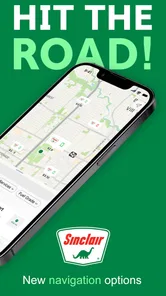
DINOPAY is Sinclair Oil’s mobile app for customers who want a more convenient way to interact with participating Sinclair fuel stations. Depending on your location and the station’s support, the app may help you find nearby locations, view fuel prices, pay for fuel from your phone, manage payment methods, and access available promotions or rewards. Features can vary by station and region.
Can I use DINOPAY to pay for fuel directly at the pump?
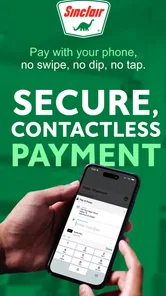
At participating Sinclair locations, DINOPAY may allow you to start and pay for a fuel transaction through the app instead of using a physical card at the pump. You normally select an eligible station and pump, choose a saved payment method, and authorize the purchase. Availability is not universal, so check the station details and follow the on-screen instructions before relying on mobile payment.
Is DINOPAY available at every Sinclair station?
No, mobile features are generally dependent on the individual Sinclair station and its equipment, network connection, and participation in the program. The app can be useful for locating nearby stations, but not every location will necessarily support in-app fueling, promotions, or the same payment options. It is a good idea to confirm the available services in the app before visiting.
Pros
- Convenient way to locate nearby Sinclair stations and plan fuel stops.
- Supports quick access to Sinclair promotions and loyalty savings.
- Useful for tracking eligible purchases and available rewards in one place.
- Clean interface makes essential payment and station tools easy to find.
- Can reduce waiting time at participating locations with mobile payment features.
Cons
- Features may vary depending on station participation and local availability.
- Requires account setup and personal information for many functions.
- Payment convenience depends on a stable internet connection and app access.
- Rewards and promotions may include restrictions
- exclusions
- or expiration dates.
- Not all Sinclair locations may support every DINOPAY feature.











