Del Taco - Del Yeah! Rewards
- 7.91K
- 4.4
- Installs
- 1.00M
- Price
- Free

Screenshots


Analysis by Reviewed
I’d judge Del Taco’s app on a practical question: does it make a meal I already want easier to order, and does the rewards side give me a reason to return? I wouldn’t install it just because every restaurant has an app; it makes most sense when Del Taco is already part of your routine. In that case, keeping the menu, ordering and rewards in one place can be more useful than searching for a general restaurant app each time.
Who benefits most from having it ready
I see the strongest fit for people who already know what they like at Del Taco, visit often enough to care about rewards, or want to arrange pickup before leaving home. It can also suit someone ordering for a small group: browsing and adjusting choices on a screen gives you a moment to check the order before sending it. If you only stop by rarely, though, a one-off visit may not justify another account and app on your phone.
A realistic use is a busy evening when I’m heading home and want to pick up dinner rather than decide at the counter. I can look over the menu while I have a moment, make the choices, and place the order when I’m ready. That separates browsing from the pressure of a queue. I’d still check the order summary carefully before confirming, especially when several people have different preferences; convenience doesn’t prevent a mistaken selection.
How it compares with other ways to order
Compared with walking in and ordering directly, the app’s main appeal is preparation: I can review choices and use the rewards experience without handling the whole decision at the counter. A general delivery or restaurant-discovery app may be more convenient when I’m comparing several places, while Del Taco’s own app is the more focused option when I’ve already chosen Del Taco. The better route depends on whether I value comparing restaurants or managing this particular meal.
There is a trade-off to that focus. A restaurant-specific app is useful only when its menu and ordering options match the way I want to eat that day. If I prefer to decide after seeing what is available in person, or I’m not interested in rewards, the ordinary in-store route may feel simpler. I’d also treat delivery as a separate convenience choice from pickup: having both presented as options doesn’t make them equally suitable for every schedule or order.
Small habits that make the experience smoother
My practical tip is to check the menu and build the order before the moment I need food. That gives me time to review customizations and avoid rushing through the final confirmation. For a shared meal, I’d keep each person’s choices clear as I add them rather than relying on memory at checkout. And if rewards matter to me, I’d make a habit of checking the app as part of ordering instead of assuming I’ll remember after paying.
Notifications can help surface offers, but I’d decide whether I want them rather than treating every alert as useful. If promotions distract me, I can rely on opening the app when I’m already considering a visit. The same goes for account setup: joining may be worthwhile for a regular customer, while a casual visitor can first decide whether the ordering and rewards features are worth maintaining another login for.
More From Our News Desk

Weather by Xiaomi Review: Clear at a Glance, Less Clear Up Close

X Under Pressure: Can It Recover When Posting Goes Wrong?

Clash of Clans Is Won Between the Battles

Android Auto Makes the Case for Quieter Car Software

MobiOffice: Transforming Mobile Productivity with Seamless Integration

EA SPORTS FC™ Mobile Soccer: Redefining Mobile Sports Gaming
If you’re anything like me, you probably have a love-hate relationship with fast food. But, let’s face it, there’s something irresistible about those quick bites that just hit the spot. Enter the Del Taco - Del Yeah! Rewards app, your new best friend for all things taco-related. I decided to give this app a whirl, and here’s how it went down.
Getting Started with the Del Yeah! Experience
First things first, downloading the app was a breeze. Available on both Android and iOS, it took just a few taps, and I was in. The user interface is clean and straightforward, which I appreciate because who needs to navigate a labyrinth just to get a taco?
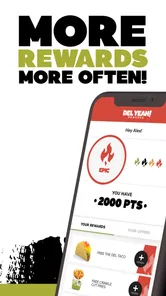
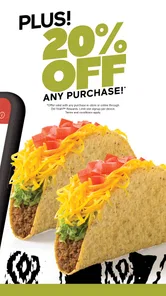
Signing up for the rewards program is simple. All it takes is an email address, and boom, you’re ready to start earning points. Oh, and can we talk about the welcome offer? A free taco just for signing up. Yes, please!
Exploring the Features
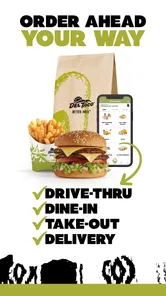
Once you’re in, the app offers a variety of features. You can place an order for pickup or delivery, which is perfect for those days when you can’t be bothered to leave the house. The menu is easy to browse, and customizing your order is straightforward. Want extra cheese on your taco? No problem.
The rewards system is where the app really shines. Each purchase earns you points that can be redeemed for free food and drinks. The app keeps track of your points, so you always know how close you are to your next freebie. And let’s be honest, who doesn’t love free food?
Before you commit to ordering
I’d think of this as a Del Taco ordering and rewards app, not as a universal food-ordering tool. Its value depends on having a nearby restaurant that fits your route and on being happy to choose from Del Taco’s menu. The app can make a decision easier once you’ve settled on the restaurant, but it won’t solve the earlier question of what to eat if you’re still comparing cuisines or looking for a broad range of local options.
That distinction matters when deciding whether to create an account. If you visit regularly, having your ordering and rewards activity together may be worth the small setup effort. If you are just curious, you can weigh the convenience of browsing against the friction of adding another login to your digital life. I’d avoid signing up solely because a reward sounds appealing; first consider whether you expect to return and whether the app’s ordering flow suits your habits.
For someone planning a pickup, I’d use the app in two passes: browse and make a tentative choice when there’s time, then reopen or review the order when I’m ready to submit it. That pause is useful because customization menus can make it easy to miss a selection while ordering quickly. It also gives me a chance to confirm that the order still matches what everyone wants, rather than treating the first draft as final.
Where it has a practical edge
The strongest advantage is the combination of a restaurant-specific menu with a rewards account. At the counter, I might remember that I meant to check my points only after I have ordered; in an app-centered routine, checking rewards becomes part of the same process as choosing food. That doesn’t automatically make every visit cheaper, but it makes the program easier to keep in view. For a repeat customer, that visibility is more useful than a rewards scheme that is easy to forget.
It can also make group ordering less dependent on one person’s memory. I can review each choice on screen and catch an obvious mismatch before sending the order. My small but useful rule is to build the meal person by person, then read the completed order as if I were checking someone else’s work. That final read-through is especially worthwhile when people want different customizations or when I’m ordering while distracted.
There is a convenience trade-off, though: the app makes it easier to plan, not necessarily easier to change plans at the last second. I’d settle the pickup-versus-delivery decision and the contents of the order before I reach the final confirmation. If timing is uncertain, or I need to ask a question that is easier to explain face to face, ordering in person may be the less stressful choice. An app is most helpful when the order is clear enough to enter without negotiation.
Choosing between pickup, delivery, and the counter
Pickup is the clearest fit for someone who already expects to pass a Del Taco and wants to reduce the amount of decision-making at the restaurant. It separates choosing from collecting: I can browse when convenient and arrive with a plan. For a meal at home, delivery may be the more comfortable option when that choice is available and fits the occasion. I wouldn’t assume it is automatically better, since the most useful method depends on where I am, how soon I need food, and whether I want to make the trip myself.
Walking in still has a real advantage. I can decide on the spot, ask a question directly, and avoid managing another account or phone-based order. A general food app is a better starting place when my main goal is to compare restaurants or consider alternatives; Del Taco’s app is more deliberate, for when the restaurant decision is already made. These options are not competing in exactly the same way: one helps me explore, another helps me handle a particular brand’s menu and rewards.
I’d also keep expectations realistic around the rewards. A points balance is a reason to pay attention, not a reason to order food I didn’t want. The sensible approach is to let a reward influence the timing of a visit only when Del Taco already works for the meal. That keeps the program useful rather than turning it into a nudge to spend just to feel that I’m making progress.
My Experience and Personal Take
Now, onto the experience. Using the app to place an order was seamless. I chose to pick up my meal, and it was ready right on time. No waiting, no fuss. Just how I like it. The food was, as always, delicious. There’s something about Del Taco that just hits different.
One of the things I love about the Del Taco - Del Yeah! Rewards app is the notifications. They’re not overbearing, but they do keep you in the loop about special offers and promotions. It’s like having a personal taco assistant in your pocket.
What to keep in mind day to day
My main reservation is that rewards and offers can make the app feel more compelling than the actual usefulness of placing an order. If I’m not near a restaurant, don’t want anything on the menu, or rarely return, the points feature won’t change that. The app is a good companion to an existing preference, not a strong reason by itself to choose Del Taco over another meal.
I’d also treat promotional alerts as optional rather than essential. If I like keeping up with offers, notifications can remind me to check in; if they interrupt more than they help, I’d prefer opening the app on my own terms. Either way, I wouldn’t rely on an alert as a substitute for checking the order and rewards details while I’m actually making a purchase. A deliberate glance is a better habit than assuming a notification has handled everything for me.
For a family or small group, I’d decide who is responsible for the order before starting. One person can collect everyone’s choices, build the order, and read it back before confirming. That avoids duplicate additions and reduces the chance that a customization gets attached to the wrong item. For a solo meal, the same careful review takes only a moment; for a group, it can prevent the kind of mix-up that makes a convenient order less convenient.
Who should pass, and who should keep it
I’d recommend trying it if Del Taco is already a regular stop, you like ordering ahead, and you’re willing to use the rewards program as part of your routine. It is also a reasonable choice for someone who likes deciding from a menu at home rather than while standing at a counter. Jack in the Box Inc. is the developer, and the app is free, so trying it does not require paying for the download. The app is rated for Everyone, and its current Android version is DelTaco 3.9.3.220, with Android 5.0 as the minimum operating-system requirement.
Its scale suggests that many diners have chosen to use it: it has an average rating of 4.6 from around 67,000 ratings, with more than 1 million installs. Those figures are useful context, but they cannot predict whether it will fit my own routine. I’d base that choice on practical things: whether I visit, whether I prefer pickup or delivery, and whether I find a restaurant-specific rewards account worth checking.
I’d skip it if I’m only making a rare visit, prefer ordering face to face, or mainly need an app for comparing lots of restaurants. In those situations, walking in or using a general discovery service may involve less commitment and give me more flexibility. If I do install it, I’d start with one straightforward order and see whether browsing, customization, and the rewards steps feel natural before making it my default way to buy a meal.
Final Thoughts
All in all, the Del Taco - Del Yeah! Rewards app is a must-have for any taco lover. It’s easy to use, packed with features, and, most importantly, it saves you money. Whether you’re a regular at Del Taco or just an occasional visitor, the rewards program is worth joining. So, next time you’re craving some tacos, give the app a try. You might just find yourself saying, "Del Yeah!"
My more measured recommendation is to treat it as a useful routine tool rather than a must-have for every diner. If I already know I want Del Taco, the app brings menu browsing, ordering, and rewards into one place, and that can make a busy meal easier to plan. If I’m undecided about where to eat or don’t expect to return, the counter or a broader restaurant app is likely the better fit. The best reason to keep it is simple: it makes an order I already wanted more convenient without turning the app itself into the point of the meal.
Del Taco - Del Yeah! Rewards Frequently Asked Questions
Can I use Del Yeah! Rewards if I am new to Del Taco?
Yes. Del Taco - Del Yeah! Rewards is designed for Del Taco guests, so you can explore the app even if you are just getting acquainted with the restaurant. Its focus is rewards, offers, and promotions, making it a useful place to start if you want to see what the app offers before deciding whether it fits your routine.
Who develops Del Taco - Del Yeah! Rewards?
Del Taco - Del Yeah! Rewards is developed by Jack in the Box Inc. The app is centered on Del Taco guests and presents itself as an all-new app experience for them. If you are checking the developer before installing, confirming that name on the app’s store page can help you identify the official app rather than another result with a similar title.
How much storage space does the app need, and will it work on my phone?
The app’s current version is DelTaco 3.9.3.220, and Android devices need to run version 5.0 or later to meet its stated minimum operating-system requirement. Storage needs can vary by device and app version, so check the available space shown on your phone before installing. If your Android phone meets the minimum, you can download the app and see how it performs on your device.
Is Del Taco - Del Yeah! Rewards free to download?
Yes, Del Taco - Del Yeah! Rewards is free to download. It is a Food & Drink app from Jack in the Box Inc., built for guests who want to keep Del Taco rewards and promotions in one place. You can install it without paying for the app itself, then explore its features and decide whether it suits how you order and enjoy Del Taco.
What is Del Taco - Del Yeah! Rewards app?
Del Taco - Del Yeah! Rewards is a mobile application designed for Del Taco fans to enhance their dining experience. The app allows users to earn rewards on their purchases, receive exclusive offers, and access the latest promotions. It's a convenient way to manage your rewards and stay updated with everything Del Taco has to offer. The app presents itself as an all-new experience for Del Taco guests.
Pros
- User-friendly interface and easy navigation.
- Generous reward points for frequent users.
- Exclusive offers and discounts available.
- Quick access to menu and nutritional info.
- Efficient order customization features.
Cons
- Limited payment options available in-app.
- Occasional glitches during peak times.
- Some offers have restrictive conditions.
- Requires location access for full features.
- Notifications can be overly frequent.











