Deferit: Split Bills, Pay in 4
- 2.29K
- 4.5
- Installs
- 1.00M
- Price
- Free

Screenshots


Analysis by Reviewed
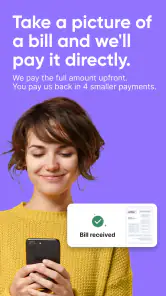
When a large bill arrives at the wrong moment, the problem is often timing rather than the total amount. Deferit: Split Bills, Pay in 4 is built around that situation: it is a free finance app from Deferit that lets eligible users divide bills into four smaller payments without interest. I see it as a short-term budgeting tool, not a way to make an unaffordable bill disappear.
That distinction matters from the first screen. The app can make a payment schedule feel more manageable, but the full obligation still exists, and the smaller instalments still need to fit your coming paydays. Used with that mindset, it can be useful for smoothing out an uneven month. Used as a reason to accept every bill immediately, it can make the following weeks harder.
Getting from installation to a useful first payment
What to expect before you begin
The app sits in the finance category and carries an Everyone age rating, so its presentation is aimed at ordinary household money management rather than specialist investing or complex banking. It is available at no charge, which makes it easy to try without committing to a subscription simply to see how the basic experience feels.
Its popularity also gives a new user some context. Deferit has passed one million installs, with an average rating of 4.5 from around 20 thousand ratings and roughly 2.3 thousand written reviews. I would not treat those figures as a guarantee that every bill or personal situation will work smoothly, but they do suggest that the app has reached a substantial audience.
The current version is 3.0.6, and the app runs on Android 7.0 or later. That broad compatibility is helpful if you use an older phone, although I would still keep the operating system and the app updated when possible. Finance apps handle sensitive personal decisions, so a current installation is a sensible starting point.
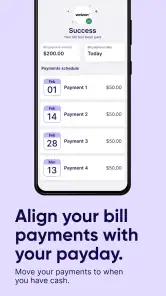
The central idea is straightforward: instead of handling one bill in a single payment, you arrange four smaller payments. The important question is not whether the screen looks simple; it is whether the resulting schedule matches your real cash flow. Before opening the app, I would have the bill details nearby and a rough view of the next few paydays.
That small preparation prevents a common mistake: choosing a bill because it is urgent, then discovering that its later instalments overlap with rent, food, transport, or another fixed commitment. I find the app most useful when it is used deliberately for a known gap in the budget, rather than as a last-second response to every expense.
Setting up an account without rushing
The first setup should be treated as a financial check-in, not a race to the payment button. Install the app, open it, and follow the account prompts carefully. Use your own details consistently, read each screen before continuing, and keep the bill information close so that names, amounts, and due dates are entered accurately.
I would also pause before accepting anything that affects the payment arrangement. The phrase “no interest” is useful, but it does not mean the service has no conditions or that a missed payment has no consequences. The practical details shown during setup are the details that should guide your decision, especially anything concerning eligibility, repayment timing, or what happens if your circumstances change.
A good first-time workflow is to choose one ordinary bill rather than the largest or most stressful one. That gives you a manageable way to learn how the app presents the schedule and reminders. It also reduces the chance of building several overlapping commitments before you understand how the arrangement fits your routine.
One of the less obvious benefits of this approach is that it turns the first transaction into a test of your own budgeting habits. You are not only testing whether Deferit can process the bill; you are testing whether you can remember and fund the four scheduled payments. If you usually rely on a single monthly review of your finances, the split structure may require more frequent attention.
I would keep a note of the dates and amounts shown after setting up the first arrangement. Even when an app displays the schedule clearly, an external reminder in your normal calendar can be worthwhile. That is not because the interface is necessarily confusing; it is because a second reminder reduces dependence on memory when several bills compete for attention.
Your first successful action
The first meaningful success is not simply opening the app. It is completing one bill arrangement and understanding exactly what happens next. Start with a bill whose amount you can comfortably cover across the four instalments, then check the displayed schedule before confirming anything.
For example, imagine that a utility bill arrives just before your regular pay date. Instead of allowing that single deadline to consume money needed for groceries, you could use the app to divide the obligation into four payments, provided the arrangement is available to you and the later instalments fit your budget. The immediate relief comes from spreading the timing, not from reducing the bill.
After the first arrangement is created, I would look at three things straight away: the amount of each payment, the date each payment is due, and the total obligation represented by the schedule. This is the point where a reassuring experience becomes a responsible one. If the dates collide with another essential expense, cancel the plan or choose a different approach before adding more commitments.
A useful habit is to label the arrangement in your own budget as an existing bill, not as spare money. People often feel better after the first payment and then mentally remove the original bill from their list. That is where the split-payment model can become dangerous. The remaining three payments are still future expenses and should be reserved for in advance.
I also recommend starting with a bill you already understand. A familiar household bill makes it easier to notice whether the amount or due date has been entered incorrectly. It is less sensible to experiment first with a complicated charge, a disputed invoice, or anything you may need to challenge with the original provider.
Once the first arrangement is active, the app becomes more valuable as a planning aid than as a one-time emergency button. You can compare the scheduled payments with your next few pay cycles and decide whether another bill would genuinely fit. My rule would be simple: if adding a second arrangement would make the first one difficult to fund, stop there.
Where new users can get confused
The biggest source of confusion is the difference between splitting a payment and lowering its cost. Deferit changes the payment pattern; it does not turn a bill into a discount. The total amount remains important, and “no interest” should not be read as “no responsibility.” I would make that distinction clear to anyone in the household who shares the budget.
Another easy misunderstanding is assuming that every bill is automatically suitable. Availability can depend on the circumstances shown in the app, so I would not plan an essential payment around an arrangement until the app has actually accepted the bill and displayed the schedule. Keep a backup plan for urgent obligations, particularly when a provider has a strict deadline.
It is also worth separating the original bill provider from Deferit in your thinking. The company you owe may still have its own rules, account notices, and service procedures. The app helps organize the payment arrangement, but it should not be treated as a replacement for checking the original account. If the bill concerns an important service, I would confirm that the payment has been handled as expected rather than relying only on an assumption.
Users can also underestimate the effect of several small payments. Four instalments may each look harmless in isolation, yet multiple arrangements can create a crowded calendar. The trade-off is especially important for people with irregular income. A split schedule may feel comfortable during a strong week and become stressful when work hours fall or an unexpected expense appears.
For that reason, I would avoid using the app to cover discretionary purchases simply because dividing them makes them easier to accept. Its strongest use case is a necessary bill whose timing is awkward but whose total cost is already accounted for. If the purchase itself is optional, waiting and saving is usually cleaner than creating another future obligation.
There is a practical privacy and security lesson here too. Because this is a finance app, I would only enter information through the official application environment, protect the phone with a screen lock, and avoid sharing account access with someone else. I would not send screenshots containing personal bill details through casual messaging. These habits are not special features, but they matter more in a payment tool than in an ordinary shopping app.
A further point concerns support and disputes. If a bill is incorrect, duplicated, or already being challenged, splitting it before the issue is resolved may complicate your own records. In that situation, I would contact the original provider first and keep copies of relevant confirmations. Deferit is better suited to a valid bill that needs a different payment rhythm than to an invoice whose amount is in question.
Who will benefit most from it
I think the app is a good match for someone who has predictable income, understands the bill being paid, and occasionally faces a mismatch between a due date and a payday. A household with several regular expenses may appreciate the ability to spread one unusually timed bill while keeping the rest of the month intact.
It can also help a first-time budgeter see the real cost of timing. Rather than vaguely thinking, “I will deal with it later,” the four-payment structure puts future dates in front of you. That visibility can support better planning if you follow through and reserve the money.
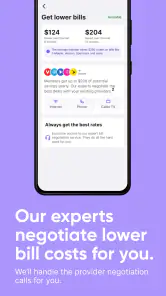
The app is less suitable for someone already missing payments, someone whose income changes sharply from week to week, or someone who needs a permanent reduction in monthly expenses. It is not a substitute for negotiating a lower bill, changing a service plan, building emergency savings, or speaking with a qualified debt adviser. Those alternatives address the underlying problem more directly.
I would also steer away from it if you prefer to keep all payments in one simple monthly routine. The split arrangement may be manageable, but it adds tracking. A traditional direct debit, a scheduled bank transfer, or paying the provider directly may be better when the money is available and simplicity matters more than flexibility.
How it compares with familiar alternatives
Compared with paying a bill directly, Deferit offers a different kind of convenience: it focuses on dividing the timing into four parts. Direct payment is usually easier when you already have the full amount and want the obligation finished immediately. The app becomes more interesting when the problem is short-term cash-flow pressure rather than the size of the bill itself.
Compared with a credit card, the four-payment structure can feel easier to understand because the repayment pattern is visible from the start. A credit card may offer broader spending flexibility, but that flexibility can make it harder to see how much future income is already committed. On the other hand, a person who already has a carefully managed card and an established repayment routine may find the extra payment schedule unnecessary.
Compared with an overdraft, the app is more deliberate because you choose a bill arrangement rather than allowing an account balance to fall below zero automatically. An overdraft may still be more appropriate for a genuine banking emergency, depending on its terms and your circumstances. I would compare the complete costs and consequences rather than assuming that any instalment option is automatically better.
Compared with a budgeting app, Deferit is more action-oriented. A budgeting app can show where money is going and help you plan savings, while this service is designed around handling a bill through smaller payments. I would use budgeting tools to decide whether an arrangement is affordable, then use Deferit only when the schedule solves a specific timing problem.
That combination is one of my preferred workflows. First, check the bill against your normal budget. Second, use the app only if the four dates fit. Third, record those dates somewhere you already monitor. This keeps the service from becoming a substitute for financial awareness.
The next step after the first arrangement
After the first successful payment, resist the temptation to treat that success as permission to add several more bills. Instead, watch how the first schedule behaves in your real month. Did the reminder arrive at a useful time? Did the instalment compete with essentials? Was the arrangement easy to understand from start to finish? Those answers tell you more than a quick first impression.
If the experience fits your budget, you can consider using the app again for another necessary bill, but I would keep a personal limit on the number of active arrangements. The exact limit should come from your income and fixed expenses, not from the maximum the app appears willing to process. A service can make a payment possible while your wider budget still says “not yet.”
Review your schedule whenever your income changes, a bill increases, or a new fixed expense appears. The four-payment model works best when the future instalments remain visible. If money becomes tight, act early by checking the available options in the app and contacting the relevant provider where appropriate, rather than ignoring the next due date.
My overall view is positive but measured. Deferit is a focused tool for smoothing the timing of valid bills, and its free access, clear core idea, and broad Android compatibility make it approachable for a first-time user. The strongest result comes when you choose one manageable bill, verify every scheduled payment, and treat the remaining instalments as real commitments.
I would recommend it to a friend who has a temporary cash-flow gap and a dependable plan for the next four payments. I would not recommend using it to stretch an already broken budget or to make optional spending feel harmless. The app works best when it creates breathing room, not when it hides the pressure. If you install it with that expectation, the path from setup to a useful first payment is reassuring, practical, and much easier to control.
Pros
- Splits rent and bills into manageable scheduled payments.
- Clear payment calendar helps users track upcoming installments.
- Can reduce the stress of large
- unexpected household expenses.
- Useful for recurring bills such as rent
- utilities
- and phone plans.
- Payment reminders help prevent missed due dates.
Cons
- Eligibility and available features may vary by location and account history.
- Late or failed payments can lead to extra fees or account restrictions.
- Not every biller or payment type may be supported.
- Requires reliable income to keep up with multiple scheduled payments.
- Using installments may make it easier to overspend beyond your budget.

- Category
- Finance
- Version
- 3.0.6











