Dave’s Hot Chicken®
- 928.00
- 3.3
- Installs
- 500.00K
- Price
- Free
Screenshots

Analysis by Reviewed
I tried Dave’s Hot Chicken® as the kind of app you open when you already know what you want: spicy chicken, a quick pickup, and as little time spent standing in line as possible. It is a free Food & Drink app from Dave’s Hot Chicken, built around the restaurant’s tenders, sliders, fries, and related menu choices. The experience is straightforward rather than adventurous, but that can be exactly the point when you are hungry and want to place an order without making a phone call.
My overall impression is mixed but useful. The app can make a visit more convenient, especially for repeat customers who have already decided on their order. At the same time, its average rating of 3.2 from roughly 5,300 ratings suggests that the experience is not equally smooth for everyone. I would recommend giving it a try if Dave’s is already one of your regular stops, but I would not install it expecting a polished restaurant platform that completely replaces every other ordering option.
How the current app feels in everyday use
The best way to understand this app is as a digital front door for Dave’s Hot Chicken, not as a general food-discovery tool. It is focused on the restaurant’s own menu and ordering journey. That narrow purpose helps keep the basic idea clear: choose your chicken, choose the format you want, review the order, and move toward getting your food.
For a first-time visitor, the menu concept is easy to understand. Tenders and sliders are the main decisions, while fries and other available items round out the meal. The restaurant’s identity is built around hot chicken, so the app does not need to explain a huge range of unrelated cuisines. If you already know whether you prefer a sandwich-style meal or individual tenders, you can move through the choice more naturally than you would in a broad delivery marketplace.
I found that this kind of focused design is most valuable during a busy routine. Imagine leaving work, checking the app before driving, and arranging your meal while you are still a few minutes away. The real advantage is not that the phone replaces the restaurant; it is that you can make the ordering decision before reaching the counter. For a quick lunch or an evening pickup, that small reduction in friction can matter.
There is also a practical difference between ordering directly through a restaurant app and using a large delivery service. A marketplace is better when you are comparing several restaurants, checking what is open nearby, or combining different cuisines in one search. Dave’s app is better when the destination is already decided. I would use the restaurant app for a planned Dave’s visit and a marketplace when I was still deciding what to eat.
Who will get the most value from it
Regular customers are the clearest audience. If you order the same style of meal often, the app gives you a more direct route to that choice than browsing a general delivery catalog. It can also suit people who dislike explaining an order aloud, want to review the details privately, or prefer handling the transaction from their own screen.
More From Our News Desk

Weather by Xiaomi Review: Clear at a Glance, Less Clear Up Close

X Under Pressure: Can It Recover When Posting Goes Wrong?

Clash of Clans Is Won Between the Battles

Android Auto Makes the Case for Quieter Car Software

MobiOffice: Transforming Mobile Productivity with Seamless Integration

EA SPORTS FC™ Mobile Soccer: Redefining Mobile Sports Gaming
It is less compelling for someone who visits Dave’s only once, lives far from a participating location, or mainly wants restaurant recommendations. Installing a dedicated app for a single planned meal may feel unnecessary when a browser or another ordering service already fits that situation. The app’s usefulness grows with repeat visits, not with the number of restaurants you want to explore.
Families and groups may find the menu-focused approach helpful, but group orders also expose a possible weakness in any single-restaurant app: one person still has to coordinate everyone’s choices. If each diner wants a different level of heat or a different meal format, I would slow down and review the entire basket before submitting it. A quick interface is useful only when it does not encourage rushed mistakes.
What I would check before placing an order
I would first confirm the selected restaurant or pickup context, then review the meal structure rather than assuming the basket contains exactly what I intended. Chicken tenders, sliders, fries, and add-ons can sound obvious when spoken about casually, but a digital order needs a final visual check. This is especially important when ordering for another person who has different preferences.
I would also avoid treating the app as a guarantee that the food will be ready at a precise moment. The app can help communicate an order, but preparation still depends on the restaurant’s workload and the practical details of that visit. If I had a strict break at work or was ordering before a scheduled trip, I would leave enough time for pickup instead of planning around the last possible minute.
One useful habit is to keep the app for ordering and use the restaurant’s physical menu or staff conversation for questions that require personal clarification. A digital menu is efficient for standard choices, but a staff member is usually the better source when an ingredient, substitution, or preparation detail matters to you. That division of labor prevents the app from being asked to solve a problem it may not be designed to handle.
Development, version 5.3.7, and the experience for existing users
The current version is 5.3.7, and the app was released on April 18, 2023. That gives the product enough time to become a familiar ordering channel rather than a brand-new experiment. I see its development story as one of practical refinement: the important question is whether each update makes ordering more dependable, easier to understand, and less frustrating for people who return regularly.
For an existing user, a newer version can be valuable even when the visible changes are modest. Restaurant apps live or die by small moments: whether the menu opens cleanly, whether the basket keeps its contents, whether the checkout path is understandable, and whether the app behaves predictably when the connection is not perfect. Those details matter more to me than a dramatic redesign because they affect every visit.
I would not judge the app’s evolution only by its version number. A higher version can indicate ongoing maintenance, but it does not automatically mean that every customer problem has disappeared. The rating shows that the present experience still has room to improve. In other words, the app appears active enough to remain relevant, yet it has not reached the point where I would assume universal reliability.
That distinction is important for people who have used an earlier release. If the current version runs well on your phone, updating is sensible because restaurant ordering depends on compatibility and stable behavior. If you are already comfortable with another ordering method and the app has previously caused trouble, I would update only when you have time to test it before a time-sensitive meal. I would not experiment for the first time when you are already late or ordering for a large group.
How the app changes the repeat-customer routine
The main benefit for returning users is mental simplicity. Once I understand the menu structure, I do not have to rediscover the restaurant through a third-party service every time. The app keeps the experience centered on Dave’s own food categories, which makes it easier to repeat a familiar order and then adjust it when I want something different.
That convenience comes with a trade-off. A dedicated restaurant app is usually less useful for comparing final costs, delivery arrangements, or nearby alternatives across several businesses. Even when the ordering steps feel shorter, I am giving up the broad comparison tools that a marketplace provides. For someone who cares most about choosing the cheapest or fastest option among many restaurants, Dave’s app is not the natural starting point.
Another subtle trade-off is attention. The app may make ordering feel quick, but quick does not mean automatic. I still need to read the basket, verify the meal format, and make sure the order suits everyone eating. My practical tip is to treat the confirmation screen as a checklist, not as a formality. That one habit is more useful than trying to memorize the menu.
The app is also a better fit for planned pickup than for spontaneous exploration. If I am already near a Dave’s location and simply want to see what is available, it can be convenient. If I am at home wondering whether to eat chicken, noodles, pizza, or something else, the app does not help me make that broader decision. Its strength is commitment, not discovery.
Where the experience still has friction
The rating of 3.2 is the clearest sign that convenience is not the whole story. Some users will encounter a smoother experience than others, but I would approach the app with realistic expectations. A restaurant app can be affected by menu availability, location-specific operations, connectivity, and the handoff between digital ordering and in-store preparation. Even a clean interface cannot remove all of those variables.
One area where I would be cautious is relying on the app without a backup plan. If the order flow becomes confusing or the restaurant cannot fulfill the expected timing, the practical alternatives are the counter, a phone conversation, or another ordering channel. I would keep the restaurant’s location and opening details in mind rather than assuming the app alone will answer every visit-related question.
There is also a learning curve for people unfamiliar with Dave’s menu language or heat preferences. The app can present choices, but a new customer may still need context before deciding. If you are sensitive to spice or ordering for someone who is, I would not choose casually just because the screen makes the process look fast. Asking a clear question before ordering is better than discovering the mismatch after the food arrives.
Accessibility and clarity matter here as well. A food-ordering app should make important distinctions easy to see, especially when several meal formats look similar at a glance. I would pay attention to labels, quantities, and the final summary. If any part of the order is difficult to interpret, that is a reason to slow down or use another channel, not a reason to guess.
Questions I would answer before downloading
Is it free to install? Yes, the app is free. That makes trying it low-risk, although the cost of the meal itself remains separate from the app download. I would still compare the convenience of direct ordering with the service and delivery conditions offered through other channels before deciding how I want to place a particular order.
Is it suitable for children? The listed content rating is Everyone, which fits the app’s role as a restaurant-ordering tool. That rating describes the software’s content, not whether every menu choice suits every child. Parents should still make the food decision based on taste, spice tolerance, allergies, and dietary needs.
Will it work on an older phone? The minimum operating-system requirement is Android 8.0, so users on older Android releases should check compatibility before planning around it. For anyone with a supported device, I would keep the app updated, especially because ordering tools depend on current system behavior and reliable account or checkout handling.
Does it replace delivery apps? Not completely. It is a direct Dave’s Hot Chicken experience, while delivery marketplaces are designed for comparing restaurants and arranging broader delivery choices. I would choose this app when I have already selected Dave’s and want a focused route to the order. I would choose a marketplace when location comparison, delivery coverage, or restaurant variety matters more.
Is it worth keeping installed? For an occasional customer, probably not necessarily. For someone who visits Dave’s regularly, the answer is more favorable because the app’s value comes from repeated convenience. I would install it, place a normal order well before I need the food, and keep it only if the process feels more dependable than my usual alternative.
What I would watch in future updates
Future development should focus on reliability before decoration. I would look for clearer order summaries, smoother recovery when a connection drops, and better communication between the selected restaurant and the digital basket. These are the changes that would directly improve a hungry customer’s experience.
I would also watch how well the app handles real-world exceptions. A good ordering tool should make it obvious what happens when an item is unavailable, when a location is busy, or when a customer needs to correct an order. Those situations are more revealing than a polished opening screen because they show whether the app is designed for actual restaurant conditions.
For existing users, the best sign of progress would be fewer moments where they need to wonder whether an order went through or whether the selected details were preserved. For new users, clearer explanations around menu choices would make the first visit less intimidating. I would welcome improvements that help people make informed choices without turning a quick chicken order into a complicated process.
My final view is that Dave’s Hot Chicken® is a useful, focused companion for people who already enjoy the restaurant and want a direct way to arrange a meal. Its free access, Everyone rating, and support for Android 8.0 or later make it approachable, while its current average of 3.2 means I would test it personally before depending on it for an important order. I like the idea more than I love every part of the execution.
If Dave’s is part of your normal lunch or dinner rotation, I think the app is worth trying once under relaxed conditions. Check the menu carefully, review the basket, and leave breathing room for the restaurant to prepare the food. If you mainly want to compare many restaurants, need highly specific dietary guidance, or have no nearby reason to return, a broader alternative may serve you better. For the right customer, this is a practical shortcut; for everyone else, it is simply another way to reach the same meal.
Dave’s Hot Chicken® Frequently Asked Questions
Is Dave’s Hot Chicken® free to download, and what devices can run it?
Dave’s Hot Chicken® is a free Food & Drink app from Dave’s Hot Chicken. It is rated for Everyone and requires iOS 8.0 or later. The app’s current version is 5.3.7, and it has been available since April 18, 2023. Before downloading, check that your device’s operating system meets the requirement and that you are getting the app from the official app store.
What is Dave’s Hot Chicken®?
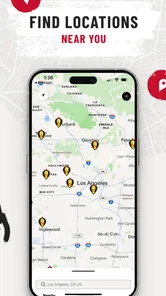
Dave’s Hot Chicken® is a fast-casual restaurant app and brand focused on Nashville-style hot chicken tenders, sliders, fries, and related menu items. The app is designed to help customers browse available food, find nearby restaurants, view location details, and place an order where mobile ordering is supported. Menu availability, prices, and services may vary depending on your selected restaurant.
Can I order Dave’s Hot Chicken® through the app?
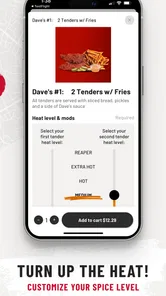
In supported locations, the app may allow you to place an order for pickup or another available ordering option. After choosing a restaurant, you can review the menu, customize certain items, select a collection time, and check the final total before submitting the order. Ordering features can differ by location, so it is worth confirming that your preferred restaurant supports mobile orders.
Does Dave’s Hot Chicken® offer different spice levels?
Yes, Dave’s Hot Chicken® is known for offering several heat levels, allowing customers to choose a flavor intensity that suits them. Options generally range from a milder preparation to very spicy choices, although exact names and availability can vary by restaurant. If you are sensitive to heat, read the menu descriptions carefully and consider starting with a lower spice level.
Can I use Dave’s Hot Chicken® rewards, promotions, or offers in the app?
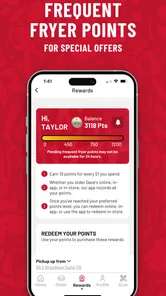
The app may include access to rewards, promotional offers, or account-based benefits, depending on your region and the current program. You may need to create or sign in to an account before earning or redeeming rewards. Terms, expiration dates, eligible menu items, and participating locations can apply, so always review the conditions shown in the app before placing an order.
Pros
- Menu focuses on flavorful
- crispy chicken with several heat levels.
- Simple ordering makes it easy to choose tenders
- sliders
- and sides.
- Digital menu helps users check available items before visiting.
- Good option for quick
- casual meals with generous chicken portions.
- Rewards and promotions may help regular customers save on orders.
Cons
- Spice levels can be intense for anyone sensitive to hot food.
- Side choices are relatively limited compared with broader fast-food menus.
- Popular locations may have long waits during lunch and dinner rushes.
- Prices can feel high when ordering larger meals or adding extras.
- Nutrition details may concern users watching calories
- sodium
- or fat.











