

Dash Cam Mobile: Driver Record
- 3.00
- 4.0
- Installs
- 10.00K
- Price
- Free
Screenshots

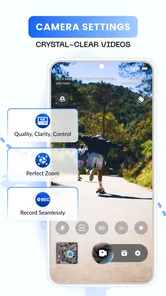
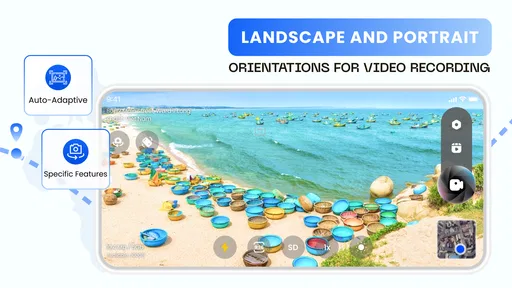
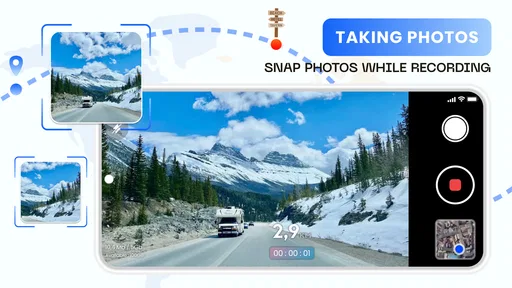
Analysis by Reviewed
I approached Dash Cam Mobile: Driver Record as a practical driving companion rather than a simple video camera. It belongs to the Auto & Vehicles category, is free to install, and comes from CoolDev Co Ltd. Its main appeal is straightforward: it turns a compatible phone into a dash cam that can record in 4K, use GPS, track speed, and share footage with a smartphone. That combination makes it interesting for everyday drivers who want a record of the road without buying a separate camera.
After spending time with the app, I think its strongest quality is convenience. A phone is already something most drivers carry, so the idea of using it for road recording feels more approachable than learning a dedicated dash-cam system. At the same time, convenience should not be confused with a complete replacement for purpose-built hardware. The experience depends heavily on how securely the phone is mounted, how visible the screen remains, and whether the driver can set everything up before moving.
How Dash Cam Mobile: Driver Record fits different drivers and situations
I look at how Dash Cam Mobile: Driver Record can fit into different routines, from an occasional drive to a shared car, and why the phone-and-mount setup matters as much as the app itself. The key question for me is whether its recording approach suits the way you actually travel; from there, it’s easier to weigh the practical trade-offs.
Readability and navigation before the car moves
The app’s role is easy to understand from the first moment: it is intended to record a journey while providing location and speed information. That clear purpose matters for readability. A dash-cam interface should not make the driver hunt through complicated menus, and this app is most useful when treated as a set-and-go tool rather than something to operate continually during a trip.
I recommend doing the important preparation while parked. Choose the recording setup, position the phone, check that the camera view is not blocked, and make sure the device is stable before starting the journey. This workflow is also better for people who find small on-screen controls difficult to read or select. The less interaction required once the car is moving, the safer and more inclusive the experience becomes.
Large text, strong contrast, and obvious controls are especially valuable in a vehicle, where sunlight, reflections, and vibration can make a phone screen harder to read than it is indoors. I would not judge the app only by how it looks on a desk. The real test is whether its controls remain understandable when the phone is mounted at a sensible viewing angle and the driver is dealing with changing light.
For drivers with reduced vision, the practical solution is to avoid relying on the display while driving. The app’s value is in recording the road, not in requiring constant visual confirmation. A passenger can handle checks when necessary, while the driver concentrates on traffic. This is a small but important distinction: a feature can be useful without being something the driver should actively watch.
More From Our News Desk

 Gmail
GmailGmail in a Busy Inbox: Who Benefits Most?
From first account to crowded workday, Gmail earns its place through dependable search and flexible sorting—but its best fit depends on how much inbox maintenance you can tolerate.

 Prime Video
Switching to Prime Video: What Changes in Your Viewing Routine
Prime Video can make a compelling second home for streaming, but switching means learning a different catalog, rental layer, and route from browsing to playback.

 Universal TV Remote Control
Universal TV Remote Control Works Best as a Reliable Backup
A phone remote earns its place through quick setup and reliable habits. Here is how to get more from Universal TV Remote Control—and where its limits show.

 Weather - By Xiaomi
Weather by Xiaomi Review: Clear at a Glance, Less Clear Up Close
Xiaomi’s weather app makes everyday forecasts quick to scan, but its calm surface can leave useful details and recovery paths harder to find than they should be.

 X
XX Under Pressure: Can It Recover When Posting Goes Wrong?
A resilience-focused review of X, examining setup, mistaken posts, interruptions, weak connections, and the gaps that matter when recovery needs to be dependable.

 Clash of Clans
Clash of Clans Is Won Between the Battles
Its raids are quick; its community is a long-term project of coordination, teaching, rivalry, and shared responsibility—with all the friction that entails.
Latest News



The current version is 1.7, and the app supports devices running Android 7.0 or later. That broad system compatibility makes it approachable for people who keep an older phone as a dedicated vehicle camera. Still, an older phone may have a smaller display, a weaker camera, or less comfortable performance than a newer device, so the operating-system requirement alone does not guarantee an equally pleasant experience for everyone.
Motor and sensory considerations inside a moving vehicle
Using a phone as a dash cam creates a physical setup challenge that a dedicated camera usually avoids. The phone needs to be mounted securely, aligned with the road, and connected to enough power for the intended journey. For someone with limited hand strength, tremors, or difficulty making precise movements, repeatedly attaching and adjusting a phone may be more tiring than using a permanently installed camera.
I found that the best approach is to treat the mount as part of the accessibility setup. A holder that can be adjusted with one broad movement is preferable to a fiddly clamp. The phone should be placed before starting the engine, with the cable routed so it does not interfere with steering or other controls. This is not an app feature, but it directly affects whether the app is usable in real life.
The 4K recording option is attractive when the goal is to preserve detail, such as road signs or the behavior of another vehicle. However, higher-quality recording can demand more from the phone and may create larger video files. For a driver who has limited time or dexterity for file management, the sharpest setting is not automatically the most practical one. A balanced setup may be easier to maintain if storage and sharing become inconvenient.
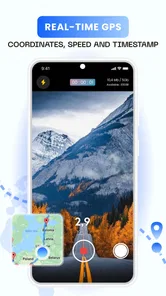
GPS and speed tracking add context to footage, which can help when reviewing a journey later. They also introduce information that some users may find visually or cognitively busy. I would keep the display as simple as possible while driving and review the recorded material only when parked. Someone who is sensitive to visual clutter may prefer to focus on the camera view and treat the location and speed details as information for later, not something to monitor continuously.
For drivers with hearing loss, the app’s central function is naturally less dependent on sound than many navigation or alert-based driving tools. The important output is visual recording and associated journey information. That said, I would not assume that every important state change can be understood without looking at the screen. Before relying on the app, I would test the start-and-stop routine while parked and confirm that the recording behavior is clear through the controls available on the device.
Situational access for commuting, trips, and shared cars
A realistic use case is a daily commute in which I place an older phone in the car, start recording before leaving, and review a short clip only if something unusual happens. In that role, Dash Cam Mobile: Driver Record is appealing because it avoids buying another camera immediately. The phone can also be removed from the car after the trip, which may be useful for people who share a vehicle or do not want equipment permanently visible.
It can also suit occasional drivers who want documentation for unfamiliar routes or longer journeys. GPS and speed information may make the footage easier to understand later because the video is not just a sequence of images; it has travel context attached to it. For a passenger, sharing footage with a smartphone can be convenient when a clip needs to be sent or reviewed away from the vehicle.
That flexibility becomes less comfortable for drivers who need a fully automatic routine. A dedicated dash cam is usually better for someone who wants a camera permanently mounted, powered, and ready with minimal handling. A phone-based solution asks the user to remember the device, the mount, the cable, and the recording session. If any one of those steps is missed, the app cannot document the journey.
People with cognitive disabilities may benefit from reducing the process to a repeatable checklist. I would use the same sequence every time: mount the phone, connect power, confirm the camera view, start recording while parked, and leave the screen alone. Keeping that routine consistent is more helpful than exploring settings just before departure. A family member or support person could help establish the setup once, after which the driver may be able to repeat it independently.
For passengers with limited mobility, the app can be useful as long as another person handles the mounting and initial controls. The phone should never be positioned where it blocks the driver’s view or creates a distraction. This is particularly important in shared vehicles, where a mount that works for one person may be poorly placed for another. The physical arrangement needs to be checked each time the seating position changes.
Sharing, reviewing, and managing recorded journeys
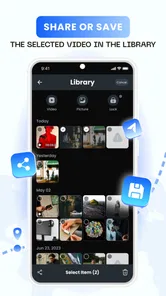
The sharing function is one of the more practical parts of the concept. If a clip needs to be shown to another person, sending it from a phone is more convenient than removing a memory card from a separate camera. This could help after a minor road incident, when a passenger wants to preserve a clip, or when someone is assisting a driver with reviewing footage.
There is a trade-off between convenience and file handling. 4K footage is likely to be more demanding to store and transfer than lower-resolution video, even though the app’s headline quality is useful for detail. I would avoid recording every journey at the highest setting unless I had a clear reason to do so. For routine commuting, a more manageable recording choice may make sharing and reviewing less frustrating.
People who have difficulty distinguishing small details on a phone may prefer to review clips on a larger screen, if their sharing workflow allows it. Someone with limited dexterity may also find it easier to ask a passenger or trusted contact to select and send the relevant segment. The app’s usefulness does not require every user to perform every step alone; a good setup can divide the tasks without taking away the driver’s independence on the road.
I would also create a simple personal rule for reviewing footage: do it only when parked, and keep only the clips that have a clear purpose. This avoids turning the phone into a crowded archive. It is a small workflow improvement, but it matters because a dash cam becomes less useful when finding one important recording is difficult.
Remaining barriers and where another option is better
The largest barrier is that the app depends on a smartphone being suitable for continuous camera use. Heat, battery condition, storage space, camera quality, and mounting position all affect the result. These are not minor details for users who need reliability. A dedicated dash cam generally offers a more permanent physical arrangement and may require less daily handling.
The free installation lowers the starting cost, but in-app purchases range from $1.99 to $38.99 per item. That means I would examine the free experience first and decide whether any paid element is genuinely useful for my routine. A person looking for a completely predictable one-time purchase may prefer hardware or an app with a simpler cost structure. The presence of optional purchases does not make the app unsuitable, but it is worth considering before building a long-term workflow around it.
The age rating is Everyone, which makes the app broadly approachable from a content perspective. That does not remove the need for adult supervision when a younger passenger is helping with setup, nor does it make phone operation while driving safe. The important boundary is simple: all adjustments, sharing, and troubleshooting should happen while parked.
I would skip this app if I needed a camera that starts recording automatically every time the car moves, if I regularly drive in conditions where a phone may overheat, or if I cannot safely mount and power the device. I would also choose a dedicated system for professional driving, fleet use, or anyone who treats uninterrupted recording as essential. In those cases, the extra hardware can justify itself through a more stable installation.
On the other hand, I would consider this app a sensible first step for an occasional driver, a family sharing one car, or someone who wants to test the usefulness of dash-cam footage before buying dedicated equipment. It is also a reasonable option for a person who already has a spare phone and can establish a reliable setup without having to manipulate the device during a journey.
An inclusive verdict for everyday drivers
Dash Cam Mobile: Driver Record has a clear, useful purpose and a practical advantage over many traditional alternatives: it uses a device people already understand. The combination of 4K recording, GPS, speed tracking, and smartphone sharing gives the footage more context than a basic camera alone. I especially like the possibility of removing the phone after a trip, which helps shared-car users and people who do not want permanent equipment in the vehicle.
Its accessibility is strongest when the user prepares carefully and minimizes interaction on the road. A stable mount, a repeatable start routine, sensible recording settings, and parked-only review make a bigger difference than any single menu option. For people with visual, motor, hearing, or cognitive considerations, the app can fit into a supportive workflow, but the physical phone setup remains a real part of the experience.
The app has attracted an average rating of 4.0 from around 73 ratings, with over 10K installs, so it has a modest but visible user base. Those figures suggest an app that is worth considering rather than an unquestionable replacement for dedicated equipment. My recommendation is positive for drivers who value flexibility and already have a suitable phone, while I would point users needing maximum automation and dependable permanent recording toward a purpose-built dash cam.
Overall, I see it as a useful bridge between having no road recorder and investing in dedicated hardware. It is free to begin with, supports Everyone-rated use, and works on Android devices from version 7.0 onward. The most inclusive way to use it is to make the setup predictable, keep the driver’s hands and attention on the road, and let the phone record quietly in the background.
Dash Cam Mobile: Driver Record Frequently Asked Questions
Is Dash Cam Mobile: Driver Record free to download, and are there optional purchases?
Dash Cam Mobile: Driver Record is free to download, with optional in-app purchases priced from $1.99 to $38.99 per item. You can consider the free app first, then decide whether any paid option suits your needs. Check the purchase details shown in the app before confirming, and remember that your phone’s data, storage, and other service costs are separate from the app’s price.
What does Dash Cam Mobile: Driver Record offer for video quality and driving information?
The app’s store summary highlights dash-cam recording in 4K quality, along with GPS, a speed tracker, and sharing from your smartphone. These features make it appealing if you want driving footage with useful trip context in one app. Actual recording quality and how smoothly features work can depend on your phone’s camera, settings, and performance, so test the setup before relying on it for important footage.
What is Dash Cam Mobile: Driver Record used for?
Dash Cam Mobile: Driver Record turns your Android or iOS device into a basic driving recorder. It can use the phone’s camera to capture the road while you drive, helping document traffic incidents, scenic journeys, or driving practice. Depending on the available settings and your device, recordings may include video, audio, location data, speed, and date or time information.
Can Dash Cam Mobile: Driver Record run while I use navigation or receive calls?
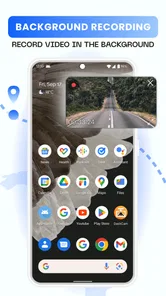
The app may support background-style recording or picture-in-picture features, but the exact behavior depends on your phone model, operating system, and the app version. Navigation, calls, notifications, and other demanding apps can affect performance. Before relying on it for a trip, test whether recording continues correctly and keep the phone securely mounted without blocking your view.
Does the app automatically save recordings or overwrite old videos?
Dash Cam Mobile: Driver Record generally requires users to manage storage carefully because continuous video can consume a large amount of space. Available options may include loop recording, automatic file splitting, or deletion of older clips when storage is limited. Check the recording and storage settings before driving, and regularly copy important footage to another device or cloud service.
Pros
- Records driving routes with your phone’s camera and GPS.
- Automatic loop recording helps manage limited storage space.
- Useful playback tools make it easy to review recorded journeys.
- Can provide video evidence after accidents or traffic incidents.
- Simple setup makes it accessible for occasional users.
Cons
- Continuous recording can drain the battery quickly.
- Long journeys may require substantial free storage space.
- Video quality depends heavily on your phone’s camera.
- Phone overheating is possible during extended recordings.
- Using the app may obstruct access to other navigation apps.












