

DailyReel:Movie Guide & Editor
- 80.00
- 4.1
- Installs
- 1.00M
- Price
- Free

Screenshots

Analysis by Reviewed
I spent time with DailyReel:Movie Guide & Editor as an entertainment app for two related jobs: keeping track of what I want to watch and turning short cinematic clips into something more presentable. That combination makes it more interesting than a basic movie browser, because it connects discovery with a small creative workflow instead of treating them as completely separate activities.
The app is free, aimed at Everyone, and comes from rea reo hore hore. It has reached over a million installs, with an average rating of 4.2 from around 690 ratings and roughly 77 written reviews. Those figures suggest that it has found a sizeable audience, although I would still judge it by how well its particular mix of movie tracking and editing fits my habits rather than by popularity alone.
How DailyReel feels in everyday use
I find the app’s everyday appeal lies in having entertainment discovery and quick clip editing under one roof, rather than in any single tool standing out on its own. In the next section, I’d focus on the choices that matter before making it part of a routine: checking what the app asks to access and deciding which clips are worth bringing into an editor. A little selectivity can keep a casual creative habit simple and comfortable.
A quick starting point for movie and TV tracking
The strongest first impression is the app’s clear purpose. I can use it to discover films, follow TV shows, and then move into editing when I have a clip worth sharing. That makes sense for someone who keeps a personal watchlist but also likes posting short visual updates, recap-style videos, or mood pieces inspired by what they have watched.
I would not approach it as a full replacement for a dedicated streaming service. Its role is closer to a companion: a place to organize entertainment interests and give simple video material a cinematic touch. That distinction matters because people looking for playback, subscriptions, or a complete media library may find the experience narrower than expected.
The “DailyReel” identity also works best when I use it regularly rather than opening it once to browse. A short daily routine is practical: look for something new, mark a show I want to remember, and edit a clip while the idea is still fresh. The workflow feels more useful when those actions support one another instead of being treated as unrelated tools.
What the editor adds
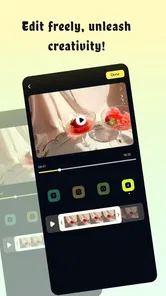
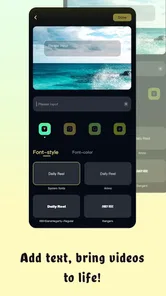
The editing side focuses on subtitles and cropping, two modest tools that can make a noticeable difference in short-form video. Subtitles are useful when dialogue needs to remain understandable without sound, while cropping helps adapt a scene to the framing I want. These are not extravagant controls, but they address common problems in social clips and personal video journals.
More From Our News Desk

 Gmail
GmailGmail in a Busy Inbox: Who Benefits Most?
From first account to crowded workday, Gmail earns its place through dependable search and flexible sorting—but its best fit depends on how much inbox maintenance you can tolerate.

 Prime Video
Switching to Prime Video: What Changes in Your Viewing Routine
Prime Video can make a compelling second home for streaming, but switching means learning a different catalog, rental layer, and route from browsing to playback.

 Universal TV Remote Control
Universal TV Remote Control Works Best as a Reliable Backup
A phone remote earns its place through quick setup and reliable habits. Here is how to get more from Universal TV Remote Control—and where its limits show.

 Weather - By Xiaomi
Weather by Xiaomi Review: Clear at a Glance, Less Clear Up Close
Xiaomi’s weather app makes everyday forecasts quick to scan, but its calm surface can leave useful details and recovery paths harder to find than they should be.

 X
XX Under Pressure: Can It Recover When Posting Goes Wrong?
A resilience-focused review of X, examining setup, mistaken posts, interruptions, weak connections, and the gaps that matter when recovery needs to be dependable.

 Clash of Clans
Clash of Clans Is Won Between the Battles
Its raids are quick; its community is a long-term project of coordination, teaching, rivalry, and shared responsibility—with all the friction that entails.
Latest News



I especially like the practical trade-off here. A focused editor can be less intimidating than a large timeline packed with effects, layers, transitions, and technical controls. If my aim is to clean up a quick clip, add readable text, and choose a better composition, a smaller toolset may help me finish instead of endlessly adjusting details.
At the same time, anyone expecting advanced color work, elaborate sound mixing, or a broad effects library should choose a more specialized video editor. DailyReel makes more sense for quick cinematic edits than for a serious post-production project.
Speed expectations before heavier use
Because the app combines browsing with editing, perceived speed will depend on what I am doing at the moment. Moving through entertainment information should feel lighter than preparing a video, while subtitle and crop work naturally asks the device to process visual content. I would therefore judge responsiveness in two separate ways rather than expecting every screen to behave identically.
For casual discovery, I would keep expectations sensible and avoid confusing a content-loading pause with a problem in the editor. For editing, the most efficient approach is to decide the intended framing before making several crop changes. That reduces unnecessary back-and-forth and keeps the workflow focused, especially on a phone with limited screen space.
A useful habit is to prepare the clip mentally first: decide whether the subject belongs in the center, whether the subtitle needs to avoid faces, and whether the final composition should feel wide or tight. That small bit of planning can make a simple editor feel faster because I am not repeatedly undoing choices.
What happens during heavier sessions
The demanding moments are likely to come when I move from browsing into repeated editing. A short clip may be easy to handle, but a longer session involving several subtitle adjustments and crop experiments is a different workload from checking a show page. I would use the editor in focused batches rather than leaving it open while switching between many other apps.
This is also where storage and device headroom become practical concerns, even without treating them as defects. Video work is more resource-sensitive than reading entertainment information, so I would keep the source material organized and avoid creating many unnecessary copies. Saving only the versions I genuinely want can make the overall experience easier to manage.
For a daily reel, I would use a repeatable sequence: choose the clip, crop it once for the intended composition, add subtitles after the framing is settled, and then review the complete result. Adding text before cropping can force me to reposition it later, so this order saves effort and reduces visual mistakes.
Stability and recovery habits
My preferred way to use an editor like this is conservatively. I would finish one small edit before starting another, check the result, and avoid making a long chain of changes without reviewing the output. That is not glamorous advice, but it makes recovery easier if I need to reopen a project or repeat a step.
Short, deliberate sessions also help separate an app issue from a source-video issue. If one clip behaves differently from another, I would first try a simpler piece of material and confirm whether the problem follows the file or the editing workflow. This kind of test is especially useful when an app offers a compact toolset, because there are fewer controls to adjust blindly.
I would also keep the original clip untouched until I am satisfied with the edited version. That gives me a straightforward fallback: if the crop feels too tight or the subtitles cover an important detail, I can start again rather than trying to rescue a poor export. For a lightweight editor, preserving the source is one of the most useful habits a new user can adopt.
Device constraints that affect the experience
The app supports Android 7.0 and later, which gives it a broad compatibility range for Android users. That does not mean every compatible phone will feel identical during video work. Older devices may be perfectly adequate for browsing but less comfortable when repeatedly processing clips, while newer phones are more likely to make the editing side feel effortless.
Screen size is another meaningful factor. On a compact phone, subtitle placement and cropping require more careful checking because small changes can have a large effect on the final composition. On a larger display, it should be easier to judge whether text is readable and whether the subject remains balanced inside the frame.
I would treat battery and available storage as part of the editing routine rather than as afterthoughts. Browsing a movie guide is usually a lighter activity than working with video. If I plan to edit several clips away from home, I would begin with enough battery and avoid filling the device with duplicate drafts.
These constraints do not make the app unsuitable; they simply clarify who will enjoy it most. It is a better match for someone wanting compact, purposeful edits than for a creator who expects a phone to behave like a full desktop workstation.
Three workflows that make the app more useful
My first suggested workflow is a watchlist-to-vlog routine. After discovering a film or following a show, I can create a short visual entry that captures the mood of the viewing session rather than trying to summarize everything. Cropping can focus attention on one image, while subtitles can add a short thought for viewers who watch silently.
The second is a spoiler-conscious recommendation clip. Instead of showing a major plot moment, I would choose atmosphere, setting, or a non-critical reaction and use subtitles to explain why the title caught my attention. This makes the editor useful for sharing an opinion without turning a recommendation into an unwanted reveal.
The third is a vertical-first cleanup process. I would decide the final orientation before adding text, crop around the most important visual element, and place subtitles where they do not compete with that subject. The key insight is that cropping is not merely a size adjustment; it changes what the viewer notices first. Used deliberately, the simple tool can give a clip a much more intentional feel.
Where it compares well with usual alternatives
Compared with a standard movie discovery app, DailyReel has a more creative finish because it does not stop at finding or tracking entertainment. I can move from deciding what interests me to preparing a small piece of content around that interest. That is its clearest point of difference.
Compared with a dedicated video editor, however, its appeal is convenience rather than depth. Specialist editors are usually the better choice when I need detailed timelines, complex audio work, layered graphics, or precise visual adjustments. DailyReel is more attractive when I want a short path from idea to shareable clip and do not want to learn a large editing system.
It also sits between a watchlist service and a creator utility, so it may not satisfy users who want only one of those things. A movie fan who never edits video may use only part of its appeal, while a serious editor may find the creative controls too limited. The best audience is someone who genuinely enjoys both sides of the experience.
Who should try it, and who should skip it
I would recommend it to casual movie fans, TV followers, and people who like making short, polished updates without spending time mastering professional software. It is also a reasonable choice for anyone who wants subtitles and cropping available in the same entertainment-oriented app rather than jumping between separate tools.
I would skip it if my main goal is streaming content, managing a large personal media collection, or producing complex videos. It is also not the first option I would choose for demanding creator work where fine control matters more than convenience.
The free price lowers the barrier to trying it, and the Everyone rating makes its intended audience broad. Still, free access does not automatically make every workflow a good fit. The real question is whether I value the connection between movie discovery, TV tracking, and quick cinematic editing.
Version, maturity, and long-term expectations
The current version is 1.0.4, and the app was released on October 14, 2025. That places it in an early stage of its product life, so I see it as a focused tool that may still be finding its shape rather than a deeply established all-purpose platform.
That early position is not necessarily a weakness. A compact feature set can be easier to understand, and the combination of subtitles and cropping already gives the editor a clear practical purpose. But I would keep my expectations aligned with what is present now and choose it for the current workflow, not for features I hope might appear later.
The developer name, rea reo hore hore, is easy to identify when checking the app, and the growing install base shows that the concept has reached beyond a tiny test audience. Even so, my recommendation remains conditional: use it because its present mix suits you, especially if you prefer quick edits over deep production controls.
My performance verdict
DailyReel works best when I treat it as a lightweight entertainment companion with a focused editing layer. Browsing and tracking should appeal to people who want a simple place for movie and TV interests, while the subtitle and crop tools add a practical reason to return after discovering something worth sharing.
Its resource demands are most relevant during editing, not during ordinary discovery, so I would use shorter sessions on older or storage-constrained phones and keep original clips safely separated from drafts. Planning the crop before placing subtitles is the most useful efficiency tip I found, and preserving the original makes recovery much less stressful.
My final opinion is positive but specific: this is a good fit for casual entertainment fans who want to turn viewing interests into concise cinematic posts. It is not a replacement for a streaming platform or a professional editor, and users seeking either extreme should look elsewhere. For the right person, though, the free app offers a convenient bridge between deciding what to watch and creating a small visual record of the experience.
DailyReel:Movie Guide & Editor earns its place through that bridge. I would recommend trying it when your ideal workflow is discover, track, crop, subtitle, and move on—not when you need a full production studio in your pocket.
DailyReel:Movie Guide & Editor Frequently Asked Questions
Can DailyReel help me keep track of TV shows as well as movies?
Yes. DailyReel is intended for discovering movies and tracking TV shows, so it may suit viewers who want to keep their film and television interests together. Its movie-guide focus can help you explore titles, while the tracking feature is useful for following shows you are interested in. The app also includes editing tools for cinematic vlogs, making it a mix of entertainment discovery and simple creative features.
Will DailyReel work on my Android device?
DailyReel requires Android 7.0 or later, so check your device’s operating-system version before downloading. The app is listed as free and has an Everyone content rating. It is an entertainment app from rea reo hore hore, with a current version of 1.0.4. If your phone meets the minimum system requirement, you can decide whether its movie discovery, TV tracking, and editing features fit what you are looking for.
What is DailyReel: Movie Guide & Editor, and what can I do with it?
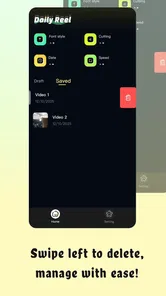
DailyReel: Movie Guide & Editor is designed for people who enjoy discovering films and organizing their viewing choices in one place. In my experience, the app combines movie-guide features with editing tools, allowing users to browse titles, explore information, save interesting films, and create or customize movie-related content. Its usefulness depends on whether you want recommendations, a personal watchlist, or simple creative editing features rather than a full streaming service.
Does DailyReel stream movies, or is it only a movie discovery and editing app?
Before downloading, it is important to understand that DailyReel should not automatically be treated as a platform for watching complete movies. The app focuses primarily on movie discovery, guide-style information, and editing or creating content. Availability of trailers, previews, links, or other media can vary by title and region. Users should check the individual movie page and the app’s current description to confirm what content is actually accessible.
Is DailyReel: Movie Guide & Editor free to use?
DailyReel is free to download, which makes it easy to try its entertainment features without an upfront charge. Before using every feature, review the app’s pricing details and any terms shown during use. Apps of this type may offer different editing options or features, so check the screens carefully before confirming a payment or subscription. The free download is a useful starting point for exploring its movie guide, TV tracking, and editing tools.
Pros
- Quickly discover movies with a clean
- easy-to-browse interface.
- Useful recommendations help match films to your viewing preferences.
- Editing tools make it simple to create polished movie-related content.
- Helpful details support faster decisions about what to watch.
- Suitable for casual users and film fans looking for daily inspiration.
Cons
- Some recommendations may feel repetitive over time.
- Advanced editing features could be limited compared with dedicated editors.
- Content availability may vary by region or platform.
- The app may require frequent updates for accurate movie information.
- Some features may depend on an internet connection.











