

Daily Wishes and Blessings Gif
- 2.49K
- 4.6
- Installs
- 1.00M
- Price
- Free

Screenshots
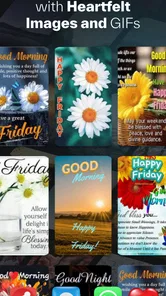
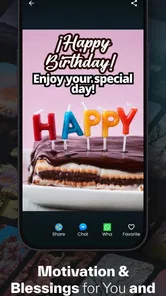
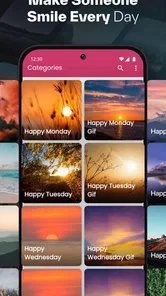
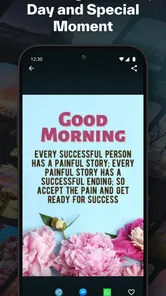
Analysis by Reviewed
I think a greetings app is most useful when it takes the awkwardness out of reaching out. A short, cheerful image can feel warmer than a plain “good morning,” especially when I want to show someone I’m thinking of them without starting a long conversation. Daily Wishes and Blessings Gif is built around that small, repeatable gesture, giving me a place to look for a greeting and share it when the moment feels right.
A practical routine for choosing a greeting
My simplest approach is to decide who I’m writing to and why before browsing. A family member might appreciate a gentle blessing, while a friend may respond better to something playful. That quick mental check helps me choose a message that fits the relationship instead of sending the first bright image I see. It also makes the app more useful on busy mornings, when I have time for a thoughtful gesture but not for composing a full note.
For example, on a weekday when I know a friend has a demanding day ahead, I can pick a supportive greeting, add a brief personal line if that option is available, and send it through a channel we already use. The image starts the message; my own words make it feel like it came from me. I’d treat the GIF as a prompt for connection, not a substitute for a personal conversation when someone needs more than a quick hello.
Small habits that keep sharing personal
Rather than sending a greeting every day by default, I’d use the app for moments when a message has a clear reason: a new week, a celebration, or a friend who could use encouragement. Repeating the same kind of greeting can make even a sincere gesture feel automatic. A useful habit is to pause before sharing and ask whether the image and wording sound like something I would actually say to that person.
I’d also check the wording and image before tapping send, especially if the message is intended for a group or someone with different tastes. A cheerful blessing may suit one recipient but feel too sentimental to another. This extra moment of judgment is a real part of using a ready-made greeting app well: convenience helps me act, while choosing carefully keeps the message from feeling generic.
A Little Gesture Goes a Long Way
Let's dive right in. The Daily Wishes and Blessings Gif app is all about spreading positivity. Every day, it sends you beautiful GIFs filled with heartwarming messages and blessings meant to uplift your spirits. It's like having a digital cheerleader rooting for you!
Ease of Use
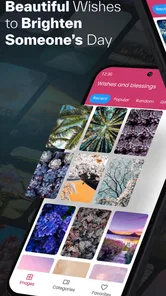
First things first, the app is super user-friendly. It's designed to cater to everyone, from tech-savvy users to those who might still be figuring out their smartphones. The interface is straightforward and intuitive. Navigating through the app feels like a breeze, and you can easily find the perfect GIF to share with friends or family. Believe me, it's as easy as pie.
More From Our News Desk

 Gmail
GmailGmail in a Busy Inbox: Who Benefits Most?
From first account to crowded workday, Gmail earns its place through dependable search and flexible sorting—but its best fit depends on how much inbox maintenance you can tolerate.

 Prime Video
Switching to Prime Video: What Changes in Your Viewing Routine
Prime Video can make a compelling second home for streaming, but switching means learning a different catalog, rental layer, and route from browsing to playback.

 Universal TV Remote Control
Universal TV Remote Control Works Best as a Reliable Backup
A phone remote earns its place through quick setup and reliable habits. Here is how to get more from Universal TV Remote Control—and where its limits show.

 Weather - By Xiaomi
Weather by Xiaomi Review: Clear at a Glance, Less Clear Up Close
Xiaomi’s weather app makes everyday forecasts quick to scan, but its calm surface can leave useful details and recovery paths harder to find than they should be.

 X
XX Under Pressure: Can It Recover When Posting Goes Wrong?
A resilience-focused review of X, examining setup, mistaken posts, interruptions, weak connections, and the gaps that matter when recovery needs to be dependable.

 Clash of Clans
Clash of Clans Is Won Between the Battles
Its raids are quick; its community is a long-term project of coordination, teaching, rivalry, and shared responsibility—with all the friction that entails.
Latest News



That low-effort workflow is the main appeal for anyone who wants to send a quick greeting without learning a complicated design tool. Compared with writing a message from scratch or opening a full photo editor to build a card, a ready-made GIF can get the sentiment across faster. I wouldn’t choose it when I need precise control over layout, typography, or a highly specific message; in that case, a custom card or a direct note gives me more room to get the details right.
The Variety Factor
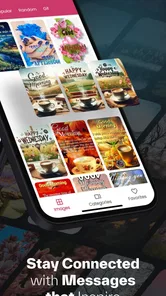
One thing I love about this app is its variety. Whether you’re looking for something funny, inspirational, or just plain cute, there's a GIF for every mood and occasion. The developers have done a fantastic job curating a diverse range of GIFs, so you never run out of options. Plus, new content is added regularly, keeping things fresh and exciting.
For a user who sends greetings across different age groups and relationships, that range can make browsing more useful than relying on a single stock message. Still, variety does not guarantee that every item will match my sense of humor, beliefs, or the specific occasion. I’d browse with the recipient in mind, and if nothing feels right, I’d rather send a simple personal message than force a GIF that misses the tone.
Sharing is Caring
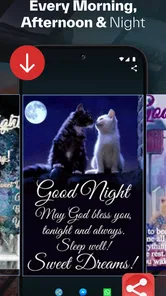
The app makes sharing these delightful GIFs incredibly simple. With just a tap, you can send a GIF via text, email, or social media. It's a fantastic way to connect with loved ones, especially when you want to send a quick pick-me-up. And trust me, seeing a loved one smile because of a message you sent is priceless.
It works best as a lightweight companion to the messaging apps I already use, rather than a replacement for them. If I’m deciding whether a greeting will arrive as intended, I’d consider the recipient’s usual channel and whether they enjoy animated images. Someone who prefers plain text, has limited patience for image-heavy chats, or wants a private, nuanced exchange may be better served by a regular message. The app is aimed at teens and older users, so I’d also keep that audience in mind when sharing with younger family members.
Customization and Personal Touch
Now, who doesn’t like a bit of customization? The app offers options to personalize your messages. You can add your own text or choose from a selection of pre-written messages. It's the little things that make these greetings feel personal and heartfelt. Whether you’re wishing someone a great day or sending blessings for a special occasion, this app has got you covered.
My tip is to keep any added text short and specific: a name, a small detail about the day, or a sentence that sounds like my own voice can do more than piling on extra phrases. That is the balance I’d aim for with any preset greeting. The image provides the quick visual warmth, while a few personal words explain why I chose it. If the available wording doesn’t fit, I would not treat customization as unlimited; I’d switch to a direct message instead.
Who will get the most from it
This is a good fit for people who enjoy sending light, visual greetings but don’t want to make every one from scratch. It may be especially handy for relatives who use messages to mark ordinary moments as well as celebrations, or for anyone who likes having a cheerful option ready when words don’t come easily. It is less suited to people who rarely share GIFs, prefer a minimalist inbox, or need carefully tailored wording for work or sensitive conversations.
The app is free, and it comes from Imágenes, Mensajes, Frases y Reflexiones Apps. Its social focus is reflected in its audience: it has a 4.6 average from around 168,000 ratings and has been installed over a million times. Those figures suggest broad interest, but they don’t tell me whether a particular collection or style will suit my contacts. I’d judge it by whether I can find greetings I’m genuinely comfortable sending.
Settings, version, and sensible expectations
When I first open a greeting app, I look for practical controls such as display preferences, sharing choices, and any options that affect how content appears. I would check what this app actually offers rather than assume there are scheduling tools or automatic reminders. If I want a repeatable routine, I can create the habit myself: browse when I have a reason to send something, choose a fitting image, add a personal note, and share it through my usual channel.
The current version is 51.1.0, and the app runs on Android 6.0 or later. I’d keep it updated through the store and check that it behaves well on my own device before relying on it for an important occasion. An animated greeting can also be less convenient than plain text when a recipient has a slow connection or dislikes moving images, so having a simple-message alternative is sensible.
Where the convenience has limits
Ready-made greetings save time, but they can also make messages look familiar if I send them too often or choose the same style for everyone. I’d avoid treating the app as a daily obligation. A GIF is most effective when it suits the moment; a direct call, a carefully written note, or a custom card is the better choice when the relationship or occasion calls for more attention.
There is also a practical difference between finding a greeting and knowing it will land well. The recipient’s preferences matter more than the number of choices on screen. I’d use the app as a source of inspiration, not as a reason to send something simply because it is available. That small filter is what keeps a convenient share from feeling like a forwarded message with no thought behind it.
My take after making it part of a routine
In a world that can sometimes feel overwhelming, apps like these remind us of the power of simple gestures. With its ease of use, variety, and ability to spread joy, the Daily Wishes and Blessings Gif app is a wonderful tool to have on your smartphone. It not only brightens your day but also helps you stay connected with the people who matter the most. So go ahead, give it a try, and start spreading some happiness today!
My recommendation is measured: I’d try it if quick, colorful greetings are already part of how I keep in touch, and I’d skip it if I want a quiet, text-only way to communicate. It is a social app for small moments, not a substitute for personal attention. Used selectively, it can make sending a warm hello easier; used without thought, even a lovely GIF can feel impersonal.
Making a repeatable routine without making it automatic
One small workflow I find useful is to separate the moment of choosing from the moment of sending. I can browse when I have a few minutes, notice a greeting that genuinely fits, and then share it only when the occasion comes up. That avoids the familiar trap of opening a collection in a hurry and picking the first result just because I need to send something now. It also makes the app easier to use for people whose days are busy but who still want their messages to feel considered.
I would keep a simple mental rule for repeat occasions: use a different tone for a close friend, an older relative, and a group chat, even when the underlying reason is the same. A “good morning” image that feels affectionate one-to-one may look excessive in a work-adjacent group. The practical advantage of browsing a dedicated greeting app is having choices in front of me; the trade-off is that choosing still takes judgment. A few seconds spent checking the audience can prevent a warm gesture from becoming awkward.
What I would check before relying on it
Because the app centers on animated greetings, I’d test the complete path once before an important birthday or celebration: find an image, open the sharing options, choose the channel I normally use, and confirm that the recipient can view it in that conversation. This is not about assuming anything is broken; it is simply a sensible way to avoid discovering a compatibility snag at the last moment. If the image does not travel conveniently, I can still send a plain message and keep the occasion personal.
I’d also look through the available settings at the start, then leave them alone unless something about browsing or sharing feels inconvenient. That is a better habit than hunting for elaborate controls that may not be part of a straightforward greetings app. If I want a reminder to contact someone, I would use a reminder tool I already trust rather than assume this app will schedule a greeting. Keeping those jobs separate makes the routine dependable and avoids confusing a library of greetings with a calendar or messaging service.
Choosing the right tool for the occasion
Compared with sending a plain text, this app gives a greeting more visual character and can help when I want to express warmth without composing a long message. Compared with a social network, it keeps the task focused on finding and sharing a greeting rather than posting publicly or building a conversation around a feed. A card-making app is the stronger choice when I want precise design control, while a regular chat is better for a private exchange that needs a thoughtful back-and-forth. I see this app as the middle option: quicker than making a card, more expressive than a bare text, and still dependent on the messaging channel I choose.
That middle ground is not right for everyone. If someone in my circle routinely ignores animated media, a GIF adds friction instead of warmth. If I’m sending condolences, discussing a difficult subject, or trying to communicate something that needs careful wording, I would skip the visual greeting and write directly. The app is most convincing for low-stakes, positive moments where a bright image can carry some of the feeling and a short personal line supplies the context.
A final check before I share
My last step would be to read the greeting as if I were receiving it: does the message fit this person, does the tone suit today, and would I still send it if the image were not attractive? That quick test helps distinguish a useful prompt from a generic forward. It also answers the practical question of whether the app can replace writing a message: for a light hello, it can make the first step easier, but the personal detail is still mine to provide.
Overall, I’d keep this as an occasional social tool rather than a daily duty. Its value comes from reducing the effort of finding a cheerful visual greeting, not from taking over the human part of communication. If that is the small gap in your routine, it is worth trying; if your messages already work best as plain words or carefully designed cards, another approach will probably suit you better.
Daily Wishes and Blessings Gif Frequently Asked Questions
Does Daily Wishes and Blessings Gif need much storage space?
If you are considering a download, it is sensible to check the available storage on your device first. The app is focused on daily wishes and GIFs, and saving or sharing images can also use space on your device over time. You can manage that by reviewing saved media and removing files you no longer want to keep.
Can I send GIFs from Daily Wishes and Blessings Gif through the messaging apps I already use?
The app is designed to make sharing GIFs through social and messaging platforms straightforward. You can choose a greeting and use the sharing option to pass it along to friends or family through a compatible app on your device. The exact choices available may depend on which sharing and messaging apps you have installed.
What devices and operating systems can I use Daily Wishes and Blessings Gif on?
Daily Wishes and Blessings Gif is an Android app for devices running Android 6.0 or later. Before downloading, check your device’s software version in its settings to make sure it meets that requirement. The app is free to download, so compatibility is the main practical point to consider before installing it.
Is Daily Wishes and Blessings Gif suitable for teenagers?
The app has a Teen content rating, so it is intended for a teen audience and older. Parents and guardians may still want to look over the app’s content and sharing options with younger users, particularly because its GIFs are designed to be shared through social and messaging platforms. The rating is a useful guide when deciding whether it suits your household.
What is Daily Wishes and Blessings Gif and how does it work?
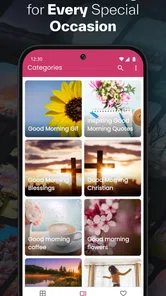
Daily Wishes and Blessings Gif is an app designed to provide users with a collection of beautiful and thoughtful GIFs that can be shared with friends and family. The app contains a variety of categories, including daily wishes, blessings, and special occasion greetings. Users can easily navigate through the app, select their desired GIF, and share it via social media or messaging apps.
Pros
- Beautiful and inspiring GIFs.
- Easy to share with friends.
- Daily updates with new content.
- User-friendly interface.
- Wide variety of blessings and wishes.
Cons
- Contains ads.
- Requires internet connection.
- Limited customization options.
- No offline access to GIFs.
- Some GIFs may not load properly.











