

Currency Strength Meter
- 5.00
- 3.5
- Installs
- 10.00K
- Price
- Free
Screenshots
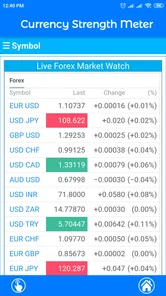
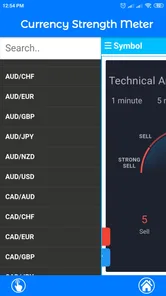
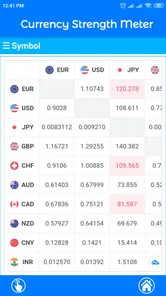
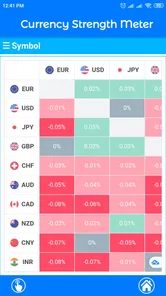
Analysis by Reviewed
I found Currency Strength Meter most useful as a quick reference rather than as a complete trading platform. It is a finance app from shubhlaxmi that helps me compare the relative strength of currency pairs across different timeframes. That sounds narrow, and it is, but the narrow focus is also the reason the app can fit neatly into a trader’s routine. Instead of opening a full charting suite every time I want a broad sense of which currencies are showing momentum, I can use this simpler tool as an initial filter.
My overall view is positive with an important qualification: Currency Strength Meter is better at organizing a first impression than proving a trade idea. It can help me decide which pairs deserve closer attention, but I would not treat its readings as a buy or sell signal on their own. If you already understand that distinction, the app has a practical place in a lightweight research workflow. If you want live charts, order execution, news, alerts, or detailed technical studies in one package, you will probably outgrow it quickly.
What the app actually adds to a currency routine
The central idea is straightforward. Currency pairs can look complicated when viewed one chart at a time, especially when several markets are moving together. A strength meter changes the starting point: rather than asking only whether a particular pair is rising or falling, I can first consider which side of the pair appears stronger and which side appears weaker over a selected timeframe.
That shift in perspective is more useful than it may sound. A rising pair does not automatically mean its base currency is broadly strong; it may simply be falling less than the quote currency. Looking at relative strength can encourage a wider comparison before I focus on an individual chart. In practice, I would use the app to create a shortlist, then move to a charting or brokerage app to inspect price structure, spreads, economic events, and risk.
The app’s simplicity is its clearest advantage. It is not trying to become a trading terminal, and I do not have to work through a crowded interface just to get a directional overview. That makes it suitable for a quick check during a break, before a market session, or while reviewing a watchlist. The store summary describes it as a way to check currency pair strength across different timeframes, and that narrow purpose is reflected in the way I would use it: glance, compare, verify elsewhere.
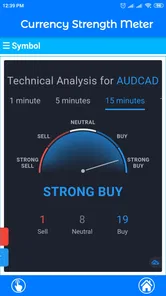
One useful habit is to avoid looking at only the shortest timeframe. A currency that appears strong over a brief period may be reacting to a temporary move, while a longer view can show whether that strength is persistent or simply a short-lived burst. I found the timeframe comparison more valuable when treated as context rather than confirmation. Agreement across several views can make a pair more interesting; disagreement is a reason to slow down, not a reason to choose the most convenient reading.
Why relative comparison can be more useful than a single chart
Suppose I am watching a major pair that has begun moving upward. A normal chart tells me what price has done, but not necessarily whether the move comes from broad strength in one currency, weakness in the other, or a mixture of both. A strength meter can help frame that question. If one currency is appearing strong across several pair comparisons while another is repeatedly weak, the pair may deserve further investigation.
More From Our News Desk

 Gmail
GmailGmail in a Busy Inbox: Who Benefits Most?
From first account to crowded workday, Gmail earns its place through dependable search and flexible sorting—but its best fit depends on how much inbox maintenance you can tolerate.

 Prime Video
Switching to Prime Video: What Changes in Your Viewing Routine
Prime Video can make a compelling second home for streaming, but switching means learning a different catalog, rental layer, and route from browsing to playback.

 Universal TV Remote Control
Universal TV Remote Control Works Best as a Reliable Backup
A phone remote earns its place through quick setup and reliable habits. Here is how to get more from Universal TV Remote Control—and where its limits show.

 Weather - By Xiaomi
Weather by Xiaomi Review: Clear at a Glance, Less Clear Up Close
Xiaomi’s weather app makes everyday forecasts quick to scan, but its calm surface can leave useful details and recovery paths harder to find than they should be.

 X
XX Under Pressure: Can It Recover When Posting Goes Wrong?
A resilience-focused review of X, examining setup, mistaken posts, interruptions, weak connections, and the gaps that matter when recovery needs to be dependable.

 Clash of Clans
Clash of Clans Is Won Between the Battles
Its raids are quick; its community is a long-term project of coordination, teaching, rivalry, and shared responsibility—with all the friction that entails.
Latest News



That does not remove the need for analysis. Relative strength can remain elevated while price is already extended, and a strong currency can weaken suddenly after an economic release. The app is therefore most valuable before the detailed chart work, not after I have already committed to a position. It helps reduce the number of charts I need to inspect, which is a small but meaningful efficiency gain for someone who follows several currencies.
There is also a psychological benefit. Traders can become attached to a familiar pair or a preferred market narrative. A comparative view can challenge that habit by showing that another currency combination may have a clearer contrast. I would not call this a hidden signal, but it is a better decision-making workflow: begin with comparison, then test the idea against price action and current market conditions.
A practical morning workflow
In an everyday scenario, I might open Currency Strength Meter before starting a broader market review. I would check the available timeframe views, note currencies that appear consistently firm or soft, and select only a few possible pairs for further inspection. I would then open my usual charting tool, check trend structure and recent support or resistance, and look at the economic calendar before considering any trade.
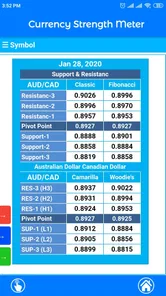
The important part is what I would not do. I would not copy the strongest-looking pair directly into an order ticket. I would not assume that a reading remains valid throughout the day. I would not use the meter to decide position size or stop placement. Those decisions require information the app is not designed to replace, including volatility, account risk, execution conditions, and the distance to technically important price levels.
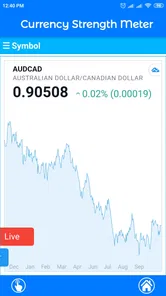
A second useful workflow is a post-session review. After a trade or a missed opportunity, I could compare the strength picture with what price eventually did. This may reveal whether I am repeatedly choosing pairs with mixed currency conditions or entering after a move has already become crowded. Used this way, the app becomes a journaling aid rather than a prediction machine. That is a more realistic and responsible role for a compact strength tool.
Where the straightforward design helps
For a beginner, the app can provide a gentler introduction to the idea that forex is a relationship between two currencies. New traders often focus on a pair name as though it were a single asset. Comparing relative strength makes the two-sided nature of the market easier to understand. I still would not recommend using it as a beginner’s only educational resource, but it can support a basic lesson in why one currency pair moves when the balance between its two components changes.
For a more experienced trader, the benefit is speed. A full platform may offer far more information, but that abundance can slow down a simple screening task. Currency Strength Meter can serve as a compact first pass before I open more demanding tools. The trade-off is that I must accept a smaller information set. The app saves time at the screening stage precisely because it does not attempt to provide every other part of a professional workflow.
Its free availability also lowers the barrier to trying that workflow. The app is listed as free, although it includes in-app purchases ranging from $1.99 to $15.99 per item. I would check the purchase prompts carefully before committing to anything, especially if I only need the basic comparison function. The free entry point makes experimentation easier, but it does not mean every part of the experience necessarily has the same cost or access conditions.
The main weakness: a strength reading is not a complete market explanation
The biggest limitation is conceptual rather than cosmetic. A meter compresses a complicated market into a simplified comparison. That is useful for orientation, but compression can hide important details. A currency may look strong because of a particular macroeconomic development, a temporary risk move, or weakness concentrated in the currencies being compared. The reading alone does not explain the cause, the quality of the move, or whether the current price already reflects it.
This matters most when the timeframe changes the story. A currency can look strong over a short view and weak over a broader one, or the reverse. Rather than treating that conflict as an error, I would interpret it as a warning that market conditions are changing or that the move lacks consistency. Users who want a single clear answer may find this frustrating, but the ambiguity is real. The app can display a comparison; it cannot remove uncertainty from the market.
I also see a risk of false confidence. A clean visual summary can feel more authoritative than it deserves, particularly for someone new to forex. If several currencies line up in an apparently attractive way, it is tempting to assume the next trade is obvious. That is exactly when I would slow down and verify the chart, liquidity, spread, scheduled news, and broader trend. The tool is most dangerous when its simplicity is mistaken for certainty.
Another point is that the app should not be confused with a broker. It is a finance utility for checking currency strength, not a replacement for an account, execution platform, or risk-management system. Anyone expecting to place trades, manage open positions, or build a full watchlist inside the same app should choose a broader alternative. I would keep it alongside, not instead of, the tools that handle those tasks.
Questions I would ask before relying on it
One natural question is whether it suits completely new traders. My answer is yes, but only as a supporting tool. A newcomer can use it to learn relative currency behavior, provided they also study chart basics, leverage, margin, and risk. It is not a shortcut around those subjects. In fact, the app is a good reminder that a simple-looking market view still needs interpretation.
Another question is whether it can replace a charting platform. In my experience, it cannot. It may help decide which charts to open, but it does not serve the same purpose as a platform built around candles, indicators, drawing tools, alerts, and execution. Someone who already pays for a charting service may still appreciate this app for quick screening, but someone seeking an all-in-one setup should look elsewhere.
It is also worth asking how to handle conflicting timeframe readings. I would not choose the timeframe that supports my preferred trade and ignore the others. Instead, I would label the setup as less clear and demand stronger confirmation from price action. A conflict can be useful information: it may indicate a short-term reversal inside a larger trend, a developing transition, or simply a market without a clean directional edge.
For day-to-day use, I would keep the app in a limited role. Check it at planned points, record what the readings suggest, and avoid refreshing endlessly in search of a perfect arrangement. Constant checking can encourage overtrading, especially when every small change appears meaningful. The strength meter should narrow attention, not create a reason to act every few minutes.
Who will get the most from Currency Strength Meter?
I think the best audience is a trader who already has a separate charting or brokerage setup and wants a fast comparative screen. It also makes sense for someone managing a broad currency watchlist who feels that opening every pair individually is inefficient. The app’s current version is 1.4.0, and its modest presentation suits users who value a focused utility over a large collection of tools.
It may also appeal to learners who are trying to understand why pair selection matters. Instead of beginning with a favorite symbol, they can start by comparing currencies and then see how that relationship appears on a chart. That workflow encourages a more structured review process. I would still pair it with reliable educational material, because the app itself should not be expected to explain every economic or technical reason behind a reading.
I would skip it if my priority is execution, advanced chart analysis, automated strategies, portfolio tracking, or detailed fundamental research. A dedicated trading platform will be stronger in those areas. I would also skip it if I tend to treat indicators as instructions rather than evidence. The app rewards a patient user who can hold a preliminary view without immediately turning it into a position.
The audience size appears reasonable for a specialized utility: it has passed 10K installs, with an average rating of 3.5 from 131 ratings. I read that as a sign of a small, mixed user base rather than proof that the app is universally polished. The content rating is Everyone, so it is presented for a general audience, but the subject itself still requires adult financial judgment. A general age label should never be mistaken for a recommendation to trade.
My final assessment
After using it as a screening companion, I see Currency Strength Meter as a focused tool with a clear ceiling. Its strongest quality is that it encourages me to compare currencies before becoming attached to a particular pair. Its weakest quality is that the same simplicity can make the market look more settled than it really is. The app gives me a useful starting question, not a finished answer.
The developer, shubhlaxmi, has kept the concept accessible enough for a quick check, and the free listing makes it easy to test whether this style of analysis fits my routine. I would begin with the basic experience, observe how it fits alongside my existing charting process, and pay attention to any purchase prompt before spending money. The app’s value depends less on collecting every reading and more on using the comparison to make a disciplined shortlist.
My recommendation is conditional but clear: try it if you want a compact currency-strength overview and already understand that confirmation and risk control happen elsewhere. Do not choose it as your only forex tool, and do not let a strong-looking comparison replace a proper market review. For the right user, it can remove some clutter from the first stage of analysis. For everyone else, a full charting platform will offer more useful depth.
Currency Strength Meter Frequently Asked Questions
Who develops Currency Strength Meter, and which devices can install it?
Currency Strength Meter is a finance app developed by shubhlaxmi. Its current version is 1.4.0, and it requires Android 7.0 or later. The app is free to download, though in-app purchases are available. Before installing, check that your device meets the minimum Android requirement and that you are comfortable with any optional purchases offered in the app.
What is Currency Strength Meter and how does it work?
Currency Strength Meter is a market-analysis app designed to show the relative strength or weakness of major currencies. It compares price movements across selected currency pairs and presents the results through visual indicators, rankings, or charts. The information can help traders identify market momentum and possible opportunities, but it should be treated as analytical guidance rather than a guaranteed prediction of future exchange rates.
Is Currency Strength Meter suitable for beginners?
The app can be useful for beginners because it provides a simplified overview of currency performance instead of requiring users to inspect every pair individually. However, new traders should understand basic concepts such as pips, currency pairs, trends, volatility, and spread before relying on the readings. It is best used as an educational and confirmation tool alongside proper research and a clear trading plan.
Can I use Currency Strength Meter to make profitable trades?
Currency Strength Meter may help users compare currencies and spot situations where one currency appears stronger than another, but it cannot guarantee profitable trades. Market conditions can change quickly because of economic news, interest-rate decisions, political events, and unexpected volatility. Users should combine the app’s data with technical and fundamental analysis, apply risk management, and never invest money they cannot afford to lose.
Does Currency Strength Meter provide real-time and accurate data?
The usefulness of Currency Strength Meter depends on the data source, update frequency, selected timeframe, and the way strength is calculated. Some readings may be delayed or based on aggregated market information, so they might not match the exact prices shown by a broker. Before making decisions, users should check the app’s refresh settings, understand its methodology, and verify important signals with a reliable trading platform.
Pros
- Quickly compares the relative strength of multiple currencies.
- Useful for spotting strong and weak pairs before placing trades.
- Clean interface makes market data easy to scan.
- Can support short-term forex analysis and trade planning.
- Helps reduce reliance on checking currency pairs individually.
Cons
- Strength readings may change rapidly during volatile market conditions.
- Not a substitute for technical
- fundamental
- or risk analysis.
- Some features or data may require an in-app purchase.
- Results can be confusing for beginners unfamiliar with forex terms.
- Currency strength signals may lag behind sudden market movements.











