Culver's
- 1.02K
- 3.2
- Installs
- 1.00M
- Price
- Free

Screenshots






Analysis by Reviewed
I find the Culver’s app most useful as a shortcut for people who already know they want a meal from the restaurant, not as a reason on its own to change their eating routine. Its focus is practical: browse, place an order ahead, and work toward rewards. That makes it a better fit for a familiar stop on a busy day than for someone looking for a broad restaurant-discovery tool.
Where it fits into a busy day
A realistic use is deciding on lunch between errands: I can look through the menu before reaching the restaurant, make choices without holding up the line, and place an order ahead. That planning can be especially handy when I’m coordinating food for more than one person, since I can settle the details before everyone is hungry. I would still check the selected location and order carefully before submitting; convenience does not remove the need to confirm that the choices match the plan.
Rewards are a reason to return, not a guarantee
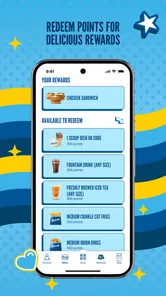
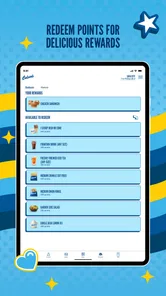
The app’s rewards angle gives regular customers a reason to keep ordering through it rather than treating it as a one-off menu browser. I’d think of rewards as a useful extra, not assume a particular benefit or redemption will suit every visit. If I’m choosing between ordering in the app and ordering another way, I’d first check what the app currently shows for my account and whether the order I want can be placed there.
What to check before relying on it
Order-ahead tools are most valuable when the restaurant you plan to visit is available and the app’s choices fit your meal. I’d confirm the location before building a detailed order, especially if I’m traveling or meeting someone at a particular branch. For a quick stop where I’m already at the counter, using the app may add steps instead of saving time. And if I want to compare several nearby restaurants, a map or general dining app is a more natural starting point than a single-brand app.
That brand-specific focus is also its main trade-off: the app is useful when Culver’s is already the destination, but it won’t help me weigh the menu against options from other restaurants. I also wouldn’t assume that every order can be customized exactly as I picture it; the available choices in the ordering flow are the sensible guide. For a first visit, I’d browse at an unhurried moment and use the menu to decide, rather than count on the app to explain every preference or answer every question at the restaurant.
As a free Food & Drink app from Culver’s, it is easy to try if you are a returning customer. Its 3.2 average from around 1,100 ratings suggests that experiences are mixed, so I’d go in with practical expectations rather than assume every interaction will be effortless. The app has been available since November 2023, and version 2.0.1 supports Android 7.0 and later. It is rated for Everyone and has over 500,000 installs, which makes it an established option without changing the basic question: will you use it often enough to value ordering and rewards in one place?
A useful routine for group orders
For a family meal or a lunch picked up for coworkers, I’d use the app as an organizer rather than simply a faster checkout. I would collect everyone’s choices first, then review the order as a whole before submitting it. That small pause helps catch easy-to-miss details, such as selecting the wrong item or choosing a different location than intended. It also means I can make decisions away from a busy counter, where conversation and a queue can make it harder to keep track.
More From Our News Desk

Weather by Xiaomi Review: Clear at a Glance, Less Clear Up Close

X Under Pressure: Can It Recover When Posting Goes Wrong?

Clash of Clans Is Won Between the Battles

Android Auto Makes the Case for Quieter Car Software

MobiOffice: Transforming Mobile Productivity with Seamless Integration

EA SPORTS FC™ Mobile Soccer: Redefining Mobile Sports Gaming
There is a trade-off, though: the app is only a convenience if the people I’m ordering for can settle on items that the menu flow actually offers. If someone has a very specific request, I’d verify the available options rather than promise that every adjustment can be made. For a group with varied preferences, the app can help me gather and check choices, but I would not treat it as a guarantee that every special instruction will be handled exactly as imagined.
How it compares with other ways to order
Compared with a general restaurant or delivery app, this one has a narrower job. A multi-restaurant service is better when I’m undecided, weighing different cuisines, or trying to compare places in one view. Culver’s is the more direct choice once I’ve already picked the restaurant and want to handle its menu and rewards together. A phone call or ordering at the counter may be more comfortable when I have an unusual question or want to talk through a request with staff.
I would also separate the app’s convenience from the convenience of the visit itself. Ordering ahead can move some decisions to an earlier, calmer moment, but it does not make every stop faster by definition. If I’m already beside the counter and know exactly what I want, placing the order there may be simpler. If I’m still on the road, I’d wait until I can safely make the selection rather than let an order-ahead feature distract me.
Small checks that prevent avoidable hassle
My most practical habit would be to choose the intended restaurant before spending time on a complicated order. This matters especially when I’m away from my usual area: a nearby location is not necessarily the one that makes sense for my route or meeting place. I’d then scan the finished order once more before confirming it. These are ordinary checks, but they matter because a digital order can feel complete while still being attached to the wrong destination or containing a detail I meant to change.
I’d also look at the rewards area when I’m actually planning a visit, rather than relying on memory about what I might earn or use. That keeps expectations grounded in what the app presents for my account at the time. The rewards feature is a reason for a regular customer to keep the app handy, but it should not be the sole reason to choose a meal or make an extra trip. If I rarely visit, the value of having rewards in reach will naturally be smaller.
Who will get the most from it
I’d recommend trying it if Culver’s is already part of your routine, you like making choices before you arrive, or you expect to use the rewards option over repeat visits. It is particularly suited to someone who wants to sort out a familiar order while taking a break at home or between errands, then arrive with the main decisions already made. The free price makes that trial low-commitment, though usefulness still depends on how often you choose this restaurant.
On the other hand, I’d skip it if you only visit occasionally and prefer to decide face to face, or if your main goal is finding and comparing restaurants. It is also not the tool I’d rely on to resolve a detailed menu question without checking the actual ordering choices. For those situations, browsing a broader dining service or asking at the restaurant may be more helpful than expecting one brand’s app to cover every need.
What the app is best at
For me, the strongest case is the combination of planning an order and keeping the brand’s rewards within reach. That is a focused purpose, not a complete solution for every dining decision. Culver’s makes sense as a practical companion to a restaurant I already intend to visit; it is less compelling as a standalone food guide. That distinction is useful when deciding whether to install it: the app’s value comes from repeated, convenient use, not from a promise that every visit will be effortless.
Are you ready to discover an app that's going to change the way you enjoy fast food? Let me introduce you to Culver's, the ultimate app for all the ButterBurger and frozen custard lovers out there! If you're as big a fan of Culver's as I am, get ready to have your mind blown. This app is like having the entire menu at your fingertips, plus a bunch of cool features that'll make your next meal choice a whole lot easier.
Why the ordering flow matters
So, why should you even bother downloading another fast food app? Let me tell you, the Culver's app isn't just any app. It's your personalized portal into everything you love about this iconic brand. Imagine being able to browse the menu from your couch, customize your order, and even find the nearest Culver's location without breaking a sweat. It’s like having a fast pass to deliciousness.
Explore the Menu Like Never Before
One of the coolest features of the app is the detailed menu section. Trust me, it's not just a list of items. You get to see everything, from classic ButterBurgers to the latest seasonal flavors of frozen custard. Each item comes with a mouthwatering description, and you can even check out nutritional information. Whether you're counting calories or just curious, it's all right there.
Customize Your Order
Now, let's talk about customization. We all have our guilty pleasures, and for me, it's adding extra cheese to everything. With the Culver's app, you can customize your order to your heart's content. Want extra toppings on your burger? Done. Prefer your custard in a cone instead of a cup? Easy. It's like having a personal chef who gets you.
Find a Culver's Near You
Ever found yourself craving a Concrete Mixer but have no idea where the nearest Culver's is? The app's location finder has got you covered. With just a few taps, you can find the closest restaurant, check their hours, and even get directions. No more wandering around aimlessly when your stomach is growling.
Stay Updated with the Latest Offers
And wait, there's more! The app keeps you in the loop with all the latest offers and promotions. Whether it's a new custard flavor or a limited-time deal on your favorite meal, you'll be the first to know. It's like having a VIP pass to all things tasty.
My verdict for regular customers
In conclusion, if you love great food and convenience, the Culver's app is a must-have. It makes ordering a breeze, keeps you updated on the latest goodies, and helps you find your way to the nearest ButterBurger haven. So, what are you waiting for? Download the app and dive into a world of delicious possibilities!
Culver's Frequently Asked Questions
Is the Culver’s app free to download, and which devices can run it?
Culver’s is a free Food & Drink app from Culver’s, so you can install it without paying for the download. It is intended for Android and iOS users, with Android support starting at version 7.0. If you are deciding whether to install it, its main appeal is the ability to order ahead and use Delicious Rewards through the app.
What is Culver's app and how does it enhance my dining experience?
Culver's app is a convenient platform designed to enhance your dining experience by allowing you to easily browse the menu, place orders, and find the nearest Culver's location. With features like nutritional information, allergen details, and personalized offers, the app ensures that your visit to Culver's is enjoyable and tailored to your preferences.
How do I place an order using the Culver's app?
Placing an order with the Culver's app is simple. First, download the app on your Android or iOS device and create an account. Once logged in, browse the menu, customize your order, and select your preferred Culver's location. After reviewing your order, proceed to checkout and choose your payment method. Your order will be ready for pickup at your chosen location.
Does Culver's app offer any loyalty or rewards program?
Yes, the Culver's app offers a loyalty and rewards program to enhance your dining experience. By signing up and using the app, you can earn points for every purchase, which can be redeemed for discounts or free items. The app frequently updates users with exclusive offers and promotions, ensuring you get the best value during your visits.
Is the Culver's app user-friendly for first-time users?
The Culver's app is designed with user-friendliness in mind, making it accessible for first-time users. Its intuitive interface allows easy navigation through the menu, order placement, and account management. Additionally, the app provides clear instructions and helpful tips to guide users through each step, ensuring a seamless experience from start to finish.
Pros
- User-friendly interface
- Wide menu variety
- High-quality ingredients
- Efficient customer service
- Easy online ordering
Cons
- Limited locations
- No delivery option
- High-calorie menu
- Seasonal item availability
- No nutritional info on app











