Cracker Barrel
- 3.99K
- 4.6
- Installs
- 1.00M
- Price
- Free
Screenshots
Analysis by Reviewed
I’d treat the Cracker Barrel app as a practical companion for deciding whether a meal or stop at the restaurant fits my plans, rather than as a reason on its own to change them. It brings menu browsing, ordering, location finding, and rewards-related information together, which is useful when I already have Cracker Barrel in mind. The app is free, so trying it does not require paying for the download; the value comes down to whether those tools suit how you eat and travel.
Free to download, useful when it fits your routine
There’s no purchase price to weigh before installing it. That makes it easy to check the menu or look for a nearby restaurant before a drive, then decide whether the available options work for the occasion. I wouldn’t confuse free access with a guarantee that every meal or ordering option has the same value for every person: the app is most worthwhile when its restaurant-specific tools save you a separate search or help you plan ahead.
For a family choosing dinner, for example, browsing first can make it easier to settle on a meal before arriving. On a road trip, checking the locator can help turn a Cracker Barrel stop into a deliberate choice instead of a last-minute guess. If you rarely eat there, though, a general maps or restaurant-search app may be more useful day to day.
What the app does well—and where I’d be cautious
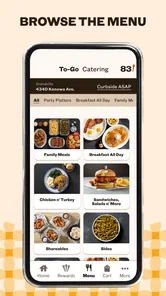
The strongest case for installing it is having several Cracker Barrel tasks in one place: you can look through the menu, place an order for pickup or delivery, find a location, and keep an eye out for app notices. Those functions serve different moments, so it can be helpful even when you aren’t ordering immediately. Checking the menu in advance is especially handy if you want to compare dishes or have a particular meal in mind.
I’d still treat notifications as optional rather than essential. Deal and event alerts may be welcome if you follow the restaurant, but frequent promotional messages can feel like clutter. You can decide whether those reminders are worth enabling instead of letting them determine whether the app is useful. And for a restaurant you visit only occasionally, opening a dedicated app may be one extra step compared with searching the web or using a general food app.
Who will get the most out of it?
I’d recommend it most to people who already enjoy Cracker Barrel, families who like to plan meals before setting out, and travelers who want to check for a nearby stop. It’s also a reasonable option if you prefer arranging pickup or delivery through the restaurant’s own app. If your priority is comparing many restaurants at once, or finding places without choosing a particular chain, a broader dining app is likely the better starting point.
Cracker Barrel’s app is a free Food & Drink app from Cracker Barrel CBOCS, with an Everyone age rating. It has a 4.1 average from around 19,000 ratings, and more than a million installs. Version 9.1.0.1155 is listed for devices running iOS 12 or later. Those details suggest an established app, but the rating alone can’t tell you whether its ordering flow or restaurant coverage will match your needs. I’d use the menu and locator for the specific place and meal I’m considering, rather than assume every visit will work the same way.
More From Our News Desk

Weather by Xiaomi Review: Clear at a Glance, Less Clear Up Close

X Under Pressure: Can It Recover When Posting Goes Wrong?

Clash of Clans Is Won Between the Battles

Android Auto Makes the Case for Quieter Car Software

MobiOffice: Transforming Mobile Productivity with Seamless Integration

EA SPORTS FC™ Mobile Soccer: Redefining Mobile Sports Gaming
Your Southern Comfort, Digitized
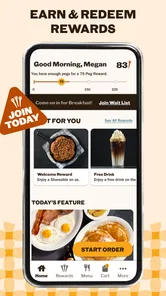
First things first, let's talk about the user interface. The Cracker Barrel app is designed to be as welcoming as the front porch of their restaurants. It's intuitive and user-friendly, making it a breeze to navigate whether you're tech-savvy or a bit of a newbie. The app opens up with a warm, inviting home screen that makes you feel like you're stepping into a digital version of an old country store.
Explore the Menu
One of the standout features of the app is the extensive menu offering. If you're anything like me, you love to plan your meal ahead of time, and this app lets you do just that. From their famous chicken n' dumplings to their irresistible biscuits, you can browse through all the scrumptious options. Plus, there's a nutritional guide for those who are keeping an eye on their diet. It’s like having the entire menu at your fingertips, minus the calories!
Order with Ease
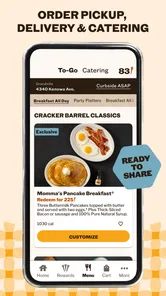
Craving a hearty meal but don’t feel like heading out? No problem! The app allows you to place an order for pickup or delivery with just a few taps. It's perfect for those days when you want to enjoy a delicious meal without leaving the comfort of your home. The ordering process is smooth and efficient, making it easy to satisfy those comfort food cravings.
Stay in the Loop
Another cool feature of the Cracker Barrel app is the notifications about special deals and events. It's like having a VIP pass to all things Cracker Barrel. Whether it's a seasonal dish you just can't miss or an exclusive discount, the app keeps you in the know. Just make sure to allow notifications, so you don't miss out on any delightful surprises!
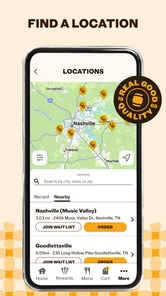
In addition to these features, the app also offers a store locator, making it convenient to find the nearest Cracker Barrel when you're out and about. It’s like having a trusty travel companion that ensures you never miss your favorite stopover.
At the end of the day, the Cracker Barrel app is a delightful extension of the brand's commitment to comfort and quality. It's not just an app; it's a little piece of Southern hospitality right on your phone. So, whether you're a regular at Cracker Barrel or just a curious first-timer, give the app a whirl. You might just find that digital dining can be just as comforting as the real thing!
A smoother way to plan a visit
A useful habit is to separate deciding what to eat from deciding how to get it. I’d browse the menu before leaving, then use the location tool to check which restaurant makes sense for the route. That order of operations avoids choosing a dish first and only afterward realizing the stop doesn’t fit the day. For a family or group, it can also turn a vague “where should we eat?” conversation into a quicker choice based on the Cracker Barrel menu.
The nutrition guide adds a practical angle to that planning. I’d use it to compare menu choices before ordering, especially when someone at the table is tracking what they eat. It doesn’t replace personal dietary advice, but it can make browsing more informed than relying on a menu description alone. If nutrition is a strict requirement, I’d still check the current details carefully rather than assume a familiar dish always suits a particular need.
Ordering has a few real-world trade-offs
Pickup and delivery are convenient when the household has already settled on Cracker Barrel, but they serve different situations. Pickup makes sense if you’re passing a restaurant and want to collect a meal; delivery is better when leaving home is the main problem. Before committing, I’d review the order carefully and confirm the selected option and location. Restaurant-specific ordering can be simpler than browsing a large delivery marketplace, while a marketplace may be more useful if you want to compare several nearby cuisines or providers.
A realistic use case is a busy evening when plans change late: I can check the menu, see whether a Cracker Barrel location is convenient, and choose whether pickup or delivery fits better. The app reduces the back-and-forth of looking up each step separately, but it doesn’t make the restaurant the right choice for every schedule. If speed, broad choice, or a particular dietary option matters more than familiarity with the menu, another restaurant or general ordering service may be a better fit.
Rewards and alerts without the pressure
The app’s rewarding angle is most relevant if you return often enough to care about restaurant updates and offers. I’d check the rewards area when I’m already planning a visit, rather than treating every alert as a reason to order. That keeps the app useful without turning promotions into a spending prompt. Notifications are a convenience, not a requirement for browsing or using the other tools, so people who dislike phone alerts can leave them off and still decide whether the app earns a place on their device.
My verdict for regulars and occasional visitors
The app has a focused purpose, and that is both its strength and its limit. It is not a general guide to dining; it is for people considering Cracker Barrel and wanting a direct way to explore its menu, locate a restaurant, or arrange an order. If that describes your routine, the free download is an easy one to try. If you only need a one-time address or want to compare a wide range of restaurants, your usual map or food app may already do the job better.
Overall, I’d keep it in mind for road trips, planned family meals, and repeat visits, while treating ordering and alerts as optional conveniences rather than promises of a perfect experience every time. The app is most valuable when it helps answer a specific question—what’s on the menu, where can I stop, or how should I arrange the meal? If those are questions you ask about Cracker Barrel, it’s a sensible download; if not, skipping it costs you nothing.
Cracker Barrel Frequently Asked Questions
Is the Cracker Barrel app appropriate for children and families?
The app is rated for Everyone, making its content suitable for a broad audience. Families can use it to explore Cracker Barrel’s restaurant-related experience together, such as looking at menu options or finding a location. As with any app, parents may want to supervise purchases and consider their child’s use of a mobile device.
Who makes the Cracker Barrel app, and what kind of app is it?
Cracker Barrel CBOCS is the developer, and the app belongs to the Food & Drink category. It is centered on connecting users with the Cracker Barrel restaurant experience through a phone. If you already visit the restaurant or want to explore its offerings, the app provides a mobile way to engage with the brand.
What should I know about the Cracker Barrel app before downloading it?
Cracker Barrel is a Food & Drink app from Cracker Barrel CBOCS, intended for people who want to connect with the restaurant through their phone. Its store summary describes the experience as rewarding, and the app is rated for Everyone. It is free to download, so you can install it without paying for the app itself; any food purchases are separate.
What is the Cracker Barrel app used for?
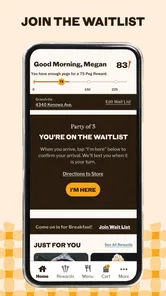
The Cracker Barrel app is designed to enhance your dining experience at Cracker Barrel restaurants. It allows you to browse the menu, place orders for pickup or delivery, and join the online waitlist to save time. Additionally, it offers a store locator, so you can easily find the nearest Cracker Barrel location, and provides access to exclusive offers and promotions.
Can I use the Cracker Barrel app to order food for delivery?
Yes, the Cracker Barrel app allows you to place orders for delivery. You can browse the menu, customize your order, and select your preferred delivery time. The app partners with delivery services to bring your favorite Cracker Barrel meals right to your doorstep. Make sure to enter your address and payment information accurately to ensure a smooth delivery process.
Pros
- Extensive menu offers variety
- Family-friendly dining environment
- Country store shopping experience
- Comfortable Southern-style ambiance
- Convenient location off highways
Cons
- Can get crowded at peak times
- Limited vegetarian options
- Some items can be pricey
- Inconsistent service quality
- Long wait times on weekends











