

Courtyard - Trading Cards
- 485.00
- 4.2
- Installs
- 100.00K
- Price
- Free

Screenshots
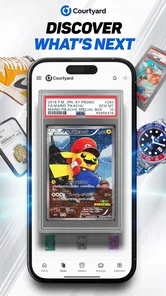

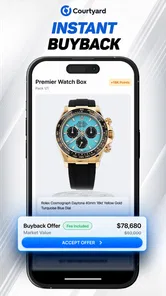
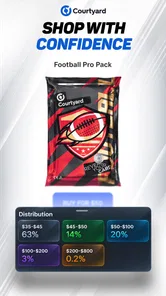
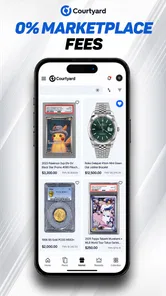
Analysis by Reviewed
I approached Courtyard - Trading Cards as a shopping app for collectors rather than as a conventional marketplace. Its focus spans Pokémon, baseball, NFL items, comics, and coins, so the appeal is easy to understand: it brings several kinds of collectible interests into one place instead of making me jump between unrelated services. The app is free to install, and Courtyard.io is the developer behind it.
My first impression was that this is best suited to someone who enjoys browsing, comparing possibilities, and thinking carefully before committing to a collectible purchase. It is less convincing for a person who simply wants the fastest way to find one specific card or coin. That distinction matters, because the experience feels shaped around discovery and collecting, not just a quick product search.
How Courtyard works for different readers, collectors, and situations
I look at Courtyard through the practical question of who can make its broad collectible mix work for them. In my experience, a little planning—choosing a category, setting a time to browse, and keeping buying decisions separate—can make the app feel more manageable for different readers and collectors. The next section considers how those habits change across everyday situations.
Readability and navigation during a browsing session
The most important accessibility question for a shopping app is whether I can understand what I am looking at without unnecessary effort. Courtyard has a clear subject area, but its broad mixture of trading cards, sports collectibles, comics, and coins can make the catalog feel mentally busy. A collector who already knows the difference between these categories will probably settle in quickly. Someone new to collectible shopping may need more time to understand which parts of the app are relevant to them.
I found that the app makes more sense when I enter with a simple purpose. For example, deciding that I am only browsing Pokémon cards gives the session a natural boundary. Opening the app with no plan can lead to a lot of visual browsing without a clear next step. That is enjoyable when I am in a discovery mood, but less efficient when I am trying to locate a particular item.
The store presentation describes Courtyard briefly, so the real value comes from how the app organizes a collector’s attention. In practice, I would treat the first pass as orientation: identify the collectible area I care about, notice how listings are presented, and only then start comparing items. That approach reduces the chance of confusing casual browsing with a purchase decision.
Text size and contrast can affect how comfortable a shopping session feels, especially when product information is dense. I would not assume that every detail will be equally easy for every reader. People who enlarge system text or use display settings should check whether the interface remains comfortable on their own phone. The app’s minimum operating-system requirement is Android 7.0, which gives it a relatively broad starting point for Android users, although device age and screen quality can still change the experience.
More From Our News Desk

 Instagram
Instagram’s Power Comes From Its Place in Your Phone
A close look at how Instagram turns Meta’s reach, recommendation systems and everyday camera habits into durable platform power—and what that costs users.

 Gmail
GmailGmail in a Busy Inbox: Who Benefits Most?
From first account to crowded workday, Gmail earns its place through dependable search and flexible sorting—but its best fit depends on how much inbox maintenance you can tolerate.

 Prime Video
Switching to Prime Video: What Changes in Your Viewing Routine
Prime Video can make a compelling second home for streaming, but switching means learning a different catalog, rental layer, and route from browsing to playback.

 Universal TV Remote Control
Universal TV Remote Control Works Best as a Reliable Backup
A phone remote earns its place through quick setup and reliable habits. Here is how to get more from Universal TV Remote Control—and where its limits show.

 Weather - By Xiaomi
Weather by Xiaomi Review: Clear at a Glance, Less Clear Up Close
Xiaomi’s weather app makes everyday forecasts quick to scan, but its calm surface can leave useful details and recovery paths harder to find than they should be.

 X
XX Under Pressure: Can It Recover When Posting Goes Wrong?
A resilience-focused review of X, examining setup, mistaken posts, interruptions, weak connections, and the gaps that matter when recovery needs to be dependable.
Latest News



One useful habit is to pause after opening a listing instead of relying on the first image or short label. Collectible buying rewards deliberate reading because a visually attractive card, comic, coin, or sports item may not match what I originally intended to collect. I also prefer using the app in portrait orientation and at a comfortable brightness, since that makes it easier to keep the object, category, and purchasing context in view together.
The app’s public reception is encouraging without making it flawless: it holds a 4.2 average from around 2.6 thousand ratings, alongside hundreds of written reviews. I read that as evidence that many users find the core experience worthwhile, not as a guarantee that every collector will find navigation effortless. A strong average can coexist with friction for people who need especially simple layouts or who dislike browsing across several collectible types.
Motor and sensory considerations for collectors
Shopping for collectibles can involve more than reading. I may need to scroll through several items, open images, move between sections, and make a careful selection before buying. That creates a practical difference between an app that is pleasant for short visits and one that remains comfortable during a long search. Courtyard is more approachable when I use it in short, focused sessions rather than treating it like an endless catalog.
For users with limited dexterity, accidental taps are a real concern in any image-heavy marketplace. I recommend slowing down around purchase-related controls and reviewing the selected item before continuing. This is not a special feature of Courtyard; it is a sensible workflow for any collectible app where a quick touch can move me from browsing toward a financial decision.
People who are sensitive to bright screens or visual clutter may prefer browsing with reduced brightness, a larger device, or a quieter environment. A tablet-sized display can make images and small labels easier to inspect, while a phone is more convenient for brief checks. The trade-off is straightforward: portability helps situational access, but a larger screen may be kinder to tired eyes and users who need more room around controls.
Voice control, screen readers, switch access, and magnification can be valuable for shoppers with different abilities. I would test these tools directly on the sections I use most, particularly catalog browsing, item details, and checkout-related steps. Support can vary from one screen to another, and an app that looks simple visually may still be difficult if labels are unclear or focus order is awkward.
There is also a sensory side to collecting. Images of cards and other objects are central to judging interest, but image-based shopping is not equally informative for someone who cannot inspect pictures easily. In that situation, Courtyard may work better as a place to follow a known category or item than as the only source for evaluating condition and visual details. I would combine it with information from a trusted person or another description-based source before making an important purchase.
For users who prefer low-pressure decision-making, the best workflow is to separate discovery from buying. I can browse when I have time, note the items that interest me, and return later when I am ready to review the choice. That reduces the motor and cognitive pressure of making a decision while simultaneously handling a busy screen.
Using the app in everyday situations
A realistic use case is an evening on the sofa after work. I might open Courtyard to browse Pokémon cards for a few minutes, then switch to baseball items when I want a change. In that setting, the app is convenient because it puts several collecting interests within the same shopping destination. I do not need to prepare a full buying plan for a casual visit; the discovery aspect is part of the appeal.
Another situation is checking a collectible while commuting or waiting somewhere. A phone makes that possible, but a short, distracted session is not ideal for a purchase. Glare, movement, background noise, and limited attention can all make small details harder to assess. I would use that time for browsing only and leave comparison or checkout for a stable setting.
Courtyard can also suit a family member or friend who wants to explore a collector’s interests without knowing the entire market. The range from Pokémon and sports to comics and coins creates an approachable starting point. However, a beginner may still need guidance about what makes an item desirable, how condition affects value, and which details deserve attention. The app can support discovery, but it does not replace basic collecting knowledge.
The mature seventeen-plus content rating is important for households. I would not treat the app as automatically suitable for younger children simply because some of the collectibles may be familiar to them. Adults should make the decision for their household and consider whether a child is ready to browse a shopping environment and understand purchase consequences.
For users who have limited data, battery, or time, a simple routine helps. Browse one category, inspect only the items that genuinely fit the goal, and stop before the session becomes tiring. Collectible marketplaces can encourage open-ended scrolling, and that can be particularly challenging for people who need predictable, low-stimulation interactions. Courtyard is more manageable when I impose my own stopping point.
Where the app fits beside usual shopping alternatives
The main alternative is a general marketplace, where I can often search for a very specific card, comic, coin, or sports item among a much larger range of sellers. That approach may be better when I already know the exact object I want and care most about comparing many individual listings. Courtyard’s advantage is the more focused collector identity: I can browse several related collecting worlds without starting from a completely general shopping environment.
A specialist auction or trading-card service may be preferable for experienced buyers who want highly detailed filters, established grading information, or a deep history of comparable sales. I would choose that type of service when the purchase depends on precise condition analysis or a narrow collecting strategy. Courtyard feels more appropriate when the pleasure comes from discovering possibilities and keeping different interests together.
Physical card shops and coin dealers still have a clear advantage for shoppers who need to inspect an object in person. Touch, lighting, scale, and a direct conversation can answer questions that an app cannot answer as comfortably. Courtyard is useful for browsing and convenience, but it should not make me forget the value of hands-on inspection for expensive or condition-sensitive collectibles.
Social groups and collector forums provide another alternative. They can offer advice, community knowledge, and personal explanations that a shopping interface usually cannot. The downside is that they may be less direct when I actually want to browse available items. I see Courtyard as complementary to those communities rather than a complete replacement for them.
The app has reached over one hundred thousand installs, which suggests that it has found an audience beyond a tiny experiment. Its current version is 1.7.00, and I would keep the app updated through the normal store process so that I am using the maintained release available for my device. The free price makes trying it low-risk in terms of installation cost, but collectible purchases themselves still deserve the same caution I would use anywhere else.
Remaining barriers before I would recommend a purchase
The biggest barrier is not simply accessibility in the technical sense; it is the amount of judgment collectible shopping demands. A person may be able to navigate the app perfectly and still struggle to decide whether an item is right for their collection. Categories such as Pokémon, NFL, baseball, comics, and coins attract different expectations, and moving between them can make comparison less straightforward.
I would also be careful if I needed a very specific accessibility arrangement. Someone who depends on flawless screen-reader labeling, unusually large controls, or a highly predictable focus path should test the exact workflow before relying on Courtyard for regular shopping. The app may be comfortable for one person and frustrating for another, especially when visual browsing is central to the decision.
Financial caution matters too. The ease of moving from one interesting collectible to another can encourage impulse decisions. My practical rule is to decide a budget before browsing, save or note the reason an item interests me, and review that reason before completing a purchase. If I cannot explain why the item fits my collection, I wait.
People who dislike broad catalogs should probably skip the app unless they are willing to narrow their focus themselves. If my only goal is to locate one exact card quickly, a specialist search tool or a familiar local seller may save time. Likewise, if I need to inspect condition personally or ask detailed questions before buying, an in-person shop may be a better first choice.
The age rating can also be a practical barrier for shared devices or younger collectors. Adults should supervise access where appropriate, particularly because the app belongs to shopping rather than a purely informational category. That distinction changes how I would introduce it to someone who is interested in Pokémon or sports cards but is not yet ready to make purchasing decisions.
My inclusive verdict on Courtyard
I see Courtyard as a convenient collecting hub with a clear personality. It is strongest for people who enjoy browsing across Pokémon, baseball, NFL, comics, and coins, and who are comfortable taking responsibility for careful decisions. The free installation lowers the barrier to trying it, while the developer’s focus on collectibles gives the app more direction than a completely general shopping marketplace.
Its inclusive value depends heavily on context. A collector with good visual access, a modern enough screen, and time to browse may find it welcoming. Someone using assistive technology, dealing with visual fatigue, or shopping in a distracting environment should take a slower approach and test the screens that matter most. I appreciate that the app can fit short sessions, but I would not describe it as equally effortless for every ability or situation.
My strongest recommendation is to use Courtyard as a discovery and comparison tool first. Choose one collecting area, inspect listings carefully, and separate browsing from buying. That workflow makes the app less overwhelming, reduces accidental decisions, and gives users with different attention or motor needs more control over the experience.
I would recommend it to collectors who want one place to explore several interests and to newcomers who enjoy learning what is available. I would point exact-item hunters toward a more specialized marketplace, and I would steer condition-focused buyers toward in-person inspection or a service built around detailed evaluation. Courtyard is most accessible when the user sets the pace, narrows the search, and treats every purchase as a considered choice rather than an impulse.
Overall, Courtyard - Trading Cards is worth trying if its mix of collectibles matches the way you like to shop. It has enough range to make browsing interesting, but that range also creates the need for personal structure. With sensible screen settings, a quiet moment, and a clear budget, I found it easier to enjoy what the app does well while working around the barriers that matter most.
Courtyard - Trading Cards Frequently Asked Questions
Is Courtyard - Trading Cards free to download, and what devices can run it?
Courtyard - Trading Cards is a free shopping app from Courtyard.io, so you can install it without paying an upfront download price. It runs on Android devices with Android 7.0 or later. The app is aimed at people interested in collecting and trading, and its store summary highlights Pokémon, baseball, NFL, comics, and coins. Check that your device meets the minimum system requirement before installing.
What kinds of collectibles can I explore in Courtyard?
Courtyard’s collection interests extend beyond one type of trading card: its store summary mentions Pokémon, baseball, NFL, comics, and coins. That gives collectors several categories to browse in one app, although the items available can vary. Take time to review each listing and its terms before purchasing, especially if you are looking for a particular character, sport, series, or collectible format.
What is Courtyard - Trading Cards, and how does it work?
Courtyard - Trading Cards is a digital collectibles platform focused on officially licensed trading cards and other collectible assets. Instead of handling only physical cards, users can browse, buy, sell, and manage digital representations connected to real-world collectibles. The app is designed for collectors who want convenient access to card ownership, marketplace activity, and portfolio management from a mobile device.
Do I need cryptocurrency or a blockchain wallet to use Courtyard?
Courtyard is built around blockchain-based ownership, but new users may not need advanced crypto knowledge to get started. Depending on the current account and payment options, you may be able to create an account and purchase collectibles using standard payment methods. Some transfers, withdrawals, or marketplace actions may require wallet-related steps, so users should review fees, supported payment methods, and account requirements before buying.
Are the trading cards physical, digital, or both?
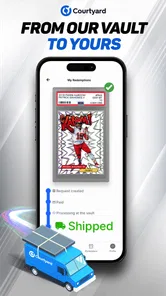
The platform combines digital collecting with physical-card utility. A collectible may appear digitally in your Courtyard account while being linked to an authenticated physical trading card stored or managed through the platform’s partners. The exact redemption, shipping, custody, and transfer conditions can vary by collection, so it is important to read each listing carefully rather than assuming every digital card automatically includes immediate delivery of a physical item.
Pros
- Simple interface makes browsing and managing cards easy.
- Supports collecting cards from multiple sports and categories.
- Useful search tools help locate specific cards quickly.
- Card-focused design is appealing to collectors and hobbyists.
- Regular marketplace activity can provide new collecting opportunities.
Cons
- Some cards and listings may be difficult to find in smaller categories.
- Prices can change quickly
- making budgeting for purchases harder.
- The app may feel limited for users who do not collect trading cards.
- Marketplace availability may vary by region and seller activity.
- Managing a large collection can become time-consuming without extra organization.











