CookShelf
- 57.00
- 3.8
- Installs
- 10.00K
- Price
- Free

Screenshots

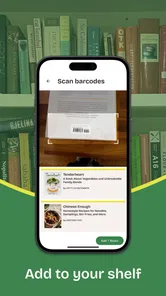




Analysis by Reviewed
I tried CookShelf as the kind of kitchen tool you open when your recipes are scattered across several cookbooks and you cannot remember where a particular dish lives. Its purpose is refreshingly focused: it helps you search your cookbooks and use that collection as a starting point for finding recipes. That makes it different from a typical recipe-discovery service, where the main experience is browsing an endless feed of online dishes.
My first impression is that CookShelf makes the most sense for people who already own cookbooks, refer to them regularly, and want a quicker way to locate the right recipe. It is less obviously useful if you only want instant inspiration from a huge online catalogue. The distinction matters, because the best cooking app for you depends less on how many recipes it appears to offer and more on where your recipes already come from.
CookShelf is a free Food & Drink app from CookShelf, with optional in-app purchases ranging from $4.99 to $39.99 per item. It is rated for Everyone, runs on Android 7.0 and newer, and the current version is 1.95.0. The app has passed ten thousand installs, with an average rating of 3.8 from roughly 171 ratings and 57 written reviews. I would read those figures as a sign of a useful but still fairly focused app rather than a universally essential kitchen companion.
How I would decide whether CookShelf belongs in my kitchen
I would judge whether CookShelf earns a regular place by tracking one simple thing: how often it helps me choose a cookbook recipe I might otherwise overlook. A week of searches can show whether it fits naturally before shopping or dinner, rather than becoming one more app I remember only when I am stuck. The next section looks at that recurring value alongside the alternatives that solve different cooking problems.
The important question is where your recipes live
Before installing it, I would ask myself one practical question: do I cook from physical or personally collected cookbooks often enough to need a search layer? If the answer is yes, CookShelf has a clear reason to exist. Searching a shelf of books by memory is slow, especially when I remember an ingredient or cooking style but not the title of the recipe. A tool built around cookbook search addresses that exact problem.
If my cooking usually begins with a web search such as “quick dinner with beans,” I would judge the app differently. Online recipe platforms are generally designed for broad discovery, photographs, filters, and suggestions. CookShelf’s appeal is narrower and more deliberate. It is about making an existing cookbook collection easier to use, not replacing every other source of food ideas.
What I would test during the first week
I would not decide after opening the app once. I would test it with three different searches: a dish I know well, an ingredient I buy often, and a less obvious phrase connected to a recipe I vaguely remember. This reveals whether CookShelf fits the way I actually think in the kitchen. Some cooks search by dish, while others remember “the lentil recipe with lemon” or “that bread from the weekend book.”
More From Our News Desk

Weather by Xiaomi Review: Clear at a Glance, Less Clear Up Close

X Under Pressure: Can It Recover When Posting Goes Wrong?

Clash of Clans Is Won Between the Battles

Android Auto Makes the Case for Quieter Car Software

MobiOffice: Transforming Mobile Productivity with Seamless Integration

EA SPORTS FC™ Mobile Soccer: Redefining Mobile Sports Gaming
I would also try the app before a real grocery trip. If it helps me move from a vague meal idea to the correct cookbook entry without opening several books, that is meaningful value. If it only works when I already know the exact recipe name, its advantage becomes smaller. This is one of the most useful ways to evaluate it because recipe search is only valuable when it matches imperfect human memory.
The difference between finding and discovering
CookShelf’s wording points toward two related activities: searching your cookbooks and discovering recipes. I see those as separate strengths that should not be confused. Search is useful when I have a destination in mind. Discovery is useful when I do not. The app is most convincing when it connects those moments without forcing me to abandon my existing collection.
For example, I might remember that one of my books contains a vegetable side suitable for a Sunday meal, but not remember which book or chapter. A cookbook-focused search tool can reduce that small but repeated annoyance. It can also encourage me to revisit books I already own instead of automatically looking for something new online.
My realistic everyday scenario
Imagine I am cooking after work and have chickpeas, tomatoes, and greens available. I do not want to scroll through a social feed or compare ten versions of the same recipe. I want to know whether one of my cookbooks already has a useful combination. I would search CookShelf around the ingredient or dish idea, check the relevant result, and then decide whether the recipe fits the time and ingredients I have.
The benefit here is not dramatic automation. It is a reduction in friction. I am more likely to cook from a book I already trust when finding the right page takes seconds rather than several minutes of browsing. That small change can be more valuable than another recommendation engine, particularly for people who have accumulated cookbooks but use only a few familiar recipes from each one.
Where CookShelf wins, and where another type of app may fit better
The right comparison depends on what I want at that moment: to find a recipe in books I already own, to browse broadly, or to keep a small personal collection organised. I would weigh CookShelf’s cookbook-first approach against those habits instead of expecting one tool to cover them all. That distinction also helps clarify where the app’s focused design is a strength and where it may not earn its place.
Its strongest advantage is respect for an existing cookbook habit
Many recipe apps assume that users want a constant stream of new content. I do not always want that. Sometimes I want to use the books I have already chosen, paid for, and marked with notes or memories. CookShelf is appealing because it starts from that personal library rather than treating it as irrelevant.
That makes the app especially suitable for home cooks who collect cookbooks by author, cuisine, dietary style, or season. It can also suit someone who cooks from a small group of trusted books but has trouble remembering where individual recipes are located. In that situation, the app’s value is cumulative: every successful search makes the collection feel more accessible.
It may be better than a general recipe feed for focused meal planning
When I plan meals, too much choice can become a problem. A general recipe service may show attractive possibilities, but I can spend more time comparing them than cooking. CookShelf encourages a different workflow: start with the resources I already own, search with a purpose, and make a decision.
This is also useful when I want consistency. If I have already cooked a recipe from a particular cookbook and know that its style suits my household, returning to that source is easier than trusting an unfamiliar result. The app can therefore support repeat cooking, not just novelty.
Where a web search or online recipe platform may be stronger
I would choose a conventional online recipe service when I need a very specific constraint handled immediately, such as a narrow dietary requirement, a precise cooking time, or a large range of substitutions. Those services are often built around public recipe discovery, and that is a better match for cooks who do not own many cookbooks or who want ideas from outside their current collection.
I would also lean toward an online platform when visual guidance is the main priority. If I need step-by-step photographs, video demonstrations, or a highly interactive cooking workflow, a cookbook search app may not be the right centre of my routine. CookShelf’s focused purpose is an advantage only when that purpose matches my need.
When a notes app or spreadsheet is enough
Some cooks keep a small personal recipe list in a notes app. That can be perfectly adequate if the collection is limited and mostly consists of copied recipes, family instructions, or handwritten adaptations. A spreadsheet may even be better for someone who wants custom columns for cost, servings, freezer suitability, or shopping quantities.
CookShelf becomes more attractive when the problem is not simply storing recipes but locating them across cookbooks. A generic notes system usually requires manual organisation, naming discipline, and ongoing maintenance. The trade-off is that a dedicated app may feel less flexible than a system I design myself. I would choose based on whether I value cookbook-oriented convenience more than complete control.
Three practical habits that make the app more useful
First, I would search with both the meal name and the ingredient idea. A dish-based search is obvious, but ingredient-led searches are more helpful when I am trying to use what is already in the refrigerator. Testing both approaches prevents me from assuming that one search style suits every cooking decision.
Second, I would treat the app as a bridge to my cookbooks, not as a replacement for reading them. When I find a promising result, I would look at the surrounding context in the book before committing to it. Adjacent recipes, introductory notes, variations, and technique explanations can be part of what makes a cookbook valuable. Search should shorten the route to the recipe without removing that context.
Third, I would use CookShelf before shopping rather than only when I am already hungry. Searching several possible meals in advance lets me compare what I already own with what I need to buy. This can reduce impulse purchases and make a cookbook collection more useful during ordinary weekday planning.
Friction I would keep in mind
The app’s narrow focus can also feel limiting. If my cookbook collection is small, or if I rarely cook from books, I may not open it often enough to justify adding another kitchen tool. The free entry point makes trying it easy, but optional purchases mean I would pay attention to which parts of my routine depend on additional access before spending money.
I would also avoid assuming that every search will match the way I remember a recipe. Cookbook language can vary widely: one author may call something a stew, another may describe it as a braise, and a third may organise it under a regional name. That is not a flaw unique to CookShelf, but it means I would try alternate terms instead of concluding too quickly that a recipe is unavailable.
The 3.8 average suggests a mixed but reasonably positive reception. I would not treat that as a guarantee that the app will suit every cookbook collection. It is better understood as a reason to test the search experience with my own books and cooking vocabulary before deciding whether optional purchases are worthwhile.
The cost of switching from my current routine
Moving from paper bookmarks, sticky notes, or a phone’s basic search to CookShelf has a small learning cost. I would need to change the way I locate recipes and build a habit of searching the app first. The payoff depends on repetition: someone cooking from cookbooks several times a week may recover that effort quickly, while an occasional cook may not notice much difference.
There is also a mental cost to maintaining two systems. If I keep some recipes in a notes app, others in bookmarked websites, and the rest in cookbooks searched through CookShelf, I still need to remember where each item belongs. I would therefore use the app most confidently as the main index for cookbook-based cooking, not as an attempt to organise every recipe source at once.
The optional purchase range deserves a practical decision rather than an automatic upgrade. I would begin with the free experience, test real searches, and ask whether it saves enough time during shopping and meal planning. If it becomes part of my weekly routine, paying may make sense. If I open it only when I cannot find one recipe, I would keep the free option or return to my existing method.
Who should install it, and who should skip it
I would recommend CookShelf to cookbook owners who want their collections to feel searchable instead of decorative. It is also a good candidate for people who repeat meals, plan around ingredients, or prefer trusted books over an endless stream of unfamiliar recipes. The app’s Everyone rating and support for Android 7.0 and newer make it accessible to a broad range of Android users.
I would be more cautious if I mainly cook from online videos, need detailed visual instruction, or expect a complete grocery and meal-planning system. I would also skip it if I own very few cookbooks and already find my recipes quickly through another method. In those cases, a general discovery platform, a notes system, or a simple web search may fit the actual problem better.
My final recommendation
After looking at CookShelf as a decision rather than simply an installation, I see a clear and worthwhile niche. It is not trying to be every kind of food app. Its best use is helping me get more value from cookbooks I already own, especially when I remember an ingredient or style but not the recipe’s exact location.
My recommendation is to try CookShelf if your cookbooks are part of your regular cooking routine, but do not buy optional access until it proves useful with real searches. Start with the three-test approach: a familiar dish, a common ingredient, and a half-remembered recipe. Then use it before grocery shopping for a week. If it consistently gets me from idea to cookbook faster, it earns a place on my phone. If I mainly want broad online inspiration or guided cooking lessons, I would choose a different category of app instead.
For me, the strongest reason to keep it is simple: it turns a forgotten cookbook recipe into a reachable option. That is a modest promise, but for the right cook, it solves a recurring everyday problem better than a crowded recipe feed does. CookShelf is most valuable when the recipes I want are already mine.
CookShelf Frequently Asked Questions
What devices and operating systems can run CookShelf?
CookShelf is an app in the Food & Drink category, and its current version is 1.95.0. On Android, it requires version 7.0 or later, so check your device’s software version before installing. The app is rated for Everyone, making it suitable for a general audience. Checking compatibility in the relevant app store is a sensible first step before downloading.
Who develops CookShelf, and how established is it?
CookShelf is developed by CookShelf. It was released on July 31, 2025, and has reached over 10,000 installs. Its average rating is 3.8 from 171 ratings, alongside 57 written reviews. These figures offer a snapshot of its early reception, but ratings are only one part of deciding whether the app suits your cooking habits and the way you prefer to organize recipes.
What is CookShelf and what can I use it for?
CookShelf is a recipe-organizing and cooking companion app designed to help you collect, browse, and manage recipes in one convenient place. You can use it to save favorite dishes, keep cooking ideas organized, review ingredients and instructions, and return to recipes whenever you need them. It is especially useful for people who want to replace scattered notes, screenshots, or bookmarked webpages with a more structured digital cookbook.
Does CookShelf work without an internet connection?
CookShelf’s offline usefulness depends on whether a recipe has already been saved or downloaded to your device. Recipes that are stored locally may remain available when you are cooking in a location with weak or no internet access, while online content or synchronization features may require a connection. Before relying on the app in the kitchen, it is a good idea to open important recipes in advance and confirm that their ingredients and instructions are accessible offline.
Can I add my own recipes to CookShelf?
Yes, CookShelf is intended to be useful for personal recipe collections, so adding your own recipes is one of its most practical features. You can generally record details such as the recipe name, ingredients, preparation steps, cooking time, and other notes. This makes the app suitable not only for discovering dishes, but also for preserving family recipes, adapting meals, and keeping your own cooking experiments organized.
Pros
- Simple way to organize recipes in one convenient place.
- Useful for planning meals and reducing last-minute cooking decisions.
- Supports building a personal collection of favorite dishes.
- Helps keep cooking ideas accessible while shopping for ingredients.
- Suitable for both beginners and experienced home cooks.
Cons
- Recipe organization may require manual setup at the beginning.
- Large collections can become difficult to browse without careful categorizing.
- Some features may depend on the app’s available recipe database.
- Offline access may be limited for certain content or functions.
- Users wanting advanced nutrition tracking may find it too basic.











