Cooklist: Pantry & Cooking App
- 919.00
- 3.2
- Installs
- 500.00K
- Price
- Free

Screenshots
Analysis by Reviewed
I like the idea behind Cooklist: Pantry & Cooking App because it starts with a problem I regularly have: food is already in the kitchen, yet deciding what to make still feels like work. Instead of beginning with a blank meal plan or a long grocery list, the app is designed around the ingredients and products you already have. In my experience, that makes it more useful on busy evenings than recipe apps that only show attractive dishes without helping with the planning around them.
Cooklist is a free Food & Drink app from Cooklist, with optional in-app purchases ranging from $5.99 to $59.99 per item. It is suitable for Everyone, has passed 500K installs, and holds an average rating of 3.2 from around 2.2K ratings. Those figures suggest a real audience, but also a mixed experience, so I would not approach it as a flawless kitchen assistant. Its value depends heavily on how carefully you set up your pantry and how willing you are to correct the app when your real-world groceries do not match its assumptions.
Where Cooklist Usually Feels Difficult
The first point of friction is that a pantry app is only as useful as its pantry information. If the contents are incomplete, outdated, or entered in a way that does not reflect what is actually at home, recipe suggestions and shopping plans can quickly become less trustworthy. This is not a criticism unique to Cooklist; it is the unavoidable trade-off of asking an app to reason about physical food in a kitchen. Still, it matters because the app’s central promise depends on that connection.
I would not try to record every item in one exhausting session. That approach sounds organized, but it can make setup feel like a chore before the app has earned a place in your routine. A better starting point is to add the ingredients and products that most often influence dinner: pasta, rice, canned goods, eggs, vegetables, sauces, and the proteins you buy regularly. Once the basic picture is useful, adding more detail becomes easier and more worthwhile.
Another common sticking point is the difference between having an ingredient and having enough of it. A recipe may technically fit what is in the pantry while still requiring a quantity you do not have. I treat the app’s suggestions as a shortlist rather than an automatic guarantee that dinner can be cooked without another check. Looking at the recipe details and comparing them with the actual package or container prevents a promising plan from failing halfway through preparation.
Users may also expect the app to understand personal preferences immediately. In reality, meal planning is more complicated than matching a few ingredients. Household size, allergies, disliked foods, cooking confidence, time available, and the desire to use leftovers all affect whether a recipe is genuinely practical. I find Cooklist more helpful when I use its ideas as a starting point and apply my own judgement, rather than expecting every recommendation to feel personally selected.
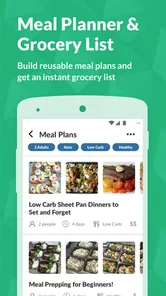
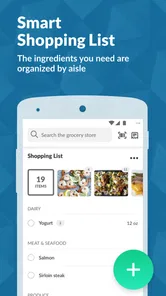
The grocery-list side can create a different kind of confusion. A list built from recipes is not automatically the same as a list for a complete shopping trip. You may already own part of an ingredient, want a different brand, or prefer to buy a larger package for future meals. Before leaving for the store, I review the list against the refrigerator, freezer, and cupboards. That short check is especially important when the app has been used by more than one person in the household.
More From Our News Desk

Weather by Xiaomi Review: Clear at a Glance, Less Clear Up Close

X Under Pressure: Can It Recover When Posting Goes Wrong?

Clash of Clans Is Won Between the Battles

Android Auto Makes the Case for Quieter Car Software

MobiOffice: Transforming Mobile Productivity with Seamless Integration

EA SPORTS FC™ Mobile Soccer: Redefining Mobile Sports Gaming
What I Check Before Blaming the App
When something appears missing or incorrect, I first check whether the pantry entry is still current. A product can be consumed, moved, or replaced without the digital record changing. I also look for variations in how an item was entered. A generic ingredient and a packaged product may not behave identically in a planning workflow, so I avoid assuming that two similar labels will always be treated as the same thing.
I also check the recipe itself before deciding that the recommendation is wrong. Some recipes use an ingredient in a very specific form, while the pantry contains a related alternative. A fresh tomato, canned tomato, tomato sauce, and prepared pasta sauce may all be useful in cooking, but they are not interchangeable in every dish. The app can help me notice what I have; it cannot replace the judgement needed to decide whether a substitution will work.
For shopping plans, I look for duplicates and quantities that need interpretation. If several planned meals use the same basic ingredient, the list may be useful as a reminder but still require a practical consolidation. I prefer to group my final list by the way I shop, such as produce, chilled items, dry goods, and household sections. That small manual adjustment makes the list easier to follow than treating it as a finished route through the store.
There is also a simple device-level check worth making when the app behaves unexpectedly: confirm that the app is current and that the phone has a stable connection when information needs to load or update. The current version is 1.105.3 and it requires Android 9 or later. If the phone is older than that requirement, updating the operating system or changing devices may be more relevant than repeatedly reinstalling the app.
If the app opens but a particular screen does not behave correctly, I would close and reopen it, then retry the same task with a smaller change. For example, instead of editing a large pantry at once, I would update one item and see whether the change is reflected properly. This helps separate a single entry problem from a broader synchronization or loading issue without risking a long session of repeated edits.
A Setup Method That Saves Time Later
My preferred setup is gradual and deliberate. I begin with the foods I can identify confidently, then use the app for one real meal-planning session. That first session reveals which pantry details matter and which ones are unnecessary for my household. After cooking, I update what was used and add the items that were missing. This turns setup into a practical loop instead of a large administrative project.
I would also decide early how precise the pantry should be. Some people need exact quantities because they plan tightly and shop infrequently. Others mainly want a reminder of broad staples. Cooklist can be approached either way, but mixing the two styles without a clear habit can produce confusing results. If I record exact information for a few items and vague information for everything else, I interpret the app’s output cautiously rather than assuming the same level of accuracy everywhere.
One useful habit is to treat the pantry as a planning tool, not an inventory system that must be perfect at every moment. I update high-impact items first: foods close to their use-by point, ingredients needed for a planned dinner, and products that are easy to forget in a cupboard or freezer. This gives the app better information where it matters most, while avoiding the frustration of maintaining an unnecessarily detailed record of every small purchase.
Before building a week of meals, I test a single dinner. I choose something that uses several items I already have and then inspect what the recipe still requires. This reveals whether the app’s ingredient recognition and my own pantry entries line up. It also gives me a chance to notice whether the recipe suits my available time. A recipe that technically uses pantry ingredients may still be a poor choice on a night when I have only a short window to cook.
People sharing a home should agree on one simple rule: changes need to be reflected soon after food is used or bought. Otherwise, one person may plan around an ingredient that another person finished earlier. I would not rely on memory for this. Even a quick update after cooking or unpacking groceries is more dependable than trying to reconstruct the pantry later.
Recovering When a Plan Goes Wrong
When a suggested meal no longer works, I do not discard the whole plan. I first identify the missing item that matters most. Sometimes it is a central ingredient, in which case I choose another recipe. In other cases it is a seasoning, garnish, or flexible component that can be replaced with something already available. This approach keeps Cooklist useful even when the pantry is imperfect, because the app remains a source of direction rather than a strict set of instructions.
A practical recovery workflow is to separate three questions: what is available, what must be purchased, and what can be substituted. The app is most helpful with the first two, while the third is where personal cooking knowledge matters. I might keep the same meal idea but change the vegetable, use a different grain, or turn a planned dish into a simpler one-pot version. That is more realistic than abandoning a recipe simply because one listed ingredient is missing.
If the grocery list looks wrong, I rebuild it from the actual meals I still intend to cook. Plans often change during the week, and leaving old recipes active can make a list feel bloated or contradictory. I remove meals I no longer want, check the pantry again, and then review the remaining items. This is a better recovery method than repeatedly adding new recipes on top of an outdated plan.
For a busy weekday, I use Cooklist in two stages. Earlier in the day, I choose a meal based on what appears available and check the required ingredients. Shortly before cooking, I perform a physical check of the refrigerator and cupboards. If something is missing, I switch to a backup meal that uses fewer dependent ingredients. This two-stage habit protects me from the most frustrating failure: discovering at the moment of cooking that the digital plan and the kitchen do not agree.
A realistic example would be coming home with vegetables, a jarred sauce, and a dry staple already on hand, but finding that the protein planned for dinner is gone. I would not necessarily abandon the entire idea. I might use the vegetables and sauce with the staple, or choose another protein already recorded. Cooklist helps by making the available ingredients easier to consider, but the successful recovery comes from treating the recommendation as adaptable.
When the Problem Is Outside the App
Not every disappointing result is a technical problem. Recipe suitability can be affected by cooking skill, equipment, ingredient quality, and the amount of time available. A recipe that looks manageable may require more preparation than expected, especially if ingredients need washing, chopping, thawing, or separate cooking. I judge the app fairly by separating the quality of its planning help from the practical demands of the recipe itself.
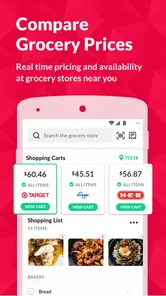
Shopping information can also become inaccurate because of real-world changes. A store may be out of stock, a package size may differ, or a household member may buy a substitute. No pantry planner can automatically know every change in a physical store or kitchen. I use the list as a prepared reminder and confirm the final choices while shopping. That is particularly important when the plan depends on a specific quantity or form of an ingredient.
There are also situations where Cooklist is simply not the best tool. If I want restaurant discovery, nutrition tracking, detailed cooking instruction, or a specialized diet-management system, I would look for an app built around that particular need. Cooklist’s strength is the connection between pantry awareness, recipes, meal planning, and groceries. It is less compelling when those connected tasks are not part of the problem I am trying to solve.
Compared with a handwritten list, Cooklist offers more structure and can help turn existing ingredients into meal ideas. Compared with a basic notes app, it is more purpose-built for food planning. However, paper and notes are often faster for a single shopping trip, especially when the list is short. A dedicated recipe app may provide deeper cooking guidance, while Cooklist is more valuable when the question is not only “What can I cook?” but also “What do I need to buy, and how can I organize the week around what I already own?”
The free entry point makes it easy to test that workflow without paying first. At the same time, optional purchases from $5.99 to $59.99 per item mean I would examine which parts of the experience are available without payment before building my entire routine around them. I would start with a small pantry and one shopping cycle, then decide whether the app saves enough time to justify any upgrade. That is a more sensible approach than paying before knowing whether its planning style suits me.
Who Will Get the Most From It
I think Cooklist is a strong candidate for people who repeatedly buy food they already have, families trying to coordinate meals, and anyone who feels overwhelmed by the gap between recipes and shopping. It can also help people who need a gentle push to use cupboard staples before buying more. The most successful users will be comfortable reviewing suggestions and maintaining the pantry enough for the information to stay useful.
I would be more cautious if you dislike entering food information, change meal plans constantly, or need exact dietary control. The app may still offer ideas, but the maintenance may outweigh the benefit. It is also not ideal for someone who only wants a quick recipe search with no interest in pantry organization. In that case, a simpler recipe browser or notes list could be faster and less demanding.
After using it as a planning aid rather than an authority, my view is positive but measured. Cooklist’s best feature is the way it encourages me to begin with food already at home, then connect that starting point to meals and shopping. Its weakest point is the effort needed to keep the digital pantry close enough to reality. If I ignore that effort, the recommendations become less dependable; if I maintain only the important items, the app becomes much more practical.
Cooklist was released on June 22, 2018, and its continuing version history is reflected in the current Android release. For me, that makes the app worth trying, but not worth using blindly. I would install it, add a manageable selection of staples, test one dinner and one grocery list, and judge the results from there. My practical verdict is simple: choose Cooklist if you want pantry-led meal planning and are willing to do light upkeep; skip it if you want instant answers with no setup.
Cooklist: Pantry & Cooking App Frequently Asked Questions
Is Cooklist suitable for someone who is new to meal planning?
Cooklist can be a helpful starting point if you want to plan meals around food already in your kitchen. Its pantry inventory, recipe discovery, and shopping-list features bring several planning steps together in one app. You can begin by recording the ingredients you have, then explore recipes and note what you still need. Keeping the inventory current will make suggestions more useful.
Can I use Cooklist to help reduce food waste?
The app is designed to make it easier to notice and use ingredients you already own, which can support efforts to reduce food waste. A digital pantry gives you a clearer view of what is available, and recipe suggestions can help turn those items into meals. The benefit depends on keeping your inventory accurate and checking it before shopping or deciding what to cook.
What is Cooklist: Pantry & Cooking App?
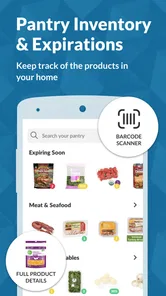
Cooklist is a pantry management and meal-planning app designed to help you organize the food you already have at home. You can create a digital inventory, discover recipes based on available ingredients, build shopping lists, and keep track of products that may be running low or nearing their expiration date. It is especially useful for households trying to reduce food waste and plan meals more efficiently.
How does Cooklist help manage my pantry and groceries?
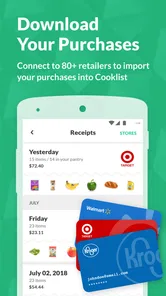
The app lets you add pantry items and groceries to a digital inventory, either manually or through supported scanning and shopping features, depending on your device and region. Once products are recorded, Cooklist can help you monitor what is available, organize items by category, and identify ingredients that should be used soon. The quality of results depends on how accurately your inventory is kept up to date.
Can Cooklist recommend recipes based on the ingredients I have?
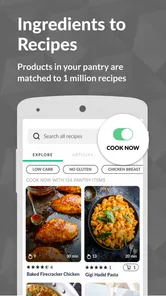
Yes. One of Cooklist’s main features is recipe discovery based on your pantry and refrigerator contents. The app can suggest meals that use ingredients you already own, helping you decide what to cook without making an unnecessary shopping trip. Recipe availability, dietary filters, serving options, and personalization may vary, so users should review each recipe before cooking and confirm that all ingredients and instructions suit their needs.
Pros
- Tracks pantry items and helps reduce forgotten or wasted food.
- Barcode scanning makes adding many grocery products quick and convenient.
- Creates meal ideas based on ingredients already available at home.
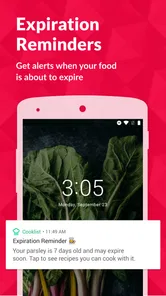
- Supports expiration-date reminders for better food organization.
- Useful shopping lists can be shared and updated across household members.
Cons
- Some product details may be missing or inaccurate in the database.
- The most useful planning features may require a paid subscription.
- Manual entry can be time-consuming for unpackaged or homemade foods.
- Recipe suggestions may not always match dietary needs or personal preferences.
- Frequent notifications could feel excessive if reminders are not customized.











