Connect & Pay
- 915.00
- 4.6
- Installs
- 500.00K
- Price
- Free

Screenshots
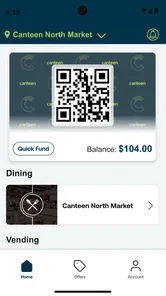
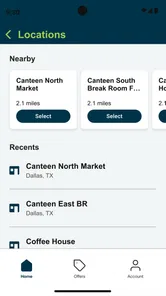
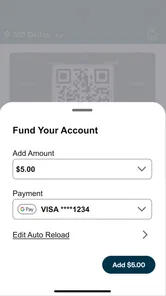
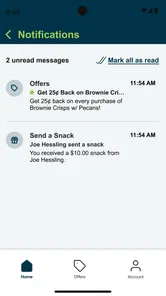
Analysis by Reviewed
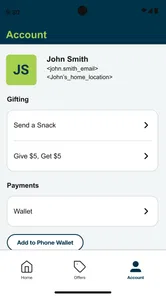
I first looked at Connect & Pay as the kind of app you open when you are already standing near a workplace canteen, not as another food app competing for attention on your phone. That distinction matters. Its purpose is practical: it connects the user with Canteen’s shopping experience and makes payment more convenient. In my experience, the value appears in those small moments when buying a snack, drink, or quick meal should take less effort than finding cash, opening a browser, or dealing with a slow checkout.
That makes it especially interesting in a household or shared-device setting. One person may install it because they regularly use a canteen, while another family member may occasionally handle the phone or help with a purchase. The app is free, aimed at Everyone, and comes from 365 Retail Markets, so it is easy to approach. Still, I would not treat “easy to approach” as the same thing as “ideal for every member of a household.” The useful question is who is actually making the purchase, whose account is involved, and whether the device is being used by one person or passed around.
How Connect & Pay fits into everyday shared use
The clearest scenario is a busy weekday. I imagine leaving a meeting with only a few minutes before the next task, walking to a Canteen location, and wanting to pick up something without turning the visit into a full payment routine. In that situation, an app focused on connecting and paying can feel more natural than a general delivery service. I am not browsing a city-wide restaurant directory or comparing menus from distant businesses; I am using a tool associated with a specific canteen environment.
That narrower purpose is both the strength and the limitation. If your normal food routine includes Canteen shopping, the app has a reason to stay on your phone. If you want restaurant discovery, grocery planning, delivery tracking, recipes, or broad loyalty management, it is not trying to be those things. I would not install it expecting a complete food companion. I would install it because a particular canteen workflow is part of my day.
For a shared household, this distinction helps avoid confusion. A parent might use the app during a workday, while a teenager might see it on the same phone and assume it works like a general food-ordering service. I would explain its role plainly: it is for connecting with Canteen and paying for that shopping experience. That simple boundary is more useful than presenting it as a universal way to buy food.
The app has reached more than 500 thousand installs and holds an average rating of 4.6 from roughly 6 thousand ratings. Those figures suggest that the basic idea has found a substantial audience, but they do not change the need to check whether the places you use are actually part of the relevant Canteen experience. A high rating can tell me the core workflow works well for many people; it cannot turn an app tied to a particular service into a general-purpose payment tool.
One phone, several people, and the account boundary
Shared-device use is where I would be most deliberate. If two adults use the same phone, the important issue is not simply whether the app opens. It is whether the person currently holding the device can clearly tell which account or payment context is active before completing a purchase. I prefer a quick pause at the checkout stage: check the visible identity, check the intended payment choice, and only then confirm.
More From Our News Desk

Weather by Xiaomi Review: Clear at a Glance, Less Clear Up Close

X Under Pressure: Can It Recover When Posting Goes Wrong?

Clash of Clans Is Won Between the Battles

Android Auto Makes the Case for Quieter Car Software

MobiOffice: Transforming Mobile Productivity with Seamless Integration

EA SPORTS FC™ Mobile Soccer: Redefining Mobile Sports Gaming
I would avoid treating the app as a family wallet. The verified purpose is convenience around Canteen shopping, not household money management. If a child borrows a parent’s unlocked phone, I would not assume that the child should be able to make a purchase. The safest household habit is to keep the app associated with the person who is responsible for the account and payment activity, rather than handing over the entire phone with no explanation.
This is also a good reason to avoid setting up the app hurriedly while someone else is waiting. A rushed setup can lead to the wrong person being signed in, an unclear payment choice, or a purchase made from the wrong context. I found that the best workflow is boring but reliable: the account holder handles the initial setup, checks the app before the first real purchase, and tells other household members exactly when they may use it.
The practical rule I would use is simple: shared phone does not mean shared payment authority. That is not a criticism of Connect & Pay; it is a sensible boundary for any app involved in purchasing. The app can make the transaction easier, but the household still needs to decide who is allowed to initiate it.
Setting it up without creating confusion
Because Connect & Pay is free, the installation decision is low-risk in financial terms. The more important setup decision is organizational. I would install it on the phone of the person who uses Canteen most often, rather than automatically placing it on every device in the home. A single, clearly managed installation reduces the chance of duplicate accounts, forgotten sign-ins, or uncertainty about which device was used for a purchase.
Before relying on it during a rushed break, I would open the app at home and become familiar with its basic flow. I would check how it presents the Canteen connection, where payment begins, and what confirmation looks like. I would also make sure the account holder knows how to recognize a completed transaction. This is one of the less obvious advantages of a calm first run: it separates learning the interface from making a real purchase.
I would not ask a child to perform the setup on behalf of an adult. Even though the content rating is Everyone, that label describes suitability of the app’s content; it does not automatically answer questions about who should control an account or payment method. In a household, the adult responsible for spending should create and manage the account context. Younger users can be shown the general purpose without being given unrestricted access to the purchasing step.
Another useful habit is keeping the app’s role visible to everyone who may encounter it on the device. A short explanation such as “this is for Canteen purchases” prevents the mistaken assumption that it is a shared grocery account or a general-purpose food service. That explanation is particularly helpful on tablets or phones that move between family members, where app icons can otherwise look like open invitations to tap and explore.
The current version is 20.2604.0 and the app requires at least iOS or Android 8.1, depending on the platform. For an older household device, I would check compatibility before planning around it, especially if the phone is kept for occasional use by a child or guest. Keeping the operating system and app current is also sensible for any payment-related workflow, although I would not promise that an update will change the features available at a particular Canteen location.
Coordinating purchases in a busy household
Connect & Pay is not something I would use as a substitute for family coordination. If several people are buying food, the household still needs a simple agreement about who is purchasing, what the spending limit is, and whose account is being used. The app may reduce checkout friction, but it does not remove the need to communicate.
A realistic example would be two adults sharing one phone during a work-and-school morning. One adult uses the app for a personal canteen purchase, then leaves the phone at home. Later, another person sees the app and assumes it is available for a separate purchase. I would prevent that confusion by making the account owner explicit and by avoiding casual handoffs when the phone is already signed in. If the second person needs a purchase, the account owner should make the decision rather than leaving the app open as an unattended payment route.
For households that coordinate meals, the app can still fit into a larger routine. Someone might use it for their own canteen visit while another person manages groceries through a different service. That separation is actually helpful: Canteen spending remains attached to the person and place using it, instead of being mixed into a household shopping list that the app was not designed to manage.
I also recommend checking the confirmation screen immediately after paying. This is a small but valuable workflow improvement. If the app makes payment more convenient, the user may be tempted to tap through quickly and put the phone away. Taking a moment to verify the result gives the account holder a clear stopping point and makes it easier to explain what happened if another household member asks about the purchase later.
One trade-off is that convenience can make spending feel less noticeable. Cash creates a physical pause; a quick app-based payment can feel almost invisible. For adults managing a shared budget, I would pair the app with a household rule such as reviewing personal canteen spending at the end of the day or week. That is not a feature I am attributing to Connect & Pay. It is simply a useful discipline when a faster checkout reduces the natural friction of paying.
Age, trust, and responsible access
The Everyone rating makes the app approachable from a content perspective, and I did not find that label concerning for ordinary family use. However, age suitability and payment responsibility are different questions. A child can understand what the app does without being the person who controls the account. In my household, I would explain the purpose, demonstrate the basic screens if needed, and keep the final purchase decision with the adult whose payment method is connected.
I would be especially careful with an unlocked shared phone. If the app opens directly into an active session, the child may not realize that a tap can lead to a real purchase. That is why I prefer supervised use for younger family members and a clear agreement for older teenagers. Trust should be based on the person’s ability to recognize the account, understand the cost, and stop before confirmation—not simply on whether the app is rated for everyone.
For a teenager who regularly uses a Canteen, the right arrangement may be a separate adult-managed setup, if the household and service context support that arrangement. I would not create a shared login merely to make coordination easier. Shared credentials blur responsibility, make it harder to know who initiated a purchase, and can create unnecessary arguments. A little separation is usually worth more than a few seconds saved at setup.
There is also a privacy angle in shared use. I would not leave the app open on a public-facing tablet or a device that guests routinely borrow. Even when the purchase itself is authorized, exposing an account or payment screen to anyone nearby is poor household practice. The app’s convenience is best enjoyed on a personal device or under direct supervision, not as an unattended communal kiosk.
These boundaries are the main reason I would recommend Connect & Pay differently to different people. For an adult who personally shops at Canteen, it can be a focused convenience tool. For a family looking for one central food account with child controls, shared allowances, and household reporting, I would choose a service specifically built around those needs instead. Connect & Pay should not be judged negatively for lacking a family-management role it was not presented as having.
How it compares with ordinary alternatives
The usual alternative is simply paying through the canteen’s normal process, whether that means a physical card, cash, or another checkout method available at the location. That approach can be better for someone who visits rarely, dislikes account setup, or wants a strict physical spending limit. It is also easier to hand a small amount of cash to a child without exposing a parent’s app session.
Connect & Pay is more appealing when the same person visits Canteen repeatedly and values a smoother routine. The benefit is not a larger food catalog or a more adventurous discovery experience. The benefit is reducing the number of steps between arriving at the canteen and completing a purchase. For a regular user, that focus can matter more than the broader features found in restaurant or grocery apps.
Compared with delivery platforms, this app is much narrower but potentially more direct for its intended environment. Delivery apps are useful when I want food brought somewhere, when I am comparing restaurants, or when several people are building a larger order. I would not replace them with Connect & Pay for those situations. Conversely, I would not open a delivery platform just to handle a quick Canteen purchase unless I specifically needed its broader ordering options.
Compared with a general mobile wallet, the distinction is also important. A wallet is designed to hold or present payment methods across many merchants. Connect & Pay is centered on connecting with Canteen and paying within that shopping context. If my goal is broad payment flexibility, the wallet is the better primary tool. If my goal is a more convenient Canteen interaction, the dedicated app makes more sense.
My non-obvious takeaway is that the best alternative depends on the source of friction. If the problem is remembering a physical card, Connect & Pay may help. If the problem is deciding what the whole family will eat, it is the wrong tool. If the problem is controlling a child’s spending, cash or a purpose-built family payment product may be safer. Matching the app to the actual problem prevents disappointment.
Who should use it and who should skip it
I would recommend Connect & Pay to adults who regularly encounter Canteen shopping and want a focused way to make those purchases more convenient. It also suits people who prefer handling their own payment from their own phone rather than carrying an additional card or using a general food platform. The free price makes trying it straightforward, provided the user understands the app’s specific purpose.
I would be more cautious about recommending it to someone who visits only once, shares a phone with several people, or strongly prefers cash because it creates a visible spending boundary. Those users may find the account and device considerations more troublesome than the time saved. A shared family tablet is another weak fit, particularly if it is left unlocked and unattended.
I would also skip it if I wanted restaurant discovery, delivery, recipe planning, or a complete household food budget. The app’s focused design is useful precisely because it does not try to solve all of those problems. Choosing a broader service would be more sensible when the food task extends beyond the Canteen purchase itself.
The developer, 365 Retail Markets, has positioned the app around convenience rather than entertainment, and that comes through in the way I evaluate it. I am not looking for elaborate features. I am looking for a dependable, understandable path from Canteen access to payment, with enough clarity that the account owner knows what is happening. That makes the app easier to judge honestly than a feature-heavy platform: either it fits the routine or it does not.
My household verdict
After using Connect & Pay as a focused Food & Drink app, I see its strongest role in personal, repeat use rather than unrestricted household sharing. It can make a familiar Canteen purchase feel less cumbersome, and its free availability lowers the barrier to trying it. The strong average rating and broad install base reinforce that it is not an obscure experiment, while the Everyone rating makes it approachable for families discussing how it works.
My recommendation is to keep the account boundary clear from the beginning. Let the person responsible for payment handle setup, use the app on a device they control, and treat any shared use as supervised rather than automatic. For teenagers, explain the difference between viewing an app and authorizing a purchase. For adults sharing a phone, confirm the active account and payment context before each transaction.
I would choose it over a general delivery app when the task is a quick Canteen purchase, and I would choose a normal wallet, cash, or a family-oriented payment option when the need is broader control or wider merchant use. That is the honest trade-off: Connect & Pay is valuable because it stays focused, but that same focus means it should not become the household’s all-purpose food or money system.
In short, Connect & Pay earns my recommendation for the regular Canteen user who wants a simpler personal checkout routine. I would install it for the adult who actually shops there, test the process before relying on it during a rushed break, and keep shared-device access intentional. Used within those boundaries, it is a practical convenience app; used as an informal family wallet, it is likely to create more confusion than it solves.
Connect & Pay Frequently Asked Questions
Is Connect & Pay free to download, and who is it intended for?
Connect & Pay is a free Food & Drink app developed by 365 Retail Markets. Its store summary describes it as Canteen’s app for making shopping more convenient, so it is intended for people who shop at participating Canteen locations. The app is rated for Everyone, making it suitable for a broad audience. Check that Connect & Pay is relevant to the places where you shop before installing it.
What is Connect & Pay, and what can I use it for?
Connect & Pay is a digital payment application designed to make everyday transactions more convenient from a mobile device. Depending on the services available in your region, it may allow you to connect payment methods, send or receive money, pay participating merchants, review transaction activity, and manage account settings. Before downloading, check whether the app supports your country, currency, banks, and preferred payment options.
Is Connect & Pay safe to use for payments and personal information?
Connect & Pay may include standard security features such as account authentication, encrypted connections, transaction notifications, and additional verification for sensitive actions. However, no payment app is completely risk-free. Use the official Android or iOS version, create a strong password, enable available security controls, and avoid sharing verification codes. Always confirm the recipient and payment amount before approving a transaction.
Does Connect & Pay charge fees for using its services?
The cost of using Connect & Pay can depend on the type of transaction, the payment method, the merchant, your location, and the terms of your connected bank or card provider. Some actions may be free, while transfers, withdrawals, currency conversions, or certain business payments could involve charges. Review the fee information displayed in the app before confirming any payment.
Which devices, payment methods, and regions are supported by Connect & Pay?
Connect & Pay availability may vary between Android and iOS devices and can also depend on your operating system version, country, currency, and local financial regulations. Supported cards, bank accounts, wallets, and merchant services may not be identical everywhere. Before installing, check the official store listing and the app’s requirements to make sure your device and preferred payment method are compatible.
Pros
- Quickly connects compatible devices for convenient payments.
- Supports contactless transactions without needing to carry a physical card.
- Simple interface makes everyday payment tasks easy to access.
- Can reduce the need for multiple payment apps on your phone.
- Useful for checking payment activity while away from a computer.
Cons
- Requires a compatible phone
- payment terminal
- and supported financial provider.
- Some features may vary depending on your country or bank.
- Contactless payments may fail when NFC is disabled or unavailable.
- Battery-saving settings can interfere with background connectivity.
- Users may need to complete identity checks before using payment features.











