Coast To Coast AM Insider
- 3.52K
- 4.5
- Installs
- 500.00K
- Price
- Free

Screenshots

Analysis by Reviewed
For listeners who enjoy strange stories, unexplained events, and long-form radio discussion, Coast To Coast AM Insider is a focused way to keep up with Coast to Coast AM on a phone. I spent time with it as a news and magazines app, and its appeal became clear quickly: it is less like a general news reader and more like a dedicated listening companion for people who already enjoy the program’s late-night style.
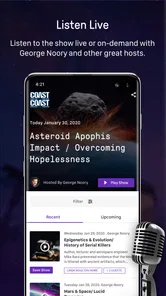
The app is developed by Premiere Radio Networks, Inc. and is free to install. Its central promise is straightforward: access to Coast to Coast AM content, podcast downloads, and show previews in one mobile place. That sounds simple, but it matters if you normally move between a radio stream, a podcast app, and a browser to find older or upcoming material. Here, the experience is built around one specific show rather than a broad collection of publishers.
My overall impression is positive, with an important qualification. This is a good choice when Coast to Coast AM is already part of your listening routine. It is a much weaker proposition if you want a broad daily news app, a general podcast directory, or a completely free replacement for every part of the listening experience.
What the app actually offers and who it is for
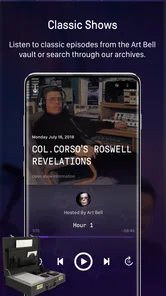
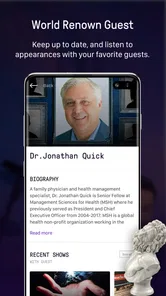
The most useful way to understand this app is to think of it as a companion for regular listeners rather than a conventional magazine or headline service. It brings the show’s audio-centered material into a single destination, with options to listen, preview shows, and download podcasts. That makes it relevant to people who follow the program while commuting, relaxing at home, or catching up after a broadcast.
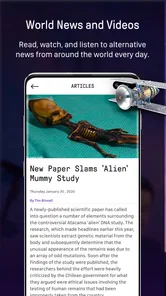
I would not install it expecting a balanced news feed covering technology, politics, business, sports, or local events. Its subject matter is tied closely to Coast to Coast AM and the kind of paranormal, unusual, and unexplained topics associated with that program. That narrow focus is its strength for fans, but it is also the first reason casual users may find it limited.
The app has been available since March 14, 2013, and the current version is 8.9.3. It supports devices running Android 7.0 or later. Those details make it accessible to many older Android phones, although anyone using an especially old device should still check compatibility before relying on it for regular listening.
Its audience size also suggests that it is an established niche product rather than an obscure experiment. It has more than 500 thousand installs, an average rating of 4.5 from about 9 thousand ratings, and roughly 3.5 thousand written reviews. I treat those figures as useful context, not a guarantee: a strong rating can tell you that many listeners are satisfied, but it cannot tell you whether the app fits your own expectations about access, downloads, or payment.
More From Our News Desk

Weather by Xiaomi Review: Clear at a Glance, Less Clear Up Close

X Under Pressure: Can It Recover When Posting Goes Wrong?

Clash of Clans Is Won Between the Battles

Android Auto Makes the Case for Quieter Car Software

MobiOffice: Transforming Mobile Productivity with Seamless Integration

EA SPORTS FC™ Mobile Soccer: Redefining Mobile Sports Gaming
A practical listening routine
A realistic everyday use case would be someone who remembers a segment from the previous night while getting ready for work. Instead of searching through a general podcast service and trying to identify the right episode, that listener can open the dedicated app, look for the relevant program material, and continue listening from the same place. The download option is especially useful before a train ride, a flight, or an area where mobile reception is unreliable.
Another sensible workflow is to use show previews as a filter. If a topic does not interest you, a preview can help you decide whether the episode deserves time before committing to a longer listening session. That is a small feature, but it can prevent the common problem of starting an audio program without knowing whether the subject matches your mood.
I also see value in separating discovery from listening. A preview can be used while you have a few spare minutes, while downloaded material can be saved for a longer uninterrupted session. That makes the app more practical than simply opening a live stream whenever the program happens to be available.
Cost, access, and the important paid distinction
Installation is free, which makes trying the app relatively easy. The listing also includes in-app purchases ranging from $6.99 to $99.99 per item. Those purchase amounts are important when judging value, because the free download should not automatically be treated as unlimited access to everything the app may offer.
I would approach the cost in three layers. First, the free installation lets you assess whether the interface and Coast to Coast AM material suit you. Second, any content or access that is available without payment can be judged on its own usefulness. Third, paid options should be considered only after you understand what they unlock and how often you would use them. The purchase range is broad enough that a quick tap without reading the offer would be unwise.
For me, the right question is not whether the app is free to download, but whether a regular listener will get enough additional convenience from paid access to justify it. Someone who listens occasionally may be satisfied with whatever free listening and preview functions are available. A devoted listener who wants the app to serve as a dependable home for the show may see more value in paying, but that decision depends on the exact access offered at the time of purchase.
Because the app is rated Everyone, it is broadly presented as suitable for general audiences from an age-rating perspective. That does not mean every discussion will appeal to every family or listener. The tone and subjects can be unusual, unsettling, or speculative, so parents and younger users should still use their own judgment about whether the program’s themes are appropriate for them.
Where the listening experience earns its place
The strongest benefit is concentration. A general podcast app may contain Coast to Coast AM alongside thousands of unrelated shows, but that variety can make a favorite program harder to manage. This dedicated app keeps the user’s attention on one source. If you already know what you want to hear, that reduced choice can feel refreshing rather than restrictive.
The combination of live-style listening, show previews, and podcast downloads gives the app several useful roles. You can use it for immediate listening, browse before choosing, or prepare audio for later. That is more flexible than relying only on a radio broadcast, where your schedule has to match the program’s schedule.
Downloads are also valuable for managing attention. If I know I will have a long drive or a quiet evening, I can prepare material beforehand instead of spending that time searching. This is one of the less obvious advantages of a show-specific app: the preparation step becomes part of the routine, and the listener can build a small queue around personal interest rather than whatever happens to be playing.
There is a useful trade-off between specialization and discovery. A broad podcast service is better when I want to stumble across a completely new program. Coast To Coast AM Insider is better when I already want Coast to Coast AM and do not want unrelated recommendations competing for attention. In that sense, it functions more like a private listening shelf than a public podcast marketplace.
How it compares with radio, podcast apps, and news readers
Compared with traditional radio, the app offers more control over when to listen. Radio is effortless when the broadcast is on, but it is less convenient when your schedule conflicts with it. The ability to download podcasts changes that relationship: the show becomes something you can fit around your day instead of something your day must fit around.
Compared with a general podcast app, the dedicated option is more focused but less expansive. A general service will usually be the better choice for someone who wants subscriptions across many subjects, broad recommendations, playlists spanning different publishers, or one place for every podcast. This app makes more sense when the show itself is the priority.
Compared with a standard news and magazines app, the difference is even greater. News readers are designed for scanning written headlines and jumping between sources. This experience is centered on audio and program-related material. If you prefer reading short articles during a lunch break, the app may feel too narrow. If you prefer listening to extended conversations while your hands are busy, its format is a better match.
That comparison also explains why I would not call it a replacement for a full news service. It can be part of a media routine, but it does not serve the same purpose as a broad news reader. I would use a general news app for staying informed across many subjects and this one for following a particular program in depth.
Small habits that make it more useful
My first practical tip is to preview before downloading. Storage and listening time are both limited resources, so saving everything can create clutter. Previews provide a quick way to decide which episodes deserve offline space, especially if your interest changes from one topic to another.
My second tip is to plan downloads around your actual listening windows. Downloading a selection before leaving home is more reliable than waiting until a weak connection makes streaming frustrating. It also avoids turning a commute into a search session. The app is most useful when it becomes part of preparation, not merely an emergency player.
My third tip is to judge paid access by frequency rather than enthusiasm. It is easy to feel that a favorite show is worth paying for in principle, but the better test is how often you will use the added access. A listener who returns several times a week can reasonably evaluate the purchase differently from someone who checks in once every few weeks.
A fourth insight is that the app may work best alongside, not instead of, your usual media tools. I would keep a broad news source for current events and use this app for focused audio listening. Treating it as a specialist tool avoids disappointment and gives its narrow design a clear purpose.
Trade-offs I noticed before recommending it
The biggest limitation is the subject range. The app is built around one recognizable program, so its usefulness falls sharply if your listening tastes are broad or if you want several unrelated shows in one place. The specialization that makes it convenient for fans can feel repetitive for everyone else.
The second issue is the free-versus-paid boundary. Since in-app purchases are present, users should inspect each access option carefully rather than assuming that every feature is included after installation. The free entry point is helpful for testing, but the long-term value depends on what you personally need and how much of the available material you expect to use.
There is also a difference between wanting a live listening experience and wanting complete control over a library. The app supports listening and podcast downloads, but those are not the same as having every program organized exactly like a personal music library. If you expect advanced sorting, deep cross-show management, or a huge catalog beyond this program, a general audio platform may be more comfortable.
Another consideration is the nature of the content. People who enjoy open-ended discussion about unexplained subjects will likely appreciate the atmosphere. Listeners looking for tightly sourced, conventional reporting may not. That is not a technical defect, but it is a genuine fit issue. The app should be chosen for the kind of conversation it delivers, not mistaken for a general-purpose factual news service.
I would also avoid judging it solely by its rating. An average of 4.5 is encouraging, and the volume of ratings shows that many people use it successfully, but ratings often reflect loyalty to the program as well as satisfaction with the software. My advice is to focus on your own listening pattern: whether you want this show specifically, whether downloads matter, and whether paid access would be used often enough to feel worthwhile.
Who will get the most value?
The clearest audience is an existing Coast to Coast AM listener who wants a more convenient mobile routine. For that person, the app gathers the show’s listening options, previews, and downloadable material without requiring a separate search each time. The value comes from reducing friction around a familiar interest.
It is also a good fit for commuters, travelers, and people who prefer audio while doing chores. Downloads can make the listening plan more dependable, while previews help avoid wasting time on episodes that do not match a particular interest. These are practical benefits rather than flashy extras, and they become more noticeable with repeated use.
New listeners may also find it useful if they are specifically curious about the program. The free installation gives them a low-commitment way to explore the experience before considering any purchase. I would still recommend starting slowly, using previews to identify subjects that genuinely appeal to them instead of assuming every episode will be a match.
On the other hand, I would tell a person who wants a complete news diet to skip it as a primary app. It is not the efficient choice for comparing many news sources, reading quick headlines, or discovering podcasts across unrelated categories. A general podcast platform is better for variety, and a traditional news reader is better for written coverage.
I would also advise caution for anyone who dislikes speculative or paranormal subject matter. The app’s focus is not a minor theme that can be ignored; it shapes the reason the app exists. If that style of content is not appealing, the dedicated design will not compensate for the mismatch.
My buy-or-skip verdict
I recommend installing Coast To Coast AM Insider if you already follow the show or want a focused way to test its audio content. The free download lowers the barrier to trying it, and the combination of listening, previews, and podcast downloads gives it more practical value than a simple broadcast shortcut. For a regular listener, the convenience can justify making it part of a daily or weekly routine.
I would not recommend paying immediately. First, use the free experience to understand how well it fits your habits, then inspect the specific paid option and decide whether the added access matches how often you listen. The available purchase range, from $6.99 to $99.99 per item, means the decision deserves attention rather than an automatic upgrade.
My final judgment is that this is a focused companion, not a universal media app. It succeeds when the question is, “How can I follow Coast to Coast AM more conveniently?” It is the wrong answer when the question is, “Where can I get all my news and podcasts?” That distinction is the key to its value.
For the right listener, I would describe it as a practical home for a specific audio habit. The app’s 4.5 average and established install base support the idea that it works for many fans, while its narrow subject focus and paid access mean it still requires a personal fit check. If Coast to Coast AM is already something you seek out, I think it is worth trying. If it is not, I would spend your time with a broader podcast or news app instead.
Coast To Coast AM Insider Frequently Asked Questions
Is Coast to Coast AM Insider free to download, and what might require payment?
The app is free to download, but some listening features and content may require an Insider membership or an in-app purchase. In-app purchase options range from $6.99 to $99.99 per item, so check the plan details shown in the app before you buy. Review the billing frequency, trial terms, and renewal conditions carefully, since downloading the app does not necessarily provide access to all content.
Which devices and operating systems can run Coast to Coast AM Insider?
Coast to Coast AM Insider is available for Android and iOS users, and the listed minimum operating system requirement is version 7.0. Before downloading, check that your device meets the platform’s requirements and has enough available storage for the app and any audio you choose to download. Keeping your operating system and app updated can also help you use the current features smoothly.
Who develops Coast to Coast AM Insider, and is it intended for a general audience?
The app is developed by Premiere Radio Networks, Inc. and is rated Everyone, making it suitable for a broad audience according to its age classification. Its subject matter can include paranormal claims, unexplained events, alternative ideas, and other topics that may be speculative or unsettling for some listeners. Consider whether those themes suit your preferences before installing it or sharing it with younger users.
What is Coast to Coast AM Insider?
Coast to Coast AM Insider is a subscription-based companion service for fans of the Coast to Coast AM radio program. It provides access to selected show content, including live or archived audio, interviews, podcasts, and other material related to paranormal topics, science, unexplained phenomena, and alternative ideas. Available features may depend on your membership and location.
What content can I access with Coast to Coast AM Insider?
The service typically gives members access to a broader selection of Coast to Coast AM programming than the free listening options. Depending on the current subscription plan, this may include live broadcasts, show archives, extended interviews, podcasts, newsletters, and exclusive features. Content availability can change, so it is worth checking the app description and membership details before subscribing.
Pros
- Access to live and archived Coast to Coast AM broadcasts
- Large library of paranormal
- scientific
- and unexplained topics
- Useful for catching up on missed episodes while traveling
- Insider content is organized for quick browsing
- Supports dedicated fans with regular show updates
Cons
- Requires a paid membership for full access to most content
- Some older recordings may have inconsistent audio quality
- Heavy reliance on streaming can use significant mobile data
- The interface may feel dated compared with newer podcast apps
- Content largely follows the show's late-night talk-radio format












