Clay and Buck
- 63.00
- 4.5
- Installs
- 10.00K
- Price
- Free

Screenshots



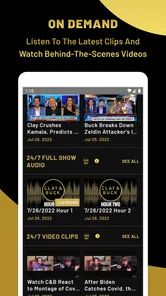
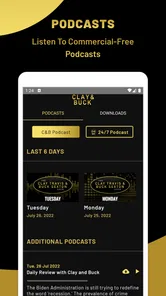


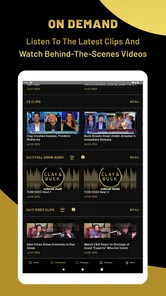
Analysis by Reviewed
I found Clay and Buck most useful when I treated it as a quick way to stay with a particular news-and-talk voice during the day, rather than as a complete replacement for every news source on my phone. The app belongs to the News & Magazines category, and its focus is clear: Clay and Buck discuss the day’s news with a strongly opinionated, conversational approach. That narrow identity is both its appeal and its main limitation.
In my experience, the best reason to install it is convenience. Instead of searching for the program through a general audio app, I can open one dedicated place built around Clay and Buck. Premiere Radio Networks, Inc. is the developer, and the app is free to install for everyone. That makes it easy to try without committing money at the outset, although the presence of in-app purchases from $6.99 to $49.99 per item means I would still check the purchase screen carefully before confirming anything.
The app has a 4.5 average from around 150 ratings, with more than 60 written reviews, and it has passed 10 thousand installs. Those figures suggest a small but engaged audience rather than a mass-market news platform. I would read that as a sign that the app serves a specific listening preference well, not as proof that it will suit every person who wants news on a mobile device.
How the connection shapes the listening experience
I find that the connection is more than a technical detail here: it determines whether a quick check turns into a smooth listening session or a wait that defeats the app’s convenience. I’d make the handoff between home Wi-Fi and mobile reception part of my routine, especially before a commute, then judge the experience by how easily I can resume my day’s listening when the network changes.
Why a reliable network matters here
The central experience depends on reaching current content through the internet. That becomes especially noticeable when I open the app expecting to catch up quickly during a short break. A strong connection makes the process feel direct: launch the app, locate the relevant material, and start listening or browsing without moving between several unrelated services.
That same dependence changes how I plan to use it. I would not make it my only source of information before boarding a flight, entering an area with unreliable reception, or beginning a long commute through places where mobile coverage regularly drops. A dedicated news app can feel more focused than a broad platform, but focus does not remove the practical need for a working connection.
For a normal morning at home, in an office, or on a dependable mobile network, this is not a serious obstacle. The app’s value comes from reducing the search involved in finding Clay and Buck, so the connection is part of the convenience rather than something I notice every minute. The friction appears when the network is slow, congested, or unavailable at exactly the moment I want the latest discussion.
More From Our News Desk

Weather by Xiaomi Review: Clear at a Glance, Less Clear Up Close

X Under Pressure: Can It Recover When Posting Goes Wrong?

Clash of Clans Is Won Between the Battles

Android Auto Makes the Case for Quieter Car Software

MobiOffice: Transforming Mobile Productivity with Seamless Integration

EA SPORTS FC™ Mobile Soccer: Redefining Mobile Sports Gaming
The difference between current commentary and saved material
News talk changes quickly. That creates an important trade-off: the more current the discussion is, the more useful a live connection becomes. I like that immediacy when I want commentary on events that are still developing, but it also means I would avoid assuming that a previously opened screen guarantees access later. I plan around connectivity instead of treating the app like a permanently available audio library.
This is one of the non-obvious points that matters in everyday use. A person may install a news app because it seems ideal for travel, then discover that the most valuable part of the experience arrives precisely when the phone cannot reach the service. My practical habit would be to open the app before leaving a reliable network, check what is currently available, and avoid depending on it as the sole entertainment or information option for a disconnected journey.
Using it in short mobile sessions
Clay and Buck fits best into repeated, modest sessions rather than one complicated research workflow. I can imagine opening it while making breakfast, checking in during a lunch break, or listening while doing a routine household task. The dedicated focus helps in those moments because I am not first sorting through unrelated podcasts, headlines, videos, and recommendations.
On a phone, that simplicity has real value. I do not need to turn a few spare minutes into a full news-reading project. If I already know that I want this particular program’s perspective, the app gives me a more direct route than a general-purpose news aggregator. It is especially suitable for listeners who return to the same hosts regularly and want their commentary close at hand.
Still, I would be cautious about using it while driving or doing anything that demands full attention. The app is a source of spoken news discussion, not a substitute for safe road habits. In a car, I would set things up before moving and avoid interacting with the screen while driving. On public transport, the experience is easier because I can choose when to browse and when to simply listen.
A realistic day with the app
Imagine a weekday in which I have ten minutes before work and want a quick sense of the conversation around the day’s major stories. I open the app on home Wi-Fi, get the material ready, and begin listening before leaving. If the commute has consistent reception, I can continue using it naturally. If the route passes through a weak-signal area, I would expect the experience to be interrupted and switch temporarily to something already available on my device.
At lunch, I might return to hear more rather than trying to reconstruct the entire news cycle through several sources. In the evening, I could use a broader publication or a wire-service app to compare facts and viewpoints. That combination is more sensible than asking one talk app to provide every type of journalism. Clay and Buck works as a focused commentary destination; it is less convincing as a complete, neutral news desk.
What happens when the connection struggles
The most frustrating moments with any network-dependent app are usually not dramatic failures but small delays: a screen taking too long to populate, audio refusing to begin immediately, or a session breaking just when I have settled into it. With this app, those moments matter because the whole point is quick access to a particular program. If the opening step becomes slow, the advantage over a general podcast or news service becomes smaller.
My recovery approach is simple. I first check whether the issue is limited to the app or affects other online services. If everything else is slow, I wait for a better connection rather than repeatedly tapping the same controls. If the network is fine, I close and reopen the app, then try again. I would also make sure the phone is running a supported system, since the application requires Android 7.0 or later.
That minimum requirement is generous enough for many Android phones, but it is still worth checking before troubleshooting. The current version is 2.5.17, so keeping the installation current is a sensible first step when behavior seems inconsistent. I would not assume that every problem is caused by the network; an outdated app or an older device can create a similar impression.
Recovery habits that reduce wasted time
I recommend avoiding last-minute dependence. If I know I want to listen during a commute, I test the app while still at home. That gives me time to discover whether the connection, device, or app itself is causing trouble. It also prevents the common mistake of treating a news app as reliable simply because it worked perfectly in one location.
Another useful habit is keeping an alternative ready. A general podcast player, radio app, or text-based news source can fill the gap when Clay and Buck is unreachable. I would not install several substitutes just for this one purpose, but having one familiar fallback makes the connectivity weakness much less disruptive. This is a better strategy than repeatedly refreshing a stalled session and missing the short window in which I wanted information.
For users with limited mobile data, recovery also means resisting unnecessary retries. Reopening an app again and again does not guarantee a faster start, and it can turn a minor connection problem into needless data use. I prefer to wait until I have stable Wi-Fi or stronger mobile reception, then continue normally.
Being careful with mobile data
Because this is a news and talk app, I would pay attention to how often I use it away from Wi-Fi. Spoken content can become a regular background habit, and a few minutes here and there can add up over a week. I would check my phone’s own data controls and review usage periodically instead of guessing how much the app consumes.
The most practical workflow is to reserve longer listening sessions for a trusted Wi-Fi connection and use mobile data selectively when I genuinely want the latest discussion. I would also avoid leaving the app running after I have finished. That sounds obvious, but background listening habits are easy to overlook when the phone is in a pocket or bag.
People who have generous data plans may not care about this trade-off, while those on a tight allowance should be more deliberate. The free installation does not mean every part of using the service is cost-free: mobile data can carry its own expense, and in-app purchases require separate attention. Before buying anything, I would read the purchase prompt rather than assuming that every feature is included with the initial download.
Where it beats broader alternatives
Compared with a general news aggregator, Clay and Buck is more focused. An aggregator is better when I want several publications, contrasting headlines, or a quick scan across unrelated subjects. This app is better when I already want Clay and Buck specifically and do not want to filter through a crowded feed.
Compared with a general podcast platform, the advantage is similar. A large podcast service usually offers stronger discovery and a wider range of shows, but it also places this program beside thousands of competing choices. The dedicated app can reduce that clutter. The trade-off is that I would not choose it for broad podcast exploration or for building a varied listening queue.
Compared with a text-first news app, it offers a more conversational way to spend time with current events. Text is usually faster when I need to confirm a name, date, or specific detail. Talk-based commentary is more comfortable when I want to follow an argument or hear hosts develop a perspective. I use the two formats differently rather than expecting one to replace the other.
Who should install it, and who should skip it
I think this app is a good match for someone who already enjoys Clay and Buck, prefers spoken commentary, and wants a direct mobile route to that content. It also makes sense for listeners who appreciate a familiar program during routines such as breakfast, commuting as a passenger, or household chores. The free price makes trying it relatively straightforward, as long as the purchase prompts are handled carefully.
I would skip it if I want an even-handed, multi-source news experience in one place. I would also look elsewhere if my priority is offline access, detailed article search, local reporting, or a large podcast catalog. The app’s focused identity is not a flaw for its intended audience, but it does make the choice less suitable for people who want variety or a strictly text-based way to verify information.
The Everyone age rating makes the app broadly accessible, but that does not mean every discussion will match every listener’s preferences. The tone and viewpoint are important parts of the experience. I would sample it with an open mind and decide whether the style feels useful rather than assuming that a high average rating automatically makes it right for me.
My final connectivity verdict
After looking at how it fits into real phone use, I see Clay and Buck as a focused companion for listeners who want this specific news-talk program within easy reach. Its strongest quality is the reduction of friction: I know what I am opening and why. Its weakest point is the same issue faced by many current-content apps—the experience is much more dependable when the network is dependable.
I would install it for regular listening at home or in places with stable reception, and I would keep a broader news source nearby for fact-checking and alternative perspectives. I would also prepare before travel, watch mobile-data habits, and avoid treating the app as guaranteed access during dead zones. That small amount of planning lets the focused design work in its favor.
Overall, my recommendation is positive but specific. If you are looking for Clay and Buck rather than an all-purpose news service, the free app is an easy option to try. If you need a complete news ecosystem, offline-first reliability, or many competing viewpoints, another category of app will serve you better. Its real strength is dependable access to a chosen voice when your connection is ready for it, not universal coverage of everything happening in the news.
Clay and Buck Frequently Asked Questions
Who publishes the Clay and Buck app, and what is it about?
Clay and Buck is a news and magazine app from Premiere Radio Networks, Inc., connected with the Clay Travis and Buck Sexton radio show. Its focus is the hosts’ take on the news of the day, making it relevant to listeners who want political commentary and current-affairs discussion in one place. The app’s short description is simply “Clay and Buck.”
What is the Clay and Buck app?
Clay and Buck is the official app connected with the Clay Travis and Buck Sexton radio show. It is designed for listeners who want convenient access to the program, including show content, clips, podcasts, news-related commentary, and other updates. The exact selection of features may vary by version and region, so users should check the current app listing before downloading.
What can I do with the Clay and Buck app?
After installing Clay and Buck, users can typically follow the show more easily through on-demand audio, recent episodes, video or short clips, program information, and links to related content. Depending on the release, the app may also provide notifications, live listening options, articles, or ways to interact with the show. Availability can differ between Android and iOS.
Is the Clay and Buck app free to download and use?
The Clay and Buck app is free to download, but it includes in-app purchases priced from $6.99 to $49.99 per item. Review the purchase details shown in the relevant app store before buying anything. Some content may be freely accessible, while certain features could depend on a supported station, network, subscription, advertising, or external service. Mobile data charges may also apply when streaming.
What devices can run the Clay and Buck app?
The app is available for Android and iOS, but compatibility depends on your device’s operating system. The minimum supported Android version is 7.0; before downloading, check your device settings to confirm that it meets this requirement. The current release is version 2.5.17, and checking the app store on your device is a practical way to see whether the version offered there is compatible.
Pros
- Free access to live Clay Travis and Buck Sexton broadcasts.
- Strong focus on conservative political commentary and current events.
- Podcast-style format makes missed show segments easy to catch up on.
- Simple interface with quick access to episodes and broadcasts.
- Useful for listeners who prefer opinion-driven news analysis.
Cons
- Content may feel politically one-sided for users seeking balanced coverage.
- Some features may depend on an active internet connection.
- Frequent political updates can make the app feel notification-heavy.
- Talk-radio segments may include repeated discussions across episodes.
- Availability of live content can vary by location or broadcast schedule.












