

Cinemark Theatres
- 35.97K
- 4.5
- Installs
- 5.00M
- Price
- Free

Screenshots


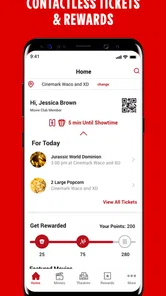
Analysis by Reviewed
I judge a cinema app by whether it makes the practical parts of a night out easier, not by how much time it can keep me browsing. The Cinemark Theatres app is most useful when Cinemark is already part of your plans: it brings theatre discovery, ticket buying, and Movie Rewards into one place. I’d reach for it when I know roughly what I want to see and need to turn that idea into a booking without juggling several steps.
Where a movie plan can get stuck
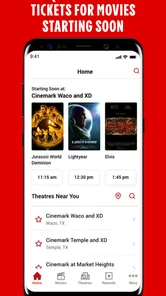
The useful part of a cinema app is not just browsing; it is getting from “that looks good” to a workable plan. I find Cinemark most helpful when I already have a rough idea of the day and theatre I want, but still need to compare showtimes before committing. If your nearest location is not the one you usually visit, check the selected theatre before choosing a screening. A schedule that looks right for one location may not fit your route or plans at another.
For a busy evening, I would use the app before leaving home: check the film details, compare available sessions, and decide whether reserved seats matter to the group. That small check can save a frustrating last-minute change, especially when friends are arriving separately. If you are only browsing casually, the app can help narrow down a film, but it is less useful than a general movie guide if you want listings across several cinema chains.
Discovering Movies with Ease
First things first, the Cinemark Theatres app is all about making your movie-going experience as smooth as possible. From the moment you open it, you’re greeted with a sleek and intuitive interface. It’s like having a personal movie concierge right in your pocket. Whether you’re looking for the latest releases or planning a movie date night, this app has got you covered.
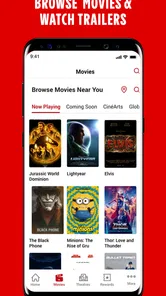
One of the features I absolutely love is the ability to browse through movies by genre, release date, or even by what’s trending. It’s like having a virtual movie guide that’s always up-to-date. Plus, the app provides detailed information about each film, including trailers, cast lists, and synopses, so you can make an informed decision about what to watch.
Booking Tickets Made Simple
Now, let’s talk about the ticket booking process. Gone are the days of waiting in long lines or dealing with sold-out shows. With the Cinemark app, you can easily select your favorite seats and purchase tickets with just a few taps. And if you’re part of the Cinemark Movie Club, you’ll enjoy exclusive perks like discounts and special offers. It’s like having a VIP pass to the movies!
What’s more, the app keeps your tickets and purchase history organized in one place. So, you don’t have to worry about losing those pesky paper tickets. Just show your phone at the entrance, and you’re good to go.
More From Our News Desk

 Gmail
Gmail in a Busy Inbox: Who Benefits Most?
From first account to crowded workday, Gmail earns its place through dependable search and flexible sorting—but its best fit depends on how much inbox maintenance you can tolerate.

 Prime Video
Switching to Prime Video: What Changes in Your Viewing Routine
Prime Video can make a compelling second home for streaming, but switching means learning a different catalog, rental layer, and route from browsing to playback.

 Universal TV Remote Control
 Works Best as a Reliable Backup
A phone remote earns its place through quick setup and reliable habits. Here is how to get more from Universal TV Remote Control—and where its limits show.

 Weather - By Xiaomi
Weather by Xiaomi Review: Clear at a Glance, Less Clear Up Close
Xiaomi’s weather app makes everyday forecasts quick to scan, but its calm surface can leave useful details and recovery paths harder to find than they should be.

 X
X Under Pressure: Can It Recover When Posting Goes Wrong?
A resilience-focused review of X, examining setup, mistaken posts, interruptions, weak connections, and the gaps that matter when recovery needs to be dependable.

 Clash of Clans
 Is Won Between the Battles
Its raids are quick; its community is a long-term project of coordination, teaching, rivalry, and shared responsibility—with all the friction that entails.
Latest News



Setup checks that prevent avoidable hassle
I’d make sure the app is current before planning a trip; its current version is 4.32.0, and it requires Android 8.0 or later. The app is free, and it comes from Cinemark USA, Inc. That makes it a straightforward option for people who already choose Cinemark, rather than a universal ticket wallet for every chain.
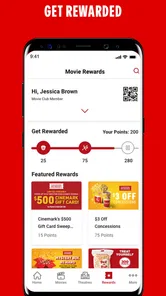
Movie Rewards is another reason to keep the app handy if you regularly visit Cinemark. Before buying, take a moment to make sure you are signed into the account you expect to use and that the selected theatre is correct. This is a practical habit, not a guarantee of a particular offer: rewards and ticket details are worth checking on the screen before you confirm a purchase. The app is rated Teen, so it is not presented as an adults-only entertainment product.
If you are deciding whether to install it before a particular outing, I’d start with two simple checks: whether the theatre you plan to visit is a Cinemark and whether your phone meets the Android requirement. The app is also available as an entertainment option for iOS users, while version 4.32.0 identifies the current Android release. It has been around since March 1, 2012, so this is an established cinema companion rather than a newly launched experiment.
One useful habit is to separate account readiness from showtime browsing. You can look over film choices first, but if you intend to use Movie Rewards, sign in before reaching the final purchase step. That gives you a chance to spot an account mismatch calmly instead of sorting it out while friends are waiting. I would also check that the theatre name remains the one you meant to select after moving between film pages.
Recovering a plan when something goes wrong
If a screen takes longer than expected or a purchase does not appear immediately, I would avoid tapping through the checkout repeatedly. First check whether the transaction is already reflected in the app’s ticket or purchase area, then confirm the theatre and showtime you intended. Repeating a payment step without checking can create confusion, even when the issue is simply a delayed refresh.
For a group outing, I also like to settle the practical details before checkout: who is choosing seats, whether everyone is attending the same session, and whether one person is buying for the group. That reduces the chance of scattered bookings or a late seat reshuffle. Keep the app available when arriving so you can bring up the ticket details, rather than relying on memory or searching through messages at the entrance.
If the booking flow stalls, I’d pause and re-open the relevant screen rather than immediately starting over. Confirm the session and ticket details that are visible, and only continue once you know whether the purchase has gone through. For a time-sensitive screening, this is a good reason to leave a little breathing room before departure: troubleshooting in the car park is more stressful than checking at home. If the app still does not show a clear result, asking theatre staff is a more sensible next step than making a second booking on guesswork.
There is also a small group-planning advantage to deciding on a seat-picker before anyone checks out. When several people browse independently, they can land on different sessions or choose seats that split the group. I’d have one person handle the booking while everyone agrees on the theatre, time, and seating preference first. It is not a special app feature; it is a simple workflow that prevents the app from becoming the place where a group disagreement turns into duplicate or mismatched plans.
When the problem may be outside the app
A phone app cannot fix every cinema-day snag. If a screening has changed or the theatre itself is handling an unexpected issue, check the information shown for that location and speak with cinema staff when you arrive. Likewise, if you are comparing showtimes across different chains, a general listings service may be a better first stop; once you know Cinemark is your choice, this app is the more direct route for its own theatres and rewards.
Cinemark is an entertainment app with a 4.5 average from around 106,000 ratings, and it has been installed over 5 million times. Those figures suggest broad use, but they do not make it the right fit for every moviegoer. I would skip it if you rarely visit Cinemark, prefer to buy at the counter, or need one app to manage cinema plans across competing brands. Its strength is convenience within the Cinemark experience, not universal coverage.
That distinction matters when comparing it with the usual alternatives. A broad movie-listing app is better for scanning several cinema chains before deciding where to go; Cinemark’s own app makes more sense after you have settled on one of its theatres and want to move toward tickets or rewards. Buying in person can be simpler for someone who dislikes handling plans on a phone, though it gives you less chance to sort out the session and seats in advance. I see this app as a direct channel, not a replacement for every way of planning a movie night.
Sometimes the source of friction is the venue choice rather than the software. A theatre can be farther away than it first appears, or its session time may not work with dinner, transport, or a friend’s schedule. I’d compare the location and screening details before checkout and treat the app as a way to make a decision visible, not as proof that the entire evening is sorted. If the problem concerns the theatre’s operations or a change to a showing, staff are better placed to help than repeated taps in the app.
Snack Time, Anytime
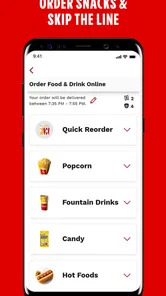
Let’s be real, snacks are a crucial part of the movie experience, right? The Cinemark app lets you skip the concessions line by pre-ordering your favorite treats. From buttery popcorn to refreshing drinks, you can customize your snack order and have it ready for pickup when you arrive. It’s like having a personal snack delivery service at your fingertips!
I would treat any snack planning as a separate decision from choosing the film. For a tight arrival, sorting out what you want ahead of time can reduce one more choice at the theatre, but it is worth checking the order details before you move on. If your group has different tastes or you are not sure when you will arrive, keeping snacks flexible may be easier than trying to coordinate everyone’s preferences during the booking.
Who gets the most from it
I think the best fit is someone who sees films at Cinemark often enough to value having theatre discovery, tickets, and Movie Rewards together. A realistic use is a last-minute weekend decision: compare a couple of sessions, choose seats while the group agrees, and keep the booking accessible on the phone. For occasional visitors, the app can still simplify a single booking, but its advantage shrinks if another cinema is closer or offers the times you need.
Its store summary points to the core job—finding theatres, getting tickets, and accessing Movie Rewards—so I would treat it as a focused companion, not a complete movie-night planner. Check the venue and session before paying, and give yourself a little time to resolve account or checkout confusion rather than doing it in the lobby. Those small choices make the app more dependable in practice.
A good everyday example is a Saturday afternoon when a few friends have not agreed on a film yet. I’d use the browsing details to narrow the choices, then compare sessions at the Cinemark location that is easiest for everyone to reach. Once the group settles on a time, one person can handle the booking and keep the ticket information ready for arrival. That sequence uses the app for the decisions it can help with, while leaving travel, meeting points, and group coordination to a shared conversation.
It is especially worthwhile for someone who already checks Cinemark showings or returns to the same chain often enough to care about Movie Rewards. The combined purpose can save a bit of switching between theatre search and ticket planning. On the other hand, a person who goes to the cinema only rarely, always chooses whichever venue is nearest, or wants a single tool for multiple chains may get more value from a wider listings service and simply use Cinemark when that is the chosen destination.
The app has 35,000 written reviews alongside its broad rating history, and that volume suggests many people have used it for ordinary cinema plans. I would still judge it by fit, not popularity: the key question is whether Cinemark is a regular part of your own movie routine. It is free to install, but the real payoff is practical convenience, not a reason to change theatres or visit more often than you want to.
My practical verdict
For me, this works best as a focused companion for a Cinemark visit, especially when I want to compare sessions, plan seats with other people, and keep ticket details close at hand. The app is free, and its combination of theatre information, bookings, and Movie Rewards gives regular Cinemark customers a clear reason to keep it available. I would not rely on it as a universal cinema guide, and I would not blame it for every delay or venue-side change. Check the location and screening, avoid repeating a checkout before confirming its status, and choose another service if your main task is comparing cinema chains. With those expectations, it is a useful and sensible addition to a movie night.
In conclusion, the Cinemark Theatres app is a must-have for anyone who loves going to the movies. It simplifies every aspect of the movie-going experience, making it more enjoyable and convenient. So, if you’re ready to take your movie nights to the next level, download the app and see for yourself why it’s a fan favorite. Happy movie watching!
Cinemark Theatres Frequently Asked Questions
Do I need a Cinemark account to use the app?
The app brings together movie tickets, theatre information, and Cinemark Movie Rewards, so signing in is useful when you want to manage rewards or make purchases. You can also use it to look for theatres and explore movie information. If you plan to use rewards, having access to your account will make it easier to view and redeem available perks.
Can I buy movie tickets through the Cinemark Theatres app?
Yes. The app lets you browse movies and showtimes and purchase tickets directly, making it convenient to plan a visit without starting the process at the theatre. Ticket purchases are separate from the free app download, so you should expect to pay for the tickets you select. Check your chosen theatre and screening details carefully before completing a purchase.
Can I order concessions in the Cinemark Theatres app?
The app supports mobile concessions ordering, which can help you arrange snacks ahead of time and pick them up at the theatre. This can be handy when you want to spend less time waiting in line. Concessions are purchases, so the items you choose may involve additional charges. The feature is intended to complement a theatre visit rather than replace the app’s movie and ticket tools.
What is Cinemark Movie Rewards, and can I use it in the app?
Cinemark Movie Rewards is part of the app experience. You can use the app to access the rewards program, earn points through purchases, and redeem points for eligible rewards such as tickets, concessions, or offers. Having the app provides a convenient place to keep track of your rewards activity while planning a movie outing. Review the choices shown in the rewards section before redeeming.
Is the Cinemark Theatres app available on both Android and iOS?
Cinemark Theatres is available for Android and iOS devices. It is an entertainment app for finding theatres, viewing movie information, purchasing tickets, and accessing Cinemark Movie Rewards. Before installing, check that your device’s operating system meets the app’s minimum requirement. The app is free to download, although purchases made through it, such as tickets or concessions, are not free.
Pros
- User-friendly interface for easy navigation
- Real-time seat availability updates
- Exclusive member discounts available
- Supports multiple payment options
- Easy booking process with quick confirmation
Cons
- Limited snack options for pre-order
- Occasional app crashes reported
- Some locations not covered
- No option for refund in app
- Limited language support











