CAVA
- 2.05K
- 4.7
- Installs
- 500.00K
- Price
- Free

Screenshots
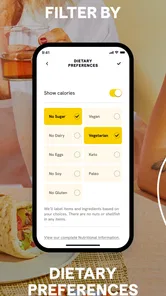
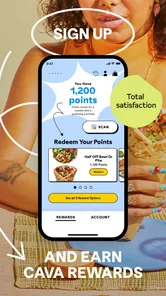
Analysis by Reviewed
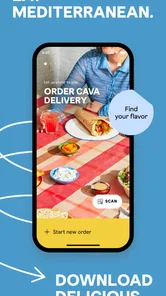
I’d judge CAVA less by the excitement of placing a first order and more by whether it earns a regular place in your lunch routine. It’s a free food-and-drink app from CAVA Grill, built around ordering ahead, delivery, and rewards. That focus makes it most useful when you already like eating at CAVA and want a more convenient way to plan a meal, rather than as a general restaurant-discovery app.
The first-week appeal: less waiting, more planning
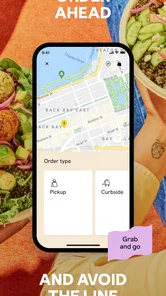
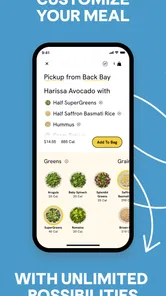
For a first visit, the main appeal is practical: you can arrange a CAVA order before you reach the restaurant, or look at delivery when going out is inconvenient. A realistic use is ordering lunch during a work break so you can spend less of that break deciding what to do. I’d still check the order carefully before submitting it; building a meal on a phone is convenient, but it can also make it easy to move through choices too quickly.
The app is aimed at people who already know they enjoy CAVA’s food, or who expect to order often enough for rewards to matter. If you’re just looking for nearby places to eat, a map or restaurant-search app gives you a broader set of choices. CAVA keeps the decision narrower, which is a strength when you’ve already settled on the restaurant and a limitation when you haven’t.
Month-to-month value: habit matters more than novelty
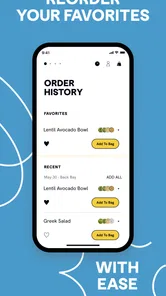
Ordering and rewards are most compelling when they fit a routine. If CAVA is a regular lunch or dinner choice, having the ordering route and rewards in one place can make repeat visits feel easier to manage. If you only visit occasionally, the app may be useful on those days, but it has less reason to stay prominent on your home screen between them. I wouldn’t install it expecting a general-purpose food planner; its value is tied to ordering from this particular restaurant.
CAVA has an average rating of 4.5 from around 6,000 ratings, and it has been installed over 500,000 times. Those figures suggest that plenty of people find a use for it, but they don’t tell me whether its ordering options suit your local routine. I’d treat delivery and pickup as alternatives to check for a specific occasion: pickup can suit a planned stop, while delivery may be more convenient when leaving is the bigger obstacle.
Maintenance and trade-offs
The maintenance burden should be low if you use the app for occasional orders, but keeping another restaurant app installed only makes sense if you remember to open it when you want CAVA. A useful habit is to decide what you want before you begin ordering, then use the app to place the order rather than browsing while hungry and rushed. That small change can make a phone order feel deliberate instead of adding another last-minute decision.
It’s rated for Everyone, is free, and its current version is 3.9.1, with a minimum operating-system requirement of 7.1. It was released on October 23, 2013, and has around 1,700 written reviews. The long-running presence is reassuring in a basic sense, but I’d still judge it by whether it handles the specific order you want and fits how you prefer to collect or receive food. For a one-off CAVA meal, using another ordering route may be simpler; for repeated visits, keeping the app ready is easier to justify.
More From Our News Desk

Weather by Xiaomi Review: Clear at a Glance, Less Clear Up Close

X Under Pressure: Can It Recover When Posting Goes Wrong?

Clash of Clans Is Won Between the Battles

Android Auto Makes the Case for Quieter Car Software

MobiOffice: Transforming Mobile Productivity with Seamless Integration

EA SPORTS FC™ Mobile Soccer: Redefining Mobile Sports Gaming
Making the order work for your day
The most useful way to approach a restaurant-specific ordering app is to match the order method to the shape of your day, not just choose whichever button looks quickest. If you are already passing a CAVA location, placing an order ahead can turn a stop you planned to make into a more organized lunch break. If you are staying home or cannot step away, delivery is the more relevant option. Neither choice is automatically better: the right one depends on your route, timing, and whether the convenience is worth whatever effort that option involves for you.
For example, imagine you have a short gap between errands and want a meal without spending the whole break choosing a restaurant. I’d decide on CAVA before opening the app, then use the ordering flow to make and review the meal. That separation matters. A general delivery marketplace encourages comparison across restaurants, which is handy when you are undecided, but it can also invite more browsing than the occasion needs. CAVA’s narrower focus works better when the restaurant decision is already made.
Small habits that prevent avoidable friction
I’d treat the final review of an order as part of the process, rather than assuming that tapping through quickly is enough. On a phone, it is easy to overlook a choice while moving between meal components, especially when ordering in a hurry. Taking a moment to check the full order before submitting is a simple safeguard, not a special feature. It is also a good time to confirm whether pickup or delivery matches your actual plan; choosing the convenient-sounding option without thinking through the handoff can create more hassle than it saves.
Another practical tip is to avoid using rewards as the reason to order something you did not want in the first place. Rewards can add value to visits you were already planning, but they are less persuasive if you have to change your habits just to make them feel worthwhile. I would think of them as a bonus attached to a familiar routine, not as a substitute for deciding whether the meal and ordering method suit the day.
Who benefits most, and who may prefer another route
This is a sensible fit for someone who already chooses CAVA repeatedly, likes handling restaurant orders on a phone, and can make use of pickup or delivery in their area. It can also help someone who wants to make a lunch decision before leaving work or home, rather than arriving hungry and starting from scratch. The app has a clear job, and that simplicity is part of its appeal for regular customers.
I would skip installing it if you rarely eat at CAVA, prefer to decide between several restaurants every time, or do not want another account or ordering routine to maintain. A general food-delivery service may be a better starting point when selection across restaurants matters more than a direct route to one chain. If you are already at a location and ordering in person is straightforward, the app may not save enough effort to justify opening it. Convenience is personal: a few taps help only when they remove a real obstacle.
What to expect from a focused restaurant app
Compared with a broad restaurant finder, CAVA is less useful for discovering somewhere new, but more direct once you know where you want to eat. Compared with a delivery marketplace, it keeps the experience centered on CAVA rather than putting competing menus alongside it. That can reduce distraction for a repeat order, while giving you fewer reasons to open it when your appetite or plans point elsewhere. I see that as a deliberate trade-off, not a flaw that can be fixed by adding more unrelated options.
It is also worth separating the app’s usefulness from the food decision itself. Installing it does not make CAVA the right choice for every meal, and rewards do not make every visit automatically better value. I’d use it when the restaurant already suits my plans, then choose the order method that fits the occasion. If the central question is “Where should I eat?”, a wider search tool is the better first step; if the question is “How do I arrange my CAVA meal?”, this focused app makes more sense.
One practical question is whether the app is worthwhile if you only order now and then. My answer is yes, if you value having the option ready for a particular visit, but not necessarily as a permanent fixture on your home screen. The free price lowers the barrier to trying it, while the real ongoing value still depends on how often you choose the restaurant. Another question is whether rewards alone justify keeping it: I would not count on that. They make more sense alongside convenient ordering than as the whole reason to use the app.
Long-term verdict: useful when the restaurant is already a habit
Hey there! If you're anything like me, you're always on the lookout for that next app to make your life a little bit easier or a tad more exciting. Enter CAVA—an app that's been getting quite a buzz lately. I decided to dive in headfirst and see what all the fuss was about. Spoiler alert: I was not disappointed!
Getting Started with CAVA
The first thing you'll notice when you open CAVA is its sleek and intuitive interface. Seriously, it's like the designers knew exactly what we wanted before we did. Setting up was a breeze; I didn't even need to consult a guide or FAQ. Just a few taps, and I was in, ready to explore all the features it had to offer.
Features That Stand Out
Now, onto the good stuff—features! CAVA isn’t just about pretty looks; it's packed with functionalities that make it a powerhouse. One feature I absolutely loved was the customization options. You can tweak the app to suit your personal style, which made it feel uniquely mine. Also, the integration with other apps is seamless. It's like they all just get along, making my experience smooth as silk.
Another highlight is the app's performance. It's fast, responsive, and hasn’t crashed on me once—a rarity these days! Whether I'm using it for productivity, entertainment, or just to kill some time, it delivers consistently.
Why I Keep Coming Back
So, what keeps me coming back to CAVA? It's the little things. The app is constantly updated, which means new features and fixes are always on the horizon. It’s like having a personal team dedicated to making my experience better every day. Plus, the community around it is super active and always willing to share tips and tricks.
And let's not forget about the level of support. The developers are incredibly responsive, taking user feedback seriously and implementing changes that matter. It's refreshing to see an app that's not just about numbers but genuinely cares about its users.
The Final Word
In a sea of apps, CAVA truly stands out. It’s not just another app on my phone; it’s a tool that enhances my daily routine. Whether you're a tech enthusiast or someone looking for a reliable app, CAVA is worth checking out. So go ahead, give it a spin, and who knows, it might just become your new favorite app too!
CAVA Frequently Asked Questions
Is CAVA a food-ordering app, and what is its purpose?
CAVA is a Food & Drink app from CAVA Grill, with a store summary focused on ordering ahead, delivery, and rewards. It is intended for people who want to engage with CAVA through the app rather than use a music player or visualization tool. Its store description is simply “CAVA,” so the clearest way to understand its purpose is through those ordering and rewards features.
What device requirements should I check before downloading CAVA?
Before downloading, check that your device runs Android 7.1 or later, the stated minimum operating system for CAVA. The app is free and rated for Everyone, which can help families assess whether its age classification is suitable. CAVA is available on Android, and checking your device’s software version first can help you avoid compatibility problems during installation or use.
What is CAVA and what does it offer to users?
CAVA is a comprehensive music visualization app designed to enhance your audio experience by providing mesmerizing visual effects that sync with your music. Users can enjoy different visual styles and customize the display according to their preferences, making it a popular choice for music lovers who want to add a visual dimension to their audio tracks.
Is CAVA compatible with all music players and audio files?
CAVA is designed to work seamlessly with a variety of music players and supports most common audio file formats. However, users should ensure that their device and music player are compatible with the app's requirements to enjoy an uninterrupted music visualization experience. Compatibility might vary depending on updates and device specifications.
Does CAVA require any special permissions or settings to function properly?
To function optimally, CAVA may require permissions to access your device's audio output. This is necessary for the app to synchronize the visualizations with the music playing on your device. Users should check and grant the necessary permissions to avoid any disruptions in the app's performance. Always ensure your device settings allow for such access.
Pros
- User-friendly interface for easy navigation.
- Wide range of customization options.
- High-quality video output.
- Seamless integration with social media.
- Regular updates with new features.
Cons
- Requires a stable internet connection.
- Limited features in the free version.
- May experience occasional bugs.
- Consumes significant device storage.
- Some features need in-app purchases.











