Casey's
- 12.54K
- 3.9
- Installs
- 5.00M
- Price
- Free

Screenshots

Analysis by Reviewed
For someone who already stops at Casey’s, the app makes most sense as part of a routine rather than as a reason to change where you shop. I’d use it to plan a food pickup before leaving home, then check the nearby store details when I’m already out. That keeps the useful steps together without turning a quick stop into a long phone session.
A practical routine for pickup
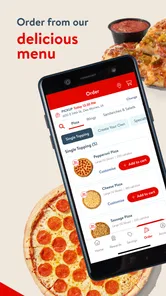
On a busy evening, I’d decide what everyone wants before opening the ordering flow, then enter the order with pickup in mind. That small bit of preparation matters: customizing several items while hungry and in a hurry is an easy way to overlook a choice. If timing is uncertain, I’d wait to place the order until I’m confident about which location I can reach, rather than assuming a convenient store will be the right one.
For a realistic example, picture leaving work with a family meal still to sort out. I’d check which Casey’s fits the drive home, agree on the order in the car before anyone starts tapping, and have one person review the selections before checkout. That last pause is useful because a small mistake in a group order can be more troublesome to correct than a few seconds spent checking it. I’d also keep the pickup plan flexible if traffic or errands could change the route.
Who benefits most from the app
The strongest fit is someone who already visits Casey’s and expects to use its food ordering, store finder or rewards often enough to justify another app. It can also make sense for a regular road-trip stop: checking a location before committing to a detour is more practical than discovering after arrival that the stop does not fit the schedule. For occasional visitors, the value is less certain. If you mainly need a single meal, compare the time and route with nearby alternatives rather than treating the app as the default.
The app is most appealing if Casey’s is already a regular stop and you want food ordering, rewards and store information in one place. If you only need a one-off meal and another nearby restaurant better suits your route or tastes, its convenience advantage may disappear. I’d also compare the final order and pickup plan with your usual option instead of choosing solely because an offer catches your eye.
Habits that make it more useful
A repeatable approach helps more than tapping around at the last minute: check the location first, review the order before submitting, and look at available offers while deciding what to buy. Treat a deal as a prompt to compare, not as proof that the order is automatically the best value. For a shared meal, confirming everyone’s selections before checkout can also prevent a second round of edits.
I’d make that routine even more dependable by separating decisions that are easy to rush. First settle the location and pickup plan; then decide what to order; finally look at the total and any offer terms before placing it. This sequence helps avoid building an order around a deal and only afterward realizing that the stop is inconvenient. If I’m ordering for others, I’d collect their choices first rather than passing the phone around at checkout.
More From Our News Desk

Weather by Xiaomi Review: Clear at a Glance, Less Clear Up Close

X Under Pressure: Can It Recover When Posting Goes Wrong?

Clash of Clans Is Won Between the Battles

Android Auto Makes the Case for Quieter Car Software

MobiOffice: Transforming Mobile Productivity with Seamless Integration

EA SPORTS FC™ Mobile Soccer: Redefining Mobile Sports Gaming
What to check before relying on it
One question people often have is whether the app is worth keeping if they don’t order food often. I’d say it depends on whether store-finding and rewards are useful to you between orders; if not, occasional use may be enough. Another practical consideration is that a digital ordering flow depends on having time and a working connection, so I wouldn’t make it the only plan when I need food immediately or have a tight schedule.
I’d also treat the app as a convenience layer, not as a replacement for common-sense planning. If the order is time-sensitive, I’d leave enough room for the drive and pickup rather than assuming that placing it on a phone guarantees a particular arrival time. When a special request matters, asking staff directly may be clearer than trying to communicate it through an ordering screen. The better choice depends on how much certainty the situation needs.
Have you ever found yourself in a situation where you just needed to grab a quick bite, fill up your gas tank, or maybe even pick up a few essentials, all in one go? Well, let me introduce you to the Casey's app, your one-stop shop for convenience, right at your fingertips. Whether you're on a road trip or just running errands around town, this app has got you covered!
What’s the Deal with Casey's?
If you've ever been to a Casey's store, you know it’s not just your average convenience store. With the Casey's app, all the goodness of the store is brought straight to your phone. This app is designed to make your life a little bit easier by letting you order food, find the nearest Casey's location, and even get exclusive deals. Yeah, you heard me right – exclusive deals! Who doesn't love saving a few bucks?
Ordering Made Simple
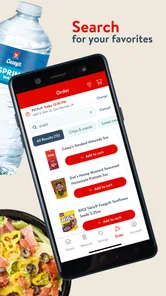
One of my favorite features of the Casey's app is the simplicity of ordering. Whether it’s their famous pizza, a fresh sub, or a breakfast sandwich, ordering is as easy as pie. You just tap a few buttons, customize your order to your liking, and voila! Your food is ready for pickup or delivery. And trust me, their pizza is something you don’t want to miss out on. It’s like a slice of heaven!
For me, the key question is how this compares with ordering directly at a counter or using a general food-ordering service. Ordering ahead can be more convenient when I already know what I want, while speaking to staff may be simpler if I need to ask questions or change plans. A general service may suit someone comparing several restaurants in one place; Casey’s is the more focused choice when the nearby store is already where you intend to go.
Choosing between app, counter and delivery services
The trade-off is focus. A general restaurant-ordering service is usually the natural place to browse a wider range of businesses, while Casey’s is easier to justify when the store is already part of the trip. Ordering at the counter can be the calmer option if I want to see what is available or ask a question before deciding. I’d choose the app when the destination and order are settled, not when I’m still shopping around.
There’s also a useful distinction between convenience and certainty. An app can help organize a pickup, but it doesn’t remove the need to check the location and allow time to get there. If plans are changing quickly, ordering in person may involve fewer assumptions. If the route is fixed and I know what I want, ordering ahead can reduce the number of decisions I need to make once I arrive.
Find Your Nearest Casey's
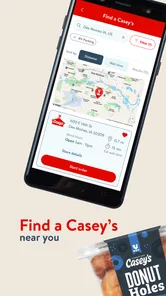
Ever been in an unfamiliar area and needed to find a store? The app's location finder is a game-changer. With just a tap, you can locate the nearest Casey's store, making it super convenient when you're on the go. Plus, the app provides store hours and contact information, so you’re always in the loop.
I’d check those details before setting off, especially on a road trip: a nearby result is useful only if its hours fit your stop. Calling the store can be a sensible fallback when a particular detail could affect the trip. That makes the finder a planning aid, not a guarantee that every location will fit every need.
Useful checks for a planned stop
When I’m unfamiliar with the area, I’d compare the nearest result with the route I’m already taking instead of choosing the shortest-looking detour automatically. A stop that is technically close may be awkward if it sends me away from the road I need. Checking the hours before setting off also helps me decide whether to make the stop now or keep moving and choose another option later.
Store details matter most when they answer a concrete question: where to go, whether the timing works, or whom to contact if a specific detail needs clarification. I wouldn’t use a location result as a substitute for confirming something important directly. That modest check is especially worthwhile when coordinating a stop with other people or trying to avoid a wasted detour.
Deals and More Deals
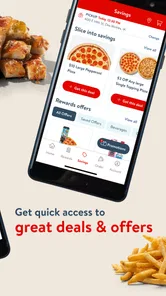
Now, let's talk about the deals, because who doesn't love a good bargain? The app offers a variety of exclusive deals that you won’t find anywhere else. From discounts on fuel to food deals, the savings are endless. Just make sure to keep an eye on the app to catch these deals before they’re gone!
I’d approach offers with a simple comparison rather than a hunt for the biggest-looking discount. If a deal changes what I planned to buy, I’d ask whether the new choice still suits the meal and the route. A reward or offer only helps when it applies to something I would reasonably choose anyway. That mindset keeps browsing from turning into an impulse purchase and makes the app more useful as a planning tool.
Points, offers and a repeatable routine
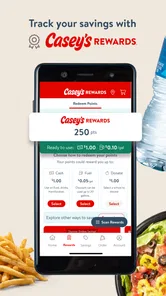
Points are most relevant to me if Casey’s is already part of my regular spending. I’d check the rewards area during a normal order rather than making a separate trip just to chase a balance. That keeps the habit low-effort and makes it easier to judge whether the benefits fit my actual visits. If my stops are infrequent, I wouldn’t assume points alone make the app worth opening every time.
For offers, I’d check the conditions before counting on a discount, then make sure the order still makes sense without it. This is a small but useful discipline: it avoids planning around a benefit that may not suit the purchase. The app’s value comes from bringing ordering and rewards into a routine, not from treating every promotion as a reason to change that routine.
Casey’s General Store develops this free food-and-drink app. It has a 3.9 average from around 37,000 ratings, and more than five million installs; its age rating is Everyone. The current version is 26.4, and it supports devices running Android 7.0 or later. Those figures suggest a widely used option, though they can’t tell you whether its ordering flow suits your own routine. I’d judge it by whether your local Casey’s is convenient and the app saves you effort on the visits you actually make.
Where the convenience has limits
There’s a trade-off in keeping another retailer’s app on your phone: it’s worthwhile when you use its ordering or store tools, but less compelling if you rarely visit Casey’s. I wouldn’t assume every offer applies to every purchase, either; checking the terms shown in the app before relying on a discount is a sensible habit. And if you prefer choosing food in person, want to compare many businesses, or need help with a special request, another route may be less fussy.
Another limit is that a focused retailer app is only as useful as the locations and routines you can reasonably use. If Casey’s is not on the route, the added steps of opening the app, choosing a store and arranging a pickup may be more effort than simply buying from somewhere nearby. I’d skip it as a regular tool if my visits were rare, I preferred browsing across restaurants, or I usually made food decisions only after arriving.
Who should keep it—and who can skip it
I’d keep it on my phone if I visit Casey’s often enough to make ordering, finding a location or checking rewards a recurring convenience. It may also suit someone who plans food stops in advance and prefers to settle the order before reaching the store. For that person, a repeatable process can make a familiar stop feel more organized without requiring much extra effort.
I’d be less enthusiastic if I lived or traveled somewhere that makes Casey’s an occasional detour, or if I mainly rely on restaurants with broader menus and comparison tools. Someone who likes to inspect food and ask questions face to face may also prefer the counter. The app is not a universal replacement for other food options; its advantage is strongest when the store itself already fits the plan.
My verdict after building a routine
As for what to expect, the app is centered on ordering food, finding a store and viewing deals, with points as part of its appeal. I’d start with one planned order and see whether pickup fits the way I travel, then make it a habit only if it genuinely cuts down on waiting or decision-making. That’s a better test than downloading it just because it promises convenience.
In conclusion, if you're someone who appreciates ease and convenience, the Casey's app is definitely worth checking out. It’s user-friendly, packed with useful features, and offers great savings. Whether you’re craving a quick snack or need to fill up your tank, Casey's has you covered. So go ahead, give it a try, and let me know what you think!
Casey's Frequently Asked Questions
Does Casey’s app work on older phones and tablets?
Casey’s app requires Android 7.0 or later, which makes the operating-system version an important check before installing it on an older device. If your device meets that requirement, you can consider the app for ordering pizza and earning points. The app is free to download, so compatibility is the main practical detail to check before you begin.
Who develops Casey’s app, and what kind of app is it?
Casey’s is a Food & Drink app developed by Casey’s General Store. Its focus is reflected in the store summary, which highlights ordering pizza and earning points. If you are looking for a way to engage with Casey’s through a phone or tablet, those are the central purposes to keep in mind when deciding whether to install it.
What can I check before placing an order in Casey's app?
Casey's is a Food & Drink app from Casey's General Store, and its short description is simply “Casey's.” The app’s store summary highlights ordering pizza and earning points. Before downloading, consider whether those features match what you want from a store app and whether your device meets the app’s minimum operating-system requirement of 7.0.
What is Casey's app and what services does it offer?
Casey's app is a comprehensive digital platform designed to enhance your convenience when interacting with Casey's General Stores. It allows users to browse the menu, place orders for delivery or pickup, earn and track rewards, and even find nearby store locations. The app also offers exclusive deals and promotions, making it a worthwhile download for frequent customers.
Is Casey's app available for both Android and iOS devices?
Yes, Casey's app is available for download on both Android and iOS devices. You can find it on the Google Play Store for Android devices and the Apple App Store for iOS users. The app is designed to provide a seamless experience across different platforms, ensuring all users have access to its features and services.
Pros
- User-friendly interface for easy navigation
- Wide variety of menu options available
- Efficient online ordering system
- Exclusive deals and rewards for members
- Fast and reliable delivery service
Cons
- Limited customization for orders
- App occasionally crashes
- Requires stable internet connection
- Limited payment methods available
- No option for guest checkout











