Carl's Jr.®
- 10.17K
- 4.5
- Installs
- 1.00M
- Price
- Free

Screenshots
Analysis by Reviewed
I’d use Carl’s Jr.® for a specific job: planning and placing an order at Carl’s Jr. without starting at the counter. It’s a free food-and-drink app from CKE Restaurants, and its main appeal is practical—browse food, order ahead, and collect points that can make repeat visits more rewarding. If you already know you like the restaurant, the app gives you a reason to put your phone to work before you arrive.
What to expect from your first visit
The app is focused on the Carl’s Jr. experience rather than being a general restaurant guide. That makes it useful when you want to look over the menu or handle an order, but less compelling if you’re trying to compare several nearby chains or decide where to eat from scratch. I’d think of it as a companion to visits you already expect to make, not a discovery tool for every meal.
It has a 4.4 average from around 19,000 ratings, and more than a million installs. Those numbers suggest plenty of people find it useful, though they can’t tell you whether a particular location or visit will go smoothly. It’s rated for everyone, and version 5.1.1 is available for devices running Android 10 or later. The app is free to download, so you can take a look before deciding whether its ordering and rewards fit your habits.
Getting from install to a useful first order
I’d use the first visit to learn the ordering flow, not to test every option at once. Start with a location that fits your route, then browse and settle on a simple meal before you commit; keeping those choices separate makes the first pickup easier to manage. Once you know how that visit goes, you can decide whether checking points and offers is a useful part of your routine.
Set up around the meal you actually want
When you open it, start by exploring the menu rather than rushing straight to checkout. That gives you a chance to compare choices and think through the whole meal before you’re hungry and making quick decisions. If you have a usual order, check its details carefully and make any changes you want while you have time. In my experience, doing that at home or before leaving is less stressful than trying to decide in a busy restaurant.
Make the first order a low-pressure test
For a first try, I’d choose a straightforward meal and review the order before sending it through. That’s a useful way to learn the app’s flow without turning a simple lunch into a complicated experiment. Ordering ahead can help when you’re short on time, but it only makes sense if you can collect the food at the location and time that work for you. Check those details before relying on the app to keep a tight schedule.
Rewards are most useful when they match your routine
Points and offers can be a nice extra if Carl’s Jr. is already somewhere you eat. I wouldn’t make a special trip just because an offer appears: the real value depends on whether it suits what you planned to order. A practical habit is to check for a relevant deal before building your order, then make sure the final cart still reflects what you actually want. That keeps a discount from nudging you into spending on food you hadn’t intended to buy.
More From Our News Desk

Weather by Xiaomi Review: Clear at a Glance, Less Clear Up Close

X Under Pressure: Can It Recover When Posting Goes Wrong?

Clash of Clans Is Won Between the Battles

Android Auto Makes the Case for Quieter Car Software

MobiOffice: Transforming Mobile Productivity with Seamless Integration

EA SPORTS FC™ Mobile Soccer: Redefining Mobile Sports Gaming
Compared with ordering at the counter, the app gives you more time to consider the menu and make changes before you arrive. Compared with a general delivery or restaurant app, it’s narrower: it centers on one brand and its own ordering and rewards experience. That focus is an advantage if you’re headed to Carl’s Jr., but a limitation if your priority is comparing restaurants or choosing from a wide range of cuisines.
Who will get the most from it
I’d recommend it to regular customers, people who like to plan their order in advance, and anyone who wants to keep an eye on points and deals. It’s also handy when you’re picking up food for someone else: deciding the items and any changes before leaving can make the handoff simpler. If you only visit occasionally, prefer speaking to staff, or usually choose a restaurant based on whichever option is closest, the app may not earn a place on your home screen.
A realistic first-day routine
Imagine you’re leaving work and want to pick up dinner on the way home. You can browse before setting out, decide what everyone wants, check for an offer that fits, and place the order once you’re confident about the pickup plan. The small but useful trick is to settle preferences before the rush: one person’s customization can be easy to overlook when everyone is deciding at once. Review the complete order before submitting, especially if you’re collecting for a group.
Where convenience has limits
Ordering ahead does not remove every source of friction. You still need to choose the right restaurant and allow time to collect your food; a pre-planned order is only convenient if the pickup fits your route. A menu that’s easy to browse can also encourage impulse additions, so I’d treat the cart as a final check rather than assuming the first selection is the best one. If you have a very specific timing constraint, don’t plan around the app alone—leave room for the ordinary unpredictability of a restaurant visit.
Points, offers, and the sensible next step
If you’re wondering whether you need to be a frequent customer, I’d say that’s where the rewards side is most likely to matter. For occasional visits, use the app mainly to inspect the menu and prepare an order; consider the points a bonus rather than a reason to change your plans. Before your next visit, check the available offers and decide whether one genuinely suits your meal. That simple routine makes it easier to tell whether the app is saving you effort or just adding another step.
Make the pickup plan work in real life
One useful way to avoid a rushed first order is to treat choosing a location and choosing food as separate decisions. Work out which Carl’s Jr. fits your route first, then build the cart around what you can realistically pick up there. This matters especially when you are coordinating with another person: agree on the restaurant before collecting everyone’s preferences, so you do not end up deciding the menu and the detour at the same time.
I’d also use the menu as a planning aid even on a day when I do not order through the app. Looking over the choices in advance can help me make a quicker decision at the counter, while still leaving room to change plans if the visit does not suit an advance order. That is a modest benefit, but it makes the download less of an all-or-nothing commitment: you can first see whether browsing is useful, then decide whether ordering and points deserve a place in your routine.
When a different ordering option is better
If your main goal is to find the fastest meal from several restaurants, a general food-ordering service or a quick look at nearby options may be more useful. The Carl’s Jr. app is designed around one chain, so it cannot replace a broad comparison when your destination is still undecided. Likewise, if you already arrive at the counter with a clear order and do not mind ordering there, the extra step of opening an app may not save you much time.
For someone who has settled on Carl’s Jr., though, the choice is more straightforward. The app gives you a place to review your meal and consider loyalty offers before you reach the restaurant. I would not assume that using it guarantees a faster handoff in every situation; the practical advantage is being able to prepare your choices ahead of time, not skipping the need to collect the food or allowing for the usual pace of a restaurant.
A few habits that make the first order smoother
Before submitting, read the cart as if you were checking someone else’s order: confirm the main items, any changes, and the number of meals. That final pass is especially worthwhile when you have been switching between menu sections or ordering for a group. If a deal influenced your choices, check that the cart still makes sense without it. I find this simple pause more useful than trying to remember every decision while moving quickly.
For a first visit, keep the order uncomplicated and avoid making the app responsible for a tight appointment or a complicated group plan. Once you understand the sequence from browsing to collection, you can decide whether it is worth using for more involved orders. This gradual approach is better than judging the whole experience by a single stressful pickup, particularly when the pressure came from the schedule rather than the app itself.
What to know about rewards before relying on them
The points and offers are most appealing when they fit a purchase you would make anyway. I would check what is available before settling the cart, but I would not build a meal around a reward until I had confirmed that the offer suits my choices. Treating rewards as a pleasant extra also keeps expectations sensible: the app can encourage repeat visits, but the value to you depends on how often you visit and whether the available deal matches what you actually want.
If you are new to the restaurant, start by seeing whether the menu and ordering flow feel comfortable. There is no need to make the loyalty side the reason for installing it on day one. A first successful pickup tells you more about whether the app suits your routine than collecting points for their own sake. After that, you can decide whether checking offers before future visits is a habit you will remember and enjoy.
Have you ever found yourself craving a juicy burger with all the fixings, only to be disappointed by lackluster fast food options? Let me introduce you to the Carl's Jr.® app, your new best friend in the quest for deliciousness. As a self-proclaimed burger aficionado, I was thrilled to dive into this app and see what it had to offer. Spoiler alert: it did not disappoint!
Ordering Made Easy
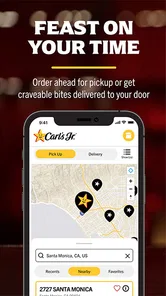
One of the standout features of the Carl's Jr.® app is how it simplifies the ordering process. You know those days when you're hangry and just want to skip the line? With this app, you can order ahead and have your meal ready for pickup, saving you precious time. The interface is super user-friendly, allowing you to customize your order to your heart's content. Want extra cheese or no pickles? No problem! It's all just a few taps away.
Explore the Menu
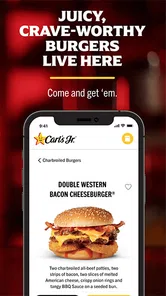
Another aspect I loved was how the app lets you explore the full menu effortlessly. It’s like having the entire restaurant at your fingertips. Whether you’re in the mood for a classic Famous Star® with Cheese or feeling adventurous enough to try the Beyond Famous Star® made with plant-based patties, the app has got you covered. I found the descriptions and images enticing, making it difficult to choose just one item!
Rewards and Offers
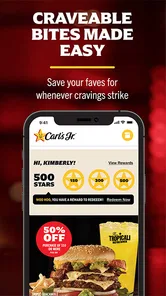
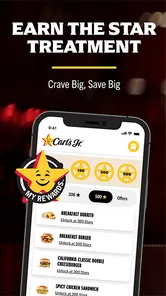
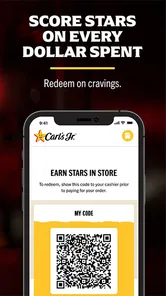
Let’s talk about rewards because who doesn’t love getting more bang for their buck? The app offers a fantastic rewards program that keeps you coming back for more. Every purchase earns you points, which you can redeem for free food. Plus, the app frequently updates with exclusive offers and discounts. I’ve already scored a couple of free burgers, which is always a win in my book!
User Experience
In terms of design, the app is sleek and modern, which makes navigating it a breeze. I appreciated the clean layout and intuitive flow from one section to another. The developers clearly prioritized ease of use, which is evident from the moment you open the app. It’s compatible with both Android and iOS, so no one’s left out of the burger bonanza.
What really stood out to me was the app’s reliability. Nothing's more frustrating than an app that crashes mid-order. Thankfully, I didn’t experience any glitches or lags, even during peak meal times. It’s clear that the team behind this app knows what they’re doing, and they’ve created a product that enhances the overall Carl's Jr. experience.
Final Thoughts
All in all, the Carl's Jr.® app is a must-have for any fast-food lover. It’s convenient, rewarding, and a joy to use. Whether you’re a regular at Carl's Jr. or just someone looking to satisfy a burger craving, this app is sure to enhance your dining experience. Download it today and get ready to embark on a culinary adventure that’s just a tap away!
Carl's Jr.® Frequently Asked Questions
Can I use the Carl's Jr.® app to check deals before ordering?
Yes. Deals are one of the app’s central features, alongside ordering and earning points. You can browse available offers while deciding what to order, which may help you plan a visit around promotions that interest you. The app is free to download, so you can explore its ordering and deal features before deciding whether they fit the way you prefer to order.
Is the Carl's Jr.® app suitable for someone who wants to order ahead and avoid waiting in line?
The app is designed for customers who want to order on their phones and skip the line. You can choose a location, look through the menu, and put together an order in the app, making it a convenient option for planning your visit. It may be especially useful if you would rather handle ordering digitally than wait to order in person.
What devices and operating systems are compatible with the Carl's Jr.® app?
Carl's Jr.® is a Food & Drink app from CKE Restaurants for customers who want to order from their phones, earn points, find deals, and skip the line. It is available for Android and iOS devices, with a minimum operating-system requirement of version 10. The app is free, and its Everyone age rating makes it suitable for a broad audience.
What features does the Carl's Jr.® app offer?
The Carl's Jr.® app provides a variety of features designed to enhance the customer experience. Users can find the nearest Carl's Jr.® location, view the full menu, and customize their orders right from their smartphone. The app also offers exclusive deals and promotions, allowing users to enjoy discounts on their favorite meals. Its focus on ordering, points, and deals makes it useful for customers who want a more convenient way to plan a visit.
How can I place an order using the Carl's Jr.® app?
Placing an order with the Carl's Jr.® app is simple and convenient. First, download and install the app on your Android or iOS device. Next, create an account or log in. From there, select your nearest location, browse the menu, customize your order, and proceed to checkout. Payments can be made securely through the app. Once your order is ready, the app’s ordering convenience can help you skip the line.
Pros
- User-friendly interface makes ordering easy.
- Wide variety of menu options available.
- Fast delivery service enhances convenience.
- Customizable orders cater to preferences.
- Regular promotions and discounts offered.
Cons
- App occasionally crashes unexpectedly.
- Limited payment options available.
- Delivery restricted to certain areas.
- Lack of nutritional information.
- Customer service response time can be slow.











