Bumper Vehicle History Reports
- 226.00
- 2.6
- Installs
- 100.00K
- Price
- Free

Screenshots
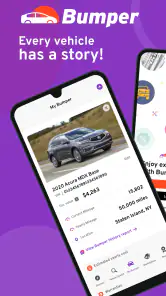
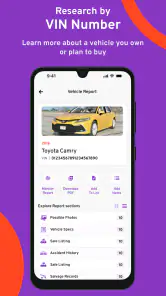
Analysis by Reviewed
When I check a used vehicle, I want answers before I spend time negotiating or arranging an inspection. That is where Bumper Vehicle History Reports tries to help: it brings vehicle background information into an app focused on market values, theft records, and other ownership or buying details. I reviewed it as an Auto & Vehicles app from Bumper, LLC, and my impression is mixed. The idea is useful, the free entry point is attractive, and the app can make early research less scattered, but the experience is not equally comfortable for every user or every buying situation.
The app is free to install, rated for Everyone, and works on Android devices running version 7.0 or later. It has passed the 100K+ install mark, while its average rating sits at 2.6 from around 433 ratings and 226 written reviews. Those figures do not make me dismiss it, but they do tell me to approach it as a research aid rather than a complete buying decision. The developer is Bumper, LLC, and the current version is 10.0.54.
How clearly the app presents vehicle research
My first concern with a history app is not how much information it promises, but whether I can understand what I am looking at without digging through a confusing interface. Bumper Vehicle History Reports is most useful when I treat it as a step-by-step screening tool. I would begin with one vehicle, enter its identifying details carefully, and read the result in sections instead of jumping straight to a conclusion.
That approach matters because vehicle history information is easy to misread. A theft record, a market-value estimate, or a past event can change how I view a car, but none of those items automatically tells me whether the vehicle is mechanically sound. The app’s clearest role is helping me decide what deserves more questions. It is not a replacement for a test drive, an independent inspection, or paperwork review.
For someone who reads comfortably on a phone, the basic concept is easy to grasp: research a vehicle before committing to it. The useful mental model is a funnel. I can use the report to remove an obviously questionable candidate, compare a few possibilities, and prepare a short list of questions for the seller. I should not use a single number or warning as the entire verdict.
Readability becomes more important when I am standing in a dealership, looking at a private-sale listing, or trying to compare information while distracted. A report that seems simple at home can feel demanding when I have to switch between the app, the seller’s listing, photographs, and my own notes. I found that the most sensible workflow is to slow down and record the vehicle identification details before opening the report. Entering information hurriedly is a poor trade-off when one wrong character can send the research in the wrong direction.
Reading results without overtrusting them
The strongest practical habit is to separate facts from interpretation. If the app shows a theft-related record, I would ask the seller for documentation and check whether the vehicle’s current paperwork matches the explanation. If the market value appears lower than the asking price, I would investigate condition, mileage, trim, location, and maintenance rather than assuming the seller is automatically overcharging.
This is one of the less obvious strengths of a report app: it can improve the questions I ask even when it cannot answer everything. Before using it, I might ask, “Does this car look reasonable?” After using it, I can ask more precise questions about ownership history, pricing, or a particular warning. That makes the app more valuable as a conversation starter than as a final authority.
I also recommend reading the entire result before showing concern about one item. A buyer who sees a warning and immediately walks away may miss context; a buyer who sees a clean-looking summary and stops investigating may take an even bigger risk. The app supports better preparation, but the quality of the decision still depends on how carefully I interpret the information.
Navigation for different reading abilities
For users with limited reading stamina, the app is easier to approach in short sessions than as one long research task. I would focus on one vehicle at a time, pause after the main result, and write down only the questions that need follow-up. That reduces the mental load of comparing several reports at once.
Users who have difficulty distinguishing small text, low contrast, or dense blocks of information should check how the current version appears on their own device rather than assuming every screen will be equally comfortable. Display size, system text settings, and lighting can change the experience considerably. I would avoid reviewing a report in direct sunlight or while walking through a busy sales lot, because glare and distractions make small details easier to miss.
There is also a useful accessibility habit for anyone who processes information differently: turn the report into a simple checklist. I might write “value question,” “theft-record question,” “seller documents,” and “inspection needed.” This does not change the app itself, but it makes the information more actionable and reduces the chance that an important concern disappears in a long screen.
Motor, sensory, and situational considerations
Vehicle research often happens in imperfect conditions, so accessibility here is not only about permanent disabilities. I may be using one hand while carrying a bag, dealing with glare, wearing gloves in a cold parking lot, or trying to read while a salesperson is waiting. Those situations expose friction that is easy to overlook when testing an app calmly at home.
For users with limited dexterity or tremors, the safest workflow is to prepare at home and use the app for confirmation later. Typing a vehicle identifier on a small touchscreen can be more error-prone than tapping through a saved note or copying information from a larger device. I would avoid rushing through fields, and I would verify the vehicle details before relying on the result.
Voice input or system-level assistance may help some people enter text, but I would still check every character afterward. Vehicle identifiers are unforgiving: a visually similar letter or number can produce a report for the wrong vehicle. That is a particularly important trade-off for users who depend on speech input, magnification, or alternative keyboards. Faster entry is not useful if accuracy suffers.
For users with visual sensitivities, a quiet indoor setting is preferable to a bright dealership forecourt. I would also enlarge the phone’s text where possible and take breaks between reports. The app’s purpose encourages comparison, but comparing multiple vehicles in one sitting can create visual and cognitive fatigue.
Users with hearing-related disabilities are not necessarily disadvantaged by the core research task, since the important work is reading vehicle information and deciding what to ask. However, the surrounding buying situation may still create barriers. If a seller explains a record verbally, I would request written details or take notes rather than relying on memory. The app can support that conversation, but it cannot make an unclear seller explanation reliable.
A realistic buying scenario
Imagine I find a used car online that looks perfect in photographs. Before arranging a long trip, I use Bumper Vehicle History Reports to research the vehicle and review its market position and theft-related information. The report does not end the process; it changes my next step. If the asking price seems far above the market context, I ask why. If a theft record appears, I request documentation before traveling. If nothing immediately concerns me, I still arrange an inspection and confirm the title and maintenance records.
This workflow is especially helpful for people who find long dealership conversations tiring or overwhelming. I can prepare questions privately, use the report before making contact, and avoid depending entirely on fast verbal explanations. It also helps buyers who need more time to process information, because the research can happen away from the pressure of a sales conversation.
On the other hand, the app is less useful when I already need a complete mechanical diagnosis or a definitive legal answer. A vehicle report may influence whether I inspect a car, but it cannot tell me everything a qualified mechanic can discover. Someone buying a high-risk, heavily modified, or unusually expensive vehicle should treat the app as one layer in a much broader review.
Cost and access trade-offs
The free price makes it easy to begin researching without committing immediately. That is valuable for a first pass, especially when I am comparing several possible vehicles and do not yet know whether the service will fit my needs. At the same time, in-app purchases range from $13.99 to $38.99 per item, so I would pay close attention before confirming anything.
That pricing structure changes how I would use the app. I would gather the vehicle details first, narrow my choices, and only then consider paying for a report that could affect a real purchase. I would not run reports casually for every interesting listing. This is a practical accessibility issue as well as a financial one: users with limited budgets need a clear plan so they do not spend money on vehicles they were unlikely to buy.
Anyone who needs help from a family member, support worker, or trusted adviser should decide together which vehicle deserves attention before opening a paid item. Sharing the research task can make the app more inclusive, but it also means keeping track of which report belongs to which vehicle. A simple note with the seller’s listing, vehicle details, and date of research can prevent confusion.
Where the experience still creates barriers
The biggest barrier is the gap between convenient information and complete confidence. The app can make research faster, but it may also encourage users to believe that a digital report settles the question. That risk affects everyone, and it can be greater for first-time buyers who are looking for a clear yes-or-no answer.
Another limitation is the pressure of combining app information with outside evidence. I still need to compare the report with the seller’s description, vehicle documents, inspection results, and the actual condition of the car. For users with cognitive disabilities, attention difficulties, or limited experience buying vehicles, that multi-source process can be demanding. The best solution is to use a written checklist and involve someone trusted when the purchase is important.
There is also a situational barrier for people who cannot comfortably type or read on a phone. A small screen may not be the right tool for detailed research, particularly when the report contains several sections that need careful interpretation. I would prefer to do the serious reading in a calm environment and use the phone only when I need to confirm a detail while viewing the vehicle.
Language and communication needs can create additional friction during the seller interaction. The app may help me identify questions, but it does not remove the need to explain those questions, understand answers, and evaluate documents. A buyer who needs communication support should plan that support before meeting the seller instead of expecting the report to carry the entire conversation.
The average rating of 2.6 is another reason I would keep expectations measured. It suggests that the experience has not worked smoothly for everyone, although a rating alone cannot explain each person’s problem. I would install it because the use case is relevant, but I would not make it the only research option on my phone.
Compared with checking a vehicle manually through scattered searches, this app offers a more focused starting point. Compared with a professional inspection or a direct records check, it is less comprehensive and less personal. That distinction is important: Bumper Vehicle History Reports is strongest before the inspection, not instead of the inspection.
Who should use it and who should skip it
I think it is a good fit for a buyer who wants an early screening step, prefers researching privately, and can interpret a report with reasonable care. It is also useful for someone helping a friend or relative compare vehicles, because the report gives the conversation a concrete starting point instead of relying only on photographs and seller claims.
I would be more cautious recommending it to someone who wants a guaranteed mechanical assessment, needs a completely hands-off experience, or is uncomfortable managing paid research choices. It may also be the wrong first tool for a buyer who has already arranged a professional inspection and needs detailed mechanical evidence rather than preliminary history clues.
For accessibility, I would recommend a deliberate setup: use a larger screen if available, increase system text size, research in good lighting, verify every identifier, and keep a short written record of the conclusions. Those steps are not glamorous, but they make the app more dependable for users with visual, motor, sensory, or processing challenges.
My inclusive verdict
Bumper Vehicle History Reports has a sensible purpose and a genuinely useful place in the used-car buying process. I like it best as a filter: it helps me decide which vehicles deserve more time, which seller questions need answers, and when a price deserves closer examination. The free entry point lowers the barrier to trying that workflow, while the available paid items mean I need to be selective and deliberate.
Its accessibility is practical rather than complete. The app can support independent research for many people, especially when used in a quiet setting with larger text, careful entry, and written notes. It can also reduce pressure for buyers who need time to process information. But the phone format, the need to verify identifiers, the surrounding seller conversation, and the cost of individual purchases can still create barriers.
My recommendation is therefore conditional: use it before an inspection, not as a substitute for one. If I were helping a friend buy a car, I would use the app to narrow the field, then confirm the result with documents, a test drive, and an independent mechanic. The most inclusive way to use this app is to treat its report as a question-building tool, not a final answer.
With that expectation, it can save time and make vehicle research more organized. Without it, a buyer may mistake a convenient screen for complete protection. I would try it for a serious shortlist, read every result carefully, and keep another trusted source involved before spending money on the vehicle itself.
Bumper Vehicle History Reports Frequently Asked Questions
Is Bumper Vehicle History Reports available for my phone, and what are the basic requirements?
Bumper Vehicle History Reports is an Auto & Vehicles app from Bumper, LLC. It is available for devices running Android 7.0 or later, and its content rating is Everyone. Before downloading, check that your phone meets that operating-system requirement and that you have enough space for the app. The app is free to install, though some features may involve in-app purchases.
What is Bumper Vehicle History Reports, and what information does it provide?
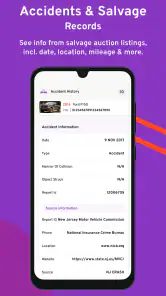
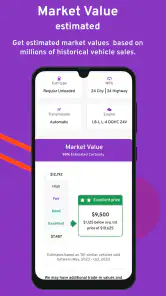
Bumper Vehicle History Reports is a vehicle research service designed to help shoppers learn more about a used car before buying it. A report may include details such as reported accidents, title and registration events, mileage records, ownership history, recalls, market value estimates, and other available records. The information shown can vary depending on the vehicle identification number, reporting sources, and the history available for that specific car.
How do I search for a vehicle using Bumper?
To search for a vehicle, you generally enter its 17-character VIN into the Bumper website or app, depending on the version available on your device. The VIN can often be found on the dashboard near the windshield, inside the driver’s door frame, or on vehicle documents. Carefully check every character before submitting the search, because an incorrect VIN may produce information for a different vehicle or fail to return a useful report.
Is a Bumper vehicle history report completely accurate and guaranteed?
No vehicle history report should be treated as a complete guarantee of a car’s condition or past. Bumper gathers information from available public, commercial, governmental, and industry sources, but some incidents may never be reported or may not yet appear in the database. A clean report does not rule out hidden damage, maintenance problems, flood exposure, or odometer issues. It is best used alongside a professional inspection, test drive, and document review.
Does Bumper show accidents, title problems, recalls, and mileage history?
Bumper may display reported accident records, title brands, salvage or total-loss events, odometer readings, recalls, ownership changes, and other vehicle-history indicators when those records are available. However, coverage differs by vehicle and location, and not every event is reported to the databases used by the service. Users should read the complete report carefully and confirm important findings with the seller, a mechanic, the manufacturer, or the relevant motor vehicle authority.
Pros
- Quickly reveals reported accidents
- title issues
- and mileage history.
- VIN lookup helps assess a used vehicle before making an offer.
- Reports can support more informed negotiations with sellers.
- Simple interface makes searching vehicle records easy for most users.
- Useful for comparing several cars during the buying process.
Cons
- Information may be incomplete when incidents were never officially reported.
- Some detailed reports or checks may require an additional payment.
- Results can vary depending on the vehicle’s country and available records.
- A clean report does not guarantee the car has no mechanical problems.
- VIN entry errors can produce results for the wrong vehicle.

- Category
- Auto & Vehicles
- Version
- 10.0.54











